

Magone – Responsive Magazine & News WordPress Themes
/Year
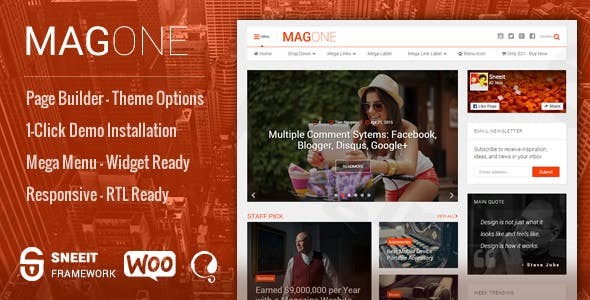
In the fast-paced world of digital publishing, performance and layout flexibility are the cornerstones of success. The MagOne WordPress theme is a powerhouse specifically engineered for high-traffic magazine, news, and portfolio-style websites. Designed with a “content-first” philosophy, this responsive magazine WordPress theme balances a professional aesthetic with an incredibly low learning curve, making it a top choice for both professional news agencies and independent bloggers.
A Deep Dive into Key Features: Design, Layout & Performance
MagOne stands out in a crowded market by offering more than just a static design; it provides a modular toolkit for publishers. Whether you are building a niche affiliate blog or a massive news portal, the theme adapts to your content volume effortlessly.
Diverse Layout & Design Options
The hallmark of MagOne is its extensive collection of “Article Boxes.” Unlike standard themes that limit you to a basic blog roll, MagOne offers:
- Dynamic Content Blocks: Choose from tickers, sliders, carousels, grids, and columns.
- Specialized Demos: With the 1-click demo installer, you can launch sites tailored for Tech Magazines, Fashion Blogs, Trending News, or even Affiliate Marketing hubs.
- Elegant Visuals: The design is clean and modern, featuring purposeful animations that enhance user engagement without causing visual clutter.
Advanced Customization via Sneeit Framework
Under the hood, MagOne utilizes the Sneeit Framework, which introduces a “Drag and Drop Casual Page Builder.” This allows users to build complex layouts without touching a single line of code.
- Header & Footer Builder: Switch between multiple header layouts with a single click in the Customizer.
- Mega Menu Support: A cutting-edge mega menu system allows you to organize links, categories, and icons with Ajax-powered efficiency.
- Unlimited Styles: Control colors, backgrounds, and typography (including custom font uploads) directly through the WordPress Customizer.
Performance and SEO Readiness
Is MagOne theme good for SEO? Absolutely. The developers have optimized the code to be lightweight and fast-loading, which is a critical factor for Core Web Vitals and Google rankings. It features:
- Clean Markup: Essential for search engine crawlers to index your content.
- AMP Compatibility: Ensures your news articles load instantly on mobile devices.
- Automatic Thumbnail Resizing: Keeps your images optimized for speed without sacrificing quality.
How to Install and Set Up MagOne (Step-by-Step)
Getting your news WordPress theme up and running is straightforward. Follow these steps to launch your site:
- Install & Activate: Upload the MagOne theme folder via
Appearance > Themes > Add Newin your WordPress dashboard. - Install Required Plugins: Upon activation, MagOne will prompt you to install the Sneeit Framework and other companion plugins. These are essential for the drag-and-drop builder and demo functionality.
- One-Click Demo Import: Navigate to the theme options and select the “Demo Import” feature. Choose the layout that best fits your niche (e.g., Tech, Fashion, or E-commerce).
- Configure Menus & Widgets: Once the demo content is imported, head to
Appearance > Menusto set up your primary and mega menus, andAppearance > Widgetsto configure your sidebars.Pro Tip: Ensure your server’s PHP execution time and memory limits are sufficient (ideally 256M or higher) before starting the demo import to avoid timeouts.
Personalized Branding & Customization Guide
Once the foundation is set, you can personalize MagOne to match your brand identity. This theme is highly flexible, allowing for deep customization through the native WordPress Customizer.
- Global Styling: Access the Customizer to change your primary brand colors and typography. MagOne supports unlimited color combinations, allowing you to match your brand’s palette perfectly.
- Homepage Construction: Use the integrated drag-and-drop builder to move “article boxes” around. You can place a high-energy news ticker at the top and a structured grid of featured articles below it.
- Monetization Setup: MagOne is a WordPress theme for affiliate marketers and publishers looking to earn. It includes dedicated ad spots and a built-in point/star rating system for product reviews, making it easy to monetize your content.
FAQ & Troubleshooting
Is MagOne compatible with Elementor or the Gutenberg Block Editor?
While MagOne features its own “Casual Page Builder” integrated with the Sneeit Framework, it is designed with modern WordPress standards and is compatible with the Gutenberg Block Editor. Additionally, Elementor template kits are available for users who prefer that ecosystem.
Can MagOne theme be used for WooCommerce?
Yes, MagOne is fully compatible with WooCommerce. It provides a seamless shopping experience with integrated shopping carts, product filters, and checkout systems, making it ideal for magazines that also sell merchandise or digital products.
Does MagOne support Child Themes?
Yes, it is always recommended to use a child theme for any deep CSS or PHP modifications. This ensures your customizations remain intact when you update the parent MagOne theme.
What should I do if my demo import looks different from the preview?
This usually happens if the “One-Click Import” process was interrupted or if specific widgets weren’t assigned to their correct areas. Check your widget settings in the Customizer and ensure all required plugins are active.
Final Verdict: Why Choose MagOne?
The MagOne WordPress theme is a top-tier solution for anyone looking to master the art of digital publishing. It excels by providing a vast array of article layouts and a user-friendly drag-and-drop builder that eliminates the need for expensive developers.Ideal for:
- News & Magazine Portals: Who need high-density content layouts.
- Affiliate Marketers: Who require built-in review systems and ad placements.
- Beginners: Who want a professional site via a simple 1-click installation.While it is feature-rich, it remains lightweight and SEO-optimized, ensuring your site stays competitive in search results. If you are looking for a flexible, responsive, and high-performance theme for your next content-driven project, MagOne is a definitive contender.For more WordPress theme reviews and SEO strategies, visit wppick.com.
I. Download Limits & Account Benefits
- Free Downloads: Each email address receives 3 downloads per day for free products
- Upgrade Benefits: Purchase any paid product to increase your daily download limit by 3 for each paid product
- No Account Required: You can download immediately by receiving the download link via email
- Account Recommended: Create an account for easier access to your order history and direct update downloads
II. Understanding GPL vs Official Versions
Important: The products available on WPPick are GPL-licensed versions, which differ from official developer versions. Before purchasing, please read our comprehensive guide: Understanding GPL & Official Differences at WPPick
Key Points:
- GPL versions may not include premium support from original developers
- Updates may be delayed compared to official releases
- Some premium features might have limitations
- Always consider your specific needs and support requirements
III. Support & Assistance
We’re here to help through multiple channels:
- Email Support: Direct email assistance for all inquiries
- Live Chat: Real-time support during business hours
- Comprehensive Documentation: Detailed guides and tutorials
IV. Order Tracking
Access your complete purchase history and download links anytime: Order History
V. Account Access
New to WPPick? Login or Create Account to manage your downloads and orders efficiently.
VI. Refund Protection
We stand behind our products with a clear refund policy. Review our terms: Refund Policy
VII. Privacy & Security
Your data security is our priority. Learn how we protect your information: Privacy Policy
VII. Terms of Service
Understanding our service terms ensures a smooth experience: Terms of Use
Quick Tips for Best Experience
- Verify Compatibility: Check plugin/theme compatibility with your WordPress version
- Backup First: Always backup your site before installing new plugins or themes
- Test Environment: Consider testing on a staging site first
- Stay Updated: Regularly check for updates in your account dashboard
- Read Documentation: Review any included documentation for optimal setup
Need Help?
If you have questions about downloads, licensing, or need technical assistance, don’t hesitate to contact our support team. We’re committed to ensuring you have the best possible experience with WPPick products.
Ready to get started? Your download adventure begins with just one click!
- Fixed: Facebook Comment not display