
Mantra – Yoga Fitness WordPress Theme
/Year
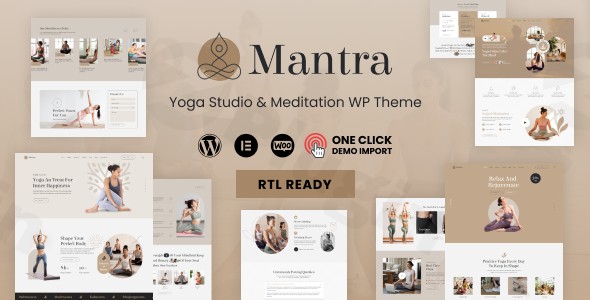
The digital world demands a strong, clear, and serene presence for wellness professionals. The Mantra Yoga Fitness WordPress Theme is expertly designed to meet this need, offering a beautifully crafted solution for yoga studios, meditation centers, and individual wellness professionals. This premium theme empowers you to create an online sanctuary that perfectly reflects the peace and professionalism of your practice, making it an ideal choice for anyone looking to establish or enhance their yoga business online.
Introduction: Cultivating Your Digital Wellness Space
Mantra is more than just a WordPress theme; it’s a dedicated platform for the wellness industry. Crafted by Designthemes, it caters specifically to yoga trainers, meditation coaches, fitness centers, and holistic health practitioners. Its design philosophy centers around harmony and visual appeal, providing a tranquil yet professional foundation for sharing spiritual teachings, promoting fitness programs, or managing your wellness center. The theme integrates stunning aesthetics with robust functionality, allowing you to showcase classes, instructor profiles, and events with ease, all without needing any coding knowledge.
Key Features: Design, Layout & Performance for Your Wellness Brand
Mantra is packed with features that bring your vision of a serene and professional wellness website to life. From flexible layouts to powerful customization, every aspect is designed to enhance user experience and support your business goals.
Intuitive Design & Flexible Layout Options
The Mantra theme provides a rich array of design and layout features, purpose-built for the yoga and fitness niche:
- Specialized Layouts: Benefit from beautifully designed layouts specifically for showcasing yoga poses, detailed trainer profiles, courses, workshops, and events. These custom designs make your content immediately relevant and engaging.
- Diverse Homepage Demos: Jumpstart your site with five distinct homepage demos tailored for yoga trainers and wellness centers, offering varied starting points for your unique brand.
- Blog Layouts: Choose from versatile blog layouts including List, Grid, and Masonry styles, perfect for sharing meditation guides, wellness tips, or studio news.
- Infinite Colors & Layouts: Achieve a truly unique look with “Infinite Colors & Layouts Available,” ensuring your site can perfectly match your brand’s aesthetic.
- Elementor Integration: Create unlimited custom headers and footers using the popular Elementor Page Builder, giving you full creative control over your site’s most crucial sections.
Powerful Customization Capabilities
Mantra offers extensive customization options, allowing you to tailor every detail to your brand’s identity:
- Color Schemes: With infinite color options and customizable color schemes, you can craft a palette that evokes calm, energy, or whatever emotion aligns with your practice.
- Typography Control: Access unlimited Google Fonts with a convenient preview feature, empowering you to select the perfect typography for readability and brand consistency.
- Visual Elements: The theme includes custom designs for yoga poses, instructor details, mantras, and workshops, ensuring every aspect of your wellness content looks professional and harmonious. Simple and elegant animations add a touch of modern sophistication.
- Powerful Theme Options: An intuitive interface with easy-to-use customizable options allows you to fine-tune your website without diving into code.
Performance & SEO Features
Mantra is built with performance and search engine optimization in mind, ensuring your serene site is also a high-performing one:
- SEO Optimized: The theme is described as fully SEO optimized, helping your yoga studio or wellness center rank higher in search results and attract more students.
- Speed Optimization: Designed for speed, Mantra promises fast loading times, which is crucial for user experience and search engine rankings.
- 100% Responsive & Mobile-Friendly: Your website will look stunning and function flawlessly on any device, from desktops to smartphones, ensuring accessibility for all users.
- Cross-Browser Compatibility: The theme ensures a consistent experience across major browsers including Firefox, Safari, Opera, Chrome, and Edge.
- WooCommerce-Ready: Fully compatible with WooCommerce, Mantra allows you to seamlessly sell yoga products, online classes, memberships, and wellness merchandise.
Installation & Demo Import: Launching Your Yoga Website
Getting started with Mantra is designed to be straightforward, even for those new to WordPress. The 1-Click Demo Import feature is a game-changer, allowing you to replicate the theme’s stunning demo sites with minimal effort.
- Install & Activate the Theme:
- From your WordPress dashboard, navigate to
Appearance > Themes. - Click
Add New, thenUpload Theme. - Choose the Mantra theme
.zipfile you downloaded and clickInstall Now. - Once installed, click
Activate.
- From your WordPress dashboard, navigate to
- Install Required Plugins:
- Upon activation, Mantra will likely recommend or require certain plugins for full functionality (e.g., Elementor, WooCommerce, Contact Form 7). Follow the on-screen prompts to install and activate these plugins.
- One-Click Demo Import:
- Locate the “Demo Import” or “Import Demo Data” option, usually found under
Appearanceor a dedicated “Mantra” menu in your WordPress dashboard. - Select the demo you wish to import. Mantra offers several pre-built layouts specifically for yoga trainers and wellness centers.
- Initiate the import process.
- What to Expect: During the import, the theme will populate your site with demo content, including pages, posts, menus, widgets, and theme options settings, mimicking the live demo. Be aware that importing large demos may require sufficient server memory and can take a few minutes. If you encounter issues, check your server’s PHP
memory_limitandmax_execution_timesettings.
- Locate the “Demo Import” or “Import Demo Data” option, usually found under
- After Import:
- Once the import is complete, review your site. You may need to manually set your main navigation menu under
Appearance > Menusand your homepage underSettings > Reading.
- Once the import is complete, review your site. You may need to manually set your main navigation menu under
Customization Guide: Branding Your Wellness Space
Personalizing the Mantra theme is an intuitive process, allowing you to imbue your website with your unique brand identity and design preferences.
- Theme Options Panel: Mantra comes with a powerful theme options panel, typically accessible via
Appearance > Customizeor a dedicated “Mantra Options” menu. Here, you’ll find comprehensive controls for global styles, colors, typography, layout settings, and more. - Elementor Page Builder: For detailed page and section design, Mantra integrates seamlessly with Elementor. Use its drag-and-drop interface to build custom layouts for your classes, services, trainer profiles, and any other pages. The theme provides 35+ dedicated shortcodes specifically for Elementor, simplifying the process of adding niche-specific content.
- Colors & Typography: Easily change global color schemes and individual element colors to match your branding. Experiment with the vast selection of Google Fonts to establish a distinct typographical style that enhances readability and brand recognition.
- Header & Footer Builder: Leverage Elementor to design unique headers and footers that capture attention and improve navigation. This allows for complete creative freedom beyond standard header and footer templates.
- Setting Up Key Pages: After demo import, ensure your homepage is set correctly under
Settings > Reading. Customize your navigation menus underAppearance > Menusto guide visitors effectively through your site’s offerings. - Widget Areas: Utilize the theme’s widget-ready areas to place custom content, social media links, or call-to-actions in sidebars or footer sections, further enhancing user engagement.
FAQ & Troubleshooting
Here are answers to some common questions about the Mantra – Yoga Fitness WordPress Theme:
Q: Is Mantra compatible with Elementor and Gutenberg?
A: Yes, Mantra is fully compatible with Elementor Page Builder and Elementor Pro, offering extensive design control and 35+ dedicated shortcodes. While it functions with the default WordPress Block Editor (Gutenberg), it is not explicitly “Gutenberg Optimized,” meaning its core design and advanced features are primarily built around Elementor.
Q: Does Mantra support WooCommerce for online stores?
A: Absolutely. The Mantra theme is WooCommerce-ready and fully compatible with recent WooCommerce versions. This makes it ideal for selling yoga products, booking online classes, managing memberships, or offering wellness merchandise directly from your website.
Q: What are the minimum PHP requirements for the Mantra theme?
A: While an explicit minimum PHP version is not formally documented by the theme developer, Mantra’s compatibility with modern WordPress versions (6.0.x to 6.8.x) strongly suggests that it requires PHP 7.4 or higher for optimal performance, security, and stability. Always use the latest stable PHP version recommended by WordPress.
Q: Does Mantra support child themes?
A: Yes, it is always recommended to use a child theme for any advanced customizations to ensure your changes are not lost during theme updates. While not explicitly detailed in all sources, premium themes like Mantra typically support child themes, and some related resources even mention a “FREE ChildTheme-Generator.”
Q: What should I do if the demo import fails or looks different from the demo site?
A: If the demo import fails, first ensure your server meets the recommended WordPress hosting requirements, especially regarding PHP memory_limit and max_execution_time. Large demo imports can time out. If the site looks different, double-check that all recommended plugins were installed and activated, and that you have cleared any caching. You may also need to manually assign menus and set your homepage after the import.
Conclusion: Empowering Your Wellness Journey Online
The Mantra – Premium Yoga & Fitness WordPress Theme stands out as a powerful and aesthetically pleasing choice for anyone in the yoga, meditation, and wellness industry. Its specialized design and robust features empower yoga studios, individual instructors, meditation centers, and holistic practitioners to create an engaging and serene online presence with minimal technical effort.With its deep integration with Elementor, comprehensive customization options, and crucial WooCommerce compatibility, Mantra provides an all-in-one solution for showcasing classes, attracting students, and selling products. Its focus on performance and mobile responsiveness ensures your site is fast, accessible, and SEO-friendly. While primarily geared towards Elementor users, its ease of use and one-click demo import make it an excellent choice for both beginners and experienced webmasters seeking a niche-specific, high-converting platform for their wellness brand. Choose Mantra to build a tranquil and professional online space that truly reflects your spiritual and physical wellness mission.
I. Download Limits & Account Benefits
- Free Downloads: Each email address receives 3 downloads per day for free products
- Upgrade Benefits: Purchase any paid product to increase your daily download limit by 3 for each paid product
- No Account Required: You can download immediately by receiving the download link via email
- Account Recommended: Create an account for easier access to your order history and direct update downloads
II. Understanding GPL vs Official Versions
Important: The products available on WPPick are GPL-licensed versions, which differ from official developer versions. Before purchasing, please read our comprehensive guide: Understanding GPL & Official Differences at WPPick
Key Points:
- GPL versions may not include premium support from original developers
- Updates may be delayed compared to official releases
- Some premium features might have limitations
- Always consider your specific needs and support requirements
III. Support & Assistance
We’re here to help through multiple channels:
- Email Support: Direct email assistance for all inquiries
- Live Chat: Real-time support during business hours
- Comprehensive Documentation: Detailed guides and tutorials
IV. Order Tracking
Access your complete purchase history and download links anytime: Order History
V. Account Access
New to WPPick? Login or Create Account to manage your downloads and orders efficiently.
VI. Refund Protection
We stand behind our products with a clear refund policy. Review our terms: Refund Policy
VII. Privacy & Security
Your data security is our priority. Learn how we protect your information: Privacy Policy
VII. Terms of Service
Understanding our service terms ensures a smooth experience: Terms of Use
Quick Tips for Best Experience
- Verify Compatibility: Check plugin/theme compatibility with your WordPress version
- Backup First: Always backup your site before installing new plugins or themes
- Test Environment: Consider testing on a staging site first
- Stay Updated: Regularly check for updates in your account dashboard
- Read Documentation: Review any included documentation for optimal setup
Need Help?
If you have questions about downloads, licensing, or need technical assistance, don’t hesitate to contact our support team. We’re committed to ensuring you have the best possible experience with WPPick products.
Ready to get started? Your download adventure begins with just one click!
- Compatible with latest Elementor Version
- Compatible with latest WordPress Version
- Added: Global Single Product Template feature