
Maruthi Fitness – Fitness Center WordPress Theme
/Year
Introduction: Elevate Your Fitness Brand with Maruthi Fitness
Are you a gym owner, personal trainer, or a health and wellness professional looking to establish a dynamic online presence? The Maruthi Fitness WordPress theme is your comprehensive solution. Designed specifically for fitness centers, gyms, and sports clubs, Maruthi offers a visually stunning and feature-rich platform to attract and engage clients. This theme blends high-converting design with essential fitness functionalities, empowering you to manage appointments, showcase trainers, and even sell memberships directly from your website.
Key Features: Design, Layout & Performance for a Powerful Online Presence
Maruthi Fitness is engineered to provide everything a fitness business needs, from captivating visuals to robust backend functionality.
Dynamic Design & Flexible Layout Options
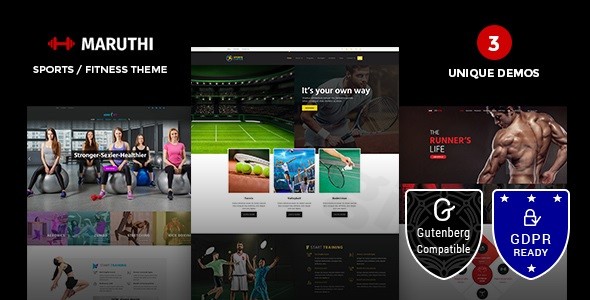
The theme comes with three captivating demo variations—Default, Aerobics, and Sports—each providing a distinct aesthetic and set of features tailored to different fitness niches:
- Default: The ultimate all-rounder, featuring a unique BMI calculator on the homepage, an appointment booking system, dynamic pricing tables, detailed trainer profiles, and enrollment forms. This is your go-to for a full-service fitness center.
- Aerobics: Perfect for class-based studios, emphasizing engaging schedule displays to keep your clients informed and enthusiastic about upcoming sessions.
- Sports: Ideal for sports clubs, incorporating stunning parallax slider effects to create an immersive and energetic user experience.Beyond these demos, Maruthi offers extensive layout flexibility. You can customize header and footer layouts with an easy builder, ensuring your brand identity shines through every part of your site. The theme’s responsiveness guarantees that your website looks sharp and performs flawlessly on any device, from desktops to smartphones.
Intuitive Customization Capabilities
Branding your fitness website has never been easier:
- Typography & Icons: With access to over 600 Google Fonts and a vast library of FontAwesome icons, you have complete creative control to define your site’s typography and visual elements.
- Color Schemes: Maruthi allows for comprehensive color customization, letting you set “any color or size in your site” to perfectly match your brand palette.
- Advanced Styling: Leverage features like Parallax and Video Backgrounds, Row effects, and elegant CSS3 animations to add depth and visual flair to your pages.
- WordPress Customizer with Kirki: The theme integrates the powerful Kirki toolkit, extending the WordPress Customizer with advanced, user-friendly UI options. This makes creating custom panels, sections, and fields incredibly straightforward, even automatically generating CSS from your changes.
Optimized Performance & SEO Readiness
Maruthi Fitness is built with performance in mind. It promises “insane performance” and features an “SEO-Friendly Structure” to help your website rank higher in search engines. Being 100% Responsive and Retina Ready, it ensures fast loading times and crystal-clear visuals across all devices, contributing to a superior user experience and better SEO outcomes. The clean markup and structured headings provided by the theme are fundamental for good search engine visibility.
Premium Plugin Integration
Maruthi comes bundled with a suite of essential premium plugins, enhancing its functionality and value:
- WPBakery Page Builder: For intuitive drag-and-drop page creation, allowing you to design complex layouts without touching a line of code.
- Slider Revolution: Create stunning, responsive sliders and visual presentations that captivate your audience.
- WooCommerce: Transform your site into an online store, ready to sell memberships, fitness products, apparel, or nutritional supplements. The theme also includes YITH Wishlist for enhanced eCommerce functionality.
- Contact Form 7: Facilitate seamless communication with your clients through customizable contact forms.
- DesignThemes Core Features: Provides custom shortcodes and crucial custom post types for managing fitness-specific content like Trainer Profiles, Class Schedules, and Programs.
- Simple Event Manager: Streamline the scheduling and display of your fitness classes and events.
Installation & Demo Import: Get Started in Minutes
Setting up your Maruthi Fitness website is a streamlined process, even for beginners.
- Install & Activate the Theme:
- First, ensure you have a fresh WordPress installation (version 5.1.1 or higher, with PHP 5 or higher recommended).
- Download the Maruthi Fitness theme package from your purchase source.
- Navigate to your WordPress dashboard, go to Appearance > Themes, and click “Add New.”
- Click “Upload Theme,” choose the theme’s
.zipfile, and click “Install Now.” - Once installed, click “Activate.”
- Install Required Companion Plugins:
- After activation, you’ll typically see a notification prompting you to install required plugins (e.g., WPBakery Page Builder, Slider Revolution, DesignThemes Core Features).
- Follow the on-screen instructions to install and activate all recommended plugins.
- Use One-Click Demo Import:
- Maruthi Fitness leverages the Unyson One Click Importer. Navigate to Appearance > Demo Content Install (or a similar menu item, depending on the theme’s setup).
- Select your preferred demo variation (Default, Aerobics, or Sports) and click “Install” or “Import.”
- What to Expect: The demo import process will populate your site with pre-designed pages, posts, menus, widgets, and theme options, making your site look exactly like the chosen demo. Be aware that importing a large demo can take several minutes. Ensure your server has sufficient memory (at least 256MB memory_limit) and a reasonable execution time to prevent timeouts.
- After Demo Import:
- Once the import is complete, your website should mirror the chosen demo.
- You may need to manually assign your main menu under Appearance > Menus and set your static homepage under Settings > Reading.
Customization Guide: Personalize Your Fitness Brand
With Maruthi Fitness, personalizing your website to reflect your unique brand is straightforward, thanks to the integrated WordPress Customizer and powerful page builder.
- Accessing Global Styles via the Customizer:
- Go to Appearance > Customize in your WordPress dashboard. This is where the Kirki toolkit extends functionality.
- You’ll find panels for Colors, Typography, Header Options, Footer Options, and more.
- Colors: Easily adjust primary, secondary, accent, and text colors to align with your brand.
- Typography: Select from over 600 Google Fonts for headings, body text, and other elements. Control font sizes, line heights, and weights.
- Logo & Site Identity: Upload your brand logo and favicon, and adjust site title and tagline.
- Building Pages with WPBakery Page Builder:
- For individual page layouts, navigate to Pages and open any page (or create a new one).
- Switch to the WPBakery Page Builder interface (often a backend editor or frontend editor button).
- Use its drag-and-drop interface to add, remove, and arrange elements. Maruthi’s custom shortcodes, provided by the DesignThemes Core Features plugin, seamlessly integrate with WPBakery, allowing you to easily insert specialized fitness elements like trainer profiles, class schedules, and pricing tables.
- Setting Up Your Homepage and Blog:
- To assign your new, customized homepage, go to Settings > Reading. Under “Your homepage displays,” select “A static page” and choose your desired page from the “Homepage” dropdown.
- Similarly, select a page for your blog posts under the “Posts page” dropdown.
- Managing Menus:
- Head to Appearance > Menus to create and organize your navigation menus.
- You can assign different menus to various locations, such as the primary header menu, footer menus, or mobile menus, all managed within this intuitive interface.The intuitive nature of the WordPress Customizer, powered by Kirki, combined with the visual editing capabilities of WPBakery, ensures that you can achieve a highly customized and branded look without needing any coding expertise.
FAQ & Troubleshooting
Here are answers to some common questions about the Maruthi Fitness WordPress theme:
Is Maruthi Fitness compatible with Elementor / WPBakery / Gutenberg?
Maruthi Fitness is deeply integrated with WPBakery Page Builder (formerly Visual Composer) and includes it as a bundled premium plugin, making it the primary tool for drag-and-drop page creation. While its core page-building workflow is centered around WPBakery, the theme has also been updated for Gutenberg editor compatibility, ensuring it works well with the native WordPress block editor for standard content. It does not explicitly mention direct integration with Elementor.
Does Maruthi Fitness theme support WooCommerce for online stores?
Yes, Maruthi Fitness offers full compatibility with WooCommerce. This allows you to easily set up an online store to sell fitness memberships, class packages, merchandise, nutritional supplements, or any other products directly from your website. It also includes the YITH Wishlist plugin to enhance the shopping experience.
Does the Maruthi Fitness theme support child themes?
Yes, a child theme is included in the Maruthi Fitness theme package. Using a child theme is highly recommended for any customizations you make, as it ensures that your changes are preserved when you update the parent theme. This is crucial for maintaining a stable and future-proof website.
How to add the BMI calculator to a WordPress site using Maruthi Fitness?
The unique BMI calculator is a prominent feature of the Default demo variation in Maruthi Fitness. When you import the Default demo, the BMI calculator is automatically integrated into the homepage. If you’re building a page from scratch, you would typically use the WPBakery Page Builder and look for a specific shortcode or element provided by the DesignThemes Core Features plugin that allows you to insert the BMI calculator module onto your page.
What should I do if the demo import fails or looks different from the demo site?
If your demo import fails or doesn’t look exactly like the live demo, first, ensure all required plugins are installed and activated. Next, check your server’s PHP memory limit (recommended 256MB or higher) and maximum file upload size (at least 128MB), as insufficient resources can cause import issues. Try re-importing the demo content. If problems persist, consult the theme’s documentation or contact the theme’s support channel for assistance.
Conclusion: Your Complete Solution for a Thriving Fitness Website
The Maruthi Fitness WordPress theme stands out as a highly specialized and robust solution for anyone in the health and wellness industry. Its thoughtful design, coupled with powerful features like the integrated BMI calculator, appointment booking system, and comprehensive premium plugin bundle (WPBakery, Slider Revolution, WooCommerce), provides an unparalleled toolkit for building a high-converting fitness website.With its three distinct demo variations, extensive customization options via the WordPress Customizer and Kirki, and an SEO-friendly, responsive structure, Maruthi Fitness offers both visual appeal and practical functionality. It’s an ideal choice for gyms, fitness centers, personal trainers, yoga studios, and sports clubs looking for a ready-made, visually dazzling, and feature-rich platform. Whether you’re a small business owner, a beginner without coding experience, or a freelancer seeking a niche-specific theme for clients, Maruthi Fitness provides a confident and complete solution to showcase programs, manage schedules, and grow your fitness business online.
I. Download Limits & Account Benefits
- Free Downloads: Each email address receives 3 downloads per day for free products
- Upgrade Benefits: Purchase any paid product to increase your daily download limit by 3 for each paid product
- No Account Required: You can download immediately by receiving the download link via email
- Account Recommended: Create an account for easier access to your order history and direct update downloads
II. Understanding GPL vs Official Versions
Important: The products available on WPPick are GPL-licensed versions, which differ from official developer versions. Before purchasing, please read our comprehensive guide: Understanding GPL & Official Differences at WPPick
Key Points:
- GPL versions may not include premium support from original developers
- Updates may be delayed compared to official releases
- Some premium features might have limitations
- Always consider your specific needs and support requirements
III. Support & Assistance
We’re here to help through multiple channels:
- Email Support: Direct email assistance for all inquiries
- Live Chat: Real-time support during business hours
- Comprehensive Documentation: Detailed guides and tutorials
IV. Order Tracking
Access your complete purchase history and download links anytime: Order History
V. Account Access
New to WPPick? Login or Create Account to manage your downloads and orders efficiently.
VI. Refund Protection
We stand behind our products with a clear refund policy. Review our terms: Refund Policy
VII. Privacy & Security
Your data security is our priority. Learn how we protect your information: Privacy Policy
VII. Terms of Service
Understanding our service terms ensures a smooth experience: Terms of Use
Quick Tips for Best Experience
- Verify Compatibility: Check plugin/theme compatibility with your WordPress version
- Backup First: Always backup your site before installing new plugins or themes
- Test Environment: Consider testing on a staging site first
- Stay Updated: Regularly check for updates in your account dashboard
- Read Documentation: Review any included documentation for optimal setup
Need Help?
If you have questions about downloads, licensing, or need technical assistance, don’t hesitate to contact our support team. We’re committed to ensuring you have the best possible experience with WPPick products.
Ready to get started? Your download adventure begins with just one click!
- Premium plugins source updated