
Maxmin – Dropshipping Aliexpress Clone Shopify Os 2.0 Theme
/Year
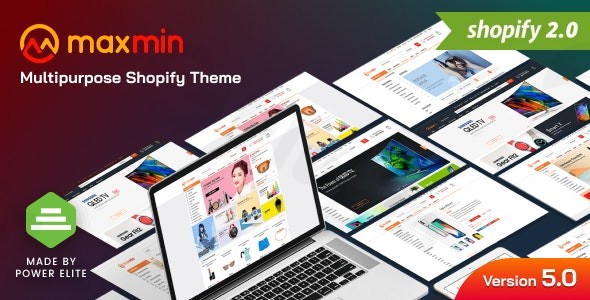
Transforming an online store into a high-converting e-commerce powerhouse requires more than just products—it demands a robust, feature-rich, and visually appealing platform. The MAXMIN Shopify theme is engineered precisely for this purpose, offering a premium solution for supermarkets, grocery stores, and ambitious dropshipping businesses operating on Shopify OS 2.0. This Shopify dropshipping theme is not just about aesthetics; it’s a meticulously crafted digital storefront designed to optimize every step of the customer journey, from product discovery to a seamless checkout.In a competitive online landscape, MAXMIN empowers merchants to create an unparalleled e-commerce experience. By blending sophisticated design with powerful functionality, it directly addresses the core challenges of online retail: reducing cart abandonment, increasing conversion rates, and scaling operations efficiently. Whether you’re a burgeoning dropshipping entrepreneur or an established grocery chain, MAXMIN provides the essential tools to elevate your online presence and drive significant sales.
Key Features of the MAXMIN Shopify Theme
The MAXMIN Shopify theme is packed with advanced functionalities that cater specifically to the demands of modern e-commerce, making it an ideal supermarket Shopify theme and a robust platform for dropshipping.
Customizable Homepage Layouts
Unleash your creativity with MAXMIN’s drag-and-drop sections. This feature allows you to effortlessly design stunning landing pages, strategically place promotional banners, and highlight featured product displays. The flexibility in layout customization ensures your homepage captivates visitors from their very first interaction, guiding them effectively through your product offerings.
Intelligent Product Filtering System
For stores with extensive inventories, an efficient filtering system is non-negotiable. MAXMIN offers advanced filtering capabilities, enabling customers to easily navigate thousands of products. Shoppers can filter by category, price range, brand, or even specific dietary requirements, drastically improving product discoverability and enhancing the shopping experience.
Mobile-Optimized Shopping Experience
In today’s mobile-first world, a responsive design is paramount. MAXMIN ensures a seamless shopping experience across all devices with its fully responsive layout. Coupled with touch-friendly interfaces and accelerated mobile performance, your customers will enjoy smooth navigation and fast loading times, irrespective of whether they’re browsing on a smartphone or tablet.
SEO-Enhanced Architecture
Built with fundamental search engine optimization principles, the MAXMIN Shopify theme helps your online store rank higher in search results. Its clean code and structured data support attract more organic traffic, making it easier for potential customers to discover your supermarket or dropshipping business.
Dropshipping & AliExpress Integration Ready
MAXMIN shines as an AliExpress clone theme due to its specific design for dropshipping business models. It offers seamless compatibility with popular AliExpress automation tools and various inventory management systems. This robust structure facilitates high-volume product imports and streamlines automated order processing, making it a powerful asset for any dropshipping venture.
Premium Benefits from Reputable Sources
When acquiring MAXMIN from platforms like ZeroPlugin.com, you benefit from:
- GPL Licensed Software: Ensuring legal compliance and ethical software usage for your business.
- Regular Update Schedule: Continuous updates keep your theme compatible with the latest Shopify platform enhancements and crucial security patches.
- Security Verified Sources: Every theme undergoes comprehensive VirusTotal scanning and third-party security verification, guaranteeing a malware-free installation and operation.
- Professional Support Access: Gain access to dedicated technical support and detailed documentation to help you customize and optimize your MAXMIN theme for maximum business impact.
Installation & Setup of the MAXMIN Shopify Theme
Installing and setting up the MAXMIN Shopify theme is a straightforward process, designed to get your premium store up and running quickly on Shopify OS 2.0.
- Download the Theme File: After purchasing, you will receive a
.zipfile containing the MAXMIN theme. Ensure you download this file to your computer. - Access Your Shopify Admin: Log in to your Shopify store’s administration panel.
- Navigate to Themes: From the sidebar, go to Online Store > Themes.
- Upload the Theme: In the “Theme library” section, click on “Add theme” and then select “Upload zip file.”
- Upload and Install: Click “Choose File” and select the MAXMIN
.zipfile you downloaded. Then, click “Upload file.” Shopify will process the upload and add MAXMIN to your theme library. - Customize and Publish: Once uploaded, the MAXMIN theme will appear in your “Theme library.” Click “Customize” to start configuring your store’s layout, colors, typography, and sections using Shopify’s intuitive drag-and-drop editor. After you’ve set up your preferences, click “Publish” to make MAXMIN your live store theme.Remember to review all the theme settings, especially for homepage sections, product page layouts, and the intelligent filtering system, to align with your specific brand and product offerings.
Practical Usage & Best Practices with MAXMIN
Leveraging the MAXMIN Shopify theme effectively means understanding its capabilities for various e-commerce models. Here’s how different business types can maximize its potential:
- For Supermarket & Grocery Chains: Utilize the intelligent product filtering system to its fullest. Categorize products by fresh produce, dairy, bakery, dietary restrictions (gluten-free, organic), and more. This makes it incredibly easy for customers to find exactly what they need, replicating an organized in-store experience online. Implement promotional banners on the homepage to highlight weekly specials or seasonal offerings.
- For Dropshipping Entrepreneurs: The Dropshipping & AliExpress Integration Ready features are your golden ticket. Configure your store for high-volume product imports and automated order processing. Focus on creating compelling product pages with detailed descriptions and high-quality images. Leverage the SEO-enhanced architecture to target long-tail keywords relevant to your niche dropshipping products, attracting organic traffic from specific buyer intent searches.
- For Specialty Food Retailers & Organic Stores: MAXMIN’s customizable homepage layouts are perfect for showcasing your unique brand story and premium products. Use hero sections to highlight your commitment to quality, organic sourcing, or artisan craftsmanship. The filtering system can also be adapted to emphasize product attributes like “fair trade,” “vegan,” or “locally sourced.”
- Improving Conversion Rates: Regardless of your business model, always prioritize the mobile-optimized shopping experience. A significant portion of online shopping happens on mobile devices; ensuring your store is fast, responsive, and easy to navigate on smaller screens is crucial for reducing cart abandonment and boosting conversions. Regularly test your checkout flow to ensure it’s as streamlined as possible.
FAQ & Troubleshooting
Here are common questions regarding the MAXMIN Shopify theme to help you get the most out of your premium e-commerce solution.
Q: Is MAXMIN compatible with AliExpress dropshipping on Shopify?
A: Yes, the MAXMIN Shopify theme is specifically designed with dropshipping business models in mind and offers seamless compatibility with popular AliExpress automation tools and various inventory management systems. Its structure supports high-volume product imports and automated order processing, making it an ideal AliExpress clone theme.
Q: What are the primary benefits of using the MAXMIN Shopify theme for my e-commerce store?
A: The main benefits include its sophisticated and customizable design (especially for grocery and dropshipping niches), an intelligent product filtering system for enhanced user experience, a fully mobile-optimized shopping experience, and an SEO-enhanced architecture to improve search engine rankings and attract organic traffic. It’s a premium Shopify solution focused on increasing conversion rates.
Q: Does the MAXMIN theme support Shopify OS 2.0 features?
A: Absolutely. MAXMIN is a Premium Shopify OS 2.0 Theme, meaning it fully leverages the latest capabilities of Shopify’s Online Store 2.0. This includes enhanced section customization everywhere, improved performance, and a more flexible content structure, giving you greater control over your store’s layout and functionality.
Q: How can MAXMIN help my online supermarket or grocery store stand out?
A: MAXMIN helps your online supermarket stand out through its specialized design framework for grocery businesses, intuitive navigation, and streamlined checkout processes. Its intelligent product filtering system allows customers to easily navigate thousands of products by category, brand, and even dietary requirements, providing an exceptional and efficient shopping experience that reduces friction and increases customer loyalty.
Q: What kind of support and updates can I expect for the MAXMIN Shopify theme?
A: When purchased from reputable sources like ZeroPlugin.com, MAXMIN comes with a GPL license, ensuring legal compliance. You can expect a regular update schedule to maintain compatibility with Shopify platform enhancements and security patches. Additionally, you gain access to professional support and detailed documentation to assist with customization and optimization.
Conclusion
The MAXMIN Shopify theme stands as a formidable solution for any entrepreneur looking to establish a high-performing online supermarket, grocery store, or dropshipping business on Shopify OS 2.0. Its thoughtful blend of cutting-edge design, powerful e-commerce features, and a strong focus on user experience and SEO makes it a truly premium Shopify solution.By choosing MAXMIN, you invest in a theme that not only looks professional but also actively works to reduce cart abandonment, boost conversion rates, and streamline your operations, especially if you’re venturing into dropshipping with AliExpress. It provides the robust foundation needed to build a successful, high-converting online presence that drives sales and cultivates lasting customer loyalty. Elevate your e-commerce journey with the MAXMIN Shopify theme and join a growing community of successful merchants.
I. Download Limits & Account Benefits
- Free Downloads: Each email address receives 3 downloads per day for free products
- Upgrade Benefits: Purchase any paid product to increase your daily download limit by 3 for each paid product
- No Account Required: You can download immediately by receiving the download link via email
- Account Recommended: Create an account for easier access to your order history and direct update downloads
II. Understanding GPL vs Official Versions
Important: The products available on WPPick are GPL-licensed versions, which differ from official developer versions. Before purchasing, please read our comprehensive guide: Understanding GPL & Official Differences at WPPick
Key Points:
- GPL versions may not include premium support from original developers
- Updates may be delayed compared to official releases
- Some premium features might have limitations
- Always consider your specific needs and support requirements
III. Support & Assistance
We’re here to help through multiple channels:
- Email Support: Direct email assistance for all inquiries
- Live Chat: Real-time support during business hours
- Comprehensive Documentation: Detailed guides and tutorials
IV. Order Tracking
Access your complete purchase history and download links anytime: Order History
V. Account Access
New to WPPick? Login or Create Account to manage your downloads and orders efficiently.
VI. Refund Protection
We stand behind our products with a clear refund policy. Review our terms: Refund Policy
VII. Privacy & Security
Your data security is our priority. Learn how we protect your information: Privacy Policy
VII. Terms of Service
Understanding our service terms ensures a smooth experience: Terms of Use
Quick Tips for Best Experience
- Verify Compatibility: Check plugin/theme compatibility with your WordPress version
- Backup First: Always backup your site before installing new plugins or themes
- Test Environment: Consider testing on a staging site first
- Stay Updated: Regularly check for updates in your account dashboard
- Read Documentation: Review any included documentation for optimal setup
Need Help?
If you have questions about downloads, licensing, or need technical assistance, don’t hesitate to contact our support team. We’re committed to ensuring you have the best possible experience with WPPick products.
Ready to get started? Your download adventure begins with just one click!
No changelog available.