
Mayosis – Digital Marketplace WordPress Theme
/Year
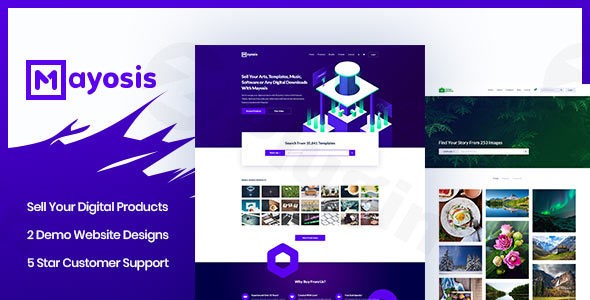
The digital economy is booming, and with it, the demand for robust platforms to sell digital products. The Mayosis WordPress theme emerges as a powerful and specialized solution, expertly crafted for creating dynamic online marketplaces. Whether you’re looking to sell templates, art, music, ebooks, stock photography, or software, Mayosis provides a comprehensive toolkit to launch a professional marketplace akin to ThemeForest or CreativeMarket, often within just a few hours.Mayosis is designed for entrepreneurs, freelancers, and businesses eager to monetize digital goods. Its design philosophy centers on clean aesthetics, intuitive user experience (UX), and high functionality, ensuring that both vendors and customers enjoy a seamless journey.
Key Features: Design, Layout & Performance
Mayosis stands out by providing a robust framework tailored specifically for the unique demands of digital product sales. Its feature set combines visual flexibility with essential performance and SEO capabilities.
Design & Layout Options
Mayosis is built on a Bootstrap 1170px Grid Layout, ensuring a structured, responsive, and aesthetically pleasing foundation across all devices. It’s fully Retina-Ready and supports 5K displays, guaranteeing crisp visuals for all your digital offerings. The theme includes a justified system for showcasing products, optimizing visual hierarchy.A major advantage of Mayosis is its collection of prebuilt templates and home page layouts. With a 1-Click Demo Import feature, you can quickly launch your site with a professional design. Demos like “Mayo Fusion,” “Mayosis Main Demo,” “Mayo Vendor,” “Graphic Market,” and “Mayophoto” provide diverse starting points, many optimized for Easy Digital Downloads (EDD) or a combination of EDD and WooCommerce. The theme also includes specialized product templates for various digital types, from photos and ebooks to audio and video, allowing direct playback from the homepage. Unique visual elements called “Magic Shapes” can be seamlessly integrated with page builders to add a distinctive flair to your marketplace.
Customization Capabilities
Mayosis offers extensive customization to reflect your brand identity. You’ll find Custom Header Options with virtually unlimited control over colors and design, allowing you to craft a unique first impression. With access to over 800+ Google Fonts, typographic choices are vast, ensuring your brand voice is perfectly articulated.Beyond global styles, Mayosis enhances popular page builders with over 25 custom builder elements. These include versatile components like Icon Boxes, Single/Dual Buttons, Recent Posts, Client Logo Grids, Theme Hero Sections, Testimonials, Pricing Tables, Searchboxes, Counters, and Team Members. Crucially for a marketplace, it also provides EDD-specific elements such as Featured, Recent, and Popular product displays, streamlining your product showcases.
Performance & SEO Features
In the competitive digital landscape, speed and search visibility are paramount. Mayosis is engineered for ultra-fast loading times, which is crucial for retaining visitors and improving user experience. Its SEO-Optimized Code ensures that your digital products and marketplace content are easily discoverable by search engines like Google and AI answer engines. The theme features a sticky header for enhanced navigation and is fully mobile-friendly, adapting flawlessly to smartphones and tablets, which is essential for today’s diverse user base.
Installation & Demo Import
Getting your digital marketplace up and running with Mayosis is designed to be straightforward, even for those new to WordPress.
Step-by-Step Setup:
- Install & Activate the Theme:
- Navigate to Appearance > Themes in your WordPress dashboard.
- Click “Add New” and then “Upload Theme.”
- Choose the
mayosis.zipfile (ormayosis-child.zipif you’re installing the child theme first, which is recommended for custom modifications) and click “Install Now.” - Once installed, click “Activate.”
- Install Required Plugins:
- Upon activation, Mayosis will prompt you to install a set of recommended plugins. These typically include:
- Easy Digital Downloads (EDD): The core plugin for selling digital products.
- WPBakery Page Builder: A premium page builder included with the theme.
- Advanced Custom Fields Pro: Another premium plugin for enhanced customization.
- Other plugins like Contact Form 7, bbPress, and potentially EDD extensions for multi-vendor functionality (e.g., EDD Front End Submission).
- Install and activate all required and recommended plugins.
- Upon activation, Mayosis will prompt you to install a set of recommended plugins. These typically include:
- Use the One-Click Demo Import:
- Mayosis provides a powerful One-Click Demo Import feature to jumpstart your site.
- Look for a “Demo Import” or similar option in your WordPress dashboard (often under Appearance or a dedicated theme options panel).
- Select your preferred demo from the available layouts (e.g., “Mayo Fusion,” “Graphic Market”).
- Click “Import.”
- What to Expect During/After Demo Import:
- The demo import process will populate your site with pre-designed pages, posts, sample products, menus, and widgets, mimicking the chosen demo layout.
- Potential Pitfalls: For larger demos, the import might take several minutes. Ensure your server’s PHP memory limit and execution time are sufficient to prevent timeouts. If the import fails or looks incomplete, try increasing
memory_limitandmax_execution_timein yourphp.inifile or contact your hosting provider.
Customization Guide: Branding & Layout
Mayosis empowers you to personalize every aspect of your marketplace to align with your brand identity and functional needs.
Using the WordPress Customizer and Page Builders
Most of the theme’s global options are accessible through the native WordPress Customizer (Appearance > Customize), providing a live preview of your changes. Here, you can fine-tune:
- Colors: While not explicitly detailing specific presets, the theme’s “Custom Header Option” and various builder elements offer extensive color control. You can adjust primary, secondary, and accent colors to match your brand palette.
- Typography: Leverage the 800+ Google Fonts to select ideal typefaces for headings, body text, and UI elements, controlling sizes, weights, and line heights.
- Logos & Branding: Easily upload your logo and favicon, ensuring consistent brand presence across your site.
- Header & Footer Layouts: Utilize the dedicated header builder and footer builder to quickly create and extensively customize these crucial site sections. Implement a sticky header for improved navigation.
- Homepage and Blog Page Settings: Define which page acts as your homepage and which displays your blog posts.
- Menus: Set up your main navigation, footer menus, and integrate the mega menu feature for complex site structures.For page-specific layouts and intricate designs, Mayosis integrates seamlessly with WPBakery Page Builder (included) and is also compatible with Elementor. These drag-and-drop builders, enhanced by Mayosis’s 25+ custom builder elements, allow you to intuitively construct unique page layouts without coding. You can drag and drop elements like product carousels, testimonials, pricing tables, and even specific EDD product displays directly onto your pages.For advanced users and developers, Mayosis offers a Child Theme Facility. This best practice allows you to safely apply custom CSS, JavaScript, and use WordPress hooks/filters for deeper modifications without losing changes when the main theme updates.
FAQ & Troubleshooting
Here are answers to common questions about the Mayosis WordPress theme:
Is Mayosis compatible with Elementor / WPBakery / Gutenberg?
Yes, Mayosis is highly compatible with popular page builders. It includes the WPBakery Page Builder (saving you $34) and is also fully compatible with Elementor (and Elementor Pro). Furthermore, Mayosis is optimized for the native WordPress Block Editor (Gutenberg), giving you flexibility in how you build and customize your pages.
Does Mayosis support WooCommerce and multi-vendor functionality?
Yes, Mayosis provides comprehensive support for e-commerce. It is exclusively built and optimized for full integration with Easy Digital Downloads (EDD), making it a robust platform for selling digital products. Additionally, it is compatible with WooCommerce versions 6.x.x and 7.x.x, allowing for a broader e-commerce scope. For multi-vendor marketplaces, Mayosis supports EDD Front End Submission (FES), EDD Commission, and Dokan, enabling other sellers to list their products on your platform.
Does Mayosis support child themes for safe customization?
Yes, Mayosis includes a Child Theme Facility. It is highly recommended to use a child theme for any custom CSS, functions, or template file modifications. This ensures that your customizations remain safe and are not overwritten when you update the main Mayosis theme, maintaining the longevity and stability of your website.
How can I ensure my Mayosis website is fast and SEO-friendly?
Mayosis is built with ultra-fast loading and SEO-optimized code from the ground up. To further enhance performance, ensure you’re using a reliable hosting provider, implement caching plugins, optimize your images, and keep your WordPress, theme, and plugin versions updated. For SEO, beyond the theme’s clean structure, focus on keyword-rich content, proper heading hierarchy, and consider using an SEO plugin like Yoast SEO or Rank Math.
What should I do if the Mayosis demo import fails or looks different from the demo site?
If the Mayosis one-click demo import fails or doesn’t look as expected, first check your server’s PHP configuration. Increase memory_limit (e.g., to 256M or 512M) and max_execution_time (e.g., to 300 or 600) in your php.ini file. Large demo imports require more server resources. If issues persist, ensure all required plugins are installed and activated. You can also consult the theme’s official documentation or contact the developer’s support.
Conclusion
The Mayosis – Premium Digital Marketplace WordPress Theme is an exceptional choice for anyone serious about building a dedicated online platform for selling digital products. Its deep integration with Easy Digital Downloads and its ecosystem, combined with robust multi-vendor support, sets it apart from generic multipurpose themes.From a design perspective, Mayosis offers significant flexibility with its Bootstrap grid, Retina-ready display, and extensive customization options through the WordPress Customizer and integrated page builders like WPBakery and Elementor. Its library of 800+ Google Fonts and unique “Magic Shapes” allow for distinct branding and engaging visual experiences.Functionally, Mayosis excels in performance with ultra-fast loading and SEO-optimized code, critical for user experience and search engine visibility. The 1-Click Demo Import simplifies setup, making it accessible even for beginners, while the Child Theme Facility provides essential flexibility for developers.While some expert reviews have noted potential needs for additional EDD extensions for full multi-vendor functionality and occasional support response times, the overwhelming user feedback and feature set solidify Mayosis as a top-tier solution. It is ideal for entrepreneurs, freelancers, and small businesses looking to launch a professional, high-converting digital marketplace with ease and efficiency. If your goal is to create a vibrant hub for digital goods, Mayosis offers a tailored and powerful foundation.
I. Download Limits & Account Benefits
- Free Downloads: Each email address receives 3 downloads per day for free products
- Upgrade Benefits: Purchase any paid product to increase your daily download limit by 3 for each paid product
- No Account Required: You can download immediately by receiving the download link via email
- Account Recommended: Create an account for easier access to your order history and direct update downloads
II. Understanding GPL vs Official Versions
Important: The products available on WPPick are GPL-licensed versions, which differ from official developer versions. Before purchasing, please read our comprehensive guide: Understanding GPL & Official Differences at WPPick
Key Points:
- GPL versions may not include premium support from original developers
- Updates may be delayed compared to official releases
- Some premium features might have limitations
- Always consider your specific needs and support requirements
III. Support & Assistance
We’re here to help through multiple channels:
- Email Support: Direct email assistance for all inquiries
- Live Chat: Real-time support during business hours
- Comprehensive Documentation: Detailed guides and tutorials
IV. Order Tracking
Access your complete purchase history and download links anytime: Order History
V. Account Access
New to WPPick? Login or Create Account to manage your downloads and orders efficiently.
VI. Refund Protection
We stand behind our products with a clear refund policy. Review our terms: Refund Policy
VII. Privacy & Security
Your data security is our priority. Learn how we protect your information: Privacy Policy
VII. Terms of Service
Understanding our service terms ensures a smooth experience: Terms of Use
Quick Tips for Best Experience
- Verify Compatibility: Check plugin/theme compatibility with your WordPress version
- Backup First: Always backup your site before installing new plugins or themes
- Test Environment: Consider testing on a staging site first
- Stay Updated: Regularly check for updates in your account dashboard
- Read Documentation: Review any included documentation for optimal setup
Need Help?
If you have questions about downloads, licensing, or need technical assistance, don’t hesitate to contact our support team. We’re committed to ensuring you have the best possible experience with WPPick products.
Ready to get started? Your download adventure begins with just one click!
- Mayofusion demo added
- New button style added
- Woo ajax search issue fixed
- CSS issue fixes
- Bug Fixes
- Plugin updated
- Demo data updated
- 9 August 2025
- Video play issue fixed
- Related video hover play issue fixed
- Search page video hover play issue fixed
- Woo ajax search issue fixed
- Woo variable product price issue fixed
- Licence issue fixed (one time manual update needed. from next version one click update will work)
- CSS issue fixes
- Bug Fixes
- Plugin updated
- Demo data updated