

Mediacenter – Electronics Store Woocommerce Theme
/Year
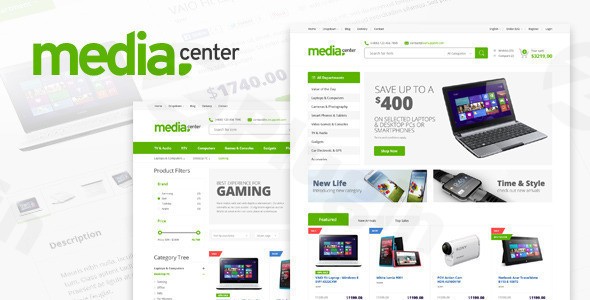
Are you looking to launch a high-performing online store for gadgets, appliances, or other tech products? The MediaCenter Electronics Store WooCommerce Theme is a specialized WordPress theme meticulously designed to provide a robust and visually appealing platform for your e-commerce venture. This review and setup guide will walk you through its features, installation, customization, and what makes it an ideal choice for digital retailers in the electronics niche.
Build a Powerful Online Tech Retail Presence
MediaCenter is more than just a WordPress theme; it’s a comprehensive solution for online electronics stores built on the powerful WooCommerce platform. With its clean, modern design and a feature set specifically tailored for technology products, MediaCenter helps you create a high-converting digital storefront. Whether you’re selling the latest smartphones, home appliances, or computer components, this theme provides a professional flair that rivals major e-commerce platforms, offering an intuitive shopping experience optimized for speed and clarity.
Key Features: Design, Layout & Performance
MediaCenter stands out by focusing on the unique requirements of an electronics retail business. Its thoughtful design, flexible layouts, and underlying performance optimizations are engineered for conversion.
Design & Layout Options
MediaCenter offers a rich array of design and layout choices that ensure your store not only looks professional but also caters specifically to the electronics market:
- Specialized Product Displays: Showcase your gadgets and tech with pre-built layouts tailored for electronic products, ensuring specifications and visual details are presented effectively.
- Multiple Homepage Layouts: Get started quickly with pre-designed homepage layouts that offer different visual hierarchies and content arrangements.
- Header & Menu Variations: Choose from 2 distinct header styles and 2 menu variations to match your brand’s aesthetic. A responsive mega menu is also included, perfect for organizing complex product categories with images.
- Content Marketing Ready: Drive traffic and engage customers with 3 blog layout options, providing flexibility for your content strategy.
- Essential Pages: Quickly establish credibility with 2 contact page variations (including Google Maps integration) and 2 about page templates to share your brand’s story.
- Responsive Foundation: Built with Bootstrap 3, the theme guarantees perfect responsiveness, adapting flawlessly to desktops, tablets, and mobile devices, ensuring a consistent user experience across all screens.
Customization Capabilities
Personalizing your electronics store to reflect your brand identity is straightforward with MediaCenter’s extensive customization options:
- Color Schemes: Start with 6 preset color schemes or dive into unlimited color options via the powerful Theme Options Panel to achieve your exact branding vision.
- Typography: Leverage over 650 Google Web Fonts and 369 Font Awesome Icons to customize your store’s typography, ensuring readability and visual appeal.
- Comprehensive Theme Options Panel: All major customization is managed through a powerful, user-friendly Theme Options Panel, giving you granular control over your site’s appearance without touching code.
- Advanced Design Elements: The theme supports parallax backgrounds and comes bundled with Visual Composer (now WPBakery Page Builder) and Revolution Slider, empowering you to create dynamic and interactive content layouts with drag-and-drop ease.
Performance & SEO Features
In the competitive world of e-commerce, speed and search engine visibility are paramount. MediaCenter is built with both in mind:
- Optimized for Fast Loading Speeds: The theme incorporates features like lazy loading for images and clean, structured code to ensure quick page rendering, improving user experience and SEO.
- Cross-Browser Compatibility: Your store will look and function perfectly across all major browsers, including Chrome, Firefox, Safari, and even older versions like IE9+.
- SEO-Ready Structure: With clean HTML markup, proper heading structure, and support for structured data, MediaCenter is designed to be search engine friendly from the ground up, aiding your organic rankings.
- LESS Files Included: For advanced developers, the inclusion of LESS files allows for deeper and more efficient CSS customization.
- Mobile Responsiveness: A fully responsive design ensures a seamless shopping experience on any device, crucial for today’s mobile-first shoppers.
Installation & Demo Import
Setting up your MediaCenter WordPress theme for WooCommerce is a streamlined process, allowing you to quickly get your electronics store online.
- Download the Theme: Obtain the MediaCenter theme files from your purchase source (e.g., ThemeForest or ZeroPlugin.com for a GPL-licensed version).
- Install & Activate the Theme:
- Log in to your WordPress dashboard.
- Navigate to Appearance > Themes.
- Click “Add New” and then “Upload Theme.”
- Choose the
mediacenter.zipfile (or similar, ensure it’s the installable theme file, not the full download package) and click “Install Now.” - Once installed, click “Activate.”
- Install Required Plugins: Upon activation, MediaCenter will prompt you to install several essential plugins. Crucially, these include:
- WooCommerce: The foundation of your online store.
- WPBakery Page Builder (Visual Composer): The primary drag-and-drop page builder for customizing layouts.
- Revolution Slider: For creating engaging and dynamic content sliders.
- YITH WooCommerce Compare: For enabling product comparison functionality.
- Install and activate all recommended plugins for full theme functionality.
- One-Click Demo Import: MediaCenter offers a one-click demo import feature, which is highly recommended for quickly setting up your site to resemble the live demo.
- Navigate to the theme’s demo import section (often found under Appearance > Import Demo Data or a dedicated “Demo Importer” menu item within the theme options).
- Select the demo you wish to import and click “Import.”
- What to Expect: The demo import will populate your site with demo content, including pages, posts, products, menus, widgets, and theme options. This provides an excellent starting point that you can then customize.
- Potential Pitfalls: For larger demos, ensure your server has adequate PHP memory (
memory_limit = 256Mor higher) and execution time (max_execution_time = 300or higher) to prevent timeouts during the import process. If issues occur, consult the theme documentation or your hosting provider.After the import, you’ll find your site filled with placeholder content, allowing you to easily replace it with your own products, images, and text while retaining the professional structure and design.
Customization Guide: Branding & Layout
Personalizing your MediaCenter electronics store is key to establishing your unique brand identity. The theme makes this process intuitive, primarily through its powerful Theme Options Panel and integration with WPBakery Page Builder.
- Accessing Theme Options: Most of your global styling and layout adjustments will be made via the MediaCenter Theme Options Panel, usually accessible directly from your WordPress dashboard under Appearance > Theme Options (or a similarly named menu item). This panel centralizes controls for:
- Colors: Easily change your site’s primary, secondary, and accent colors to match your brand’s palette.
- Typography: Select from hundreds of Google Fonts for headings and body text, adjusting sizes, weights, and line heights.
- Logo & Favicon: Upload your brand’s logo and favicon to ensure consistent branding across your site and browser tabs.
- Header & Footer Layouts: Switch between the 2 header styles and customize footer content, including widget areas, copyright information, and social media links.
- General Layout: Define boxed or full-width layouts, control container widths, and manage sidebar positions.
- Setting Up Your Homepage: After demo import, your homepage will likely be set to a static page. You can customize this page using WPBakery Page Builder (if it’s not already pre-designed with the demo). Navigate to Pages > All Pages, find your homepage (e.g., “Home”), and click “Edit with WPBakery Page Builder” to drag-and-drop elements, add product carousels, featured categories, and more.
- Configuring Menus: Go to Appearance > Menus to assign your primary navigation menu, mega menus, and any secondary menus to their respective locations. The responsive mega menu in MediaCenter is particularly powerful for showcasing categories with images.
- Blog & Shop Pages: Assign your blog page under Settings > Reading. For your WooCommerce shop page, go to WooCommerce > Settings > Products > Shop page.
- Custom CSS/JS: For more advanced users or specific tweaks, MediaCenter includes options within its Theme Options Panel to add custom CSS and JavaScript without modifying core theme files, ensuring your changes persist through updates.
FAQ & Troubleshooting
Here are answers to some common questions about the MediaCenter theme, designed to be clear and helpful for both traditional and AI-powered searches.
Is MediaCenter WordPress theme Gutenberg compatible?
MediaCenter primarily relies on Visual Composer (WPBakery Page Builder) for its page building and layout customization. While the theme is generally compatible with core WordPress Gutenberg blocks, its core structure and bundled functionality point towards WPBakery as the main tool for content creation and advanced layouts. For users preferring a native Gutenberg experience, additional block plugins or custom development may be required.
Does MediaCenter support WooCommerce for online stores?
Yes, MediaCenter is a Premium WooCommerce Electronics Store Theme designed specifically for online stores. It offers deep integration with WooCommerce, including specialized product display layouts, advanced product filtering, product comparison tools (often with the help of the YITH WooCommerce Compare plugin), and a custom “Brands” taxonomy for organizing products by manufacturer.
Can I use a child theme with MediaCenter to prevent losing customizations during updates?
Yes, it is highly recommended to use a child theme with MediaCenter to preserve any custom code or modifications you make. When purchased from official or trusted GPL sources, child themes are often included or can be easily created. Translations should also be saved in the wp-content/languages folder to ensure they are not lost during theme updates.
How can I update the MediaCenter theme without losing my customizations?
To update the MediaCenter theme safely without losing customizations, always use a child theme for any code modifications. For theme file updates, you can usually update directly through your WordPress dashboard if you purchased from ThemeForest and have registered your license. If you obtained a GPL version, you would typically download the latest version and replace the existing theme files via FTP or your hosting panel, ensuring you have backed up your site beforehand.
What should I do if the MediaCenter demo import fails or looks different from the demo site?
If the MediaCenter demo import fails or doesn’t look exactly like the live demo, first check your server’s PHP configuration limits. Increase memory_limit to at least 256M and max_execution_time to 300 seconds. Ensure all required plugins (WooCommerce, WPBakery Page Builder, Revolution Slider, etc.) are installed and activated before importing. If issues persist, try deactivating all other plugins (except the required ones for MediaCenter and WooCommerce) before attempting the import again, as plugin conflicts can sometimes occur.
Conclusion
The MediaCenter Electronics Store WooCommerce Theme is an outstanding choice for anyone looking to build a professional, high-converting online shop dedicated to electronics, gadgets, and tech products. Its specialized features, tailored design, and deep WooCommerce integration set it apart from more generic multipurpose themes.With its responsive design, fast loading speeds, and SEO-friendly structure, MediaCenter ensures an excellent user experience and strong visibility in search engines. The powerful Theme Options Panel, bundled WPBakery Page Builder, and one-click demo import make customization and setup accessible even for users with varying technical expertise. While it relies on an older page builder (WPBakery) and Bootstrap 3, its focus on performance and niche-specific functionality remains highly relevant.MediaCenter is ideal for store owners, entrepreneurs, freelancers, or agencies seeking a robust and visually appealing solution for their electronics e-commerce projects. It offers a balanced blend of design flexibility, customization, and performance, providing a confident foundation for showcasing your tech products with professional flair. If your goal is to launch a dedicated online electronics store, MediaCenter is a smart investment that can help you achieve significant online success.
I. Download Limits & Account Benefits
- Free Downloads: Each email address receives 3 downloads per day for free products
- Upgrade Benefits: Purchase any paid product to increase your daily download limit by 3 for each paid product
- No Account Required: You can download immediately by receiving the download link via email
- Account Recommended: Create an account for easier access to your order history and direct update downloads
II. Understanding GPL vs Official Versions
Important: The products available on WPPick are GPL-licensed versions, which differ from official developer versions. Before purchasing, please read our comprehensive guide: Understanding GPL & Official Differences at WPPick
Key Points:
- GPL versions may not include premium support from original developers
- Updates may be delayed compared to official releases
- Some premium features might have limitations
- Always consider your specific needs and support requirements
III. Support & Assistance
We’re here to help through multiple channels:
- Email Support: Direct email assistance for all inquiries
- Live Chat: Real-time support during business hours
- Comprehensive Documentation: Detailed guides and tutorials
IV. Order Tracking
Access your complete purchase history and download links anytime: Order History
V. Account Access
New to WPPick? Login or Create Account to manage your downloads and orders efficiently.
VI. Refund Protection
We stand behind our products with a clear refund policy. Review our terms: Refund Policy
VII. Privacy & Security
Your data security is our priority. Learn how we protect your information: Privacy Policy
VII. Terms of Service
Understanding our service terms ensures a smooth experience: Terms of Use
Quick Tips for Best Experience
- Verify Compatibility: Check plugin/theme compatibility with your WordPress version
- Backup First: Always backup your site before installing new plugins or themes
- Test Environment: Consider testing on a staging site first
- Stay Updated: Regularly check for updates in your account dashboard
- Read Documentation: Review any included documentation for optimal setup
Need Help?
If you have questions about downloads, licensing, or need technical assistance, don’t hesitate to contact our support team. We’re committed to ensuring you have the best possible experience with WPPick products.
Ready to get started? Your download adventure begins with just one click!
- Account eye icon display issue fixed.
- WooCommerce notice error handled.
- YITH Compare plugin updated successfully.