

Medical Clinic – Health & Doctor Medical WordPress Theme
/Year
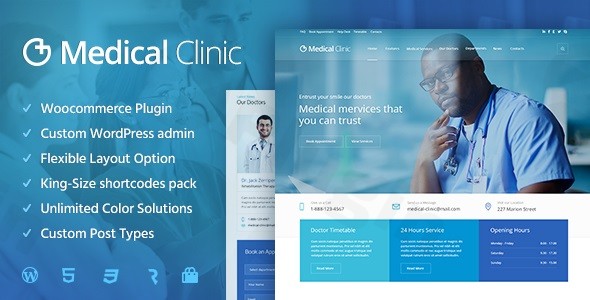
Creating a professional and trustworthy online presence is paramount for any healthcare provider or institution. The Medical Clinic – Health & Doctor Medical WordPress Theme by cmsmasters is meticulously designed to address this need, offering a specialized and comprehensive solution for medical professionals, clinics, hospitals, and health-related businesses. This theme stands out by blending a visually appealing, clean design with robust, niche-specific functionalities, making it an ideal choice for establishing a strong digital footprint in the healthcare sector.
1. Introduction: Your Gateway to a Trusted Medical Online Presence
The Medical Clinic WordPress Theme is engineered for healthcare professionals who demand both aesthetic appeal and practical functionality for their websites. Whether you run a private doctor’s office, a bustling dental clinic, a specialized pediatric center, a gynecology practice, or a larger hospital, this theme provides the essential tools to build a credible and engaging online platform. Its design philosophy centers on clarity, professionalism, and user-friendliness, ensuring your patients can easily find information, understand your services, and connect with your practice.
2. Key Features: Design, Layout & Performance for Medical Excellence
The Medical Clinic theme is packed with features tailored to meet the exacting standards of the healthcare industry, focusing on flexible design, intuitive customization, and optimized performance.
Design & Layout Options
This theme delivers a highly adaptable design framework to showcase your medical services effectively.
- Fully Responsive & Retina-Ready: Ensures your site looks impeccable and functions flawlessly across all devices—desktops, tablets, and mobile phones—and displays stunningly on high-resolution Retina screens.
- Diverse Layouts: Offers specialized layouts for your content, including three distinct blog layouts to share health insights and news, and masonry puzzle and grid portfolio options perfect for showcasing medical equipment, facilities, or service categories. Dedicated doctor profiles are a cornerstone feature, allowing you to professionally introduce your medical team.
- One-Click Demo Import: Get a head start with your website by utilizing the convenient one-click demo import feature. This allows you to replicate the theme’s stunning demo content and design instantly, providing a solid foundation for your customizations.
Customization Capabilities
The theme offers extensive control over your site’s appearance, allowing you to align it perfectly with your brand identity without writing a single line of code.
- Advanced Custom Admin Panel: Beyond the standard WordPress Customizer, the theme boasts a greatly extended WordPress admin panel. This powerful interface provides an unprecedented range of options and settings, giving you maximum flexibility to customize virtually every aspect of your medical website.
- Unlimited Colors & Unique Color Scheme System: Effortlessly match your brand’s palette with unlimited color variations for nearly all elements. A unique color scheme system enables quick, site-wide color adjustments, ensuring visual consistency.
- Google Fonts Integration: Take full control of your website’s typography with integrated Google Fonts, allowing you to choose from hundreds of professional and readable fonts.
- Custom Page Backgrounds: Personalize individual pages or posts, or the entire website, with custom color or image backgrounds, offering options for repeat type and positioning.
- Cmsmasters Visual Content Composer: A key differentiator, this proprietary drag-and-drop shortcode builder is deeply integrated into the theme. It comes with 99+ custom shortcodes that act as powerful building blocks, enabling you to create complex and unique page layouts with ease.
- Bundled Premium Sliders: Enhance your site’s visual appeal with included premium plugins, Layer Slider and Revolution Slider. These powerful tools allow you to create stunning, animated content displays and dynamic hero sections to showcase your services.
- Custom Mega Menu Plugin: Elevate your navigation with a free Custom Mega Menu plugin, providing advanced options for creating complex, multi-column menu structures.
- Custom Form Builder: Specifically designed for healthcare providers, this tool lets you create specialized medical surveys, health questionnaires, patient contact forms, and appointment request forms.
Performance & SEO Features
Understanding the importance of visibility, the Medical Clinic theme is built with SEO best practices in mind.
- SEO-Optimized Structure: Built with valid CSS3 and HTML5, the theme ensures your website’s code is clean and easily indexed by search engines like Google, helping potential patients find your services online. It includes custom SEO options for all pages and posts, giving you granular control over your site’s search visibility.
- Mobile-First Approach: Its responsive design isn’t just about display; it’s optimized for faster loading and better user experience on mobile devices, a critical factor for modern SEO.
- Security Guaranteed: The developers emphasize safety, with all themes undergoing rigorous VirusTotal scans and third-party security checks before release, ensuring your website remains secure from vulnerabilities.
3. Installation & Demo Import: Your Quick Start Guide
Setting up your Medical Clinic WordPress Theme is designed to be straightforward, even for those new to WordPress.
- Install & Activate the Theme:
- First, log in to your WordPress dashboard.
- Navigate to
Appearance > Themes > Add New > Upload Theme. - Choose the theme’s
.zipfile you downloaded from ThemeForest or Envato Elements and clickInstall Now. - Once installed, click
Activate.
- Install Required Companion Plugins:
- After activation, you will typically see a notification banner prompting you to install required plugins (e.g., the Cmsmasters Visual Content Composer, Revolution Slider, Layer Slider, Custom Form Builder).
- Follow the on-screen instructions to install and activate these plugins. They are crucial for the theme’s full functionality.
- Use the One-Click Demo Import:
- To mirror the professional look of the demo site, navigate to the theme options panel (usually found under
Appearanceor a dedicatedcmsmastersmenu item in your dashboard). - Look for a section like “Demo Content,” “Import Demo,” or “One-Click Demo Import.”
- Follow the prompts to initiate the demo import. This process will import pages, posts, sample images, widgets, and menu structures.
- To mirror the professional look of the demo site, navigate to the theme options panel (usually found under
- What to Expect During/After Demo Import:
- The demo import process can take several minutes, depending on your server’s speed and the amount of content. It’s important not to close your browser during this time.
- After completion, your website will largely resemble the theme’s demo. You’ll find pre-designed pages, blog posts, doctor profiles, and pre-set menus and widgets.
- Common Pitfalls: For large demo imports, ensure your server has sufficient memory limits (
memory_limit), execution time (max_execution_time), and input time (max_input_time) to prevent timeouts. If the import fails or looks incomplete, check your server’s settings or contact your hosting provider.
4. Customization Guide: Branding Your Medical Practice
Personalizing the Medical Clinic WordPress Theme to reflect your practice’s unique brand is intuitive, thanks to its extended customization options.
- Accessing the Customization Options: Most global styling and layout options are accessible through the custom WordPress admin panel (often found as a dedicated
Theme Optionsorcmsmastersmenu in your dashboard). For real-time visual changes, the WordPress Customizer (Appearance > Customize) will also offer various settings. - Changing Colors & Typography: Utilize the “Unlimited color variations” and “Unique color scheme system” within the theme options to effortlessly update your primary, secondary, and accent colors. Integrate Google Fonts to select the perfect typeface that conveys professionalism and readability.
- Uploading Your Logo: Easily upload your practice’s logo and favicon through the theme options, ensuring consistent branding across your site.
- Header & Footer Layouts: Explore the available header and footer styles within the custom admin panel. Use the included Custom Mega Menu plugin to build complex and intuitive navigation for your services and departments.
- Setting Up Your Homepage and Blog Page: Designate a static page as your homepage (e.g., a service showcase) and another for your blog posts (
Settings > Reading). Use the Cmsmasters Visual Content Composer to customize the content and layout of your homepage with its powerful drag-and-drop interface and 99+ shortcodes. - Intuitive Design Patterns: The theme’s focus on shortcodes and a visual composer means you can quickly build sophisticated layouts by dragging and dropping pre-designed elements. This approach reduces the learning curve and speeds up the design process.
5. FAQ & Troubleshooting
Here are answers to common questions about the Medical Clinic – Health & Doctor Medical WordPress Theme:
Is the Medical Clinic WordPress Theme compatible with Elementor or other page builders?
The Medical Clinic WordPress Theme primarily uses its proprietary Cmsmasters Visual Content Composer, a drag-and-drop shortcode builder, for creating page layouts. It does not explicitly state direct compatibility or integration with popular third-party page builders like Elementor or WPBakery. Users typically use the theme’s built-in composer for all content creation.
Does the Medical Clinic theme support WooCommerce for online stores?
Yes, the Medical Clinic WordPress Theme is fully compatible with WooCommerce. This means you can seamlessly integrate e-commerce functionalities into your medical website, allowing you to sell products, medical supplies, or even digital health resources online.
Can I use a child theme with Medical Clinic to protect my customizations?
While not explicitly detailed in the provided documentation, using a child theme is a standard WordPress best practice and is highly recommended with any premium theme. A child theme allows you to make custom code modifications (CSS, PHP) without altering the core theme files, ensuring your changes are preserved when the main theme is updated.
What PHP version is recommended for the Medical Clinic WordPress Theme?
The provided information does not explicitly state the minimum or recommended PHP version for the Medical Clinic WordPress Theme. However, for optimal performance and security with any modern WordPress theme, it is generally recommended to use PHP version 7.4 or higher. Always consult your hosting provider or the theme’s official documentation for the most current recommendations.
What should I do if the demo import fails or looks different from the demo site?
If the demo import fails or doesn’t look as expected, first check your server’s PHP configuration (memory limit, max execution time, max input time) as insufficient resources are a common cause. You can also try importing the demo content multiple times. If issues persist, refer to the theme’s comprehensive documentation or contact the cmsmasters dedicated support team, which is known for its fast and professional assistance.
6. Conclusion: A Specialized Solution for Healthcare Websites
The Medical Clinic – Health & Doctor Medical WordPress Theme by cmsmasters stands as a highly specialized and robust solution for the healthcare industry. Its comprehensive feature set, including the intuitive Cmsmasters Visual Content Composer, extensive customization options, and built-in elements like doctor profiles and custom forms, make it an exceptional choice for creating a professional medical website.With its responsive and Retina-ready design, SEO-optimized structure, and compatibility with essential plugins like WooCommerce and WPML, the theme provides a solid foundation for both aesthetics and functionality. While it relies on its proprietary page builder rather than third-party alternatives, this offers a self-contained and consistent customization experience.This theme is an excellent fit for healthcare professionals, clinics, hospitals, medical stores, and agencies building sites for medical clients who prioritize a niche-specific, visually appealing, and feature-rich platform. If you’re looking for a reliable, well-supported theme to establish a trusted and effective online presence in the medical field, the Medical Clinic WordPress Theme offers a powerful and comprehensive toolkit.
I. Download Limits & Account Benefits
- Free Downloads: Each email address receives 3 downloads per day for free products
- Upgrade Benefits: Purchase any paid product to increase your daily download limit by 3 for each paid product
- No Account Required: You can download immediately by receiving the download link via email
- Account Recommended: Create an account for easier access to your order history and direct update downloads
II. Understanding GPL vs Official Versions
Important: The products available on WPPick are GPL-licensed versions, which differ from official developer versions. Before purchasing, please read our comprehensive guide: Understanding GPL & Official Differences at WPPick
Key Points:
- GPL versions may not include premium support from original developers
- Updates may be delayed compared to official releases
- Some premium features might have limitations
- Always consider your specific needs and support requirements
III. Support & Assistance
We’re here to help through multiple channels:
- Email Support: Direct email assistance for all inquiries
- Live Chat: Real-time support during business hours
- Comprehensive Documentation: Detailed guides and tutorials
IV. Order Tracking
Access your complete purchase history and download links anytime: Order History
V. Account Access
New to WPPick? Login or Create Account to manage your downloads and orders efficiently.
VI. Refund Protection
We stand behind our products with a clear refund policy. Review our terms: Refund Policy
VII. Privacy & Security
Your data security is our priority. Learn how we protect your information: Privacy Policy
VII. Terms of Service
Understanding our service terms ensures a smooth experience: Terms of Use
Quick Tips for Best Experience
- Verify Compatibility: Check plugin/theme compatibility with your WordPress version
- Backup First: Always backup your site before installing new plugins or themes
- Test Environment: Consider testing on a staging site first
- Stay Updated: Regularly check for updates in your account dashboard
- Read Documentation: Review any included documentation for optimal setup
Need Help?
If you have questions about downloads, licensing, or need technical assistance, don’t hesitate to contact our support team. We’re committed to ensuring you have the best possible experience with WPPick products.
Ready to get started? Your download adventure begins with just one click!
- Fixed Security Vulnerabilities
- Updated WooCommerce templates
- Updated plugins