

Medicenter – Health Medical Clinic WordPress Theme
/Year
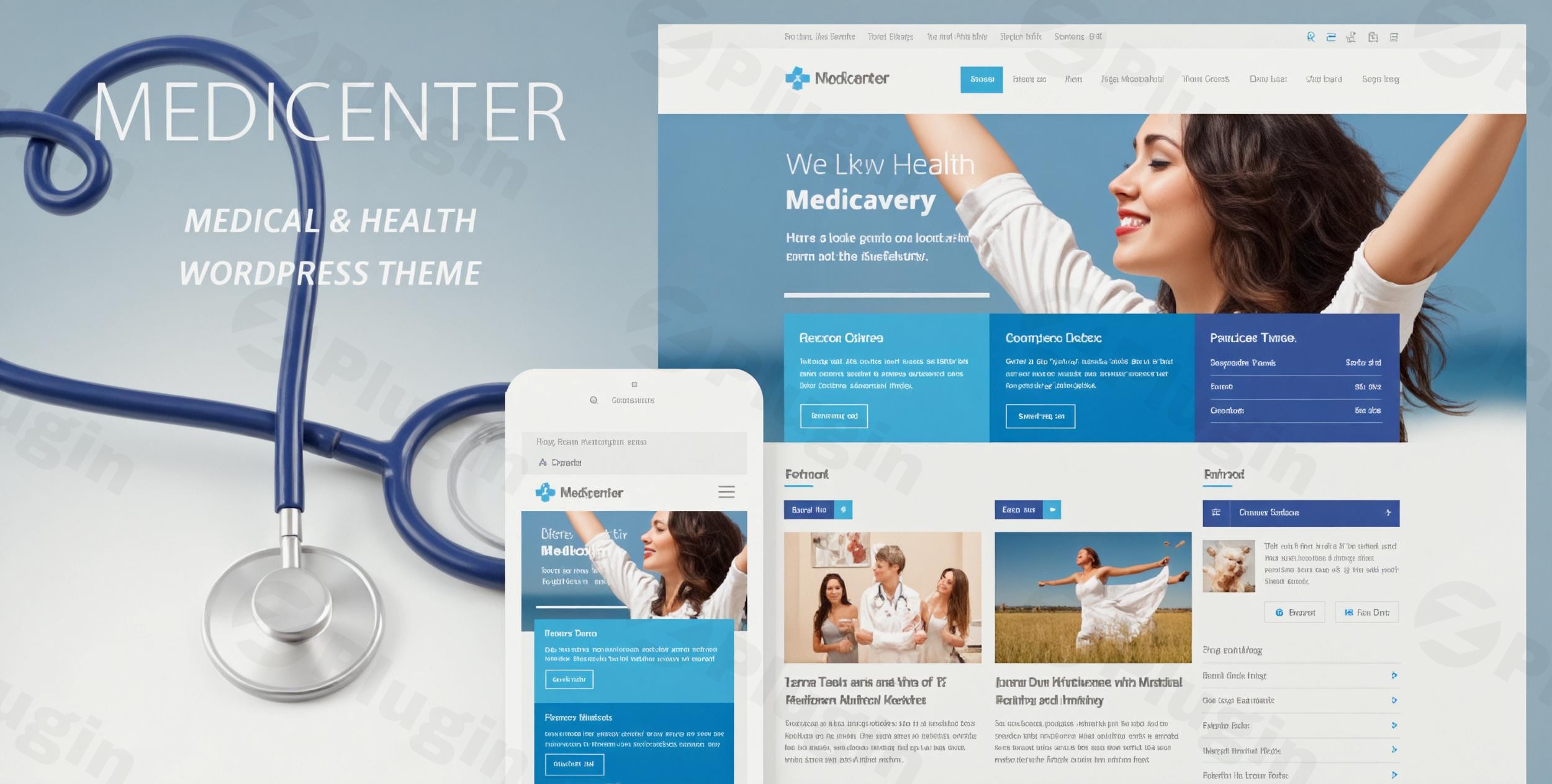
Creating a professional and trustworthy online presence is paramount for medical professionals, clinics, and healthcare institutions. The MediCenter WordPress Theme stands out as a robust and aesthetically pleasing solution, meticulously designed to meet the unique needs of the healthcare industry. Whether you’re a doctor, dentist, veterinarian, psychologist, or manage a wellness center, MediCenter offers an intuitive platform to showcase your services, doctors, and facilities with ease.This premium theme, developed by QuanticaLabs, focuses on delivering a modern, responsive, and feature-rich website that instills confidence and simplifies patient interaction. It’s built for WordPress users who need a specialized healthcare site without requiring extensive coding knowledge.
Key Features: Design, Layout & Performance
MediCenter is engineered to combine stunning visuals with powerful functionality, ensuring your medical website is both effective and user-friendly.
Design & Layout Options
The theme prioritizes a clean, professional look that is crucial for the medical sector.
- Modern & Responsive Design: Your site will look impeccable on any device, from large desktops to smartphones, thanks to its fully responsive and mobile-friendly layout. Retina-ready graphics ensure crisp, high-resolution visuals that enhance the user experience.
- Flexible Layouts: MediCenter supports both wide and boxed page layouts. It comes with 8 predefined homepages and a total of 20+ page layouts, offering diverse structural options. The theme also includes 6 distinct homepage layouts, with specific demos tailored for:
- Main Medical Clinics
- Pregnancy Clinics
- Ophthalmologists
- Veterinary Clinics
- DentistsEach demo features unique color palettes and design elements, allowing you to launch a specialized site quickly.
- Unique Visual Elements: The theme includes sophisticated design touches like full-width backgrounds with parallax scrolling effects, the Streamline Premium Icon Font (106 icons), 33 font-based social icons, smart sticky columns, sticky menus, and mobile touch-friendly sliders, all contributing to an enhanced visual experience.
Customization Capabilities
MediCenter provides extensive tools to personalize your website and align it with your brand identity.
- Powerful Page Builders Included: At its core, MediCenter integrates with two of the most popular drag-and-drop page builders: WPBakery Page Builder (formerly Visual Composer) and Elementor Website Builder. This means you can create custom pages and intricate layouts without writing a single line of code. The theme extends these builders with exclusive content elements: 66 Elementor widgets (30 exclusive to Medicenter) and 77 WPBakery content elements (30 MediCenter-exclusive ones), including specialized modules for doctors lists, timetables, and feature boxes.
- Unlimited Color Schemes & Typography: With a built-in theme color picker, you have access to unlimited colors and various color skins. Additionally, you can choose from over 800 Google Fonts to customize the typography for both body text and headings, ensuring your brand’s voice is visually consistent. Six predefined color skins are also available for quick setup.
- Comprehensive Theme Options Panel: A powerful Theme Options Panel, accessible from your WordPress admin area, allows you to customize virtually every aspect of your site. This includes uploading your logo, configuring footer content, setting responsive modes, managing sticky menus, customizing contact forms, and adjusting global color schemes and fonts.
- Specialized Medical Features: Showcase your departments, doctor profiles, and services with dedicated sections. The integrated Timetable Responsive Schedule Plugin (often referred to as a “built-in schedule (timetable) manager” or “Timetable plugin”) helps patients easily view and book appointments online. The theme also provides built-in tools for creating and managing a doctor database, defining working days/hours, and displaying descriptions.
- Flexible Layout Elements: Beyond pages, you get options for full-width backgrounds with parallax effects, unlimited sidebars, and control over header position (over slider or at the top) and menu text colors. Footer customization is also available through the theme options panel.
Performance & SEO Features
MediCenter is built with modern web standards, focusing on both speed and search engine visibility.
- Optimized for Performance: The theme is coded with “best SEO practices in mind” and aims for fast page loading speeds. It features an optimized codebase, including improvements to existing scripts like jQuery and phpMailer, contributing to a smooth and efficient user experience.
- Mobile & Cross-Browser Compatibility: Beyond being 100% responsive and Retina Ready, MediCenter ensures optimal display and functionality across major browsers, including Firefox, Safari, Opera, Chrome, IE, and Edge.
Installation & Demo Import
Setting up MediCenter and getting your medical website online is designed to be a straightforward process, even for beginners.
- Install & Activate the Theme:
- First, purchase and download the MediCenter theme files from ZeroPlugin.com or ThemeForest.
- Log in to your WordPress dashboard.
- Go to
Appearance > Themes > Add New > Upload Theme. - Choose the theme’s
.zipfile, clickInstall Now, and thenActivate.
- Install Required Companion Plugins:
- Upon activation, MediCenter will prompt you to install a set of recommended plugins. This will include crucial ones like WPBakery Page Builder, Elementor Website Builder, Slider Revolution Responsive WordPress Plugin, and CSS3 Responsive Web Pricing Tables Plugin. Follow the on-screen prompts to install and activate these. The Timetable Responsive Schedule Plugin is also a key feature.
- Use the One-Click Demo Import:
- MediCenter features a convenient one-click demo importer. Navigate to the theme’s dedicated import section (usually found under
Appearance > Import Demo Dataor a similarly named menu item in your WordPress dashboard). - You’ll be presented with 5 available demos to choose from: Main, Pregnancy, Ophthalmologist, Veterinary, and Dentist. Select the demo that best suits your needs.
- Click the
Importbutton.
- MediCenter features a convenient one-click demo importer. Navigate to the theme’s dedicated import section (usually found under
- What to Expect After Demo Import:
- The demo import process will populate your website with sample pages, posts, images, menus, widgets, and theme options, making your site look exactly like the chosen demo. This provides an excellent starting point, allowing you to simply replace the placeholder content with your own.
- Common Pitfalls: While generally smooth, demo imports can sometimes require sufficient server resources (like PHP memory limit and execution time) to complete successfully, especially for larger demos. If you encounter issues, check your hosting provider’s PHP configuration or consult the theme’s documentation for server requirements.
Customization Guide: Branding & Layout
Personalizing your MediCenter theme to reflect your clinic’s brand and specific services is intuitive and flexible.
- Accessing Theme Options: The primary hub for customization is the Theme Options Panel, typically located under
Appearancein your WordPress admin menu. This powerful panel lets you control global settings such as:- Logo & Favicon: Easily upload your clinic’s logo and site icon.
- Colors & Skins: Use the in-built color picker for unlimited color choices across your site, or select from 6 predefined color skins to quickly establish a visual style.
- Typography: Select from over 800 Google Fonts for precise control over your site’s headings and body text.
- Header & Footer: Customize header position, menu text colors, and configure your footer content and widget areas.
- Responsive Mode & Sticky Menu: Manage how your site behaves on different devices and enable/disable the sticky menu feature.
- Contact Form: Configure your site-wide contact form settings.
- Using Page Builders (Elementor & WPBakery): For detailed page layouts, MediCenter’s integration with Elementor and WPBakery Page Builder is key.
- When editing a page or post, simply open it with your preferred page builder.
- Drag and drop the specific MediCenter widgets/elements (e.g., Doctors List, Timetable, Service Boxes) to build unique and highly functional pages. These builders offer a visual, front-end editing experience, allowing you to see your changes in real-time.
- Setting Up Your Homepage and Blog Page:
- To assign a static homepage, go to
Settings > Readingand select a pre-designed page (imported from the demo) as your “Homepage” and another for your “Posts page” (blog).
- To assign a static homepage, go to
- Menu Management:
- Navigate to
Appearance > Menusto create and assign your main navigation, footer menus, and any other custom menus.
- Navigate to
- Advanced Customizations:
- For those with CSS knowledge, the theme provides a
custom.cssfile within its structure. Placing your custom CSS here ensures that your modifications are not overwritten during theme updates. - For more extensive code modifications, it’s highly recommended to use a Child Theme. This protects your customizations when the main MediCenter theme receives updates, ensuring long-term stability for your site.
- For those with CSS knowledge, the theme provides a
FAQ & Troubleshooting
Here are answers to common questions about the MediCenter WordPress Theme to help you maximize its potential.
Is MediCenter compatible with Elementor and WPBakery Page Builder?
Yes, the MediCenter WordPress Theme is fully integrated with and includes both Elementor Website Builder and WPBakery Page Builder (formerly Visual Composer). It offers unique, exclusive widgets and content elements specifically designed for medical websites within both builders, giving you powerful drag-and-drop page creation capabilities without coding.
Does MediCenter support WooCommerce for online stores?
Yes, MediCenter is fully integrated with WooCommerce, allowing healthcare professionals and clinics to easily set up an online store. You can sell health-related products, services, or even medical equipment directly from your website.
Does MediCenter support child themes?
Yes, MediCenter fully supports child themes. It is highly recommended to use a child theme for any significant customizations (CSS, PHP, etc.). This ensures that your modifications are preserved and not lost when the main MediCenter theme is updated, providing a safe and future-proof way to personalize your site.
What WordPress and PHP versions does MediCenter require?
MediCenter is compatible with WordPress 5.0.x and above, and is regularly updated to support the latest WordPress releases. While specific PHP version requirements are not explicitly documented, modern WordPress themes generally require PHP 7.4 or higher for optimal performance, security, and compatibility with the latest WordPress core.
How can I import demo content into the MediCenter theme?
To import demo content, after installing and activating the MediCenter WordPress Theme and its required plugins, navigate to the theme’s dedicated demo importer section in your WordPress dashboard (typically found under Appearance > Import Demo Data). From there, you can choose from 5 available demos (Main, Pregnancy, Ophthalmologist, Veterinary, Dentist) and initiate the one-click import process to quickly set up your site with sample data.
Conclusion
The MediCenter Health Medical Clinic WordPress Theme is a comprehensive, expertly crafted solution for anyone in the healthcare industry looking to establish a professional and functional online presence. Its specialized design and robust feature set cater directly to the needs of medical clinics, hospitals, individual practitioners, and wellness centers.With its modern and responsive design, full integration with leading page builders like Elementor and WPBakery, and a wealth of customization options (unlimited colors, 800+ Google Fonts, powerful theme panel), MediCenter offers unparalleled design flexibility. Key medical-specific functionalities, such as the Timetable Responsive Schedule Plugin and dedicated doctor/department profiles, streamline patient interaction and information display. Furthermore, its commitment to performance and SEO best practices, coupled with full WooCommerce compatibility, makes it a future-ready choice for growth.Whether you’re a medical professional without coding experience, a freelancer building sites for healthcare clients, or an agency seeking a comprehensive toolkit, MediCenter provides an intuitive and powerful platform. It’s a confident choice for creating a trustworthy, efficient, and visually appealing medical website that stands out in the digital landscape.
I. Download Limits & Account Benefits
- Free Downloads: Each email address receives 3 downloads per day for free products
- Upgrade Benefits: Purchase any paid product to increase your daily download limit by 3 for each paid product
- No Account Required: You can download immediately by receiving the download link via email
- Account Recommended: Create an account for easier access to your order history and direct update downloads
II. Understanding GPL vs Official Versions
Important: The products available on WPPick are GPL-licensed versions, which differ from official developer versions. Before purchasing, please read our comprehensive guide: Understanding GPL & Official Differences at WPPick
Key Points:
- GPL versions may not include premium support from original developers
- Updates may be delayed compared to official releases
- Some premium features might have limitations
- Always consider your specific needs and support requirements
III. Support & Assistance
We’re here to help through multiple channels:
- Email Support: Direct email assistance for all inquiries
- Live Chat: Real-time support during business hours
- Comprehensive Documentation: Detailed guides and tutorials
IV. Order Tracking
Access your complete purchase history and download links anytime: Order History
V. Account Access
New to WPPick? Login or Create Account to manage your downloads and orders efficiently.
VI. Refund Protection
We stand behind our products with a clear refund policy. Review our terms: Refund Policy
VII. Privacy & Security
Your data security is our priority. Learn how we protect your information: Privacy Policy
VII. Terms of Service
Understanding our service terms ensures a smooth experience: Terms of Use
Quick Tips for Best Experience
- Verify Compatibility: Check plugin/theme compatibility with your WordPress version
- Backup First: Always backup your site before installing new plugins or themes
- Test Environment: Consider testing on a staging site first
- Stay Updated: Regularly check for updates in your account dashboard
- Read Documentation: Review any included documentation for optimal setup
Need Help?
If you have questions about downloads, licensing, or need technical assistance, don’t hesitate to contact our support team. We’re committed to ensuring you have the best possible experience with WPPick products.
Ready to get started? Your download adventure begins with just one click!
- Elementor update (to version 3.32.5)
- WPBakery Page Builder update (to version 8.7.1)
- MediCenter Theme Doctors plugin update (to version 1.8)
- MediCenter Theme Galleries plugin update (to version 1.8)
- Theme Twitter Widget plugin update (to version 2.2)
- Updated set of social media icons
- WooCommerce template files update
- Minor code fixes
- Dedicated integration with Elementor introduced
- 30 Elementor widgets included: Announcement Box, Blog, Carousel, Contact Form, Counter Box, Doctor Box, Doctor Description Box, Doctors List, Dropcap Text, Features List, Gallery Items List, Google Map, Icon, Info Box, Items List, Menu, Notification Box, Our Clients List, Photostream, Pricing Table, Sentence, Service Box, Services List, Single Doctor, Single Post, Single Service, Small Slider, Testimonials, Timeline Item, Timetable
- One click demo content import for Elementor included
- Option to select demo content for either Elementor or WPBakery Page Builder
- WPBakery Page Builder update (to version 8.6.1)
- Revolution Slider update (to version 6.7.38)
- CSS3 Compare Pricing Tables for WordPress plugin update (to version 11.8)
- MediCenter Theme Departments plugin update (to version 1.4)
- MediCenter Theme Doctors plugin update (to version 1.7)
- MediCenter Theme Features plugin update (to version 1.6)
- MediCenter Theme Galleries plugin update (to version 1.7)
- MediCenter Theme Shortcodes plugin update (to version 1.2)
- Theme Dummy Content Importer plugin update (to version 2.3)
- Theme Services plugin update (to version 4.1)
- WooCommerce template files update
- WPBakery Page Builder update (to version 8.4.1).
- Revolution Slider update (to version 6.7.34).
- CSS3 Compare Pricing Tables for WordPress plugin update (to version 11.7).
- Security improvements.
- Fix for ‘_load_textdomain_just_in_time’ notice.
- WooCommerce template files update.
- Minor code fixes.