

Meeek – The Most Powerful Link In Bio Theme
/Year
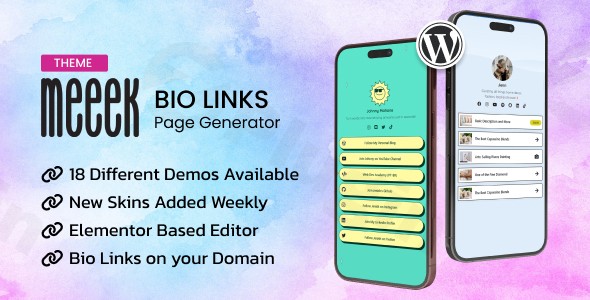
In the fast-paced world of social media, your “link in bio” is the most valuable piece of digital real estate you own. The Meeek WordPress theme is a specialized, high-performance solution designed to replace restrictive third-party services like Linktree with a self-hosted, fully customizable landing page. Whether you are an influencer on TikTok, a freelancer on Instagram, or a brand on Twitter, this link in bio theme for WordPress provides a professional way to centralize your digital footprint and direct your audience to your most important content.
Key Features: Design, Layout & Performance
Meeek is built with a “mobile-first” philosophy, recognizing that nearly 100% of link-in-bio traffic originates from mobile devices. Its design is clean, modern, and focused entirely on conversion and user navigation.
Visual Variety & Layout Options
Meeek doesn’t offer a “one size fits all” layout. Instead, it provides a robust library of design choices:
- 18+ Skins: Choose from a wide variety of pre-styled skins that cater to different aesthetics, from minimalist and corporate to bold and creative.
- Horizontal & Vertical Orientations: Flexibility in how your links are displayed allows you to prioritize visual hierarchy based on your specific content type.
- 10+ Premade Templates: Ready-to-use page templates mean you can go live in minutes by simply swapping out links and images.
Customization Capabilities
Unlike standard multipurpose themes, Meeek offers a dedicated “Theme Panel” within the WordPress dashboard. This allows for deep branding without touching a single line of code:
- Custom Style Options: Modify backgrounds (images or solid colors), borders, and spacing to match your brand identity perfectly.
- Header & Footer Builders: Use the built-in builders to create unique navigation experiences or simple, distraction-free footers.
- Typography & Colors: Complete control over the visual system ensures your bio link page feels like an extension of your primary website or social profile.
Performance & SEO Ready
Speed is a critical factor for social media landing pages. Meeek is designed to be lightweight and fast, minimizing “bloat” to ensure that users don’t bounce while waiting for your page to load.
- Clean Markup: The theme uses SEO-friendly structure and schema support, helping your bio page rank in search engines for your name or brand.
- Responsive Design: Every layout is fully responsive, ensuring a seamless experience across iPhones, Android devices, and tablets.
Why Meeek is the Best Link in Bio Theme for WordPress
The primary advantage of Meeek over its competitors is ownership and cost-effectiveness. While services like Linktree charge recurring monthly fees for premium features, Meeek allows you to own your data and your platform with a one-time purchase.Furthermore, its deep Elementor integration sets it apart. It includes over 30 custom shortcodes and widgets specifically designed for bio link pages, such as social media icons, contact forms, and call-to-action buttons. For those looking to monetize, Meeek is fully compatible with WooCommerce, allowing you to sell digital products or merchandise directly from your bio link page.
Installation & Demo Import Guide
Setting up Meeek is straightforward, even for WordPress beginners. Follow these steps to get your site running:
- Install & Activate: Upload the Meeek theme file via
Appearance > Themes > Add Newin your WordPress dashboard. - Plugin Installation: Upon activation, the theme will prompt you to install required companion plugins, including the ModelTheme Framework, Elementor, and the Meeek Bio Links Plugin.
- One-Click Demo Import: Navigate to the theme’s “Import Demo” section. Choose your preferred skin from the 18+ available options and click “Import.”
- Wait for Completion: Ensure your server has sufficient memory (at least 256MB recommended) to prevent timeouts during the import of images and layouts.
- Final Polish: Once imported, your menus, widgets, and pages will be pre-configured to match the demo site.
Customization Guide: Personalizing Your Brand
Once the demo is imported, you can personalize the theme to match your unique brand voice:
- The ModelTheme Panel: This is your command center. Access it from the sidebar to manage global styling, social media links, and general settings.
- Elementor Editing: Open your bio link page and click “Edit with Elementor.” You can drag and drop custom MT Widgets to add new links, video embeds, or newsletter sign-up forms.
- Customizing Links: Use the dedicated “link in bio builder” functionality to style individual buttons with unique icons, hover effects, and custom borders.
- Branding: Upload your logo as the central profile image and set your brand colors in the Styling Settings to ensure consistency across all touchpoints.
FAQ & Troubleshooting
Is Meeek compatible with Elementor?
Yes, Meeek is fully compatible with Elementor. It includes a dedicated suite of over 30 custom shortcodes and widgets specifically designed to enhance the Elementor page-building experience for link-in-bio pages.
Does Meeek support WooCommerce for online stores?
Absolutely. Meeek is WooCommerce-ready, allowing influencers and small businesses to sell products, services, or digital downloads directly from their consolidated social media landing page.
Does it support child themes?
Yes, Meeek supports child themes. Using a child theme is recommended for advanced users who wish to add custom code to functions.php or modify core templates without losing updates.
How do I update the theme without losing my customizations?
To maintain your customizations, always perform styling changes through the ModelTheme Panel or a child theme. When a new version is released, you can update it safely through the WordPress dashboard or via Envato Market plugin.
Can I create a self-hosted link in bio page with Meeek?
Yes, that is the core purpose of Meeek. By using this theme on your own WordPress site, you avoid the monthly subscription fees of third-party services and maintain total control over your audience data and SEO.
Conclusion
Meeek is a highly specialized, professional-grade solution for anyone looking to maximize their social media traffic. By combining the design flexibility of Elementor with the power of a dedicated link in bio theme for WordPress, it offers a superior alternative to third-party subscription services. Whether you are a solo creator looking for a clean aesthetic or a small business needing WooCommerce integration, Meeek provides the performance, SEO readiness, and customization options required to build a high-converting digital hub. If you want a fast, mobile-optimized, and visually stunning landing page that you truly own, Meeek is an excellent choice for your WordPress site.
I. Download Limits & Account Benefits
- Free Downloads: Each email address receives 3 downloads per day for free products
- Upgrade Benefits: Purchase any paid product to increase your daily download limit by 3 for each paid product
- No Account Required: You can download immediately by receiving the download link via email
- Account Recommended: Create an account for easier access to your order history and direct update downloads
II. Understanding GPL vs Official Versions
Important: The products available on WPPick are GPL-licensed versions, which differ from official developer versions. Before purchasing, please read our comprehensive guide: Understanding GPL & Official Differences at WPPick
Key Points:
- GPL versions may not include premium support from original developers
- Updates may be delayed compared to official releases
- Some premium features might have limitations
- Always consider your specific needs and support requirements
III. Support & Assistance
We’re here to help through multiple channels:
- Email Support: Direct email assistance for all inquiries
- Live Chat: Real-time support during business hours
- Comprehensive Documentation: Detailed guides and tutorials
IV. Order Tracking
Access your complete purchase history and download links anytime: Order History
V. Account Access
New to WPPick? Login or Create Account to manage your downloads and orders efficiently.
VI. Refund Protection
We stand behind our products with a clear refund policy. Review our terms: Refund Policy
VII. Privacy & Security
Your data security is our priority. Learn how we protect your information: Privacy Policy
VII. Terms of Service
Understanding our service terms ensures a smooth experience: Terms of Use
Quick Tips for Best Experience
- Verify Compatibility: Check plugin/theme compatibility with your WordPress version
- Backup First: Always backup your site before installing new plugins or themes
- Test Environment: Consider testing on a staging site first
- Stay Updated: Regularly check for updates in your account dashboard
- Read Documentation: Review any included documentation for optimal setup
Need Help?
If you have questions about downloads, licensing, or need technical assistance, don’t hesitate to contact our support team. We’re committed to ensuring you have the best possible experience with WPPick products.
Ready to get started? Your download adventure begins with just one click!