
Modave – Multipurpose Woocommerce WordPress Theme
/Year
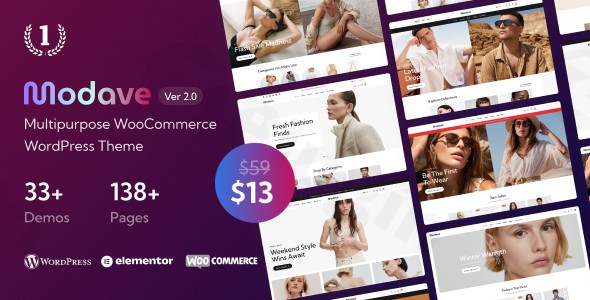
Transform Your Online Store with Modern E-commerce Design
In today’s competitive digital landscape, a powerful and visually stunning online store is no longer a luxury but a necessity. Introducing Modave, a premium Multipurpose WooCommerce WordPress Theme meticulously engineered to equip businesses with a professional, high-converting e-commerce platform. Designed for versatility and performance, Modave empowers retailers across diverse industries—from fashion boutiques and cosmetic retailers to electronics merchants and furniture showrooms—to establish a commanding online presence. Its robust feature set and intuitive design capabilities cater to both seasoned developers and ambitious entrepreneurs, ensuring a seamless journey from concept to launch.
The Modave Design Philosophy: Professionalism Meets Accessibility
Modave’s core design philosophy revolves around offering advanced, professional-grade design capabilities while maintaining unparalleled ease of use. This theme is not just about aesthetics; it’s about providing a comprehensive toolset that solves common website design challenges and drives business value. We believe that a premium solution should deliver exceptional visual appeal, superior user experience, and robust functionality without demanding extensive technical expertise. Modave achieves this by integrating industry-leading tools and best practices, making sophisticated web design accessible to everyone.
Key Design Features: Crafting Your Vision with Precision
Modave is packed with an array of features designed to offer ultimate control over your store’s look and feel, ensuring it perfectly aligns with your brand identity.
Multipurpose Design for Every Niche
Modave’s inherent versatility is its strength. With 26+ meticulously crafted pre-built homepage demos, this theme seamlessly adapts to a wide array of online businesses, including:
- Fashion & Apparel: Create elegant storefronts for clothing, accessories, and footwear.
- Health & Beauty: Showcase cosmetics, skincare, and wellness products with sophisticated layouts.
- Electronics & Gadgets: Present tech products with clean, functional designs.
- Home Décor & Furniture: Inspire customers with stunning visual product displays.
- Jewelry & Accessories: Highlight intricate details with exquisite gallery options.
- Specialty Stores: Adapt for toy shops, yoga studios, pet supplies, and more.Each demo is fully responsive and retina-ready, guaranteeing a flawless display on any device, from high-resolution monitors to smartphones.
Intuitive Drag-and-Drop Customization with Elementor
At the heart of Modave’s user-friendliness is its deep integration with Elementor, the leading drag-and-drop page builder for WordPress. This powerful tool eliminates the need for coding, allowing you to:
- Visually Create Pages: Design stunning product pages, landing pages, and promotional sections in real-time.
- Effortless Customization: Drag and drop elements, adjust settings, and see changes instantly.
- Empower All Users: From business owners with no coding experience to developers seeking rapid prototyping, Elementor streamlines the design process.
Unlimited Customization for a Unique Brand Identity
Modave provides an extensive suite of customization options, allowing you to tailor every aspect of your online store:
- Headers & Footers: Design unlimited unique header and footer layouts to match your brand’s aesthetic, from minimalist to boldly intricate.
- Product Display: Captivate customers with 6 distinct product hover effects and multiple product gallery styles, ensuring your items are presented in the most engaging way.
- Mega Menus: Enhance navigation with advanced mega menus, perfect for organizing extensive product categories and improving user experience.
- Layout Versatility: Adapt your store’s layout to various branding needs, opting for bold or minimal designs, and choosing between boxed or wide page layouts.
Premium Elementor Widgets & Visual Elements
Expand your design capabilities with a curated collection of premium Elementor widgets included with Modave:
- Product Tabs, Carousels, and Grids: Showcase products dynamically and engagingly.
- Countdown Timers: Create urgency for sales and promotions.
- Instagram Shop: Integrate your social media presence directly into your store.
- Newsletter Forms: Grow your audience with seamlessly integrated subscription options.
- Parallax Effects: Add depth and a modern aesthetic to your site’s background elements, creating an immersive browsing experience.
- Before/After Image Sliders: Ideal for demonstrating product transformations or service results.
- Marquee Effects: Add subtle, elegant motion to textual elements for announcements or promotions.
Advanced E-commerce Functionality: Optimizing the Shopping Experience
Modave is built from the ground up to provide a seamless and highly functional shopping experience, driving conversions and customer satisfaction.
Enhanced Shopping Experience Features
Elevate customer engagement and streamline the purchasing journey with Modave’s sophisticated e-commerce capabilities:
- Advanced Product Filters: Allow customers to quickly narrow down choices by category, price, size, color, and more.
- Ajax Search: Deliver instant search results as users type, improving discoverability.
- Ajax Add to Cart: Enable customers to add items to their cart without leaving the current page, reducing friction.
- Quick Buy Option: Offer a fast-track purchase path for popular products.
- Mini Cart Functionality: Provide an immediate overview of cart contents without navigating to a separate page.
- Hot Deal Blocks & Countdown Timers: Create compelling promotions that convert.
- Store Locations: Easily display your physical store addresses and contact details.
Comprehensive Marketplace Compatibility
For entrepreneurs looking to build a multi-vendor platform, Modave offers robust compatibility with leading marketplace plugins:
- Dokan Multivendor: Create a powerful marketplace where multiple vendors can sell their products.
- WCFM Marketplace: A comprehensive solution for building an e-commerce marketplace.
- WooCommerce Frontend Manager: Provides vendors with an intuitive frontend dashboard to manage their stores.
Essential Business & Engagement Tools
Beyond core e-commerce, Modave integrates features vital for modern online businesses:
- Instagram Shop: Connect your Instagram feed directly to your product listings.
- Social Buttons: Easily link to your social media profiles.
- Newsletter Forms: Grow your email list with stylish, integrated subscription forms.
- Contact Sections: Provide clear and accessible contact information for customer support.
- Blog Widgets: Drive traffic and engage customers with integrated blog layouts.
- Vertical Menus: Offer alternative navigation styles for specific sections or product categories.
Technical Excellence & Performance: Built for Speed and SEO
Underpinning Modave’s beautiful design and rich feature set is a foundation of robust technical excellence, ensuring your site is fast, reliable, and search engine friendly.
Optimized for Speed and Responsiveness
- Built with HTML5 and CSS3: Leveraging modern web standards, Modave ensures fast loading times and smooth performance, critical factors for user retention and SEO.
- Mobile Responsive Design: Your store will perform and look perfect on all devices—desktops, tablets, and smartphones—providing an optimal experience for every visitor.
Extensive Plugin Compatibility
Modave is engineered for seamless integration with the most essential WordPress plugins:
- WooCommerce: The leading e-commerce platform for WordPress, enabling you to sell anything, anywhere.
- Elementor: For intuitive drag-and-drop page building.
- WPML (WordPress Multilingual Plugin): Translate your store into multiple languages, reaching a global audience and supporting RTL (right-to-left) languages.
SEO Optimized for Higher Rankings
With clean code and optimized performance, Modave is designed to give your online store a significant advantage in search engine rankings. Descriptive headings, fast loading speeds, and a mobile-friendly structure all contribute to better visibility on Google and other search engines, driving more organic traffic to your products.
Setup, Customization, and Usage Guide: Getting Started with Modave
Setting up and customizing your Modave-powered online store is a straightforward process, designed to get you online quickly and efficiently.
Step-by-Step Installation
- Download & Upload: After purchasing, download the Modave theme package. Navigate to your WordPress Dashboard > Appearance > Themes > Add New > Upload Theme. Select the Modave .zip file and click “Install Now.”
- Activate: Once installed, click “Activate” to make Modave your active theme.
- Install Required Plugins: Modave will prompt you to install necessary plugins like WooCommerce and Elementor. Follow the on-screen instructions to install and activate them.
One-Click Demo Import
To jumpstart your design process, Modave offers a powerful one-click demo import system. This allows you to rapidly deploy any of the 26+ pre-built homepage templates, complete with demo content, within minutes. This significantly reduces development timelines, allowing faster market entry.
Global Customization with the Theme Customizer
Navigate to Appearance > Customize in your WordPress dashboard. Here, you’ll find Modave’s extensive administration panel, featuring over 450 theme options. This centralized hub allows you to manage:
- Header Styles: Select from unlimited options or customize existing ones.
- Page Layouts: Control global page structures, sidebars, and content areas.
- Typography: Set fonts, sizes, and colors for consistent branding.
- Color Palettes: Fine-tune your site’s color scheme to perfection.
Page Building with Elementor
For individual page and post customization, the Elementor page builder is your go-to tool.
- Edit with Elementor: When creating or editing a page, click the “Edit with Elementor” button.
- Drag & Drop: Use the Elementor interface to drag and drop sections, columns, and widgets onto your page.
- Customize Elements: Click on any element to access its settings panel and adjust styling, content, and advanced options.
Leveraging Widget Areas
Modave includes a collection of pre-built widgets and extensive widget areas (e.g., sidebar, footer, specific page sections). Navigate to Appearance > Widgets to add and arrange these widgets, extending your site’s functionality and content display.
Who is Modave For? Target Audience & Use Cases
Modave is an ideal solution for a broad spectrum of users and business models, thanks to its flexibility and powerful feature set.
- Aspiring Entrepreneurs & Startups: With its intuitive Elementor integration and one-click demo import, beginners can launch a professional online store without needing to hire a developer.
- Established Retailers: Businesses looking to revamp an existing store or expand into new niches will appreciate Modave’s advanced customization and performance optimizations.
- Web Designers & Developers: The clean code, extensive theme options, and Elementor integration make Modave a powerful and flexible foundation for client projects, accelerating development time.
- E-commerce Businesses:
- Fashion & Apparel Brands: Showcase clothing collections with sophisticated product galleries and hover effects.
- Health & Beauty Shops: Create elegant product pages for cosmetics, skincare, and wellness products.
- Home & Furniture Stores: Display large product images and inspire customers with engaging layouts.
- Electronics & Gadget Sellers: Present technical specifications clearly and organize extensive product catalogs efficiently.
- Multi-Vendor Marketplaces: Leverage compatibility with Dokan and WCFM to build thriving vendor communities.
Why Choose Modave? A Premium Solution You Can Trust
Choosing Modave means investing in a premium WordPress theme that delivers professional design results, robust functionality, and peace of mind.
- Ease of Use: Modave simplifies website creation, making advanced design accessible to everyone, regardless of technical skill.
- Professional Design: Elevate your brand with a modern, stylish, and conversion-optimized aesthetic.
- Enhanced User Experience: Features like Ajax search, quick buy, and mobile responsiveness ensure a smooth and enjoyable shopping journey for your customers.
- Future-Proof & Reliable: Built with modern web standards (HTML5/CSS3) and optimized for performance, Modave ensures long-term viability and adaptability.
- Comprehensive Support: Premium themes like Modave typically come with dedicated support, ensuring you have assistance when you need it.
- Continuous Updates: Expect regular version updates that incorporate feature enhancements, security patches, and compatibility improvements, safeguarding your investment.
- Security-Verified: Reputable premium themes undergo rigorous security screening, guaranteeing malware-free, clean-coded installations that protect your business infrastructure and customer data.
Conclusion
Modave stands as a definitive solution for merchants seeking to establish competitive, feature-rich online stores without substantial development investment. Its comprehensive feature set, design versatility, and commitment to user-friendliness make it suitable for startups and established enterprises across diverse retail sectors. By choosing Modave, you are selecting a premium WordPress theme that not only looks exceptional but also performs flawlessly, helping you to achieve your e-commerce goals and deliver an unparalleled online shopping experience.
I. Download Limits & Account Benefits
- Free Downloads: Each email address receives 3 downloads per day for free products
- Upgrade Benefits: Purchase any paid product to increase your daily download limit by 3 for each paid product
- No Account Required: You can download immediately by receiving the download link via email
- Account Recommended: Create an account for easier access to your order history and direct update downloads
II. Understanding GPL vs Official Versions
Important: The products available on WPPick are GPL-licensed versions, which differ from official developer versions. Before purchasing, please read our comprehensive guide: Understanding GPL & Official Differences at WPPick
Key Points:
- GPL versions may not include premium support from original developers
- Updates may be delayed compared to official releases
- Some premium features might have limitations
- Always consider your specific needs and support requirements
III. Support & Assistance
We’re here to help through multiple channels:
- Email Support: Direct email assistance for all inquiries
- Live Chat: Real-time support during business hours
- Comprehensive Documentation: Detailed guides and tutorials
IV. Order Tracking
Access your complete purchase history and download links anytime: Order History
V. Account Access
New to WPPick? Login or Create Account to manage your downloads and orders efficiently.
VI. Refund Protection
We stand behind our products with a clear refund policy. Review our terms: Refund Policy
VII. Privacy & Security
Your data security is our priority. Learn how we protect your information: Privacy Policy
VII. Terms of Service
Understanding our service terms ensures a smooth experience: Terms of Use
Quick Tips for Best Experience
- Verify Compatibility: Check plugin/theme compatibility with your WordPress version
- Backup First: Always backup your site before installing new plugins or themes
- Test Environment: Consider testing on a staging site first
- Stay Updated: Regularly check for updates in your account dashboard
- Read Documentation: Review any included documentation for optimal setup
Need Help?
If you have questions about downloads, licensing, or need technical assistance, don’t hesitate to contact our support team. We’re committed to ensuring you have the best possible experience with WPPick products.
Ready to get started? Your download adventure begins with just one click!