

Moddroid – Android Download Theme For WordPress
/Year
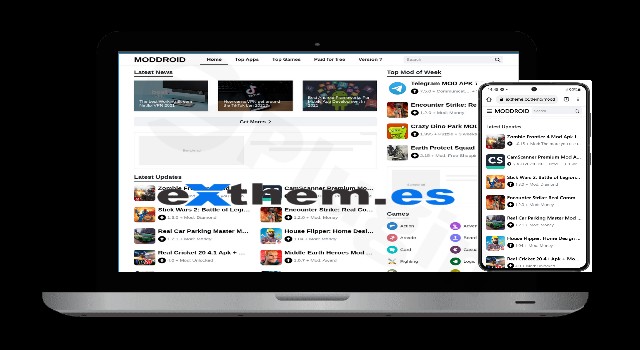
Building a high-traffic app gallery or an APK distribution site requires more than just a standard blog layout; it requires automation, speed, and a mobile-first user experience. The Moddroid WordPress theme is a specialized solution designed specifically for the Android niche, allowing site owners to create professional APK download portals similar to industry giants like Moddroid.com. If you are looking for an APK website theme for WordPress that prioritizes functional automation over complex design bloat, this theme is engineered for your specific needs.
Key Features: Design, Layout & Performance
The Moddroid theme is less about generic multipurpose design and more about niche-specific efficiency. It aims to streamline the workflow for creators who need to publish dozens of app updates daily.
1. Niche-Optimized Layouts
While many themes try to do everything, Moddroid focuses on a clean, minimalist two-column layout. This structure is ideal for app listings, where the primary goal is to provide information and a clear path to the download button.
- Page Download Templates: Dedicated templates optimized for download links to reduce bounce rates and improve user intent.
- Mobile-Friendly Design: Since the target audience is primarily Android users, the theme is fully responsive and behaves like a native app on mobile devices.
- Numbered Page Navigation: Built-in navigation that makes browsing large catalogs of apps seamless for the end user.
2. Powerful Automation & Content Extraction
The standout feature of this Android download theme for WordPress is its ability to automate content creation.
- Google Play Integration: The theme (often bundled with specialized plugins) can extract information directly from the Google Play Store, including app names, icons, descriptions, and version history.
- Automatic Categorization: It helps organize apps into relevant categories automatically, saving hours of manual data entry.
3. Performance & SEO Readiness
In the competitive APK niche, speed is a ranking factor. The Moddroid theme is advertised as fast-loading with a focus on “fast indexing.”
- Clean Markup: The code is optimized to help search engine crawlers understand the app metadata (like version numbers and file sizes).
* SEO-Friendly Structure: Designed to help your site appear in search results for specific app queries and “modded APK” searches.
Installation & Demo Import Guide
Setting up your APK portal with the Moddroid theme is straightforward. Follow these steps to get your site live:
- Install & Activate: Upload the theme zip file via Appearance > Themes > Add New in your WordPress dashboard.
- Plugin Setup: Upon activation, the theme will prompt you to install required companion plugins (often including the “Exthemes” or “Moddroid” core plugins). These are essential for the automation features.
- Demo Import: Use the built-in importer to bring in the starter structure. This will set up your homepage, download pages, and basic categories.
4. Verification: Ensure your server has adequate memory (at least 256MB) to handle the initial data import and the automated scraping tools.
Customization Guide: Branding Your APK Portal
Personalizing the Moddroid WordPress theme ensures your site doesn’t look like a carbon copy of others in the niche.
- Branding & Logos: Access the WordPress Customizer to upload your custom logo and favicon. Given the theme’s minimalist aesthetic, a high-contrast logo works best.
- Color Schemes: You can modify primary and secondary colors to match your brand identity. Many users opt for the classic “dark mode” or “Android Green” accents typical of the niche.
- Header & Footer: While it doesn’t use a complex drag-and-drop builder, you can configure the header menus and footer widgets to include essential links like “Top Apps,” “Latest Updates,” and “Contact Us.”
* Custom Post Types: The theme uses specific post types for apps. You can customize how the “Download Box” appears on these pages, ensuring the “Download APK” button is the most prominent visual element.
FAQ & Troubleshooting
Is the Moddroid theme good for SEO?
Yes, the Moddroid theme is specifically optimized for SEO in the Android niche. It features clean code for fast loading times and a structure that supports fast indexing, which is crucial for ranking in competitive app-related search results.
How do I create an APK download website with WordPress using this theme?
To create an APK site, install the Moddroid theme, activate the bundled automation plugins, and use the “Extractor” feature to pull app data from the Google Play Store. This automates the creation of posts, including app details and category assignments.
Is Moddroid compatible with Elementor or WPBakery?
The Moddroid theme is built with a focus on its own internal functionality and automated templates. While it may work with standard page builders, it is designed to function primarily through the WordPress Customizer and its own specialized settings to maintain maximum loading speed.
Does the theme support automatic updates for apps?
The theme facilitates the posting of new versions, but the actual “modding” or hosting of files is managed by the site owner. Its core strength lies in its ability to update the metadata (version, description, changelog) quickly via its extraction tools.
Conclusion
The Moddroid WordPress theme is a powerful, niche-specific tool for anyone serious about the Android APK market. Its design philosophy favors utility and speed over flashy animations, making it the ideal choice for developers, website flippers, and app reviewers.By automating the most tedious parts of site management—data entry and categorization—it allows you to focus on growth and monetization. If your goal is to build a fast, mobile-responsive, and SEO-ready app portal, Moddroid offers the most streamlined path to success.For more WordPress theme reviews and SEO strategies, visit us at wppick.com.
I. Download Limits & Account Benefits
- Free Downloads: Each email address receives 3 downloads per day for free products
- Upgrade Benefits: Purchase any paid product to increase your daily download limit by 3 for each paid product
- No Account Required: You can download immediately by receiving the download link via email
- Account Recommended: Create an account for easier access to your order history and direct update downloads
II. Understanding GPL vs Official Versions
Important: The products available on WPPick are GPL-licensed versions, which differ from official developer versions. Before purchasing, please read our comprehensive guide: Understanding GPL & Official Differences at WPPick
Key Points:
- GPL versions may not include premium support from original developers
- Updates may be delayed compared to official releases
- Some premium features might have limitations
- Always consider your specific needs and support requirements
III. Support & Assistance
We’re here to help through multiple channels:
- Email Support: Direct email assistance for all inquiries
- Live Chat: Real-time support during business hours
- Comprehensive Documentation: Detailed guides and tutorials
IV. Order Tracking
Access your complete purchase history and download links anytime: Order History
V. Account Access
New to WPPick? Login or Create Account to manage your downloads and orders efficiently.
VI. Refund Protection
We stand behind our products with a clear refund policy. Review our terms: Refund Policy
VII. Privacy & Security
Your data security is our priority. Learn how we protect your information: Privacy Policy
VII. Terms of Service
Understanding our service terms ensures a smooth experience: Terms of Use
Quick Tips for Best Experience
- Verify Compatibility: Check plugin/theme compatibility with your WordPress version
- Backup First: Always backup your site before installing new plugins or themes
- Test Environment: Consider testing on a staging site first
- Stay Updated: Regularly check for updates in your account dashboard
- Read Documentation: Review any included documentation for optimal setup
Need Help?
If you have questions about downloads, licensing, or need technical assistance, don’t hesitate to contact our support team. We’re committed to ensuring you have the best possible experience with WPPick products.
Ready to get started? Your download adventure begins with just one click!
- Added Google PlayStore Live Search feature to APK extractor.
- Added API Token Monitor Dashboard feature.
- Added on/off option for JSON SEO BlogPosting.
- Added new style for the license page.
- Fixed minor issues in themes.
- Fixed minor issues in APK extractor.