
Modkids – Modern Kids WordPress Theme
/Year
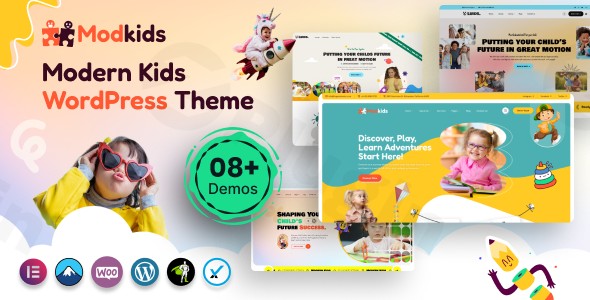
The online world for children’s education and care centers requires a special touch – vibrant, welcoming, and intuitive for both parents and kids. The Modkids WordPress Theme rises to this challenge, offering a modern and engaging solution specifically designed for kindergartens, preschools, nurseries, day care centers, and even art & craft training institutes. This comprehensive review and setup guide will explore how Modkids empowers you to create a professional and visually appealing website that speaks directly to families.
Introduction: Crafting a Friendly Online Space for Children’s Education
Modkids is a beautifully crafted Modern Kids WordPress Theme that transforms the digital presence of any child-focused educational or activity center. Its design philosophy centers around creating a “friendly,” “easy,” and “reassuring” user journey, ensuring that information is clear, accessible, and appealing to parents seeking quality care and education for their children. With its focus on readability, thoughtful typography, and engaging visual elements, Modkids stands out as an ideal choice for institutions that want to build trust and convey a nurturing environment online.
Key Features: Design, Layout & Performance
Modkids is packed with features that blend aesthetic appeal with robust functionality, ensuring your website not only looks great but also performs flawlessly.
Design & Layout Options
Modkids offers exceptional flexibility to visually represent your institution, making it easy to create an inviting online space.
- 8+ Ready-to-Use Demos: Jumpstart your site with a single click, choosing from over eight charming and professionally designed pre-built demos. These include both multi-page and one-page options, tailored to showcase your educational institution effectively.
- Mobile-Friendly & Retina Ready: Your website will look perfect on any device, from smartphones to high-resolution desktops, thanks to full responsiveness and retina-ready graphics. This ensures a consistent and high-quality viewing experience for all visitors.
- Flexible Header & Footer Templates: Customize your site’s structure with 4+ distinct header templates and 4+ footer templates. The theme also includes sticky menus for both desktop and mobile, improving navigation and user experience.
- Unique Visual Elements: Modkids incorporates a modern design layout with playful color accents and “stickers” that add personality without compromising contrast or accessibility. It maintains stable image ratios for galleries, ensuring visual consistency throughout your site. Cool CSS3 animations and smooth transition effects further enhance the user experience.
Customization Capabilities
With Modkids, personalizing your website is intuitive and powerful, even without coding knowledge.
- Elementor Page Builder Integration: Gain complete creative control with the popular drag-and-drop Elementor page builder. Customize every aspect of your website with real-time previews, from pages to headers and footers. The theme comes with 55+ dedicated Elementor elements to enrich your content.
- Powerful Theme Options Panel: Take advantage of Modkids’ “Powerful Theme Options Panel” for extensive site-wide adjustments. This includes “Unlimited Color Settings” and “Unlimited Color Options,” allowing you to perfectly match your brand’s identity with global primary, secondary, third, and fourth color options.
- Advanced Typography: Control your site’s text with comprehensive typography options, supporting Google Fonts and FontAwesome Icons, along with other premium icon collections.
- Granular Control: Elementor integration allows for precise control over spacing, section layouts, and backgrounds, including parallax and video backgrounds, giving your site a dynamic and modern feel.
Performance & SEO Features
Modkids is built with performance in mind, ensuring a fast, stable, and SEO-friendly website for kids education WordPress theme users.
- Quick Setup: Get your website live within 5-10 minutes using the included demo content and step-by-step video tutorials.
- Performance-Minded Assets: The theme utilizes optimized assets to keep pages quick and stable, contributing to a smooth browsing experience. User reviews indicate “very good” speed for internal pages.
- AJAX Lazy Loading: This feature enhances perceived speed by loading content only when it’s needed, reducing initial page load times.
- Cross-Browser Optimization: Modkids ensures your site looks and functions flawlessly across all major web browsers.
- SEO-Ready Structure: While not explicitly detailing schema, the theme’s clean markup, thoughtful heading structure, and focus on fast loading times inherently provide a strong foundation for search engine optimization.
Installation & Demo Import
Setting up your Modkids WordPress Theme is a straightforward process, designed for users of all technical levels.
- Install & Activate the Theme:
- First, purchase and download the Modkids theme files from ZeroPlugin.com or ThemeForest.
- From your WordPress dashboard, navigate to
Appearance > Themes > Add New > Upload Theme. - Choose the Modkids theme zip file and click “Install Now.”
- Once installed, click “Activate.”
- Install Required Companion Plugins:
- Upon activation, Modkids will recommend installing several plugins. Crucially, it fully integrates with the Elementor Page Builder (free version). Other essential plugins often include Revolution Slider (included with the theme purchase), Booked (for appointments, also included), Contact Form 7, and WooCommerce (if you plan to sell products). Install and activate all recommended plugins for full theme functionality.
- Use the One-Click Demo Import:
- Modkids simplifies the setup process with its one-click demo import feature. After installing the required plugins, navigate to the theme’s demo import section (often found under
Appearance > Import Demo Dataor a dedicated theme menu). - Select your preferred demo from the 8+ available options (including multi-page and one-page layouts).
- Click “Import.” This process will populate your site with demo content, pages, posts, widgets, and theme settings, making your site look exactly like the chosen demo.
- Modkids simplifies the setup process with its one-click demo import feature. After installing the required plugins, navigate to the theme’s demo import section (often found under
- What to Expect During/After Demo Import:
- The import process may take a few minutes, especially for larger demos. Ensure your server’s PHP memory limit and execution time are sufficient (often 256MB memory limit and 300 seconds execution time is recommended for WordPress).
- After import, you’ll find pre-designed pages, sample posts, default menus, and widget areas filled with content. You’ll then need to go to
Appearance > Menusto assign your primary navigation andSettings > Readingto set your homepage. The included step-by-step video tutorials are invaluable here.
Customization Guide: Branding & Layout
Personalizing your Modkids site to reflect your unique brand is both easy and enjoyable, thanks to its deep integration with Elementor and a powerful theme options panel.
- Utilizing Elementor for Page & Layout Customization:
- Since Modkids is fully integrated with Elementor, most page and section layouts are editable with its drag-and-drop interface.
- Navigate to any page and click “Edit with Elementor.” You can then easily add, remove, or rearrange sections, columns, and widgets (including the 55+ custom Modkids Elementor elements).
- Use Elementor’s style options to adjust spacing, backgrounds (including parallax and video), and element-specific colors or typography.
- Global Styles and Theme Options:
- Access the “Powerful Theme Options Panel” (often found under
Appearance > Customizeor a dedicated Modkids menu item) to manage global settings. - Here you can:
- Change Colors: Easily set your site-wide primary, secondary, and accent colors using the “Unlimited Color Settings” to align with your brand.
- Typography: Select Google Fonts for various text elements (headings, body text) and control font sizes to enhance readability.
- Logo & Favicon: Upload your institution’s logo and favicon to establish brand identity.
- Header & Footer Layouts: Choose from the pre-built header/footer templates or use Elementor’s dedicated builders to create custom designs. You can customize elements like contact information, social media links, and navigation styles.
- Access the “Powerful Theme Options Panel” (often found under
- Setting Up Homepage, Blog Page, and Menus:
- After demo import, navigate to
Settings > Readingto set your desired static homepage and a dedicated blog page. - Go to
Appearance > Menusto organize your main navigation. You can easily drag and drop pages to create parent and child menu items, making your site easy to navigate. Modkids also supports mega menus, ideal for larger sites.
- After demo import, navigate to
- Advanced Customizations with a Child Theme:
- Modkids includes a child theme, which is essential for advanced customizations. If you plan to add custom CSS, PHP functions, or modify theme templates, always do so within the child theme. This ensures your changes are preserved when the parent Modkids theme receives updates. The Theme Options panel also provides a custom CSS field for smaller style adjustments.
FAQ & Troubleshooting
Here are answers to some common questions about the Modkids WordPress Theme:
Is Modkids compatible with Elementor?
Yes, Modkids is fully integrated and optimized for the Elementor Page Builder (free version). This means you can use Elementor’s drag-and-drop interface to customize virtually every aspect of your website, including pages, headers, footers, and mega menus, without writing any code.
Does Modkids support WooCommerce for online stores?
Absolutely! Modkids is fully WooCommerce ready and compatible. It includes specialized layouts for product displays and shop pages, supporting features like product wishlists, quick views, product comparisons, and shopping cart functionalities, making it ideal for selling children’s products or educational resources.
Does Modkids include a child theme for safe customizations?
Yes, Modkids comes with an included child theme. Using the child theme is highly recommended for any custom code or styling changes, as it ensures that your modifications are not overwritten when the main Modkids theme receives updates.
How do I import demo content in Modkids?
To import demo content in Modkids, after installing and activating the theme and its recommended plugins (especially Elementor), navigate to the theme’s demo import section (typically found under Appearance > Import Demo Data or a dedicated theme panel). Select your desired demo from the 8+ options and click “Import.”
What are the recommended WordPress and PHP versions for Modkids?
While specific minimum and recommended WordPress and PHP versions are not explicitly documented in the available information, it is generally best practice to use the latest stable versions of WordPress and PHP (e.g., PHP 7.4 or higher) for optimal performance, security, and compatibility with any modern WordPress theme like Modkids.
Conclusion
The Modkids WordPress Theme stands out as a top-tier choice for anyone looking to build a professional, engaging, and responsive kids WordPress theme website. Its dedicated focus on kindergartens, preschools, and children’s activity centers means it comes with design elements and functionalities perfectly tailored for this niche, eliminating the need for extensive customization often required by generic multipurpose themes.With its robust Elementor integration, a plethora of customization options (including unlimited colors and advanced typography), and a commitment to performance and mobile responsiveness, Modkids empowers both beginners and experienced web creators. Whether you’re a small business owner launching a daycare website, a freelancer building a site for an art school, or an agency working with a preschool client, Modkids offers a streamlined, visually rich, and SEO friendly WordPress theme for schools. It’s an excellent investment for creating an online presence that parents will trust and children will love.
I. Download Limits & Account Benefits
- Free Downloads: Each email address receives 3 downloads per day for free products
- Upgrade Benefits: Purchase any paid product to increase your daily download limit by 3 for each paid product
- No Account Required: You can download immediately by receiving the download link via email
- Account Recommended: Create an account for easier access to your order history and direct update downloads
II. Understanding GPL vs Official Versions
Important: The products available on WPPick are GPL-licensed versions, which differ from official developer versions. Before purchasing, please read our comprehensive guide: Understanding GPL & Official Differences at WPPick
Key Points:
- GPL versions may not include premium support from original developers
- Updates may be delayed compared to official releases
- Some premium features might have limitations
- Always consider your specific needs and support requirements
III. Support & Assistance
We’re here to help through multiple channels:
- Email Support: Direct email assistance for all inquiries
- Live Chat: Real-time support during business hours
- Comprehensive Documentation: Detailed guides and tutorials
IV. Order Tracking
Access your complete purchase history and download links anytime: Order History
V. Account Access
New to WPPick? Login or Create Account to manage your downloads and orders efficiently.
VI. Refund Protection
We stand behind our products with a clear refund policy. Review our terms: Refund Policy
VII. Privacy & Security
Your data security is our priority. Learn how we protect your information: Privacy Policy
VII. Terms of Service
Understanding our service terms ensures a smooth experience: Terms of Use
Quick Tips for Best Experience
- Verify Compatibility: Check plugin/theme compatibility with your WordPress version
- Backup First: Always backup your site before installing new plugins or themes
- Test Environment: Consider testing on a staging site first
- Stay Updated: Regularly check for updates in your account dashboard
- Read Documentation: Review any included documentation for optimal setup
Need Help?
If you have questions about downloads, licensing, or need technical assistance, don’t hesitate to contact our support team. We’re committed to ensuring you have the best possible experience with WPPick products.
Ready to get started? Your download adventure begins with just one click!