

Mooboo – Fashion Theme For Woocommerce WordPress
/Year
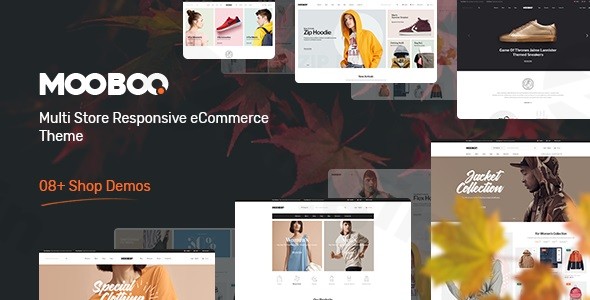
The Mooboo WordPress theme is a specialized, high-performance solution designed specifically for fashion entrepreneurs and clothing brands looking to establish a professional digital presence. In a market crowded with generic multipurpose themes, Mooboo carves out a niche by offering a minimalist yet feature-rich aesthetic that prioritizes product photography and a seamless shopping experience. Whether you are launching a boutique clothing line or a large-scale apparel store, this theme provides the technical foundation needed to convert visitors into loyal customers.
Key Features: Design, Layout & Performance
Mooboo is engineered to balance visual elegance with technical efficiency. It is a fashion WooCommerce theme that doesn’t just look good—it performs.
Versatile Layout Options
Mooboo offers a variety of structural choices to suit different brand identities:
- Multiple Homepage Layouts: Choose from 6 to 7 pre-designed homepage demos tailored for fashion, accessories, and lifestyle brands.
- Boxed vs. Full-Width: Switch between a modern full-width look or a classic boxed layout depending on your brand’s visual hierarchy.
- Advanced Shop Views: Customers can toggle between grid and list views, while “Tab Products” and “Product Sliders” keep the storefront dynamic and engaging.
Customization Capabilities
The theme is powered by the Redux Framework, giving users granular control over the site’s appearance without touching a line of code:
- Typography & Color: Access unlimited color schemes and the full library of Google Fonts to align the site with your brand guidelines.
- Header & Footer Builder: Customize your site’s navigation and footer areas using integrated tools, often compatible with Visual Composer for drag-and-drop ease.
- Mega Menu Support: For stores with extensive categories, the built-in Mega Menu ensures that navigation remains intuitive and user-friendly.
Performance & SEO Optimization
In the era of Core Web Vitals, speed is a ranking factor. Mooboo is marketed as a lightweight WooCommerce theme with optimized code to ensure fast loading times. Its clean markup and responsive, retina-ready design ensure that your store looks sharp and functions perfectly on everything from high-end desktops to mobile smartphones.
Installation & Demo Import
Setting up your fashion store with Mooboo is designed to be a straightforward process, even for WordPress beginners.
- Theme Installation: Upload the Mooboo theme zip file via Appearance > Themes > Add New in your WordPress dashboard.
- Plugin Activation: Upon activation, the theme will prompt you to install required plugins, including WooCommerce, the Redux Framework, and a page builder (Elementor or Visual Composer).
- One-Click Demo Import: Navigate to the theme options to find the demo importer. This allows you to replicate the professional look of the Mooboo preview sites in minutes.
- Verification: After the import, check your menus and widgets. Because fashion themes rely heavily on imagery, ensure your server has sufficient memory to process the high-quality demo images.
Customization Guide: Personalizing Your Fashion Brand
Once the demo is imported, personalizing the Mooboo WordPress theme to match your unique brand identity is the next step.
- Global Styles: Use the Theme Options panel to set your primary brand colors and typography. This ensures consistency across your product pages, blog, and checkout.
- Visual Building: Use Elementor to modify homepage sections. Mooboo’s compatibility with Elementor Free allows you to drag and drop elements like “New Arrivals” or “Best Sellers” anywhere on your page.
- Product Displays: Take advantage of the Product Quick View and Image Zoom features. These tools are essential for clothing stores, as they allow customers to inspect fabric textures and details without leaving the main shop page.
FAQ & Troubleshooting
Is the Mooboo theme compatible with Elementor?
Yes, the Mooboo theme is fully compatible with Elementor, allowing for a visual, drag-and-drop design experience. It also utilizes Visual Composer for specific layout areas like headers and footers.
Does Mooboo support WooCommerce for online stores?
Absolutely. Mooboo is built with WooCommerce as its core engine. It includes specialized e-commerce features such as Ajax shopping carts, product wishlists, and advanced product filters for size, color, and material.
Is the Mooboo theme good for SEO?
The Mooboo theme is designed with SEO best practices in mind. It features clean, optimized code and a mobile-responsive structure, which are critical components for ranking well in Google and other search engines.
How do I update the theme without losing my changes?
To protect your customizations, it is recommended to use a Child Theme. Mooboo’s GPL licensing supports child theme integration, allowing you to update the parent theme for security and features while keeping your custom CSS and functions intact.
What should I do if the demo import fails?
Demo import failures are usually caused by low server resources. Ensure your PHP “maxexecutiontime” is set to at least 300 and your “memory_limit” is 256M or higher. If issues persist, the theme’s support team can assist with manual installation.
Conclusion: Is Mooboo Right for You?
The Mooboo WordPress theme is an exceptional choice for small to medium-sized fashion retailers who want a high-end look without a high-end price tag. Its combination of minimalist design, robust WooCommerce integration, and Elementor compatibility makes it one of the best WordPress themes for a clothing store available today.While it is highly specialized for the fashion niche, its performance-focused code and ease of use make it a reliable “Shopify alternative” for those who prefer the flexibility and ownership of the WordPress ecosystem. If you are looking for a stylish, fast, and mobile-ready storefront, Mooboo is a top-tier contender for your next e-commerce project.For more WordPress theme reviews and SEO strategies, visit wppick.com.
I. Download Limits & Account Benefits
- Free Downloads: Each email address receives 3 downloads per day for free products
- Upgrade Benefits: Purchase any paid product to increase your daily download limit by 3 for each paid product
- No Account Required: You can download immediately by receiving the download link via email
- Account Recommended: Create an account for easier access to your order history and direct update downloads
II. Understanding GPL vs Official Versions
Important: The products available on WPPick are GPL-licensed versions, which differ from official developer versions. Before purchasing, please read our comprehensive guide: Understanding GPL & Official Differences at WPPick
Key Points:
- GPL versions may not include premium support from original developers
- Updates may be delayed compared to official releases
- Some premium features might have limitations
- Always consider your specific needs and support requirements
III. Support & Assistance
We’re here to help through multiple channels:
- Email Support: Direct email assistance for all inquiries
- Live Chat: Real-time support during business hours
- Comprehensive Documentation: Detailed guides and tutorials
IV. Order Tracking
Access your complete purchase history and download links anytime: Order History
V. Account Access
New to WPPick? Login or Create Account to manage your downloads and orders efficiently.
VI. Refund Protection
We stand behind our products with a clear refund policy. Review our terms: Refund Policy
VII. Privacy & Security
Your data security is our priority. Learn how we protect your information: Privacy Policy
VII. Terms of Service
Understanding our service terms ensures a smooth experience: Terms of Use
Quick Tips for Best Experience
- Verify Compatibility: Check plugin/theme compatibility with your WordPress version
- Backup First: Always backup your site before installing new plugins or themes
- Test Environment: Consider testing on a staging site first
- Stay Updated: Regularly check for updates in your account dashboard
- Read Documentation: Review any included documentation for optimal setup
Need Help?
If you have questions about downloads, licensing, or need technical assistance, don’t hesitate to contact our support team. We’re committed to ensuring you have the best possible experience with WPPick products.
Ready to get started? Your download adventure begins with just one click!
- Fixed: PHP8
- Updated: Latest WooCommerce and Latest WordPress