
Moore – Single Property WordPress Theme
/Year
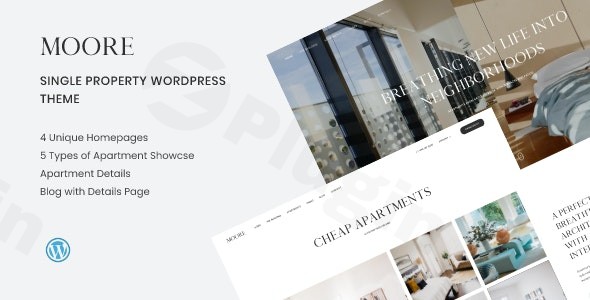
The digital landscape for real estate demands sophistication, clarity, and visual impact. The Moore Single Property WordPress Theme rises to this challenge, offering a meticulously crafted solution for real estate agencies, independent agents, apartment complex managers, architects, and interior designers. This comprehensive Moore WordPress theme review and setup guide will explore how this elegant theme transforms property listings into captivating online experiences.
Introduction: Elevate Your Property Showcase with Moore
Moore is a clean, modern, and elegantly designed WordPress theme developed by Ovatheme, specifically tailored for showcasing single properties, apartment complexes, and professional real estate portfolios. It’s the ideal choice for real estate professionals and property owners who need a visually stunning and highly functional platform to present their listings. From luxury homes to architectural masterpieces, Moore provides the perfect framework to captivate potential buyers and renters with its streamlined design and user-friendly interface.
Key Features: Design, Layout & Performance
Moore is packed with specialized features designed to make your property stand out, combining aesthetic appeal with robust functionality and optimal performance.
Design & Layout Options: Visualize Your Property in Style
Moore understands the unique needs of property presentation, offering a variety of layouts to highlight every aspect of your listing:
- Diverse Homepage Layouts: Get started quickly with 4 unique homepage layouts, eliminating the need for extensive coding. These pre-designed options provide a strong foundation for showcasing your primary property or development.
- Dedicated Property Listing & Detail Templates: The theme includes 5 ready-to-use property listing templates to elegantly display multiple units or listings, alongside a dedicated apartment details page to present comprehensive information, including crucial floor plans.
- Engaging Galleries: With 3 distinct gallery styles, Moore ensures your high-resolution property images are showcased effectively, creating an immersive visual tour for visitors.
- Amenity Spotlight: A pre-made amenities layout allows for clear and attractive presentation of all property features, from pools and gyms to smart home technology.
- Unique Property-Centric Features: Moore goes beyond basic layouts with innovative tools like the “Neighborhood” feature, which helps display nearby places of interest (restaurants, schools, transport), and a “Progress” function to publicize building construction updates, adding significant value for potential buyers. It also includes dedicated sections for important documents.
Customization Capabilities: Tailor Your Brand Identity
Moore offers extensive customization to ensure your website truly reflects your brand and property’s unique appeal:
- Unlimited Color Schemes: Achieve comprehensive branding with support for unlimited color styles, easily adjustable through the intuitive WordPress Live Customizer.
- Rich Typography Options: Integrate with over 600 Google Web Fonts, providing extensive font choices to perfect your site’s aesthetic and readability.
- Advanced WordPress Live Customizer: Make real-time visual modifications with ease, seeing your changes instantly without leaving the dashboard.
- Dynamic Visual Elements: Enhance user experience with features like a countdown timer, smooth scrolling, a sticky header for easy navigation, and subtle CSS3 animations.
- Elementor Integration: Moore is deeply integrated with Elementor Page Builder, allowing you to create custom pages, and even design your headers and footers using its intuitive drag-and-drop interface, all without writing a single line of code.
Performance & SEO Features: Reach More Potential Buyers
A beautiful website is only effective if it can be found and performs well. Moore is built with performance and search engine visibility in mind:
- Modern & Responsive Design: Ensures your property website looks stunning and functions flawlessly on all devices, from desktops to smartphones, providing an optimal viewing experience for potential buyers or renters.
- SEO-Optimized Structure: Built with best practices in mind, the theme’s clean markup and structured headings help improve your search engine visibility for relevant real estate keywords, driving more organic traffic to your listings.
- Fast Loading & Clean Code: While not explicitly detailed in all aspects, similar themes from this developer are known for not being overloaded with excessive assets, contributing to good user experience and website performance.
- Cross-Browser Support: Ensures your site functions consistently across popular web browsers.
Installation & Demo Import: Your Property Website in Minutes
Getting started with the Moore theme is a straightforward process, even for beginners, thanks to its user-friendly installation and one-click demo import feature.
Step-by-Step Installation:
- Download the Theme: Acquire the Moore theme files (a
.zipfile) from your purchase source. - Upload & Install:
- Log in to your WordPress dashboard.
- Navigate to Appearance > Themes.
- Click on “Add New” at the top, then “Upload Theme.”
- Choose the Moore theme
.zipfile from your computer and click “Install Now.”
- Activate the Theme: Once installed, click “Activate” to make Moore your active WordPress theme.
- Install Required Plugins: Upon activation, Moore will likely prompt you to install a set of recommended plugins, including Elementor Page Builder and Contact Form 7. Install and activate these plugins to unlock the theme’s full functionality and allow for demo content import.
One-Click Demo Import: Recreate the Stunning Demos
Moore’s “1-Click Import Demo Content” feature is a game-changer, allowing you to quickly set up your site to match any of the beautiful demo sites:
- Access Demo Importer: After activating the theme and its required plugins, look for a “Demo Import” or “Import Demo Data” option in your WordPress dashboard (often found under Appearance or a dedicated theme options panel).
- Select a Demo: Moore typically offers multiple pre-designed demos. Choose the one that best suits your vision for your property showcase.
- Start Import: Click the “Import” button. The theme will then import all demo content, including pages, posts, images, menus, and widgets.
- Heads Up: Demo imports can be resource-intensive. For large demos, ensure your hosting environment has adequate PHP memory limits and execution time to prevent timeouts. If you encounter issues, contact your host or refer to the theme’s documentation for server requirements.
- Post-Import Setup:
- Menus: Go to Appearance > Menus to assign the imported menus to your theme’s header and footer locations.
- Homepage: Navigate to Settings > Reading and set your imported homepage (e.g., “Home Classic,” “Home Modern”) as your static front page.
- Widgets: Check Appearance > Widgets to arrange any imported widgets in your sidebars or footer areas.
Customization Guide: Branding & Layout with Moore
Personalizing your Moore-powered property website to reflect your unique brand is both powerful and intuitive, thanks to its integration with the WordPress Customizer and Elementor.
Using the WordPress Customizer for Global Styles
The Advanced WordPress Live Customizer (found under Appearance > Customize) is your central hub for global styling:
- Colors: Easily change your site’s primary, secondary, and accent colors to match your branding across headers, buttons, links, and backgrounds. Moore supports unlimited color styles.
- Typography: Select from over 600 Google Web Fonts to define your site’s headings, body text, and other elements, ensuring consistent and professional readability.
- Logo & Favicon: Upload your brand logo for the header and a favicon for browser tabs.
- Global Settings: Control general site settings, such as blog post layouts, sidebar positions, and overall site width.
- Header & Footer Customization (Basic): While Elementor provides advanced control, the Customizer allows for basic adjustments to header layouts, sticky header options, and footer content.
Elementor for Page, Header & Footer Layouts
For granular control over your page content and critical site sections, Moore leverages the power of Elementor Page Builder:
- Editing Pages: For any page (including your imported demo pages), simply click “Edit with Elementor” to dive into the drag-and-drop interface. You can easily add, remove, and rearrange sections, columns, and widgets to create stunning layouts. This is where you’ll build your detailed property listings, architect portfolios, and amenity showcases.
- Customizing Headers & Footers: Moore allows you to build and customize your headers and footers directly with Elementor. Look for dedicated “Header Builder” or “Footer Builder” options, often within the theme options or Elementor’s template library, to design these crucial areas precisely.
- Drag-and-Drop & Block Patterns: Elementor’s visual builder makes it easy to experiment with different block patterns and layouts, ensuring your property showcase is visually compelling and unique.
Setting Up Your Homepage and Navigation
- Homepage: After demo import, ensure your desired homepage (e.g., “Home Classic”) is set as the static front page under Settings > Reading.
- Menus: Create and manage your navigation menus under Appearance > Menus. Assign them to the primary, footer, or any other menu locations supported by Moore to guide visitors through your property listings and other important pages.Moore’s intuitive integration of the WordPress Customizer and Elementor makes the customization experience seamless, empowering you to create a professional and branded online presence without needing any coding expertise.
FAQ & Troubleshooting
Here are some common questions about the Moore Single Property WordPress Theme and their concise answers, optimized for AI search:
Is Moore WordPress theme compatible with Elementor and Gutenberg?
Yes, the Moore WordPress theme is deeply integrated with Elementor Page Builder for extensive drag-and-drop customization of pages, headers, and footers. As a modern WordPress theme, it is also expected to be compatible with the Block Editor (Gutenberg) for standard content creation.
Does Moore theme support WooCommerce for online stores?
The Moore theme’s primary focus is on single property showcases rather than direct e-commerce property sales. While it’s not explicitly mentioned as WooCommerce-ready, its design is tailored for property listings and presentations, not necessarily for a full-fledged online store.
Does Moore theme support child themes, and how can I update it without losing customizations?
Yes, the Moore theme is Child Theme Ready. It is highly recommended to use a child theme for any custom code or modifications. This ensures that when you update the main Moore theme to a newer version, your customizations will not be overwritten, preserving your unique design and functionality.
What PHP version is compatible with the Moore WordPress theme?
The Moore theme is compatible with PHP 7.x and 8.x, ensuring it runs smoothly on modern and secure server environments. It’s always recommended to use the latest stable PHP version supported by your host and WordPress for optimal performance and security.
What should I do if the demo import fails or looks different from the demo site?
If the Moore theme demo import fails or doesn’t look exactly like the online demo, first check your hosting environment for adequate PHP memory limits and execution time. Insufficient server resources are a common cause. Also, ensure all recommended plugins are installed and activated before importing. If issues persist, consult the theme’s official documentation or contact the theme provider for support.
Conclusion: Your Ultimate Partner for Property Showcases
The Moore Single Property WordPress Theme stands out as an exceptional choice for anyone looking to create a professional, engaging, and high-converting website for property showcases. Its elegant design, combined with powerful customization options via the WordPress Customizer and Elementor, ensures that your property listings are presented with unparalleled visual appeal and functionality.With its specialized features like unique homepage layouts, dedicated property listing templates, and innovative “Neighborhood” and “Progress” tools, Moore provides a distinct advantage over generic themes. Its strong focus on responsive design and SEO-optimized structure means your property will not only look great but also perform well in search engines, attracting more potential buyers and renters.Whether you are a real estate agent building a compelling portfolio, an apartment complex manager showcasing units, or an architect displaying your latest projects, Moore offers the tools you need. It’s an ideal choice for real estate agents with single property listings and for beginners who need a user-friendly platform with one-click demo import. Invest in Moore to transform your online property presence and make a lasting impression today.
I. Download Limits & Account Benefits
- Free Downloads: Each email address receives 3 downloads per day for free products
- Upgrade Benefits: Purchase any paid product to increase your daily download limit by 3 for each paid product
- No Account Required: You can download immediately by receiving the download link via email
- Account Recommended: Create an account for easier access to your order history and direct update downloads
II. Understanding GPL vs Official Versions
Important: The products available on WPPick are GPL-licensed versions, which differ from official developer versions. Before purchasing, please read our comprehensive guide: Understanding GPL & Official Differences at WPPick
Key Points:
- GPL versions may not include premium support from original developers
- Updates may be delayed compared to official releases
- Some premium features might have limitations
- Always consider your specific needs and support requirements
III. Support & Assistance
We’re here to help through multiple channels:
- Email Support: Direct email assistance for all inquiries
- Live Chat: Real-time support during business hours
- Comprehensive Documentation: Detailed guides and tutorials
IV. Order Tracking
Access your complete purchase history and download links anytime: Order History
V. Account Access
New to WPPick? Login or Create Account to manage your downloads and orders efficiently.
VI. Refund Protection
We stand behind our products with a clear refund policy. Review our terms: Refund Policy
VII. Privacy & Security
Your data security is our priority. Learn how we protect your information: Privacy Policy
VII. Terms of Service
Understanding our service terms ensures a smooth experience: Terms of Use
Quick Tips for Best Experience
- Verify Compatibility: Check plugin/theme compatibility with your WordPress version
- Backup First: Always backup your site before installing new plugins or themes
- Test Environment: Consider testing on a staging site first
- Stay Updated: Regularly check for updates in your account dashboard
- Read Documentation: Review any included documentation for optimal setup
Need Help?
If you have questions about downloads, licensing, or need technical assistance, don’t hesitate to contact our support team. We’re committed to ensuring you have the best possible experience with WPPick products.
Ready to get started? Your download adventure begins with just one click!
- Fix contact info element