
Motorx – Car Rental Elementor Template Kit
/Year
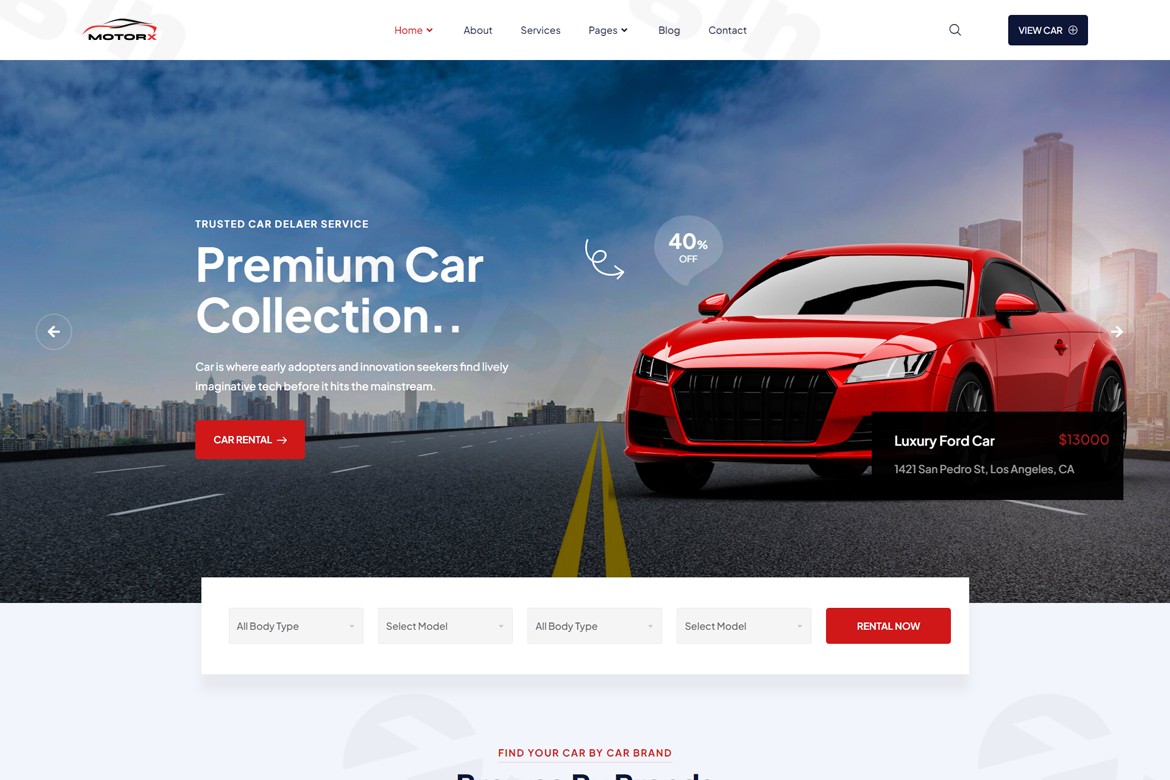
In today’s competitive digital landscape, a professional and highly functional website is paramount for any car rental business aiming to thrive. The Motorx – Premium Car Rental Elementor Template Kit emerges as a sophisticated, no-code solution specifically engineered to empower car rental agencies, motorcycle and bike rental services, yacht rental companies, and general vehicle booking platforms. This premium Elementor Template Kit allows businesses to effortlessly create stunning, high-performing websites that not only showcase their fleet with elegance but also provide customers with a seamless and intuitive booking experience.
Key Features That Drive Success
Motorx is designed with a clear focus on functionality and user experience, incorporating a suite of features that address the core needs of rental businesses.
Comprehensive Vehicle Showcase
Motorx provides robust tools to display your entire fleet with captivating image galleries and interactive listings. Each listing can highlight crucial vehicle specifications, real-time availability, and transparent pricing. The template includes specialized layouts tailored for various vehicle types, ensuring optimal presentation whether you’re showcasing cars, motorcycles, yachts, or luxury vehicles. This comprehensive display capability is crucial for engaging potential customers and converting interest into bookings.
Advanced Booking System Integration
Understanding the critical role of efficient reservations, Motorx is built with online booking functionality at its core. It seamlessly integrates with popular third-party booking plugins and reservation systems. While Elementor’s native form widgets are excellent for data collection, Motorx’s design ensures compatibility with dedicated booking solutions that handle complex availability checking, scheduling, and payment processing, allowing customers to reserve vehicles directly and securely through your website.
Mobile-Responsive and Retina-Ready Design
In an era dominated by mobile browsing, Motorx guarantees an exceptional user experience across all devices. Its 100% responsive layout ensures your car rental website looks and functions perfectly on desktops, laptops, tablets, and smartphones. Furthermore, retina-ready graphics provide crisp, high-resolution visuals on modern displays, enhancing the professional appearance and visual appeal of your vehicle fleet.
No-Code Customization with Elementor
Motorx leverages the power of the Elementor page builder, making website customization accessible to everyone, regardless of technical expertise. With its intuitive drag-and-drop interface, you can modify every aspect of your site—from layouts and sections to fonts and colors—without writing a single line of code. This significantly reduces development time and costs, putting creative control directly into your hands.
Professional Design Elements
The template boasts a clean, modern aesthetic meticulously crafted to build trust and credibility with your potential customers. Every element, from elegant vehicle display pages to streamlined booking forms and clear call-to-action buttons, is designed with conversion in mind. The fast-loading architecture further enhances user experience and contributes positively to your website’s search engine performance.
Why Choose Motorx for Your Business?
Opting for a premium solution like Motorx offers distinct advantages, ensuring your investment translates into a reliable, secure, and professional online presence.
Genuine GPL Licensed & Regularly Updated
We provide genuine GPL (General Public License) licensed versions of Motorx, ensuring you have the freedom to use, modify, and distribute the software as per the license terms. Our templates receive regular updates to guarantee ongoing compatibility with the latest versions of WordPress and Elementor. Furthermore, every template undergoes rigorous security scanning using trusted tools like VirusTotal and other third-party security applications, protecting your site from vulnerabilities.
Safety & Security Guaranteed
Your online safety is our priority. Each Motorx template undergoes comprehensive security scanning to safeguard your website against potential threats and vulnerabilities. This commitment to security provides peace of mind, allowing you to focus on your business without worrying about digital risks.
Professional Support & Documentation
While Motorx is designed for ease of use, professional assistance is readily available when you need it. Access reliable support and extensive documentation to guide you through installation, customization, and best practices. Our dedicated team is committed to ensuring you have all the resources necessary to maximize the potential of your car rental website.
Ideal for Diverse Rental Businesses
Motorx is a versatile solution perfect for a wide range of rental services, including:
- Car rental agencies
- Motorcycle and bike rental services
- Yacht and boat rental companies
- Vehicle listing directories
- Online booking platforms
- Fleet management services
Getting Started with Motorx: Installation & Usage Guide
Launching your professional car rental website with Motorx is a straightforward process. Before you begin, ensure you have WordPress installed and the free Elementor plugin activated. For advanced dynamic content features and full theme building capabilities, Elementor Pro is highly recommended.
Prerequisites:
- A self-hosted WordPress installation.
- The Elementor Page Builder plugin (free version is sufficient, Elementor Pro recommended for advanced features).
- The Envato Elements plugin (often required for installing template kits).
Step-by-Step Installation:
- Install Envato Elements Plugin: From your WordPress dashboard, navigate to
Plugins > Add New, search for “Envato Elements,” install, and activate it. - Upload the Template Kit: Do not unzip the Motorx template kit file. Go to
Elements > Installed Kitsin your WordPress dashboard and click “Upload Template Kit ZIP File.” Select the Motorx.zipfile. - Install Required Plugins: After uploading, you will be prompted to install any additional plugins necessary for the kit’s full functionality. Install and activate them.
- Import Individual Templates: Go back to
Elements > Installed Kits, click on the Motorx kit, and import the desired templates one by one (e.g., Homepage, About, Contact, Fleet listings). - Create New Pages: Navigate to
Pages > Add Newand create new pages (e.g., “Home,” “About Us,” “Our Fleet”). - Edit with Elementor: Click “Edit with Elementor” for each new page.
- Set Page Layout: In the Elementor editor, click the gear icon (Site Settings) in the bottom-left corner, go to “Layout Settings,” and set the Page Layout to “Elementor Full Width.” You may also choose to hide the page title.
- Insert Template: Click the gray folder icon in the Elementor canvas, go to the “My Templates” tab, and insert the Motorx template you imported for that specific page.
- Customize Content: Replace all demo content—images, text, and links—with your own unique business information, vehicle details, and branding.
Configuration Tips:
- Global Styling: Use Elementor’s Site Settings to customize global fonts, colors, and button styles to maintain brand consistency across your website.
- Dynamic Content: Leverage Elementor Pro’s Theme Builder for creating dynamic templates for your vehicle listings, ensuring consistency and ease of management for your fleet.
- Booking Forms: While Motorx integrates with booking systems, you can use Elementor’s powerful Form widget to create custom inquiry or contact forms.
- Image Licensing: Be mindful that demo images included in the template kit are for demonstration purposes only. Ensure you replace them with your own licensed images to avoid copyright issues.
Conclusion
The Motorx – Premium Car Rental Elementor Template Kit is more than just a design package; it’s a comprehensive, secure, and user-friendly solution designed to elevate your vehicle rental business online. With its robust features, no-code customization capabilities, and commitment to security and support, Motorx provides everything you need to launch a professional website that stands out from the competition, streamlines your booking process, and ultimately drives significant business growth. Invest in Motorx today and transform your online presence into a powerful asset for your rental enterprise.
I. Download Limits & Account Benefits
- Free Downloads: Each email address receives 3 downloads per day for free products
- Upgrade Benefits: Purchase any paid product to increase your daily download limit by 3 for each paid product
- No Account Required: You can download immediately by receiving the download link via email
- Account Recommended: Create an account for easier access to your order history and direct update downloads
II. Understanding GPL vs Official Versions
Important: The products available on WPPick are GPL-licensed versions, which differ from official developer versions. Before purchasing, please read our comprehensive guide: Understanding GPL & Official Differences at WPPick
Key Points:
- GPL versions may not include premium support from original developers
- Updates may be delayed compared to official releases
- Some premium features might have limitations
- Always consider your specific needs and support requirements
III. Support & Assistance
We’re here to help through multiple channels:
- Email Support: Direct email assistance for all inquiries
- Live Chat: Real-time support during business hours
- Comprehensive Documentation: Detailed guides and tutorials
IV. Order Tracking
Access your complete purchase history and download links anytime: Order History
V. Account Access
New to WPPick? Login or Create Account to manage your downloads and orders efficiently.
VI. Refund Protection
We stand behind our products with a clear refund policy. Review our terms: Refund Policy
VII. Privacy & Security
Your data security is our priority. Learn how we protect your information: Privacy Policy
VII. Terms of Service
Understanding our service terms ensures a smooth experience: Terms of Use
Quick Tips for Best Experience
- Verify Compatibility: Check plugin/theme compatibility with your WordPress version
- Backup First: Always backup your site before installing new plugins or themes
- Test Environment: Consider testing on a staging site first
- Stay Updated: Regularly check for updates in your account dashboard
- Read Documentation: Review any included documentation for optimal setup
Need Help?
If you have questions about downloads, licensing, or need technical assistance, don’t hesitate to contact our support team. We’re committed to ensuring you have the best possible experience with WPPick products.
Ready to get started? Your download adventure begins with just one click!