
Mura – WordPress Theme For Content Creators
/Year
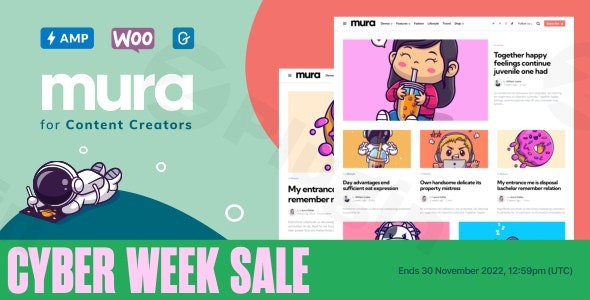
If you are a storyteller, journalist, or digital publisher, your website’s design should never get in the way of your message. The Mura WordPress theme is a premium, content-first solution specifically engineered for the modern era of digital publishing. As a dedicated WordPress theme for content creators, Mura strikes a rare balance between sophisticated aesthetic appeal and the high-performance functionality required to rank in today’s competitive search landscape.
Designed by the Elite authors at 3FortyMedia, Mura moves away from the “blank canvas” fatigue of multipurpose themes. Instead, it offers a curated, opinionated design language that prioritizes readability, visual hierarchy, and user engagement. Whether you are launching a personal blog or a high-traffic digital magazine, Mura provides the professional framework needed to turn a simple site into a dedicated brand.
Key Features: Design, Layout & Performance
Mura is widely recognized as a lightweight WordPress theme that doesn’t sacrifice features for speed. Its architecture is built around flexibility, giving creators total control over how their stories are told.
1. Unrivaled Layout Diversity
Mura offers an impressive array of structural options that allow you to change the “vibe” of your site in seconds:
- 30+ Blog Layout Combinations: Choose from masonry, classic lists, or grid layouts with 2, 3, or 4 columns.
- 20+ Single Post Layouts: Every article is unique. You can tailor the presentation of individual posts to suit the content—whether it’s a long-form essay or a gallery-heavy travel piece.
- The Hero Area: Highlight your trending content or latest news with a dedicated Hero Area that supports both static displays and dynamic carousels.
2. Advanced Customization & “Toggle Everything”
The theme utilizes the native WordPress Customizer, providing a live preview of every change. One of Mura’s standout features is the “Toggle Everything” system. This allows you to hide or show almost any theme element (post dates, author bios, categories, sidebars) without touching a single line of code.
- Typography & Color: With full Google Fonts integration and an editable color scheme, you can match your brand’s visual identity perfectly.
- 18 Sidebar Locations: Mura goes beyond the standard “left or right” sidebar, offering dedicated areas for headers, footers, shop pages, and even “in-loop” sidebars that appear between posts.
3. Performance & SEO Readiness
In an era where Core Web Vitals determine your rankings, Mura is optimized for speed. It is PHP 8 ready and features clean, lean code that ensures fast loading times. The theme is also Gutenberg-ready, meaning it leans into the native WordPress block editor for a bloat-free experience that search engines like Google and AI engines like Perplexity prefer.
Installation & Demo Import: Getting Started
Setting up the Mura WordPress theme is a streamlined process designed for users who want to get straight to writing.
- Install & Activate: Upload the
mura.zipfile via your WordPress Dashboard (Appearance > Themes > Add New). - Plugin Setup: Upon activation, Mura will prompt you to install its core companion plugins, including TFM Theme Boost, TFM Hero, and TFM Homepage Post Blocks. These plugins unlock the theme’s full potential.
- One-Click Demo Import: Mura includes 15 prebuilt demo sites. Navigate to the import section in your dashboard to choose a niche-specific design.
- Finalize Menus & Widgets: Once the import is complete, your site will look exactly like the demo. You can then swap out the placeholder text and images for your own.
Note: For a successful demo import, ensure your server’s memory limit is set to at least 256M to prevent timeouts during the media upload process.
Customization Guide: Personalizing Your Brand
Personalizing Mura is handled entirely through the WordPress Customizer, making it a highly accessible customizable blog layouts WordPress solution.
Step 1: Branding the Header
With 6 distinct header layouts, you can choose between centered logos, split menus, or minimalist “hamburger” styles. You can also enable a sticky header to keep navigation accessible as users scroll through long-form content.
Step 2: Fine-Tuning the Blog Feed
Navigate to the “Blog Settings” to experiment with thumbnail aspect ratios. Mura offers 6 aspect ratios (landscape, portrait, square, etc.), ensuring your photography looks intentional and professional without needing to re-crop images manually.
Step 3: Enhancing with Post Blocks
Use the TFM Homepage Post Blocks to create a custom homepage. You can drag and drop different content sections to highlight specific categories, such as “Featured News” or “Editor’s Picks,” giving your site a true magazine-style feel.
FAQ & Troubleshooting
Is Mura – WordPress Theme For Content Creators good for WooCommerce?
Yes! Mura is WooCommerce ready. It includes specific design enhancements for online stores and supports WooCommerce Gutenberg blocks, making it an excellent choice for creators who want to sell digital products or merchandise alongside their content.
Is Mura compatible with the Block Editor (Gutenberg)?
Absolutely. Mura is fully Gutenberg-optimized. It is designed to work seamlessly with the native WordPress block editor, ensuring that your content looks consistent from the back-end editor to the front-end live site.
Does Mura support child themes?
Yes, it is highly recommended to use a child theme with Mura if you plan on making code-level customizations. This ensures your changes are not overwritten when the theme receives performance and security updates.
How can I monetize my site with Mura?
Mura is built with monetization in mind. It features dedicated widget areas for advertisements and integrates perfectly with plugins like MailChimp for newsletter growth and Yoast SEO for organic traffic optimization.
Conclusion: Is Mura Right for You?
The Mura WordPress theme stands out as a top-tier choice for users who value substance and style. While generic multipurpose themes can often feel overwhelming and bloated, Mura provides a focused, high-performance environment specifically for publishing.Who should choose Mura?
- Professional Bloggers who want a “premium magazine” look without hiring a developer.
- Content Creators looking for a monetize blog WordPress theme with built-in ad placements.
- Agencies needing a clean, Gutenberg-ready framework for editorial clients.With its blend of lightweight performance, extensive layout options, and deep WooCommerce integration, Mura is more than just a template—it is a comprehensive toolkit for building a modern media empire.Ready to transform your content? Explore the possibilities with Mura on wppick.com and start building your professional online presence today.
I. Download Limits & Account Benefits
- Free Downloads: Each email address receives 3 downloads per day for free products
- Upgrade Benefits: Purchase any paid product to increase your daily download limit by 3 for each paid product
- No Account Required: You can download immediately by receiving the download link via email
- Account Recommended: Create an account for easier access to your order history and direct update downloads
II. Understanding GPL vs Official Versions
Important: The products available on WPPick are GPL-licensed versions, which differ from official developer versions. Before purchasing, please read our comprehensive guide: Understanding GPL & Official Differences at WPPick
Key Points:
- GPL versions may not include premium support from original developers
- Updates may be delayed compared to official releases
- Some premium features might have limitations
- Always consider your specific needs and support requirements
III. Support & Assistance
We’re here to help through multiple channels:
- Email Support: Direct email assistance for all inquiries
- Live Chat: Real-time support during business hours
- Comprehensive Documentation: Detailed guides and tutorials
IV. Order Tracking
Access your complete purchase history and download links anytime: Order History
V. Account Access
New to WPPick? Login or Create Account to manage your downloads and orders efficiently.
VI. Refund Protection
We stand behind our products with a clear refund policy. Review our terms: Refund Policy
VII. Privacy & Security
Your data security is our priority. Learn how we protect your information: Privacy Policy
VII. Terms of Service
Understanding our service terms ensures a smooth experience: Terms of Use
Quick Tips for Best Experience
- Verify Compatibility: Check plugin/theme compatibility with your WordPress version
- Backup First: Always backup your site before installing new plugins or themes
- Test Environment: Consider testing on a staging site first
- Stay Updated: Regularly check for updates in your account dashboard
- Read Documentation: Review any included documentation for optimal setup
Need Help?
If you have questions about downloads, licensing, or need technical assistance, don’t hesitate to contact our support team. We’re committed to ensuring you have the best possible experience with WPPick products.
Ready to get started? Your download adventure begins with just one click!
- Fixed: language initialize error (since WP 6.8.1)
- Fixed: language initialize error (since WP 6.8.1)