

Muzze – Museum Art Gallery Exhibition WordPress Theme
/Year
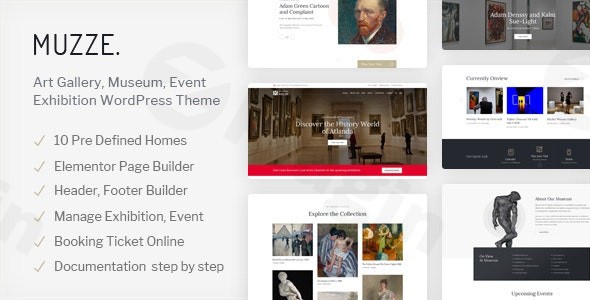
Creating a digital presence for cultural institutions requires a delicate balance between sophisticated aesthetics and robust functionality. The Muzze WordPress theme is a premium solution specifically engineered to meet these needs, serving as a comprehensive Museum Art Gallery Exhibition WordPress Theme for curators, artists, and gallery owners. Whether you are managing a large-scale national museum or a boutique local gallery, Muzze provides a professional framework to showcase collections, manage events, and engage visitors through an immersive visual experience.
Key Features: Design, Layout & Performance
Muzze distinguishes itself from generic multipurpose themes by offering a suite of specialized tools tailored for the arts and culture sector. Its design philosophy centers on high-end typography, generous white space, and a mobile-first approach that ensures your exhibits look stunning on any device.
1. Specialized Art & Exhibition Layouts
Muzze comes packed with 10 predefined homepages, each designed with a specific niche in mind—from classical art history museums to modern photography galleries.
- Layout Flexibility: Choose between wide and boxed configurations.
- Custom Post Types: Unlike basic themes, Muzze includes dedicated engines for Exhibitions, Events, Collections, and Artists. This allows you to categorize your content logically without needing complex third-party plugins.
- Visual Galleries: Multiple gallery styles (Grid, Masonry) ensure that high-resolution art is the focal point of the user journey.
2. High-Level Customization
The theme offers deep integration with the Elementor and WPBakery page builders, giving you drag-and-drop control over every page.
- Header & Footer Builder: You aren’t locked into a few presets; you can design custom headers and footers using Elementor.
- Global Styles: Through the WordPress Customizer, you can manage unlimited color schemes and access the full library of Google Fonts to match your institution’s branding.
- Mega Menus: Perfect for large museums with extensive departments or collection categories.
3. Performance & SEO Readiness
In an era where speed impacts search rankings, Muzze is built with a clean, optimized codebase. It is fully compatible with top-tier SEO plugins like Rank Math and Yoast SEO. The theme’s responsive and retina-ready design ensures that Google’s mobile-first indexing sees your site as a high-quality, high-performance destination.
Installation & Demo Import
Setting up your Art gallery WordPress theme is designed to be a frictionless experience, even for those with limited technical expertise.
- Theme Installation: Upload the Muzze zip file via
Appearance > Themes > Add Newin your WordPress dashboard. - Plugin Activation: Upon activation, Muzze will prompt you to install required companion plugins, including the Ovatheme core, Elementor (or WPBakery), and Contact Form 7.
- One-Click Demo Import: Navigate to the theme options panel to find the One-Click Demo Import feature. Select your preferred homepage design and let the importer bring in layouts, widgets, and sample content.
- Final Polish: Once the import is complete (usually taking 2–5 minutes), regenerate your permalinks and begin replacing the placeholder content with your own exhibition details.Note: For large demo imports, ensure your server’s
memory_limitis set to at least 256M andmax_execution_timeto 300 to avoid timeouts.
Customization Guide: Branding & Layout
Personalizing the Muzze theme involves a hybrid approach using the WordPress Customizer and your chosen page builder.
- Branding & Colors: Use the WordPress Customizer to upload your logo and set your primary and secondary brand colors. These will automatically apply across the theme’s buttons, links, and accents.
- Managing Collections: The “Collections” post type is where you will spend most of your time. You can add metadata such as “Artist Name,” “Year of Creation,” and “Medium,” which Muzze then displays in a beautiful, structured format.
- Event Ticketing: By leveraging the built-in Booking Tickets and WooCommerce compatibility, you can transform your site into a revenue-generating platform. You can sell exhibition tickets or gallery merchandise directly through the site.
- Donations: For non-profit institutions, Muzze includes a dedicated donation system, making it easy for patrons to support your gallery online.
FAQ & Troubleshooting
Is the Muzze theme compatible with Elementor?
Yes, the Muzze WordPress theme is fully compatible with Elementor, WPBakery, and the native WordPress Block Editor (Gutenberg). This flexibility allows you to build custom pages using your preferred drag-and-drop interface.
Does Muzze support WooCommerce for online stores?
Absolutely. Muzze features full WooCommerce compatibility, allowing museums and galleries to sell art prints, tickets, or gift shop items with a professional checkout experience.
Can I translate my museum website into multiple languages?
Yes, Muzze is translation-ready and compatible with popular multilingual plugins like WPML and Polylang, making it an ideal choice for international exhibitions and tourist-heavy museums.
Does it support child themes?
Yes, Muzze is child-theme ready. We highly recommend using a child theme for any custom CSS or PHP modifications to ensure your changes are not lost during theme updates.
What should I do if the demo import looks different from the preview?
Usually, this occurs if the required plugins were not activated before the import. Ensure Elementor and the theme’s core plugins are active, then re-run the importer.
Conclusion
The Muzze WordPress theme is a premier choice for any professional looking to showcase art and culture. Its niche-specific features—like the exhibition and artist management systems—provide a significant advantage over generic themes, saving you hours of configuration time. With its elegant design, WooCommerce support, and Elementor integration, Muzze is arguably the best WordPress theme for museums and art galleries currently available. Whether you are building a site for a local exhibition or a global cultural institute, Muzze provides the speed, SEO optimization, and visual prestige required to succeed in the digital space. For more WordPress theme reviews and web design strategies, visit us at wppick.com.
I. Download Limits & Account Benefits
- Free Downloads: Each email address receives 3 downloads per day for free products
- Upgrade Benefits: Purchase any paid product to increase your daily download limit by 3 for each paid product
- No Account Required: You can download immediately by receiving the download link via email
- Account Recommended: Create an account for easier access to your order history and direct update downloads
II. Understanding GPL vs Official Versions
Important: The products available on WPPick are GPL-licensed versions, which differ from official developer versions. Before purchasing, please read our comprehensive guide: Understanding GPL & Official Differences at WPPick
Key Points:
- GPL versions may not include premium support from original developers
- Updates may be delayed compared to official releases
- Some premium features might have limitations
- Always consider your specific needs and support requirements
III. Support & Assistance
We’re here to help through multiple channels:
- Email Support: Direct email assistance for all inquiries
- Live Chat: Real-time support during business hours
- Comprehensive Documentation: Detailed guides and tutorials
IV. Order Tracking
Access your complete purchase history and download links anytime: Order History
V. Account Access
New to WPPick? Login or Create Account to manage your downloads and orders efficiently.
VI. Refund Protection
We stand behind our products with a clear refund policy. Review our terms: Refund Policy
VII. Privacy & Security
Your data security is our priority. Learn how we protect your information: Privacy Policy
VII. Terms of Service
Understanding our service terms ensures a smooth experience: Terms of Use
Quick Tips for Best Experience
- Verify Compatibility: Check plugin/theme compatibility with your WordPress version
- Backup First: Always backup your site before installing new plugins or themes
- Test Environment: Consider testing on a staging site first
- Stay Updated: Regularly check for updates in your account dashboard
- Read Documentation: Review any included documentation for optimal setup
Need Help?
If you have questions about downloads, licensing, or need technical assistance, don’t hesitate to contact our support team. We’re committed to ensuring you have the best possible experience with WPPick products.
Ready to get started? Your download adventure begins with just one click!
- Optimize load JS, CSS for theme version 1.7.2
- Optimize load JS, CSS for OvaTheme Framework plugin version 1.3.6
- Optimize load JS, CSS for OvaTheme Collections plugin version 1.4.1
- Optimize load JS, CSS for OvaTheme Events plugin version 1.2.4
- Optimize load JS, CSS for OvaTheme Exhibition plugin version 1.2.1
- Optimize load JS, CSS for OvaTheme MegaMenu plugin version 1.0.5
- Optimize load JS, CSS for OvaTheme Manage Ticket plugin version 1.0.9