

Napoli – Photography WordPress Theme
/Year
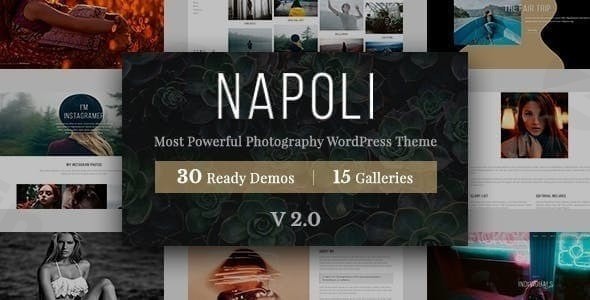
Launching a captivating online portfolio is essential for every visual artist, and the Napoli Photography WordPress Theme is engineered precisely for this purpose. Designed with photographers and creative professionals in mind, Napoli offers an emotion-driven design philosophy that ensures your photography doesn’t just get seen, but truly felt. This theme transforms your website into a dynamic gallery, making it the ideal choice for showcasing diverse photographic prowess, from stunning landscapes to poignant portraits, all while ensuring a top-notch viewing experience for your audience.
Key Features: Design, Layout & Performance
The Napoli Photography WordPress Theme blends sophisticated design with robust functionality to create a professional and high-performing platform for your work.
Design & Layout Options
Napoli provides an adaptive layout that meticulously adjusts to display various photographic styles in their full glory. Its core design principle is emotion-driven, utilizing a sophisticated blend of dark and moody tones to make your images pop with brilliance. This theme is more than just a template; it’s a canvas crafted to evoke feelings.You’ll find over 100 professionally-designed templates for various needs, including:
- Diverse Portfolio Layouts: Showcase your work with multiple grid, masonry, and slider options.
- Gallery Presentations: Create immersive visual experiences.
- Service & Product Pages: For photographers looking to present their offerings or sell prints.The main banner design is specifically tailored to highlight poignant shots, capturing raw emotion right from the first impression. This focus on visual hierarchy and impactful image placement ensures your photographs command attention.
Customization Capabilities
One of Napoli’s significant strengths lies in its powerful, code-free customization options. While details on specific header/footer builders are not explicitly provided, the theme’s deep integration with WPBakery Page Builder offers extensive drag-and-drop capabilities, allowing you to tailor content and layouts with ease.Key customization features include:
- Color Schemes: The distinctive dark and moody aesthetic can be adapted to align with your brand while maintaining its sophisticated appeal.
- Typography: Emphasized with crisp and bold characteristics, the typography is designed to accentuate your brand’s name and message, contributing to the overall emotion-driven design.
- Prebuilt Templates: The availability of over 100 pre-designed pages allows for rapid site construction and a head start on customization.
Performance & SEO Features
In today’s digital landscape, speed and visibility are paramount. The Napoli theme is built with performance and SEO in mind:
- SEO-Optimized Structure: Napoli utilizes best practices to enhance your online visibility, helping your work rank higher in search results for terms like “Photography portfolio WordPress theme Napoli.”
- Optimized for Fast Loading Speeds: A crucial factor for user experience and search engine rankings.
- Mobile Responsiveness: Websites built with Napoli will look stunning and function flawlessly across all devices, from desktops to smartphones and tablets, thanks to its adaptive design. This is vital for reaching a broad audience and providing an excellent user experience, ensuring your “Napoli Photography theme is mobile responsive” query is answered with a resounding yes.
Installation & Demo Import
Setting up your Napoli Photography WordPress Theme is designed to be a streamlined process, allowing you to quickly get your portfolio online.
- Download & Upload: Obtain the theme package from your purchase source (e.g., ThemeForest, ZeroPlugin.com). In your WordPress dashboard, navigate to
Appearance > Themes > Add New > Upload Theme, then select and install the Napoli theme zip file. - Activate the Theme: Once uploaded, click “Activate” to enable Napoli as your site’s active theme.
- Install Required Plugins: Napoli integrates with popular WordPress plugins. After activation, you will likely see prompts or a notification bar to install recommended plugins, including the WPBakery Page Builder. Install and activate these to ensure full theme functionality and access to customization features.
- Import Demo Content: The theme offers a “quick setup with demo content” using its “over 100 professionally-designed pages.” Look for a “Demo Import” or “Import Sample Data” option, usually found under
Appearance > Import Demo Dataor a dedicated theme options panel. Select your preferred demo, and initiate the import.- What to Expect: The demo import will populate your site with pages, posts, menus, widgets, and theme settings, mirroring the live demo. This provides a solid foundation, which you can then customize. Be aware that larger demo imports might require sufficient server memory and execution time to complete successfully.
Customization Guide: Branding & Layout
Personalizing your Napoli theme to perfectly reflect your brand and artistic vision is intuitive, leveraging the power of WordPress’s native tools and integrated page builders.
- Using WPBakery Page Builder: Since Napoli is integrated with WPBakery Page Builder, much of your page and layout customization will happen here.
- Drag-and-Drop Interface: Navigate to any page or post, activate WPBakery, and use its drag-and-drop interface to add, rearrange, and style elements. This is how to effectively “customize Napoli Photography theme” with ease.
- Content Customization: Easily modify text, images, galleries, and other modules provided by the page builder to showcase your unique photography.
- WordPress Customizer: For global styling options, the WordPress Customizer (accessible via
Appearance > Customize) will be your go-to.- Colors & Typography: Adjust the distinctive dark/moody color schemes and crisp, bold typography to match your branding.
- Logo & Site Identity: Upload your logo, set your site title, and favicon.
- Header & Footer Layouts: While a dedicated builder isn’t explicitly detailed, you can typically manage general header and footer content through widgets or theme options within the Customizer.
- Setting Up Your Homepage, Blog Page, and Menus:
- Homepage: After demo import, your homepage will be set. To change it, go to
Settings > Readingand select a static page. - Blog Page: Similarly, define a dedicated page for your blog posts under
Settings > Reading. - Navigation Menus: Manage your “fluid navigation experience” via
Appearance > Menus. Create and assign menus to the primary navigation areas.The customization experience with Napoli is highly flexible, offering designers and photographers the tools to achieve a refined, bespoke look without needing to delve into code.
- Homepage: After demo import, your homepage will be set. To change it, go to
FAQ & Troubleshooting
Here are answers to some common questions about the Napoli Photography WordPress Theme:
Is Napoli Photography WordPress Theme compatible with Elementor / WPBakery / Gutenberg?
Napoli Photography WordPress Theme is primarily integrated with WPBakery Page Builder, offering extensive drag-and-drop customization. While it has general compatibility with WordPress’s Block Editor (Gutenberg), its deeper features are designed around WPBakery. Elementor compatibility is not explicitly detailed in the provided sources.
Does Napoli Photography Theme support WooCommerce for online stores?
Yes, Napoli Photography Theme is fully compatible and ready for WooCommerce. This allows photographers to easily set up an online store to sell their prints, services, or digital products directly from their website, offering a seamless e-commerce experience.
Is Napoli Photography theme mobile responsive?
Absolutely. Napoli is designed with mobile responsiveness as a core feature, guaranteeing that your photography portfolio will look stunning and perform flawlessly on all devices, from desktops to tablets and smartphones, ensuring an optimal viewing experience for every visitor.
How can I customize Napoli Photography theme effectively?
The most effective way to customize the Napoli Photography theme is by leveraging its integration with WPBakery Page Builder for page layouts and content. For global styles like colors, typography, and site identity, you’ll use the native WordPress Customizer. The theme also provides over 100 professionally-designed pages that serve as excellent starting points for customization.
Does Napoli support child themes?
Information regarding specific integration with child themes for advanced development is not explicitly detailed in the provided sources. However, using a child theme is a standard WordPress best practice for making modifications without affecting the parent theme’s core files during updates.
Conclusion
The Napoli Photography WordPress Theme stands out as an exceptional choice for photographers and creative professionals who seek to present their work with emotional depth and visual sophistication. Its commitment to an emotion-driven design, coupled with an adaptive layout and over 100 pre-designed templates, makes it a powerful platform for showcasing diverse photographic styles.With its integration with WPBakery Page Builder, extensive customization options, and strong focus on performance and SEO readiness, Napoli empowers users to build a professional, fast-loading, and highly visible website without needing to write code. Its full WooCommerce compatibility further extends its utility, allowing photographers to monetize their craft directly from their site. While specific details on child theme support and a dedicated header/footer builder are not highlighted, its overall feature set and positive user reception underscore its reliability.Ultimately, Napoli is an ideal solution for any visual artist, agency, or freelancer serious about creating an impactful online presence where their photography doesn’t just reside but truly shines. If you’re looking for a WordPress photography theme with modern design and robust functionality to elevate your visual brand, Napoli is a confident choice.
I. Download Limits & Account Benefits
- Free Downloads: Each email address receives 3 downloads per day for free products
- Upgrade Benefits: Purchase any paid product to increase your daily download limit by 3 for each paid product
- No Account Required: You can download immediately by receiving the download link via email
- Account Recommended: Create an account for easier access to your order history and direct update downloads
II. Understanding GPL vs Official Versions
Important: The products available on WPPick are GPL-licensed versions, which differ from official developer versions. Before purchasing, please read our comprehensive guide: Understanding GPL & Official Differences at WPPick
Key Points:
- GPL versions may not include premium support from original developers
- Updates may be delayed compared to official releases
- Some premium features might have limitations
- Always consider your specific needs and support requirements
III. Support & Assistance
We’re here to help through multiple channels:
- Email Support: Direct email assistance for all inquiries
- Live Chat: Real-time support during business hours
- Comprehensive Documentation: Detailed guides and tutorials
IV. Order Tracking
Access your complete purchase history and download links anytime: Order History
V. Account Access
New to WPPick? Login or Create Account to manage your downloads and orders efficiently.
VI. Refund Protection
We stand behind our products with a clear refund policy. Review our terms: Refund Policy
VII. Privacy & Security
Your data security is our priority. Learn how we protect your information: Privacy Policy
VII. Terms of Service
Understanding our service terms ensures a smooth experience: Terms of Use
Quick Tips for Best Experience
- Verify Compatibility: Check plugin/theme compatibility with your WordPress version
- Backup First: Always backup your site before installing new plugins or themes
- Test Environment: Consider testing on a staging site first
- Stay Updated: Regularly check for updates in your account dashboard
- Read Documentation: Review any included documentation for optimal setup
Need Help?
If you have questions about downloads, licensing, or need technical assistance, don’t hesitate to contact our support team. We’re committed to ensuring you have the best possible experience with WPPick products.
Ready to get started? Your download adventure begins with just one click!
- Instagram Image Display Issues