
Natural Spa – Massage Booking WordPress Theme
/Year
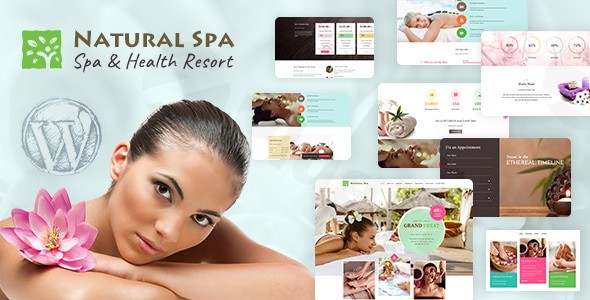
Introduction: The Perfect Massage Booking WordPress Theme for Wellness Businesses
In today’s digital landscape, a sophisticated online presence is crucial for beauty salons, massage parlors, and wellness centers. The Natural Spa WordPress Theme emerges as a powerful, multipurpose solution specifically crafted to transform your beauty business. Designed for elegance and functionality, Natural Spa is ideal for spa centers, hairdressers, barbershops, healthcare facilities, massage therapists, and beauticians seeking to showcase their organic treatments, natural beauty products, and professional services with a clean, modern aesthetic.This theme combines beautiful design with essential business features, making it a compelling choice for anyone looking to create an exceptional online presence in the health and beauty industry.
Key Features: Design, Layout & Performance
Natural Spa is engineered to provide a comprehensive digital solution for the beauty and wellness sector, focusing on visual appeal, user experience, and robust performance.
Design & Layout Options
The theme boasts a professional, clean, and modern design optimized for spas and salons. Its visual philosophy emphasizes tranquility and luxury, perfect for showcasing services like spa massages, salt baths, essential oils, and treatment plans.
- Service Showcase Capabilities: Beautifully display your organic treatments, spa packages, skin care procedures, nail salon services, and beauty products. Dedicated layouts allow you to highlight treatment durations, benefits, and special offers with attractive, informative sections. The theme offers 6 specific layouts for showcasing treatments.
- Therapist & Procedure Pages: Unique to Natural Spa are dedicated pages for showcasing individual therapists, complete with their experience and credentials, and detailed procedure pages that outline treatment plans, duration, cost, and benefits. This helps clients make informed decisions and build trust.
- Layout Variations: Natural Spa supports both wide and boxed layouts, offering flexibility in how your content is presented. It includes pre-designed templates for essential pages such as services, about us, contact, and various internal page styles for blogging and events, ensuring a consistent and polished look across your site.
- Slider Revolution Integration: The inclusion of Slider Revolution allows for dynamic and engaging content showcases with animated effects, perfect for highlighting promotions, new services, or compelling imagery.
Customization Capabilities
Branding your spa or salon website is made intuitive with Natural Spa’s extensive customization options, primarily powered by the Kirki Toolkit integrated into the WordPress Customizer.
- Unlimited Color Schemes: Tailor your website to match your brand’s aesthetic with unlimited color options, ensuring a cohesive and professional visual identity.
- Typography Control: With integration of Google Fonts, you have access to over 800 fonts, allowing for varied and precise typographic choices that enhance readability and brand personality.
- Granular Design Control: The Kirki Toolkit empowers users to easily create and customize panels, sections, and fields within the Customizer, automatically generating CSS. This provides significant control over spacing, containers, sections, and backgrounds, enabling a truly bespoke design.
Performance & SEO Features
In the competitive beauty and wellness market, a fast, mobile-friendly, and SEO-optimized website is non-negotiable. Natural Spa is built with these principles in mind.
- Mobile-Responsive Design: The theme features a responsive and retina-ready design, guaranteeing that your website looks flawless and performs excellently on all devices—from desktop computers to smartphones and tablets. This is crucial for capturing clients browsing on any platform.
- SEO Optimized Structure: Natural Spa is built with search engine optimization best practices. Its clean code and structured markup are designed to help your beauty business rank higher in search results, attracting more local clients and enhancing your online visibility.
- Clean Code and Fast Loading: While specific page speed scores are not detailed, the theme emphasizes clean code, contributing to faster loading times and a better user experience, which is a key factor for both visitors and search engine rankings.
Installation & Demo Import
Setting up your Natural Spa website is designed to be straightforward, even for those without extensive technical knowledge. The theme aims for a smooth initial experience to get your spa or salon online quickly.
- Install & Activate the Theme:
- Navigate to
Appearance > Themesin your WordPress dashboard. - Click
Add Newand thenUpload Theme. - Choose the
natural-spa.zipfile (or similar, provided by your download source) and clickInstall Now. - Once installed, click
Activate.
- Navigate to
- Install Required Companion Plugins: Upon activation, Natural Spa will likely prompt you to install a set of recommended plugins. These typically include:
- WPBakery Page Builder (Visual Composer): For drag-and-drop page creation.
- Slider Revolution: For creating engaging content sliders.
- WooCommerce: If you plan to sell products or services online.
- Contact Form 7: For creating contact forms.
- Kirki Toolkit: For advanced Customizer options.
- Follow the on-screen prompts to install and activate these plugins.
- Use the One-Click Demo Import: Natural Spa includes a one-click demo import feature, which is a huge time-saver.
- Look for a menu item like
Appearance > Import Demo DataorTheme Options > Demo Import. - Select the demo you wish to import (often there’s one main demo).
- Click
Import.
- Look for a menu item like
- What to Expect During/After Demo Import:
- The import process can take several minutes, depending on your hosting environment and the size of the demo content. Do not close your browser during this time.
- Once complete, your site should largely resemble the Natural Spa demo website, including pre-set pages, menus, widgets, and images (placeholder images might be used or actual demo images, depending on the theme package).
- Common Pitfalls: For larger demo imports, ensure your server has sufficient memory (
WP_MEMORY_LIMIT) and execution time (max_execution_time) set. If the import fails or times out, consult your hosting provider or the theme’s documentation for increasing these limits.
Customization Guide (Branding & Layout)
Personalizing Natural Spa to reflect your brand’s unique identity is primarily done through the intuitive WordPress Customizer, enhanced by the Kirki Toolkit.
- Accessing the Customizer: Go to
Appearance > Customizein your WordPress dashboard. This live editor allows you to see changes in real-time before publishing. - Changing Colors & Typography:
- Within the Customizer, look for sections like
Colors,Typography, orGeneral Settings. - Here, you can modify primary and secondary brand colors, link colors, and background colors.
- Adjust font families, sizes, weights, and line heights for headings, body text, and other elements using the Google Fonts integration.
- Within the Customizer, look for sections like
- Setting Your Logo & Favicon:
- Find the
Site Identitysection in the Customizer. - Upload your logo image (often with options for retina versions) and your favicon (site icon) for browser tabs.
- Find the
- Header & Footer Layouts:
- While specific header/footer builders aren’t explicitly mentioned, the Customizer typically offers options to customize elements within these areas. Look for sections like
HeaderorFooter. - You might be able to adjust layouts, background colors, widget areas, and contact information displayed.
- While specific header/footer builders aren’t explicitly mentioned, the Customizer typically offers options to customize elements within these areas. Look for sections like
- Setting Up Your Homepage and Blog Page:
- Under
Homepage Settingsin the Customizer, you can choose whether your homepage displays your latest posts or a static page. For most spa websites, a static page built with WPBakery Page Builder will be the ideal choice. - Designate a separate page for your blog posts if you plan to share wellness articles or news.
- Under
- Configuring Menus:
- Navigate to
Menusin the Customizer (orAppearance > Menus). - Create your main navigation menu, adding links to your services, about page, contact, and booking system.
- Assign your menu to the appropriate display locations (e.g., “Primary Menu,” “Footer Menu”).The integration with WPBakery Page Builder (and potentially Elementor, as indicated by some sources) significantly enhances layout customization. You can easily drag-and-drop elements, create complex row/column structures, and populate your pages with rich content without touching a single line of code, ensuring a highly visual and intuitive design process.
- Navigate to
FAQ & Troubleshooting
Here are answers to some common questions about the Natural Spa WordPress Theme:
Is Natural Spa compatible with Elementor / WPBakery / Gutenberg?
Natural Spa is fully compatible with Visual Composer (now known as WPBakery Page Builder), allowing for easy drag-and-drop page creation without coding. While some GPL distributors mention Elementor compatibility, the primary ThemeForest listing mainly emphasizes WPBakery. Direct compatibility with the Block Editor (Gutenberg) is not explicitly stated in the official documentation, suggesting that while basic content blocks will work, the theme’s custom layouts are primarily designed for WPBakery.
Does Natural Spa support WooCommerce for online stores?
Yes, Natural Spa is fully compatible with WooCommerce. This means you can seamlessly integrate an online store into your spa website to sell products, spa packages, gift vouchers, and beauty services directly to your clients, supporting multiple currencies for broader reach.
How do I import demo content into the Natural Spa theme?
To import demo content, first ensure Natural Spa and its recommended plugins are installed and activated. Then, navigate to the Theme Options or Appearance section in your WordPress dashboard, look for a “Demo Import” or “Import Demo Data” option, and follow the one-click import instructions. Remember that large demo imports may require increased server memory and execution time.
Is Natural Spa mobile-responsive and SEO-friendly?
Yes, Natural Spa features a fully responsive design that adapts beautifully to all screen sizes, from desktops to tablets and smartphones, ensuring an optimal viewing experience for your clients on any device. It is also SEO-optimized, built with clean code and best practices to help your beauty business achieve higher search engine rankings.
What WordPress and PHP versions does Natural Spa require?
The official ThemeForest listing for Natural Spa states “Tested up to version 4.6” for WordPress compatibility, which is severely outdated. While GPL-licensed versions claim “regular updates” for compatibility with the latest WordPress versions, users should be aware of this discrepancy. Information regarding the specific required PHP version is not explicitly documented. For optimal performance and security, it is generally recommended to run WordPress on the latest stable PHP version (currently 7.4 or 8.x). We recommend verifying compatibility with the vendor or using a testing environment if you plan to use it with modern WordPress versions.
Conclusion
The Natural Spa WordPress Theme offers a compelling package for beauty salons, massage parlors, and wellness centers aiming to establish a professional and functional online presence. Its elegant and clean design, coupled with dedicated features for service showcases, therapist profiles, and an advanced booking system, makes it a robust solution for this niche.With strong WooCommerce compatibility and integration with WPBakery Page Builder, it provides both e-commerce capabilities and intuitive drag-and-drop customization. The theme’s mobile responsiveness and SEO-optimized structure ensure your site looks great and ranks well across all devices and search engines.While the officially stated compatibility with an older WordPress version (4.6) from the original marketplace listing is a point of consideration, especially for new installations, its continued availability through GPL channels often implies broader updates. For spa owners, massage therapists, and beauticians seeking a specialized, feature-rich WordPress theme that simplifies online appointments and showcases their services beautifully, Natural Spa remains a highly viable and recommended choice.
I. Download Limits & Account Benefits
- Free Downloads: Each email address receives 3 downloads per day for free products
- Upgrade Benefits: Purchase any paid product to increase your daily download limit by 3 for each paid product
- No Account Required: You can download immediately by receiving the download link via email
- Account Recommended: Create an account for easier access to your order history and direct update downloads
II. Understanding GPL vs Official Versions
Important: The products available on WPPick are GPL-licensed versions, which differ from official developer versions. Before purchasing, please read our comprehensive guide: Understanding GPL & Official Differences at WPPick
Key Points:
- GPL versions may not include premium support from original developers
- Updates may be delayed compared to official releases
- Some premium features might have limitations
- Always consider your specific needs and support requirements
III. Support & Assistance
We’re here to help through multiple channels:
- Email Support: Direct email assistance for all inquiries
- Live Chat: Real-time support during business hours
- Comprehensive Documentation: Detailed guides and tutorials
IV. Order Tracking
Access your complete purchase history and download links anytime: Order History
V. Account Access
New to WPPick? Login or Create Account to manage your downloads and orders efficiently.
VI. Refund Protection
We stand behind our products with a clear refund policy. Review our terms: Refund Policy
VII. Privacy & Security
Your data security is our priority. Learn how we protect your information: Privacy Policy
VII. Terms of Service
Understanding our service terms ensures a smooth experience: Terms of Use
Quick Tips for Best Experience
- Verify Compatibility: Check plugin/theme compatibility with your WordPress version
- Backup First: Always backup your site before installing new plugins or themes
- Test Environment: Consider testing on a staging site first
- Stay Updated: Regularly check for updates in your account dashboard
- Read Documentation: Review any included documentation for optimal setup
Need Help?
If you have questions about downloads, licensing, or need technical assistance, don’t hesitate to contact our support team. We’re committed to ensuring you have the best possible experience with WPPick products.
Ready to get started? Your download adventure begins with just one click!