
Neuros | Ai Agency & Technology WordPress Theme
/Year
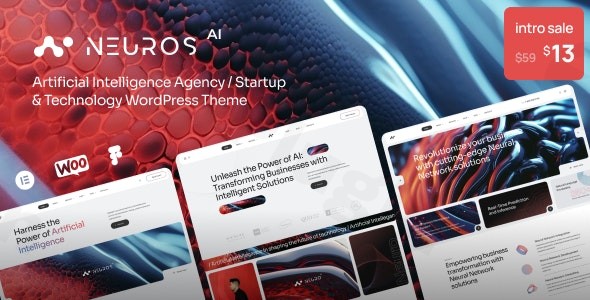
The Neuros WordPress Theme stands at the forefront of web design innovation, offering an intelligent, AI-powered solution for agencies, startups, and technology-focused businesses. Designed to provide a sleek, modern, and futuristic online presence, Neuros integrates artificial intelligence features to streamline the design and customization process. This makes it an ideal choice for AI agencies, tech startups, creative studios, marketing agencies, consultants, photographers, designers, artists, and general business websites that demand a contemporary and professional aesthetic with cutting-edge capabilities.
Key Features: Design, Layout & Performance for the Modern Web
Neuros is engineered to deliver a powerful visual impact alongside robust functionality, leveraging AI to enhance both the user and developer experience.
Design & Layout Options
Neuros revolutionizes website design with its AI-powered layout generation, offering intelligent suggestions for an optimal user experience. The theme supports versatile layout options, including full-width and standard layouts, ensuring your content always looks pristine. It comes packed with a wide array of pre-built templates and homepage demos specifically tailored for:
- AI agencies and neural networks
- AI tools and IT services
- General business sites and creative studiosBeyond homepages, Neuros provides diverse portfolio and blog styles, ensuring you can showcase your work and share insights with elegance. Its design philosophy emphasizes a modern, sleek, and futuristic aesthetic, perfect for conveying expertise in the technology sector.
Customization Capabilities
Personalizing your site with Neuros is intuitive and extensive, allowing for deep branding without touching a line of code.
- Smart Color Palette Generator: Based on your branding, this AI-driven feature helps you establish a cohesive and professional look. You also have unlimited color options and the ability to effortlessly switch between light and dark modes to match user preference or time of day.
- Advanced Typography: With access to over 650 Google Fonts and fine-tuned typography controls, you can achieve precise text styling that reflects your brand’s voice.
- Theme Options & Elementor Integration: Neuros comes with a powerful, Redux-powered theme options panel for global adjustments to headers, footers, sidebars, and page headings. For granular control over individual page elements, sections, and backgrounds, its full compatibility with Elementor—the world’s leading live page builder—provides a drag-and-drop interface. This includes custom Elementor widgets tailored to Neuros’s layouts, such as a Projects Listing widget and a custom Tabs widget.
Performance & SEO Features
A high-performing website is crucial for user engagement and search engine rankings. Neuros is built for speed and reliability, incorporating clean HTML5 and CSS3 code and AJAX loading for dynamic content. It boasts a responsive framework that ensures pixel-perfect rendering across all devices and screen sizes, making it 100% responsive and retina-ready. Furthermore, its cross-browser compatibility guarantees a consistent experience for all visitors.For SEO performance, Neuros offers automated content structuring and is compatible with renowned SEO plugins like Yoast, ensuring your content is optimized for discoverability. These performance enhancements contribute to faster deployment and higher conversion rates through data-driven design.
Installation & Demo Import: Getting Started with Neuros
Setting up your website with the Neuros WordPress Theme is designed to be straightforward, even for those without extensive technical knowledge.
- Install & Activate the Theme: After downloading Neuros, navigate to your WordPress dashboard. Go to
Appearance > Themes > Add New > Upload Theme, choose the Neuros theme ZIP file, and clickInstall Now. Once uploaded, clickActivate. - Install Required Companion Plugins: Upon activation, Neuros will typically prompt you to install any necessary plugins. This often includes Elementor for page building and potentially WooCommerce if you plan to run an online store. Follow the on-screen instructions to install and activate all recommended plugins.
- One-Click Demo Import: Neuros features a convenient one-click demo content import functionality. This is usually found within the theme options panel or a dedicated ‘Demo Import’ section in your WordPress dashboard. Select your desired demo (e.g., AI Agency, Neural Network, IT Services) and initiate the import process.
- What to Expect After Demo Import: Once the demo import is complete, your website will be populated with pre-built pages, posts, sample content, menus, and widgets, mimicking the exact design of the demo site. This provides an excellent foundation, allowing you to simply replace the placeholder content with your own. It’s important to ensure your server resources (like PHP memory limit and execution time) are sufficient for a smooth import, especially for larger demos, to prevent timeouts.
Customization Guide: Branding Your Neuros Website
Neuros offers extensive options to personalize your site, making it truly reflect your brand identity and vision.
- WordPress Customizer & Theme Options Panel: The primary hub for global styling is the Redux-powered theme options panel. Here, you can easily control elements like:
- Colors: Utilize the unlimited color options or the smart color palette generator to define your brand’s primary and accent colors, and switch between light and dark modes.
- Typography: Select from over 650 Google Fonts and fine-tune font sizes, weights, and line heights for headings and body text.
- Logo & Favicon: Upload your brand logo and favicon to establish your visual identity across the site.
- Header & Footer Layouts: Customize the structure and content of your header and footer areas, including contact information, social links, and navigation.
- Sidebars: Manage widget areas and sidebar options to display relevant content throughout your site.
- Setting Up Your Homepage and Blog Page: From the WordPress Customizer or
Settings > Reading, you can designate any static page as your homepage and another page as your blog archives. The pre-built demo pages offer excellent starting points. - Menu Management: Neuros integrates with Max Mega Menu for advanced navigation possibilities. Go to
Appearance > Menusto create and assign menus to your chosen header locations, enhancing user navigation with custom styles and sub-menus. - Elementor for Page-Specific Layouts: For detailed page construction, Elementor provides a drag-and-drop interface. You can build hero banners, feature grids, testimonial sliders, and any custom section, leveraging Neuros’s dedicated Elementor widgets. The theme also includes a child theme, allowing for safe custom CSS and JS additions without affecting core theme files during updates.The customization experience with Neuros is designed to be intuitive and code-free, making it accessible for beginners while offering the flexibility advanced users expect.
FAQ & Troubleshooting
Is Neuros compatible with Elementor, WPBakery, or Gutenberg?
Neuros is fully compatible with Elementor, serving as its primary and recommended page builder, offering an intuitive live editing experience. While modern WordPress themes generally support the Block Editor (Gutenberg), Elementor is highlighted for its deep integration and custom widgets within Neuros. There is no explicit mention of WPBakery compatibility in the provided information.
Does Neuros support WooCommerce for online stores?
Yes, Neuros offers built-in WooCommerce functionality, making it fully compatible for creating and managing e-commerce sites. This allows you to set up product pages, shopping carts, and checkout processes seamlessly within your AI agency or technology website.
Does Neuros support child themes?
Yes, the Neuros theme includes a child theme to facilitate safe customizations. Using a child theme ensures that any modifications you make to the theme’s code or styles will not be overwritten when you update the main Neuros theme.
How can I update the Neuros theme without losing my customizations?
To update the Neuros theme safely, always use the provided child theme for any custom CSS, JavaScript, or template modifications. When an update is available, you can usually update the parent theme directly through your WordPress dashboard (Appearance > Themes) without impacting the customizations made in your child theme.
What should I do if the demo import in Neuros fails or looks different from the demo site?
If the demo import fails, first check your server’s PHP settings (memory limit, execution time, post_max_size, upload_max_filesize) to ensure they meet WordPress and theme requirements. You might also try increasing these values. If the imported demo looks different, ensure all required plugins (especially Elementor) are installed and activated, and that your WordPress and theme versions are up to date. Sometimes, clearing your website and browser cache can also resolve display issues.
Conclusion
The Neuros WordPress Theme is a compelling choice for any AI agency, technology startup, or innovative business seeking a modern, high-performing, and visually stunning online presence. Its unique selling proposition lies in its AI-powered design tools, which simplify layout generation, color scheme selection, and content structuring, making advanced web design accessible to all.From its responsive framework and robust performance optimizations to its deep integration with Elementor and WooCommerce, Neuros offers a comprehensive solution for creating everything from corporate websites and creative portfolios to fully functional online stores. It shines for users who value a cutting-edge aesthetic and the efficiency of AI-assisted design, providing a structured toolkit that stands out from generic multipurpose themes.Whether you’re a freelancer building client sites, an agency showcasing your expertise, or a startup launching a new product, Neuros provides the design flexibility, customization options, and SEO readiness to help you establish a strong, future-proof digital footprint. It represents a smart investment for those looking to convey a technologically advanced and professional brand image without requiring extensive coding knowledge.
I. Download Limits & Account Benefits
- Free Downloads: Each email address receives 3 downloads per day for free products
- Upgrade Benefits: Purchase any paid product to increase your daily download limit by 3 for each paid product
- No Account Required: You can download immediately by receiving the download link via email
- Account Recommended: Create an account for easier access to your order history and direct update downloads
II. Understanding GPL vs Official Versions
Important: The products available on WPPick are GPL-licensed versions, which differ from official developer versions. Before purchasing, please read our comprehensive guide: Understanding GPL & Official Differences at WPPick
Key Points:
- GPL versions may not include premium support from original developers
- Updates may be delayed compared to official releases
- Some premium features might have limitations
- Always consider your specific needs and support requirements
III. Support & Assistance
We’re here to help through multiple channels:
- Email Support: Direct email assistance for all inquiries
- Live Chat: Real-time support during business hours
- Comprehensive Documentation: Detailed guides and tutorials
IV. Order Tracking
Access your complete purchase history and download links anytime: Order History
V. Account Access
New to WPPick? Login or Create Account to manage your downloads and orders efficiently.
VI. Refund Protection
We stand behind our products with a clear refund policy. Review our terms: Refund Policy
VII. Privacy & Security
Your data security is our priority. Learn how we protect your information: Privacy Policy
VII. Terms of Service
Understanding our service terms ensures a smooth experience: Terms of Use
Quick Tips for Best Experience
- Verify Compatibility: Check plugin/theme compatibility with your WordPress version
- Backup First: Always backup your site before installing new plugins or themes
- Test Environment: Consider testing on a staging site first
- Stay Updated: Regularly check for updates in your account dashboard
- Read Documentation: Review any included documentation for optimal setup
Need Help?
If you have questions about downloads, licensing, or need technical assistance, don’t hesitate to contact our support team. We’re committed to ensuring you have the best possible experience with WPPick products.
Ready to get started? Your download adventure begins with just one click!
- Slider Carousel fullwidth section fix
- Fixed colors changing after other color scheme demo import
- Fixed Mega Menu styles after demo import
- Updated textdomain connection for theme and plugin, now they are loaded at 'init' event
- Updated language files
- Removed obsolete code in /woocommerce/wooinit.php file, which could prevent new users from registering in the store
- Updated /woocommerce/myaccount/form-login.php file to version 9.9.0 for compatibility with the latest versions of WooCommerce
- Minor fixes to form styles on WooCommerce pages
- Updated rtl styles
- Updated demo data
- Theme button styles no longer affect Elementor editor service buttons
- Image Carousel widget navigation and pagination colors change correctly: added compatibility with new version of swiper carousel in Elementor
- Removed RTL settings in sliders, now sliders switch to RTL mode automatically