

Nilah – Fashion, Jewelry Woocommerce Theme
/Year
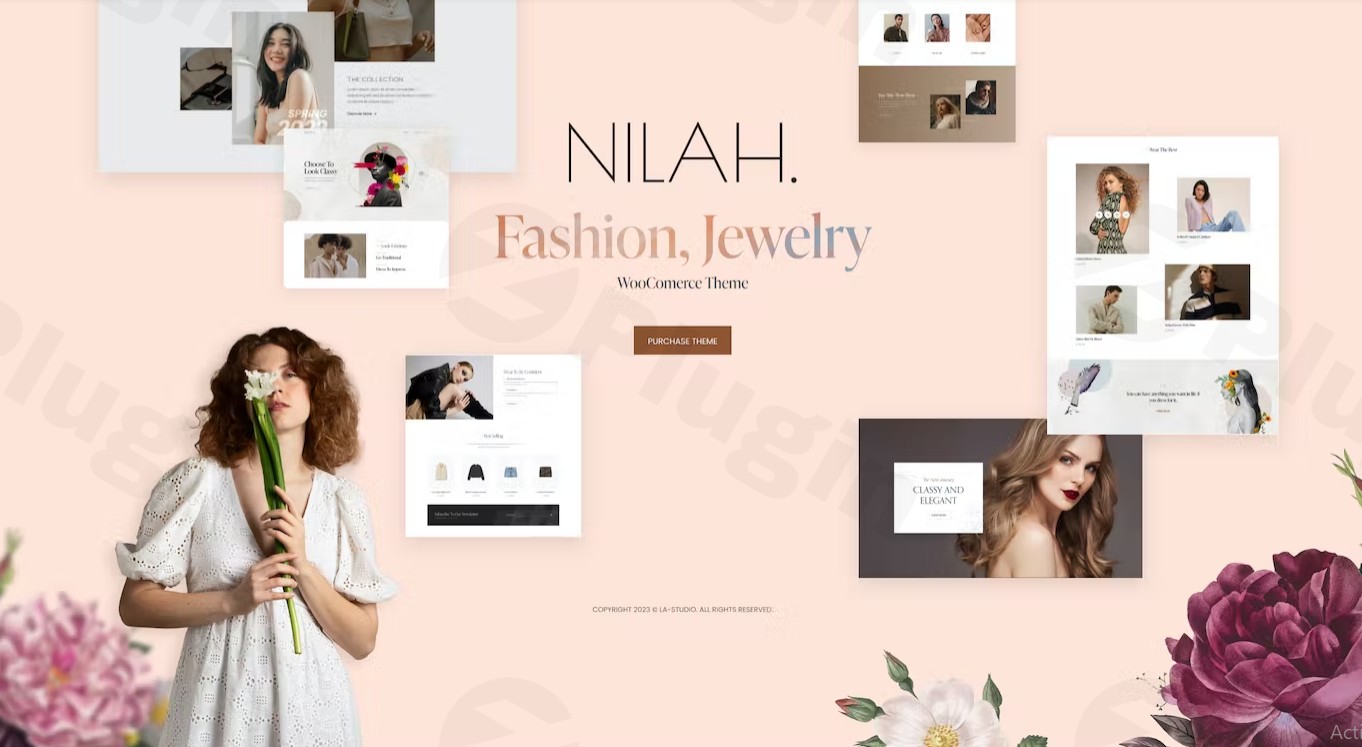
When it comes to high-end retail, aesthetics are everything. The Nilah WordPress theme is a premium Fashion WooCommerce theme designed specifically for brands that want to establish a “dazzling” and sophisticated online presence. Whether you are launching a luxury boutique or a high-end apothecary, Nilah provides the visual hierarchy and technical robusticity needed to turn casual browsers into loyal customers.Designed by LA-Studio, Nilah targets store owners and entrepreneurs who prioritize design-forward layouts without wanting to touch a single line of code. It bridges the gap between high-concept web design and user-friendly eCommerce functionality.
Key Features: Design, Layout & Performance
The Nilah WordPress theme is built on a foundation of visual storytelling. It doesn’t just list products; it showcases them through a lens of luxury and modern UI/UX principles.
Versatile Design & Layout Options
Nilah offers a variety of layout combinations that go beyond the standard eCommerce grid. Users can choose from Masonry, Grid, and Slider options for both blog and portfolio sections.
- 10+ Unique Demo Sites: These aren’t just skins; they are fully realized concepts for jewelry, beauty, and fashion.
- Dynamic Visual Elements: The theme incorporates beautiful loading animations, smooth toggles, and modal windows that contribute to a premium “boutique” feel.
- Header & Footer Builder: Unlike many themes that lock you into a few choices, Nilah allows you to build custom headers and footers that can be assigned on a page-by-page basis.
Customization Powered by Elementor
Nilah is a dedicated Elementor compatible fashion theme. It extends the power of the world’s most popular page builder by including over 70 custom Elementor elements. This means you aren’t just dragging in basic buttons; you are using specialized widgets designed specifically for high-end fashion and jewelry displays.
Performance & SEO Optimization
In the world of eCommerce, speed equals conversions. Nilah is built with performance in mind, supporting the compression of JavaScript and CSS to ensure fast load times. From an SEO perspective, the theme features clean markup and is compatible with popular optimization plugins, making it easier for your products to rank on Google and appear in AI-driven search results like SGE.
Installation & Demo Import: A Step-by-Step Guide
Setting up your Jewelry WordPress theme shouldn’t be a technical hurdle. Nilah simplifies the process through an intuitive onboarding workflow.
- Install & Activate: Upload the Nilah theme file via your WordPress Dashboard (Appearance > Themes > Add New).
- Plugin Setup: Upon activation, the theme will prompt you to install required companion plugins, including Elementor, WooCommerce, and Slider Revolution (which is included for free, saving you approximately $26).
- One-Click Demo Import: Navigate to the theme options panel to find the One-Click Demo Importer. Choose from the 10+ available fashion and jewelry demos.
- Wait for Content: The importer will pull in sample products, menus, and high-quality layouts.
- Pro Tip: Ensure your server’s memory limit is set to at least 256MB to prevent timeouts during the import of high-resolution media.
Customization Guide: Branding Your Store
Once the demo is imported, personalizing the Nilah WordPress theme to match your brand identity is handled primarily through the Elementor interface and the WordPress Customizer.
- Global Styling: Use the Elementor Template Library to save and reuse design patterns across your site, ensuring consistent branding from the homepage to the checkout.
- Typography & Color: While Nilah provides stunning defaults, you can easily adjust the color palette and typography via the global settings to match your brand’s “look and feel”—be it minimal and airy or bold and avant-garde.
- Mega Menus: For stores with large inventories, Nilah’s built-in Mega Menu builder allows you to create organized, image-rich navigation that helps users find products faster.
- Child Theme Usage: For developers looking to make advanced modifications, Nilah includes a Child Theme in the package. This ensures your custom code remains intact even after theme updates.
FAQ & Troubleshooting
Is the Nilah theme good for beauty products?
Yes, while Nilah is marketed as a Fashion WooCommerce theme, its clean lines and “dazzling” visual effects make it an excellent choice for beauty, cosmetics, and skincare brands that require a high-end, aesthetic presentation.
Does Nilah support the Elementor Page Builder?
Absolutely. Nilah is deeply integrated with Elementor and includes over 70 custom widgets and elements specifically designed to enhance the e-commerce shopping experience.
Does it support WooCommerce for online stores?
Yes, full WooCommerce compatibility is the core of the Nilah theme. It includes specialized eCommerce features like an Ajax Cart and optimized product display layouts to drive sales.
How do I update the Nilah WordPress theme?
You can update the theme directly through the WordPress dashboard if you have linked your marketplace account, or by downloading the latest version from your provider and re-uploading the files. Because a child theme is included, your custom styles will remain safe during updates.
What should I do if the demo import fails?
If the demo import looks different or fails, check your server’s PHP limits (especially max_execution_time and memory_limit). You can also reach out to LA-Studio’s 24/7 professional support for manual assistance.
Conclusion: Is Nilah Right for Your Brand?
The Nilah WordPress theme is a powerhouse for any brand operating in the luxury, fashion, or jewelry sectors. Its primary strength lies in its ability to deliver a “pixel-perfect” design that looks expensive and professional right out of the box.For store owners who want the flexibility of Elementor paired with high-performance eCommerce features, Nilah is a top-tier contender. While it has a specific niche focus, its versatility allows it to adapt to any brand that values visual storytelling and a seamless user experience. If you are looking to build a high-converting, SEO-friendly online boutique, Nilah provides all the tools necessary to succeed in a competitive digital landscape.Ready to build your dream store? Visit wppick.com for more WordPress theme insights and optimization strategies.
I. Download Limits & Account Benefits
- Free Downloads: Each email address receives 3 downloads per day for free products
- Upgrade Benefits: Purchase any paid product to increase your daily download limit by 3 for each paid product
- No Account Required: You can download immediately by receiving the download link via email
- Account Recommended: Create an account for easier access to your order history and direct update downloads
II. Understanding GPL vs Official Versions
Important: The products available on WPPick are GPL-licensed versions, which differ from official developer versions. Before purchasing, please read our comprehensive guide: Understanding GPL & Official Differences at WPPick
Key Points:
- GPL versions may not include premium support from original developers
- Updates may be delayed compared to official releases
- Some premium features might have limitations
- Always consider your specific needs and support requirements
III. Support & Assistance
We’re here to help through multiple channels:
- Email Support: Direct email assistance for all inquiries
- Live Chat: Real-time support during business hours
- Comprehensive Documentation: Detailed guides and tutorials
IV. Order Tracking
Access your complete purchase history and download links anytime: Order History
V. Account Access
New to WPPick? Login or Create Account to manage your downloads and orders efficiently.
VI. Refund Protection
We stand behind our products with a clear refund policy. Review our terms: Refund Policy
VII. Privacy & Security
Your data security is our priority. Learn how we protect your information: Privacy Policy
VII. Terms of Service
Understanding our service terms ensures a smooth experience: Terms of Use
Quick Tips for Best Experience
- Verify Compatibility: Check plugin/theme compatibility with your WordPress version
- Backup First: Always backup your site before installing new plugins or themes
- Test Environment: Consider testing on a staging site first
- Stay Updated: Regularly check for updates in your account dashboard
- Read Documentation: Review any included documentation for optimal setup
Need Help?
If you have questions about downloads, licensing, or need technical assistance, don’t hesitate to contact our support team. We’re committed to ensuring you have the best possible experience with WPPick products.
Ready to get started? Your download adventure begins with just one click!
- Compatibility with WordPress 6.9.x
- Compatibility with WooCommerce 10.4.x
- Compatibility with WooCommerce 3.34.x
- Update Revolution Slider 6.7.40