

Nimbo – Personal WordPress Blog Theme
/Year
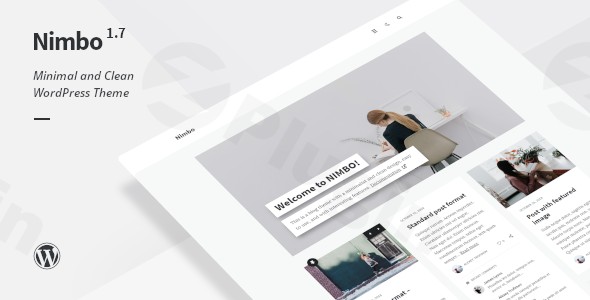
If you are a writer, journalist, or hobbyist blogger looking for a clean, distraction-free environment to share your stories, the Nimbo WordPress theme is designed specifically for you. Unlike heavy, multipurpose themes that overwhelm users with endless settings, Nimbo focuses on the core of blogging: readability, speed, and a sophisticated aesthetic. As a Nimbo Personal Blog Theme, it prioritizes a minimalist design philosophy that puts your content front and center. Whether you are launching a travel diary, a professional portfolio, or a niche review site, this theme provides a lightweight framework that ensures your website remains fast and visually engaging across all devices.
Key Features: Design, Layout, and Performance
The Nimbo WordPress theme stands out in the crowded blogging market by offering a curated selection of layouts that feel intentional rather than cluttered. It is a lightweight WordPress blog theme built for high performance and ease of use.
Sophisticated Layout Options
Nimbo offers flexibility where it matters most for content creators:
- Header & Menu Styles: Choose between two distinct header styles (Minimalist and Classic) and two menu types with full dropdown support.
- Blog & Page Layouts: The theme includes three different blog layout configurations, including a Masonry layout (with horizontal ordering support) that is perfect for visual storytelling. You also get three dedicated layouts for single pages.
- Unique Visual Elements: Support for popup windows allows you to display images, video/audio players, and galleries elegantly without navigating away from the page.
Customization and The Dark Mode Experience
One of Nimbo’s most impressive features is the live light/dark style switcher. This allows visitors to toggle their preferred viewing mode instantly, and the theme “remembers” this preference for their next visit—a significant boost for user experience (UX). You can also set the default global style to dark or light within the WordPress Customizer.
Speed and SEO Performance
Nimbo is a fast loading WordPress theme for bloggers because it avoids the “code bloat” common in many premium themes.
- Clean Markup: The theme uses structured headings and clean HTML5/CSS3, making it highly SEO-friendly.
- Gutenberg Optimized: It is fully compatible with the WordPress Block Editor (Gutenberg), ensuring that your content looks great and loads efficiently.
* Mobile Responsiveness: The design is fully fluid, performing flawlessly on Firefox, Safari, Chrome, and Edge, as well as mobile and tablet devices.
Installation and Demo Import Guide
Setting up the Nimbo WordPress theme is a straightforward process, even for beginners. Follow these steps to get your blog live:
- Install the Theme: From your WordPress Dashboard, go to Appearance > Themes > Add New. Upload the
nimbo.zipfile and click Activate. - Install Required Plugins: Nimbo requires the Meta Box plugin to handle advanced post and page settings. It also recommends the Nimbo Social Media and Nimbo Widgets plugins to enable social sharing and custom sidebar features.
- Import Demo Content: To match the look of the official Nimbo demo, use the built-in demo import feature. This will populate your site with sample posts, menus, and widgets, giving you a perfect starting point.
- Final Polish: Once the import is complete, navigate to the Customizer to set your site logo and primary menu.
Pro Tip: Ensure your server is running a modern version of WordPress (6.7 or higher) to guarantee full compatibility with Nimbo’s latest features.
How to Customize the Nimbo Theme
Personalizing your Nimbo Personal Blog Theme is done primarily through the intuitive WordPress Customizer (Appearance > Customize).
Branding and Typography
Nimbo integrates seamlessly with popular Google Fonts, such as Lora, Source Sans Pro, Playfair Display, and PT Sans. You can adjust your typography and global color schemes in real-time to match your personal brand.
Widget Areas and Sidebars
The theme provides three dedicated widget areas in the footer. By using the Nimbo Widgets plugin, you can easily add:
- Popular and recent post lists.
- A post slider for your homepage.
- “About the Author” sections to build trust with your readers.
Child Theme Support
For power users who want to make deep code customizations, Nimbo includes a nimbo-child.zip file. Using a child theme ensures that your custom CSS or functional changes are not overwritten when the parent theme receives updates.
FAQ: Nimbo WordPress Theme Troubleshooting
Is Nimbo compatible with page builders like Elementor or WPBakery?
While Nimbo is strictly Gutenberg Optimized and works perfectly with the default WordPress Block Editor, it does not officially market deep integration with Elementor or WPBakery. It is designed to be a streamlined blog theme rather than a complex drag-and-drop page builder framework.
Does Nimbo support WooCommerce for online stores?
Nimbo is a content-focused personal blog theme and does not include built-in styling or specific support for WooCommerce. If you need a full eCommerce solution, a multipurpose theme might be more suitable; however, Nimbo is perfect for those who prioritize writing over retail.
How do I enable Dark Mode in Nimbo?
You can enable and customize the dark style through the WordPress Customizer. Nimbo features a unique live switcher that allows your audience to choose their preference, which the theme saves for their future visits.
Is the Nimbo theme good for SEO?
Yes, Nimbo is considered SEO-ready due to its lightweight code, fast loading times, and clean header hierarchy. Its focus on performance helps improve Core Web Vitals, which is a key ranking factor for Google.
Conclusion: Is Nimbo Right for You?
The Nimbo WordPress theme is a masterclass in minimalist web design. It is the ideal choice for bloggers, writers, and journalists who want a professional, fast, and elegant platform without the technical headache of multipurpose themes.Choose Nimbo if:
- You want a clean, minimalist WordPress theme that highlights your writing.
- You value page speed and mobile performance.
- You want a unique “Dark Mode” feature for your readers.
- You prefer using the native WordPress Block Editor (Gutenberg).While it may not be the best fit for complex eCommerce or corporate sites, its focus on the personal blogging experience makes it one of the most efficient and aesthetically pleasing themes available on the market today. Ready to start your journey? You can find Nimbo on ThemeForest and begin building your dream blog at wppick.com.
I. Download Limits & Account Benefits
- Free Downloads: Each email address receives 3 downloads per day for free products
- Upgrade Benefits: Purchase any paid product to increase your daily download limit by 3 for each paid product
- No Account Required: You can download immediately by receiving the download link via email
- Account Recommended: Create an account for easier access to your order history and direct update downloads
II. Understanding GPL vs Official Versions
Important: The products available on WPPick are GPL-licensed versions, which differ from official developer versions. Before purchasing, please read our comprehensive guide: Understanding GPL & Official Differences at WPPick
Key Points:
- GPL versions may not include premium support from original developers
- Updates may be delayed compared to official releases
- Some premium features might have limitations
- Always consider your specific needs and support requirements
III. Support & Assistance
We’re here to help through multiple channels:
- Email Support: Direct email assistance for all inquiries
- Live Chat: Real-time support during business hours
- Comprehensive Documentation: Detailed guides and tutorials
IV. Order Tracking
Access your complete purchase history and download links anytime: Order History
V. Account Access
New to WPPick? Login or Create Account to manage your downloads and orders efficiently.
VI. Refund Protection
We stand behind our products with a clear refund policy. Review our terms: Refund Policy
VII. Privacy & Security
Your data security is our priority. Learn how we protect your information: Privacy Policy
VII. Terms of Service
Understanding our service terms ensures a smooth experience: Terms of Use
Quick Tips for Best Experience
- Verify Compatibility: Check plugin/theme compatibility with your WordPress version
- Backup First: Always backup your site before installing new plugins or themes
- Test Environment: Consider testing on a staging site first
- Stay Updated: Regularly check for updates in your account dashboard
- Read Documentation: Review any included documentation for optimal setup
Need Help?
If you have questions about downloads, licensing, or need technical assistance, don’t hesitate to contact our support team. We’re committed to ensuring you have the best possible experience with WPPick products.
Ready to get started? Your download adventure begins with just one click!