

Nioland – Saas & Software Startup Tech WordPress Theme
/Year
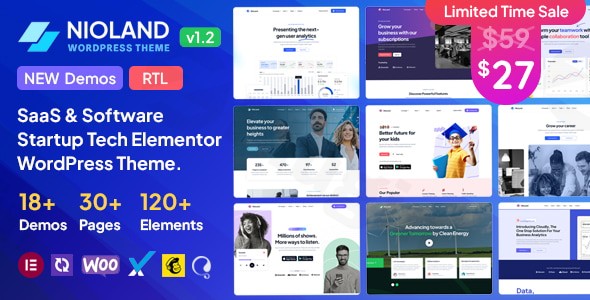
In the fast-paced world of technology, your website is often the first point of contact for potential investors and customers. The Nioland WordPress theme is a premium, multi-purpose solution specifically engineered to meet the demands of the modern SaaS WordPress theme market. Designed with a professional, clean, and tech-forward aesthetic, Nioland provides software startups and digital agencies with the tools needed to build a high-converting online presence without writing a single line of code.
Whether you are launching a new mobile app, a complex analytics platform, or a project management tool, Nioland offers a design philosophy rooted in clarity and user experience. Built on the robust Bootstrap 5 framework, it ensures your site looks as innovative as the technology you develop.
Key Features: Design, Layout & Performance
Nioland isn’t just a skin for WordPress; it is a comprehensive design system tailored for the tech industry. It prioritizes visual hierarchy and conversion-focused layouts to help businesses articulate their value propositions clearly.
Modern Design & Professional Layouts
Nioland offers a versatile array of layout variations, emphasizing full-width designs that make a bold impact.
- 19+ Prebuilt Demos: The theme comes packed with numerous starter sites for niches like language learning, help desks, finance, and software analytics.
- Responsive & Mobile-First: Every element is 100% responsive, ensuring your software startup WordPress theme looks flawless on everything from high-resolution monitors to smartphones.
Extensive Customization Capabilities
The theme provides deep integration with Elementor, the world’s leading drag-and-drop page builder. This allows users to control:
- Global Styles: Manage typography (Google Fonts) and color schemes across the entire site through a dedicated options panel.
- Advanced Headers & Footers: Build complex navigation menus and information-rich footers directly within the Elementor interface.
- Custom Post Types: Effortlessly manage portfolios, testimonials, and service lists to build social proof.
Performance & SEO Readiness
Nioland is built with clean code and a focus on speed. While it is feature-rich, it is “Optimized for best performance” to ensure fast loading times—a critical factor for both user retention and search engine rankings. Its semantic HTML structure is inherently SEO-friendly, helping your startup climb the SERPs (Search Engine Results Pages).
Installation & Demo Import
Setting up the Nioland WordPress theme is designed to be a frictionless experience, even for those who aren’t tech-savvy.
- Upload and Activate: After purchasing the theme, upload the
nioland.zipfile via your WordPress Dashboard (Appearance > Themes > Add New). - Plugin Installation: Upon activation, you will be prompted to install required companion plugins. This includes Elementor, Contact Form 7, and MailChimp for WordPress.
- One-Click Demo Import: Navigate to the theme options to find the demo importer. Choose from one of the 19+ niche-specific demos to import pages, menus, and media.
- Final Checks: Once the import is complete, ensure your permalinks are set to “Post name” and your navigation menus are assigned to their respective locations (Header/Mobile Menu).
Note: Ensure your hosting environment is running PHP 7.4 or higher and has sufficient memory limits to prevent timeouts during the demo content import.
Customization Guide: Branding & Layout
Personalizing Nioland to match your corporate identity is intuitive thanks to its 100+ Customizer options.
- Branding: Upload your logo, set your favicon, and define your brand colors within the “Global Colors” section of the Customizer. This ensures consistency across all buttons, icons, and accents.
- Typography: Access the full library of Google Fonts to choose a typeface that reflects your brand’s personality—whether that’s a professional Serif or a clean, modern Sans-Serif.
- Header & Mega Menus: Use the built-in Header Builder to create transparent headers for landing pages or complex Mega Menus for sites with deep information architecture.
* Child Theme Support: For developers looking to add custom CSS or PHP functions, Nioland includes a child theme (Nioland-child.zip). Always activate this first to ensure your customizations are not lost during theme updates.
FAQ & Troubleshooting
Is Nioland theme good for startups?
Yes, Nioland is specifically designed for software startups and SaaS companies. It includes specialized layouts for pricing tables, feature comparisons, and lead-generation forms that are essential for growing a tech business.
Is the Nioland WordPress theme compatible with Elementor?
Nioland is a fully Elementor compatible tech theme. It includes custom Elementor add-ons and widgets that extend the builder’s functionality, allowing you to create complex layouts without touching any code.
Does Nioland support WooCommerce for online stores?
Absolutely. Nioland is fully compatible with WooCommerce. This makes it an excellent choice for businesses that need to sell digital subscriptions, software licenses, or physical tech products directly from their website.
Is Nioland optimized for the WordPress Block Editor (Gutenberg)?
Based on technical documentation, Nioland is not currently optimized for Gutenberg. It is designed to be used primarily with Elementor to provide the highest level of design flexibility and control.
How can I update the theme without losing my customizations?
To protect your changes, always use the included Nioland Child Theme for any code modifications. For CSS changes, use the “Additional CSS” section in the Customizer or the Elementor global settings.
Conclusion
The Nioland WordPress theme stands out as a premier solution for the technology sector. By combining the power of Elementor with a professional, Bootstrap 5-based design, it removes the technical barriers to launching a world-class website. While it lacks native Gutenberg optimization, its deep integration with the most popular page builder and e-commerce tools makes it a powerhouse for SaaS and software startups. If you are looking for a responsive, SEO-ready, and highly customizable theme to elevate your tech brand, Nioland is a confident and reliable choice.Visit wppick.com for more expert WordPress theme reviews and web design strategies.
I. Download Limits & Account Benefits
- Free Downloads: Each email address receives 3 downloads per day for free products
- Upgrade Benefits: Purchase any paid product to increase your daily download limit by 3 for each paid product
- No Account Required: You can download immediately by receiving the download link via email
- Account Recommended: Create an account for easier access to your order history and direct update downloads
II. Understanding GPL vs Official Versions
Important: The products available on WPPick are GPL-licensed versions, which differ from official developer versions. Before purchasing, please read our comprehensive guide: Understanding GPL & Official Differences at WPPick
Key Points:
- GPL versions may not include premium support from original developers
- Updates may be delayed compared to official releases
- Some premium features might have limitations
- Always consider your specific needs and support requirements
III. Support & Assistance
We’re here to help through multiple channels:
- Email Support: Direct email assistance for all inquiries
- Live Chat: Real-time support during business hours
- Comprehensive Documentation: Detailed guides and tutorials
IV. Order Tracking
Access your complete purchase history and download links anytime: Order History
V. Account Access
New to WPPick? Login or Create Account to manage your downloads and orders efficiently.
VI. Refund Protection
We stand behind our products with a clear refund policy. Review our terms: Refund Policy
VII. Privacy & Security
Your data security is our priority. Learn how we protect your information: Privacy Policy
VII. Terms of Service
Understanding our service terms ensures a smooth experience: Terms of Use
Quick Tips for Best Experience
- Verify Compatibility: Check plugin/theme compatibility with your WordPress version
- Backup First: Always backup your site before installing new plugins or themes
- Test Environment: Consider testing on a staging site first
- Stay Updated: Regularly check for updates in your account dashboard
- Read Documentation: Review any included documentation for optimal setup
Need Help?
If you have questions about downloads, licensing, or need technical assistance, don’t hesitate to contact our support team. We’re committed to ensuring you have the best possible experience with WPPick products.
Ready to get started? Your download adventure begins with just one click!
- Compatibility with WordPress 6.9
- WooCommerce outdated templates 10.3.X
- Included plugins
- Redux Framework