

Obour | Digital Marketing Agency WordPress Theme
/Year
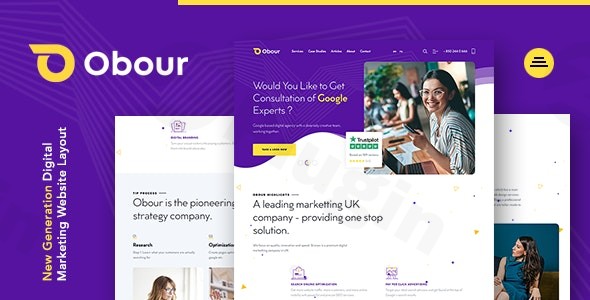
Building a high-converting online presence is critical for growth in the competitive landscape of digital advertising. The Obour WordPress theme is a premium, responsive solution specifically engineered for digital marketing agencies, SEO professionals, and creative consultancies. With its modern aesthetic and conversion-focused layouts, Obour aims to bridge the gap between sophisticated design and technical functionality.Whether you are an agency owner looking to refresh your brand or a freelancer building sites for clients, this Digital Marketing Agency WordPress Theme provides a professional framework to showcase services, portfolios, and client results with minimal friction.
Key Features: Design, Layout & Performance
Obour stands out by moving away from generic corporate aesthetics and embracing a “new generation” design philosophy. It focuses on a clean, professional, and high-impact visual style that resonates with modern tech audiences.
1. High-Converting Layout Options
The theme comes packed with 11+ prebuilt demos (9+ highly converting ready-made templates) that cater to various agency niches. These include:
- Full-Width and Modern Grids: Perfect for showcasing large-scale imagery and bold typography.
- Smart Sticky Navbar: Enhances user experience by keeping navigation accessible during long-scroll sessions.
- Creative Interaction UI: Smooth animated preloaders, parallax backgrounds, and hover effects that give the site a premium, custom-coded feel.
2. Deep Customization Capabilities
While the default “white and purple” color scheme is striking, Obour offers extensive flexibility through ACF Theme Options. This allows users to control global styles without touching code.
- Typography: Full integration with Google Fonts ensures your brand’s voice is consistent across all pages.
- Header & Footer Builder: The theme includes up to six default header layouts and three footer layouts, with the ability to create more using the integrated page builder.
- Retina Ready Design: Ensures all elements, icons, and text look crisp on high-resolution displays like iPhones and MacBooks.
3. Technical Performance & SEO Readiness
A responsive marketing agency theme must be fast and search-engine friendly. Obour is built with clean markup and is optimized for cross-browser compatibility (Chrome, Firefox, Safari, Edge). Because it uses the WP Bakery Page Builder and Advanced Custom Fields (ACF), the code is structured to be “SEO-friendly,” helping your agency rank for critical local and global keywords.
Installation & Demo Import: A Step-by-Step Guide
Getting your agency site live with Obour is a streamlined process designed for both beginners and experienced developers.
- Install & Activate: Upload the
obour.zipfile via your WordPress Dashboard (Appearance > Themes > Add New). Once uploaded, click Activate. - Install Required Plugins: Upon activation, you will see a prompt to install required plugins, including WP Bakery Page Builder, Contact Form 7, and the Obour Core plugin.
- One-Click Demo Import: Navigate to the theme options panel and locate the “Demo Import” section. Choose your preferred layout from the 11 available demos and click import.
- Pro Tip: Ensure your hosting environment has a PHP memory limit of at least 256MB to avoid timeouts during the import of high-resolution demo images.
- Final Polish: Once the import is complete, your site will look exactly like the Obour demo. You can then begin replacing the placeholder content with your agency’s copy.
Customization Guide: Personalizing Your Brand
Once the framework is in place, you can tailor the WP Bakery digital marketing theme to match your unique branding.
- Using the Theme Options: Use the ACF-powered options panel to change your logo, update the favicon, and set your primary brand colors.
- Page Building with WP Bakery: Every page is built using a drag-and-drop interface. To change a section, simply click the “Edit with WP Bakery” button on the front end. You can move blocks, change backgrounds to parallax videos, or adjust spacing with zero coding knowledge.
- Child Theme Support: For advanced developers, Obour includes a child theme. This is essential if you plan on adding custom PHP functions or CSS overrides, as it ensures your changes aren’t lost during theme updates.
FAQ & Troubleshooting
Is the Obour theme compatible with Elementor?
Obour is natively built on the WP Bakery Page Builder. While you can install Elementor, the prebuilt demos and theme-specific elements are designed specifically for WP Bakery. For the best experience, it is recommended to use the included builder.
Does it support WooCommerce for selling agency packages?
Yes, Obour is 100% plugin compatible. You can integrate WooCommerce to sell digital products, SEO audits, or marketing retainers directly through your website.
How do I update the theme without losing my customizations?
To keep your site safe, always use the included child theme for custom code. For general theme updates, you can re-upload the new version via FTP or use the Envato Market plugin to automate updates.
What are the requirements for the Obour WordPress theme?
The theme requires WordPress 5.0 or higher and PHP 5.6 or higher (though PHP 7.4+ or 8.x is recommended for better performance).
Conclusion: Is Obour Right for Your Agency?
The Obour WordPress theme is a robust, visually stunning solution for any digital marketing agency that values design and ease of setup. By leveraging the power of WP Bakery and ACF, it offers a level of customization that feels both intuitive for beginners and flexible for professionals.Pros:
- Elite author backing (themezinho).
- Unique, modern UI elements that stand out from competitors.
- Comprehensive demo content that speeds up the development cycle.Cons:
- Heavily reliant on WP Bakery (may be a downside for Gutenberg purists).
- Third-party license versions may lack direct developer support.If you are looking for an easy-to-use marketing agency theme that doesn’t sacrifice professional aesthetics, Obour is a top-tier choice. For more WordPress theme reviews and agency growth tips, visit wppick.com.
I. Download Limits & Account Benefits
- Free Downloads: Each email address receives 3 downloads per day for free products
- Upgrade Benefits: Purchase any paid product to increase your daily download limit by 3 for each paid product
- No Account Required: You can download immediately by receiving the download link via email
- Account Recommended: Create an account for easier access to your order history and direct update downloads
II. Understanding GPL vs Official Versions
Important: The products available on WPPick are GPL-licensed versions, which differ from official developer versions. Before purchasing, please read our comprehensive guide: Understanding GPL & Official Differences at WPPick
Key Points:
- GPL versions may not include premium support from original developers
- Updates may be delayed compared to official releases
- Some premium features might have limitations
- Always consider your specific needs and support requirements
III. Support & Assistance
We’re here to help through multiple channels:
- Email Support: Direct email assistance for all inquiries
- Live Chat: Real-time support during business hours
- Comprehensive Documentation: Detailed guides and tutorials
IV. Order Tracking
Access your complete purchase history and download links anytime: Order History
V. Account Access
New to WPPick? Login or Create Account to manage your downloads and orders efficiently.
VI. Refund Protection
We stand behind our products with a clear refund policy. Review our terms: Refund Policy
VII. Privacy & Security
Your data security is our priority. Learn how we protect your information: Privacy Policy
VII. Terms of Service
Understanding our service terms ensures a smooth experience: Terms of Use
Quick Tips for Best Experience
- Verify Compatibility: Check plugin/theme compatibility with your WordPress version
- Backup First: Always backup your site before installing new plugins or themes
- Test Environment: Consider testing on a staging site first
- Stay Updated: Regularly check for updates in your account dashboard
- Read Documentation: Review any included documentation for optimal setup
Need Help?
If you have questions about downloads, licensing, or need technical assistance, don’t hesitate to contact our support team. We’re committed to ensuring you have the best possible experience with WPPick products.
Ready to get started? Your download adventure begins with just one click!