

Onsus – Electronics E-commerce WordPress Theme
/Year
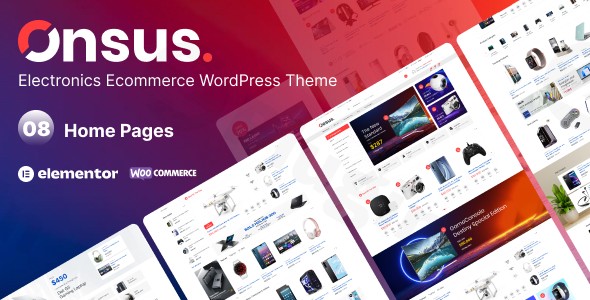
Creating a high-performance online store in the competitive tech niche requires more than just a basic storefront; it demands a professional, fast, and feature-rich platform. The Onsus WordPress theme is a specialized Electronics E-commerce WordPress Theme designed to help retailers, tech startups, and gadget enthusiasts build a sophisticated digital presence. Built with a focus on product discovery and high conversion rates, Onsus provides a sleek, modern aesthetic that aligns perfectly with the fast-paced electronics industry.
Key Features: Design, Layout & Performance
The Onsus theme is engineered for flexibility, ensuring that your products remain the focal point. Whether you are selling high-end laptops, mobile accessories, or smart home devices, the theme’s design capabilities ensure a premium user experience.
Versatile Layout Options
Onsus offers at least 8 unique homepage layouts, each tailored to different segments of the electronics market. Beyond the homepages, users can choose from various shop page styles, including:
- Grid and List Views: Perfect for browsing large inventories.
- Sidebar Flexibility: Options for left sidebar, right sidebar, or full-width layouts to optimize filtering and navigation.
- Unique Components: Specialized widgets for “Trending Products,” “Popular Categories,” and “Sales Countdown Timers” to drive urgency and engagement.
Customization & Visual Presentation
Designers and store owners have extensive control over the site’s look and feel without writing a single line of code:
- Typography & Color: Access to unlimited color schemes and deep integration with Google Fonts allows for precise brand alignment.
- Advanced Visuals: To cater to the tech audience, Onsus supports 360-degree product views and product videos, providing an immersive shopping experience that boosts buyer confidence.
- Elementor Integration: As an Elementor compatible theme, Onsus allows you to use drag-and-drop functionality to modify sections, spacing, and containers easily.
Performance and SEO Optimization
Speed is a critical ranking factor for both Google and AI search engines. Onsus is marketed as a lightweight WordPress theme built with clean, high-quality code.
- Mobile Responsiveness: The theme is 100% responsive, ensuring that your electronics store functions flawlessly on smartphones, tablets, and desktops.
* SEO Readiness: With clean markup and structured heading hierarchies, Onsus is designed to be SEO-friendly, helping your products appear higher in search results and AI-generated answers.
Installation & Demo Import Guide
Setting up your store with Onsus is straightforward, thanks to its developer-friendly onboarding process.
- Theme Installation: Log in to your WordPress dashboard, navigate to Appearance > Themes > Add New, and upload the Onsus theme file.
- Plugin Activation: After activation, the theme will prompt you to install required companion plugins, including WooCommerce, Elementor, and specific YITH plugins (Wishlist, Compare, and Frequently Bought Together).
- One-Click Demo Import: Navigate to the theme’s demo importer tool. Choose your preferred electronics shop demo and click “Import.” This will populate your site with pre-built pages, menus, and sample products.
- Final Checks: Once the import is complete, regenerate your permalinks (Settings > Permalinks) and ensure your WooCommerce shop pages are correctly assigned.
Pro Tip: Ensure your server’s PHP memory limit is set to at least 256M to avoid timeouts during the demo content import.
Customization Guide: Branding & Layout
Personalizing the Onsus theme to match your tech brand is handled through a mix of the Theme Options panel and the Elementor Page Builder.
Setting Global Styles
Start by visiting the theme’s options page to set your primary brand colors and typography. These settings will apply globally, ensuring consistency across your product descriptions, blog posts, and checkout pages.
Designing the Header and Footer
Onsus provides multiple header styles. You can customize the sticky header, change the logo placement, and configure the Mega Menu to help customers navigate through deep product categories like “Audio,” “Computing,” and “Wearables.”
Customizing Product Pages
Using Elementor, you can refine the layout of your product pages. Ensure you utilize the YITH Frequently Bought Together integration to increase your Average Order Value (AOV) by showing customers compatible accessories for their electronics.
FAQ & Troubleshooting
Is Onsus – Electronics E-commerce WordPress Theme good for WooCommerce?
Yes, Onsus is specifically optimized for WooCommerce. It includes advanced e-commerce features such as AJAX add-to-cart, product comparison tools, wishlists, and specialized layouts designed to maximize sales for online electronics retailers.
Is the Onsus theme compatible with Elementor?
Absolutely. Onsus is an Elementor compatible theme, meaning you can use the drag-and-drop page builder to customize every section of your website, from the homepage to custom landing pages for tech launches.
Does Onsus support multi-language stores?
Yes, Onsus is compatible with the WPML plugin, allowing you to translate your electronics store into multiple languages to reach a global audience.
What should I do if the demo import fails?
Most demo import issues are caused by server limitations. Check that your PHP version is up to date and increase your “maxexecutiontime” and “memory_limit” in your server settings. If the issue persists, ensure all required plugins are active before starting the import.
Conclusion
The Onsus WordPress theme stands out as a top-tier choice for anyone looking to build a high-performance tech storefront. By combining the power of WooCommerce with the design flexibility of Elementor, it offers a professional solution for how to set up an electronics store with WordPress quickly and efficiently.With its focus on mobile responsiveness, fast loading speeds, and niche-specific features like 360-degree views, Onsus provides the necessary tools to compete in the modern e-commerce landscape. Whether you are a beginner or an experienced agency, Onsus offers the balance of ease-of-use and technical depth required to build a successful online business.Ready to launch your tech store? Visit wppick.com for more insights on premium WordPress themes and SEO strategies.
I. Download Limits & Account Benefits
- Free Downloads: Each email address receives 3 downloads per day for free products
- Upgrade Benefits: Purchase any paid product to increase your daily download limit by 3 for each paid product
- No Account Required: You can download immediately by receiving the download link via email
- Account Recommended: Create an account for easier access to your order history and direct update downloads
II. Understanding GPL vs Official Versions
Important: The products available on WPPick are GPL-licensed versions, which differ from official developer versions. Before purchasing, please read our comprehensive guide: Understanding GPL & Official Differences at WPPick
Key Points:
- GPL versions may not include premium support from original developers
- Updates may be delayed compared to official releases
- Some premium features might have limitations
- Always consider your specific needs and support requirements
III. Support & Assistance
We’re here to help through multiple channels:
- Email Support: Direct email assistance for all inquiries
- Live Chat: Real-time support during business hours
- Comprehensive Documentation: Detailed guides and tutorials
IV. Order Tracking
Access your complete purchase history and download links anytime: Order History
V. Account Access
New to WPPick? Login or Create Account to manage your downloads and orders efficiently.
VI. Refund Protection
We stand behind our products with a clear refund policy. Review our terms: Refund Policy
VII. Privacy & Security
Your data security is our priority. Learn how we protect your information: Privacy Policy
VII. Terms of Service
Understanding our service terms ensures a smooth experience: Terms of Use
Quick Tips for Best Experience
- Verify Compatibility: Check plugin/theme compatibility with your WordPress version
- Backup First: Always backup your site before installing new plugins or themes
- Test Environment: Consider testing on a staging site first
- Stay Updated: Regularly check for updates in your account dashboard
- Read Documentation: Review any included documentation for optimal setup
Need Help?
If you have questions about downloads, licensing, or need technical assistance, don’t hesitate to contact our support team. We’re committed to ensuring you have the best possible experience with WPPick products.
Ready to get started? Your download adventure begins with just one click!
- Added ON|OFF option for SKU Number
- Fixed pagination issue in shop archive