

Organica – Organic, Beauty, Natural Cosmetics, Food, Farm And Eco WordPress Theme
/Year
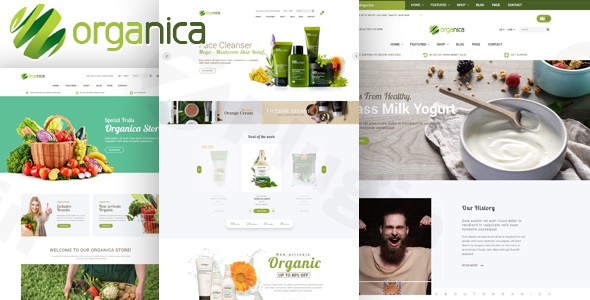
The Organica WordPress Theme is a meticulously crafted digital storefront designed specifically for businesses in the organic, natural, and eco-friendly product sectors. If you’re running an online shop for organic cosmetics, natural beauty products, nutritional foods, farm-fresh produce, or sustainable lifestyle goods, Organica provides a clean, bright, and professional platform. Its design philosophy, centered around green accents on white backgrounds, instantly conveys the purity and quality synonymous with your brand, making it an ideal choice for a WooCommerce organic store theme.
Key Features: Design, Layout & Performance
Organica isn’t just about aesthetics; it’s engineered with robust features to ensure your online organic business thrives.
Design & Layout Options
Organica offers significant flexibility to present your products in the best light. You can choose from six professionally designed homepage layouts, allowing you to instantly set a distinct tone for your store. Beyond the homepage, the theme includes multiple blog configurations to support your content marketing efforts and flexible header/footer designs, often facilitated by its integration with Visual Composer (now WPBakery Page Builder). Whether you prefer a clean, boxed layout or an immersive full-width design, Organica provides the options to match your brand’s vision.
Customization Capabilities
Powered by the Redux Framework, Organica puts extensive customization power at your fingertips without needing to touch a single line of code. This robust framework enables:
- Unlimited Color Customization: Easily adjust every visual element to perfectly align with your brand’s identity using a comprehensive color palette.
- Google Fonts Integration: Access a vast library of Google Fonts to define your website’s typography, ensuring readability and brand consistency.
- Fine-tuned Styling: Control spacing, container widths, and background settings with precision. The theme even includes sample background images to kickstart your design process.
eCommerce & Business Tools
Built upon the powerful WooCommerce 3.x platform, Organica integrates a suite of advanced eCommerce features essential for any modern organic retailer:
- Ajax Shopping Cart: Provides a smooth and seamless checkout experience, reducing cart abandonment.
- Product Quick View & Image Zoom: Customers can quickly inspect products and view high-resolution details, enhancing their shopping journey.
- Advanced Product Filtering: Allow customers to easily find products by attributes like size or color, streamlining the browsing process.
- Wishlist Functionality: Enables customers to save products for later, encouraging return visits and future purchases.
- Grid and List View Options: Offer flexibility in how products are displayed on your shop pages.
- Product Sale Countdown Timers: Create a sense of urgency for special offers, helping to drive conversions.
- Related Products & Upsell Suggestions: Smartly recommend additional items, increasing average order value.For businesses looking to expand globally, Organica boasts full WPML compatibility, making it effortless to translate your entire organic store into multiple languages and reach an international audience.
Performance & Responsiveness
In today’s mobile-first world, a responsive design is non-negotiable. Organica is a fully responsive WordPress theme, ensuring flawless performance and visual appeal across all devices—smartphones, tablets, laptops, and desktops. This means your customers can shop your natural products anytime, anywhere, with an optimal browsing experience. The theme is also described as “Mobile-Optimized + Lightweight” and “Optimized for Speed & Performance,” suggesting an emphasis on fast loading times, which is crucial for both user experience and SEO.
SEO & Content Marketing
Organica is designed with modern web standards, which contribute to its SEO readiness. It includes:
- Integrated Blog Functionality: Share educational content about organic living, natural beauty tips, or sustainable practices to engage your audience and improve search engine visibility.
- Testimonial Sections: Build trust and community by showcasing customer success stories.
- Google Maps Integration: Help local customers find your physical locations, farmers’ markets, or retail stores.
- Professional Contact Forms & Social Media Integration: Create multiple touchpoints for customer interaction and expand your online presence.
Installation & Demo Import
Setting up your Organica WordPress theme is a straightforward process, even for beginners. Here’s a general guide:
- Theme Installation:
- From your WordPress dashboard, navigate to
Appearance > Themes > Add New > Upload Theme. - Choose the
organica.zipfile (or similar, provided in your theme package) and clickInstall Now. - Once installed, click
Activate.
- From your WordPress dashboard, navigate to
- Required Plugin Installation:
- After activation, you’ll typically see a notice prompting you to install required plugins (e.g., WooCommerce, Visual Composer, Redux Framework, Revolution Slider, Contact Form 7). Install and activate all recommended plugins.
- One-Click Demo Import:
- Organica usually provides a One-Click Demo Import feature. Look for an
Import DemoorSample Dataoption within the theme’s settings or a dedicated plugin interface. - Select the demo you wish to import (e.g., one of the six homepage layouts) and proceed.
- Important: Demo imports can be resource-intensive. Ensure your hosting environment has sufficient PHP memory limit and execution time to prevent timeouts. A typical setting of
256Mformemory_limitand300seconds formax_execution_timeis often recommended.
- Organica usually provides a One-Click Demo Import feature. Look for an
- Post-Import Setup:
- After a successful import, your site will largely resemble the chosen demo. You’ll need to assign your primary menu via
Appearance > Menusand set your homepage underSettings > Reading. Review widgets inAppearance > Widgetsand customize them as needed.
- After a successful import, your site will largely resemble the chosen demo. You’ll need to assign your primary menu via
Customization Guide (Branding & Layout)
Personalizing Organica to reflect your unique brand identity is intuitive thanks to its integration with the WordPress Customizer and the Redux Framework.
- Global Styles and Branding: Navigate to
Appearance > Customizein your WordPress dashboard. Here, you can usually find options to change your site title and tagline, upload your logo, and set a favicon. The Redux Framework-powered theme options panel (often found under a dedicated “Organica Options” menu item) will give you granular control over unlimited color schemes, typography settings (including Google Fonts), and general layout preferences (boxed/full-width). - Header and Footer Customization: Organica leverages Visual Composer (WPBakery Page Builder) for flexible header and footer layouts. You can often find dedicated sections or templates in your theme options to build or modify these key areas using drag-and-drop elements.
- Homepage and Blog Page Setup: Once your demo content is imported, you can easily select which page serves as your static homepage and which displays your blog posts via
Settings > Reading. - Menu Management: Organize your navigation by going to
Appearance > Menus. Create new menus or modify existing ones imported with the demo, and assign them to your theme’s available menu locations (e.g., Primary Menu, Footer Menu).The combination of the WordPress Customizer and the Redux Framework makes the customization experience highly user-friendly, allowing both beginners and experienced users to create a unique and professional online presence for their organic business.
FAQ & Troubleshooting
Is Organica theme compatible with Visual Composer / Gutenberg?
Yes, Organica integrates with Visual Composer (WPBakery Page Builder), allowing for flexible header and footer layouts and general page building using its drag-and-drop functionality. While the primary source doesn’t explicitly mention Gutenberg, the secondary content notes that “Organica Store Pro is noted as fully compatible with the WordPress block editor,” implying good compatibility with Gutenberg for content creation.
Does Organica theme support WooCommerce for online stores?
Absolutely. Organica is built with robust and advanced WooCommerce 3.x support, making it a premium choice for organic food, natural cosmetics, and eco-friendly product online stores. It includes essential eCommerce features like an Ajax shopping cart, product quick view, advanced filtering, and more.
How to customize the header in Organica theme?
Header customization in Organica is managed through its integration with Visual Composer. You can typically find options within the theme’s settings panel or a dedicated header builder interface that utilizes Visual Composer’s drag-and-drop elements to modify layouts, add logos, navigation menus, and other header components.
Is Organica theme good for SEO?
Organica is designed with modern coding standards and focuses on performance, which are foundational for good SEO. Its responsive design, mobile optimization, and clean structure help search engines effectively crawl and index your site. While specific technical SEO features like schema markup aren’t explicitly detailed, the theme’s emphasis on speed and clean code suggests it provides a solid base for your SEO efforts.
How do I set up an organic food store with the Organica WordPress theme?
To set up an organic food store, first install and activate the Organica theme, then install all recommended plugins like WooCommerce. Next, use the theme’s One-Click Demo Import feature to import one of the specialized organic store demos. After import, customize the content, images, and branding through the WordPress Customizer and the theme’s options panel to tailor it to your specific organic product range.
Conclusion
The Organica WordPress Theme stands out as a powerful and aesthetically pleasing solution for anyone in the organic, natural, and eco-friendly product market. Its specialized design, featuring a clean green and white aesthetic, immediately establishes trust and reflects the quality of your goods. With extensive WooCommerce integration, it provides all the necessary tools for a high-converting online store, from advanced product displays to seamless checkout experiences.The theme’s flexibility, powered by the Redux Framework and Visual Composer, ensures that you can customize virtually every aspect to match your unique brand without needing coding expertise. Its focus on mobile responsiveness and overall performance lays a strong foundation for both user experience and search engine visibility.Organica is an excellent choice for small business owners, eCommerce store owners, bloggers, and freelancers who operate within the organic, natural beauty, food, or farm sectors. If you’re looking for a theme that combines sophisticated design with robust eCommerce functionality and intuitive customization, Organica provides a comprehensive and compelling package to grow your sustainable business online.
I. Download Limits & Account Benefits
- Free Downloads: Each email address receives 3 downloads per day for free products
- Upgrade Benefits: Purchase any paid product to increase your daily download limit by 3 for each paid product
- No Account Required: You can download immediately by receiving the download link via email
- Account Recommended: Create an account for easier access to your order history and direct update downloads
II. Understanding GPL vs Official Versions
Important: The products available on WPPick are GPL-licensed versions, which differ from official developer versions. Before purchasing, please read our comprehensive guide: Understanding GPL & Official Differences at WPPick
Key Points:
- GPL versions may not include premium support from original developers
- Updates may be delayed compared to official releases
- Some premium features might have limitations
- Always consider your specific needs and support requirements
III. Support & Assistance
We’re here to help through multiple channels:
- Email Support: Direct email assistance for all inquiries
- Live Chat: Real-time support during business hours
- Comprehensive Documentation: Detailed guides and tutorials
IV. Order Tracking
Access your complete purchase history and download links anytime: Order History
V. Account Access
New to WPPick? Login or Create Account to manage your downloads and orders efficiently.
VI. Refund Protection
We stand behind our products with a clear refund policy. Review our terms: Refund Policy
VII. Privacy & Security
Your data security is our priority. Learn how we protect your information: Privacy Policy
VII. Terms of Service
Understanding our service terms ensures a smooth experience: Terms of Use
Quick Tips for Best Experience
- Verify Compatibility: Check plugin/theme compatibility with your WordPress version
- Backup First: Always backup your site before installing new plugins or themes
- Test Environment: Consider testing on a staging site first
- Stay Updated: Regularly check for updates in your account dashboard
- Read Documentation: Review any included documentation for optimal setup
Need Help?
If you have questions about downloads, licensing, or need technical assistance, don’t hesitate to contact our support team. We’re committed to ensuring you have the best possible experience with WPPick products.
Ready to get started? Your download adventure begins with just one click!
- Fixed: PHP8
- Updated: Latest WooCommerce and Latest WordPress