

Orgarium – Agriculture & Organic Farm WordPress Theme
/Year
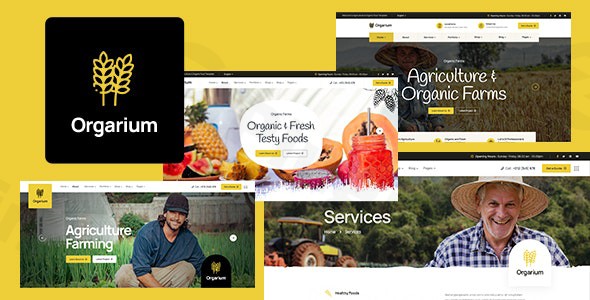
Transforming an agriculture business or organic farm into a thriving online presence requires more than just a website; it demands a digital platform that authentically reflects your values and operational excellence. The Orgarium WordPress theme is specifically designed to meet this need, offering a professional, visually appealing, and feature-rich solution for the agriculture and organic farming sector. This comprehensive review will guide you through its features, setup process, and customization options, helping you leverage Orgarium to create a high-converting website for your agri-business.
Introduction: Cultivating Your Online Presence with Orgarium
The Orgarium agriculture theme is a meticulously crafted WordPress solution for organic farms, eco-friendly product stores, dairy farms, livestock businesses, and any venture rooted in natural products or sustainable agriculture. Its design philosophy marries creativity with simplicity, delivering a clean, modern, and professional aesthetic that resonates with an authentic, earthy feel. For agripreneurs, organic food producers, and farm-to-table businesses, Orgarium provides the ideal foundation to showcase products, share sustainable practices, and connect with a health-conscious audience, establishing a strong and trustworthy online presence.
Key Features: Design, Layout & Performance for Modern Agriculture
Orgarium distinguishes itself with a robust suite of features designed to cater specifically to the agricultural niche, focusing on intuitive design, flexible layouts, and optimized performance.
Design & Layout Options: Tailored for Agriculture Niches
Orgarium is not a one-size-fits-all theme. It’s built from the ground up to serve various agriculture niches, whether you’re managing an organic food store, a vast fruit and vegetable farm, a poultry business, or advocating for sustainable forestry.The theme offers:
- Niche-Specific Aesthetics: A nature-inspired, clean, and modern look ensures your site inherently aligns with organic and agricultural values.
- Multiple Homepage Demos: Start quickly with four pre-designed homepage demos that provide a professional foundation for your site.
- Flexible Page Layouts: Beyond homepages, modify inner pages like contact and about sections, as well as distinct layouts for single blog posts, archive pages, single product pages, and product archives.
- Responsive & Retina-Ready Design: Engineered with a mobile-first approach and built with Bootstrap 5, Orgarium ensures your website looks impeccable and functions flawlessly on any device, from desktops to smartphones, providing an optimal user experience across all screen sizes.
Customization Capabilities: Shape Your Brand Identity
Orgarium empowers users with powerful customization options, making it easy to personalize your website without writing a single line of code.
- Elementor Page Builder Integration: Deeply integrated with the free Elementor Page Builder, Orgarium allows for intuitive drag-and-drop website creation. It extends Elementor’s capabilities with over 30 custom drag-and-drop elements, specifically designed to meet the needs of agricultural businesses.
- Revolution Slider: Create stunning visual presentations and dynamic content displays with the included Revolution Slider plugin.
- Powerful Theme Control Panel: Powered by the Redux framework, the theme’s control panel offers extensive global options, including unlimited color options and comprehensive typography controls supporting Google Fonts and standard fonts. This allows you to fine-tune your brand’s visual identity with precision.
- Header and Footer Customization: Easily modify header and footer layouts to match your branding and navigation needs.
Performance & SEO Features: Speed and Visibility for Your Farm
In today’s competitive online landscape, speed and search engine visibility are paramount. The Orgarium WordPress theme is built with modern web technologies and optimized for performance:
- Modern Web Technologies: Built with Bootstrap 5, SASS, HTML5, and CSS3, the theme ensures your website is fast, responsive, and future-proof.
- Speed & SEO Optimized: Orgarium is marketed as “Speed & SEO optimized for better rankings & conversions” and “Core Web Vitals optimized,” aiming for fast-loading pages and improved search engine performance. While specific performance metrics aren’t detailed, the underlying technologies support a swift user experience.
- Clean Code: The theme’s foundation ensures clean markup and structured headings, which are crucial for effective SEO.
Installation & Demo Import: Get Your Orgarium Site Live
Setting up your Orgarium theme is a straightforward process, even for those new to WordPress. The goal is to get your agriculture website online quickly and efficiently.
Step-by-Step Installation Guide:
- Download the Theme: Obtain the Orgarium theme files from your purchase source (e.g., ThemeForest or ZeroPlugin.com).
- Upload & Install:
- Log in to your WordPress dashboard.
- Navigate to
Appearance > Themes. - Click
Add Newand thenUpload Theme. - Choose the
orgarium.zipfile (this is the installable theme file, usually found within the main download package) and clickInstall Now.
- Activate the Theme: Once installed, click
Activateto make Orgarium your active theme. - Install Required Plugins: Upon activation, Orgarium will prompt you to install a set of recommended plugins. These typically include:
- Elementor Page Builder: Essential for drag-and-drop page creation.
- Revolution Slider: For creating dynamic and engaging sliders.
- WooCommerce: If you plan to sell products online.
- Events Calendar: For managing farm events.
- Install and activate all recommended plugins for full theme functionality.
One-Click Demo Import: Jumpstart Your Website
Orgarium features a one-click demo import function, allowing you to quickly replicate the stunning demo sites with pre-designed content, layouts, and settings. This is ideal for kickstarting your design process.
- Access Demo Import: After installing the required plugins, look for a “Demo Import,” “Import Demo Data,” or similar option in your WordPress dashboard, often found under
Appearanceor a dedicated theme options panel. - Select a Demo: Orgarium offers multiple homepage demos. Choose the demo that best fits your vision for your organic farm or agriculture business.
- Initiate Import: Click the “Import” button.
- What to Expect:
- The demo import process will populate your site with pages, posts, images (placeholders, ensure you replace with your own licensed media), menus, widgets, and theme settings as seen in the live demo.
- Important: Large demo imports can be resource-intensive. Ensure your hosting environment meets standard WordPress requirements (e.g., sufficient PHP memory limit, execution time) to prevent timeouts. If you encounter issues, consult your host or the theme’s documentation.
- After Import: Once the import is complete, you’ll likely need to:
- Set Your Homepage: Go to
Settings > Readingand set your preferred imported homepage as the “Static page” for your homepage display. - Configure Menus: Navigate to
Appearance > Menusto ensure your navigation menus are correctly assigned to their respective locations (e.g., primary menu, footer menu). - Replace Placeholder Content: Update all demo text and images with your own authentic content, farm photos, and product descriptions.
- Set Your Homepage: Go to
Customization Guide: Branding & Layout with Orgarium
Personalizing your Orgarium theme to align with your unique brand and showcase your agriculture business effectively is intuitive and flexible.
- Powerful Theme Control Panel: The heart of Orgarium’s customization lies within its comprehensive theme options panel. Here, you’ll find global settings for:
- Color Schemes: Experiment with unlimited color options to match your brand’s palette, from subtle earthy tones to vibrant accents.
- Typography: Select from Google Fonts or standard fonts to define your website’s voice. Adjust font sizes, weights, and line heights for headings and body text to optimize readability and visual hierarchy.
- Header & Footer Layouts: Easily switch between pre-designed header and footer styles or customize elements within them to create a unique look.
- Global Layout Settings: Control overall site width, sidebar positions, and container settings.
- Elementor for Page-Level Design: For detailed page and section layout, Elementor Page Builder provides a visual drag-and-drop interface. Use Orgarium’s 30+ custom Elementor elements to build unique sections like:
- Product showcases for your organic produce.
- Team member profiles for your farming crew.
- Testimonials from satisfied customers.
- Interactive maps to your farm location.
- Setting Up Your Homepage and Blog: After importing a demo, you can easily designate any page as your front page and a separate page for your blog posts via
Settings > Reading. - Menu Management: Organize your site’s navigation under
Appearance > Menus, creating clear pathways for visitors to explore your products, services, and farm story.
FAQ & Troubleshooting
Here are answers to common questions about the Orgarium WordPress theme, designed to be concise and helpful for quick reference.
Is Orgarium compatible with Elementor / WPBakery / Gutenberg?
Orgarium is built with strong integration for Elementor Page Builder (the free plugin) and is also compatible with WPBakery Page Builder, offering over 30 custom drag-and-drop elements for these builders. While not primarily focused on Gutenberg, content created within the native Block Editor will display correctly.
Does Orgarium support WooCommerce for online stores?
Yes, Orgarium features full WooCommerce integration, allowing you to seamlessly set up and manage an online store to sell your farm produce, organic products, or related merchandise directly from your website. It includes built-in shop features and dedicated product page layouts.
Does Orgarium support child themes?
Yes, Orgarium is Child Theme Compatible and typically includes a basic child theme in its package. Using a child theme is highly recommended for making customizations, as it ensures your changes are safe from being overwritten during theme updates.
How can I update the Orgarium theme without losing my customizations?
To update Orgarium safely without losing customizations, you must use a child theme for all your modifications (custom CSS, functions, template overrides). If you’ve modified the parent theme files directly, your changes will be lost upon update. Always back up your website before performing any theme updates.
What are the recommended PHP and WordPress versions for Orgarium?
Orgarium has been “Tested up to version 6.0” of WordPress. While specific minimum PHP requirements for the theme aren’t explicitly stated, it’s generally recommended to use PHP 7.4 or higher for optimal performance and security with WordPress. WordPress itself recommends PHP 8.3 or greater. Always ensure your server meets these recommendations for the best experience.
Conclusion: The Ideal Choice for Agriculture & Organic Businesses
The Orgarium – Agriculture & Organic Farm WordPress Theme is a powerful and specialized solution for anyone in the agriculture, organic farming, or eco-friendly product sector. Its combination of aesthetic appeal and functional design makes it an outstanding choice for establishing a credible and engaging online presence.With its design flexibility tailored for various agriculture niches, deep integration with Elementor for intuitive customization, and robust WooCommerce compatibility for online sales, Orgarium empowers users to build stunning websites without extensive technical knowledge. Furthermore, its focus on performance and SEO readiness ensures your site is fast, responsive, and visible to your target audience.Orgarium is ideal for agripreneurs, organic food producers, small to medium-sized agricultural businesses, and anyone looking to create an online organic food store or showcase sustainable farming practices. By leveraging Orgarium’s specialized features, you can cultivate a strong online identity that genuinely reflects the natural, eco-friendly values of your business, driving engagement and growth.
I. Download Limits & Account Benefits
- Free Downloads: Each email address receives 3 downloads per day for free products
- Upgrade Benefits: Purchase any paid product to increase your daily download limit by 3 for each paid product
- No Account Required: You can download immediately by receiving the download link via email
- Account Recommended: Create an account for easier access to your order history and direct update downloads
II. Understanding GPL vs Official Versions
Important: The products available on WPPick are GPL-licensed versions, which differ from official developer versions. Before purchasing, please read our comprehensive guide: Understanding GPL & Official Differences at WPPick
Key Points:
- GPL versions may not include premium support from original developers
- Updates may be delayed compared to official releases
- Some premium features might have limitations
- Always consider your specific needs and support requirements
III. Support & Assistance
We’re here to help through multiple channels:
- Email Support: Direct email assistance for all inquiries
- Live Chat: Real-time support during business hours
- Comprehensive Documentation: Detailed guides and tutorials
IV. Order Tracking
Access your complete purchase history and download links anytime: Order History
V. Account Access
New to WPPick? Login or Create Account to manage your downloads and orders efficiently.
VI. Refund Protection
We stand behind our products with a clear refund policy. Review our terms: Refund Policy
VII. Privacy & Security
Your data security is our priority. Learn how we protect your information: Privacy Policy
VII. Terms of Service
Understanding our service terms ensures a smooth experience: Terms of Use
Quick Tips for Best Experience
- Verify Compatibility: Check plugin/theme compatibility with your WordPress version
- Backup First: Always backup your site before installing new plugins or themes
- Test Environment: Consider testing on a staging site first
- Stay Updated: Regularly check for updates in your account dashboard
- Read Documentation: Review any included documentation for optimal setup
Need Help?
If you have questions about downloads, licensing, or need technical assistance, don’t hesitate to contact our support team. We’re committed to ensuring you have the best possible experience with WPPick products.
Ready to get started? Your download adventure begins with just one click!
- Version 1.2.2 released on 3 November 2025