

Orto – Physiotherapy, Chiropractor & Rehabilitation WordPress Theme
/Year
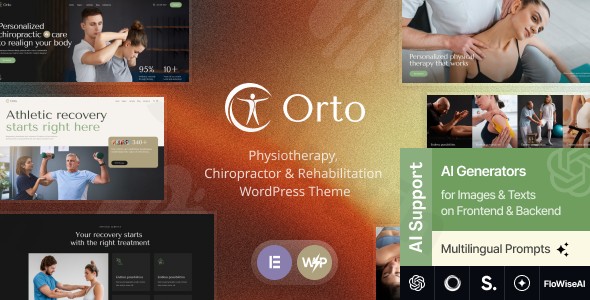
Establishing a trustworthy online presence is critical for healthcare providers, where the first impression often dictates a patient’s confidence in your care. The Orto WordPress theme is a specialized, high-performance solution designed specifically as a physiotherapy WordPress theme and rehabilitation center site builder. With its clean medical aesthetic and functional layout, Orto helps practitioners transition from a simple web presence to a professional digital clinic that facilitates patient engagement and service discovery.
Built by Ancora Themes, Orto is tailored for private practices, chiropractic clinics, and sports medicine providers. Its design philosophy centers on clarity and competence, using ample whitespace and professional typography to ensure that medical information is easy to navigate on any device.
Key Features: Design, Layout & Performance
The Orto – Physiotherapy, Chiropractor & Rehabilitation WordPress Theme is more than just a visual skin; it is a specialized toolkit for healthcare marketing.
Professional Design & Layout Options
Orto offers high flexibility in how you present your clinic’s brand:
- Layout Variations: Choose between boxed and full-width page layouts depending on your brand’s style.
- Niche-Specific Post Types: Unlike multipurpose themes, Orto includes built-in Custom Post Types for Services (treatments), Team Members (practitioner profiles), and Testimonials (patient social proof).
- Dynamic Gallery & Blog: Showcase your facility with beautiful gallery layouts and maintain an educational blog to improve your local SEO.
Advanced Customization Capabilities
While Orto is a specialized medical WordPress theme, it doesn’t lock you into a single look:
- Elementor Integration: Fully compatible with Elementor Page Builder, utilizing the latest FlexBox Containers for precise control over spacing and structure.
- Header & Footer Builder: You can create and assign different header styles to specific pages directly through Elementor.
- Typography & Color Systems: Easily adjust global colors and fonts to match your clinic’s existing branding via the Theme Options panel.
Performance & SEO Optimization
In the healthcare industry, speed and accessibility are paramount.
- Mobile-First Response: Orto is 100% responsive, ensuring patients can book appointments easily from their smartphones.
- Clean Code: Built with optimized code, the theme is compatible with WP-Optimize, helping you maintain high Lighthouse scores and fast loading times.
* SEO Ready: The theme uses clean HTML5 and CSS3 markup, making it easier for search engines to index your services and practitioner names.
Installation & Demo Import: Getting Started
Setting up your physiotherapy website template WordPress site is straightforward, even for those without a technical background.
- Theme Installation: Upload the
orto.zipfile through your WordPress Dashboard (Appearance > Themes > Add New). - Plugin Activation: Upon activation, the theme will prompt you to install required plugins. Ensure you install ThemeREX Addons and Elementor, as these power the theme’s core functionality.
- One-Click Demo Import: Navigate to the Theme Panel and select the One-Click Demo Import option. This will pull in the professional medical layouts, placeholder images, and sample pages seen in the official Orto demo.
- Final Polish: Once the import is complete, check your menus and widgets to ensure they are assigned to the correct locations.
Note: Ensure your hosting environment meets the requirements (WordPress 6.5+ and PHP 7.4 or higher) to avoid timeouts during the demo import process.
Customization Guide: Personalizing Your Clinic’s Brand
To make the Orto theme truly yours, you will primarily work within two areas: the Theme Options and the Elementor Page Builder.
Branding and Visual Identity
Navigate to Theme Panel > Theme Options in your WordPress sidebar. Here, you can upload your clinic’s logo, set your primary brand colors (e.g., a calming medical blue or a professional teal), and choose your typography.
Building Your Homepage with Elementor
Since Orto is an Elementor compatible physiotherapy theme, you can edit any page by clicking “Edit with Elementor.” Use the drag-and-drop interface to:
- Swap out hero images for photos of your actual clinic.
- Use the Services widget to link directly to your treatment pages.
* Embed a MetForm (recommended plugin) to create custom appointment request forms.
FAQ & Troubleshooting
Is the Orto WordPress theme compatible with Elementor?
Yes, Orto is highly compatible with the Elementor Page Builder. In fact, its pre-built demo pages and header/footer layouts are built specifically for Elementor, allowing for easy drag-and-drop customization without touching any code.
Does Orto support appointment booking for patients?
Orto is designed to facilitate appointment bookings through integration with contact form plugins like MetForm. While it focuses on the layout and presentation of services, you can easily embed your preferred booking calendar or form within any Elementor-built page.
Can I use Orto for a WooCommerce online store?
While Orto is a specialized rehabilitation WordPress theme focused on healthcare services rather than retail, it is built on standard WordPress architecture. While WooCommerce isn’t its primary focus, most Elementor-based themes from Ancora Themes can support WooCommerce integration if you wish to sell medical supplies or equipment.
How do I update the theme without losing my changes?
It is highly recommended to use a Child Theme for any CSS or functional modifications. When an update for the Orto parent theme is released via the ThemeREX Updater, your child theme will preserve all your custom code and style changes.
Conclusion: Is Orto Right for You?
The Orto WordPress theme is a top-tier choice for healthcare professionals who need a balance between aesthetic beauty and clinical professionalism. Its reliance on Elementor makes it accessible for beginners, while its specialized post types for doctors and services provide the “Authoritativeness” required for high-performing medical websites.Orto is ideal for:
- Physiotherapists and Chiropractors wanting a polished, ready-to-use site.
- Rehabilitation Centers that need to showcase complex treatment programs.
- Web Agencies looking for a stable, well-coded niche theme for medical clients.If you are looking for a professional medical website design on WordPress that prioritizes patient trust and ease of use, Orto is a definitive front-runner in the niche.For more WordPress theme reviews and SEO strategies for your clinic, visit wppick.com.
I. Download Limits & Account Benefits
- Free Downloads: Each email address receives 3 downloads per day for free products
- Upgrade Benefits: Purchase any paid product to increase your daily download limit by 3 for each paid product
- No Account Required: You can download immediately by receiving the download link via email
- Account Recommended: Create an account for easier access to your order history and direct update downloads
II. Understanding GPL vs Official Versions
Important: The products available on WPPick are GPL-licensed versions, which differ from official developer versions. Before purchasing, please read our comprehensive guide: Understanding GPL & Official Differences at WPPick
Key Points:
- GPL versions may not include premium support from original developers
- Updates may be delayed compared to official releases
- Some premium features might have limitations
- Always consider your specific needs and support requirements
III. Support & Assistance
We’re here to help through multiple channels:
- Email Support: Direct email assistance for all inquiries
- Live Chat: Real-time support during business hours
- Comprehensive Documentation: Detailed guides and tutorials
IV. Order Tracking
Access your complete purchase history and download links anytime: Order History
V. Account Access
New to WPPick? Login or Create Account to manage your downloads and orders efficiently.
VI. Refund Protection
We stand behind our products with a clear refund policy. Review our terms: Refund Policy
VII. Privacy & Security
Your data security is our priority. Learn how we protect your information: Privacy Policy
VII. Terms of Service
Understanding our service terms ensures a smooth experience: Terms of Use
Quick Tips for Best Experience
- Verify Compatibility: Check plugin/theme compatibility with your WordPress version
- Backup First: Always backup your site before installing new plugins or themes
- Test Environment: Consider testing on a staging site first
- Stay Updated: Regularly check for updates in your account dashboard
- Read Documentation: Review any included documentation for optimal setup
Need Help?
If you have questions about downloads, licensing, or need technical assistance, don’t hesitate to contact our support team. We’re committed to ensuring you have the best possible experience with WPPick products.
Ready to get started? Your download adventure begins with just one click!
No changelog available.