
Oxygen – Best Woocommerce WordPress Theme
/Year
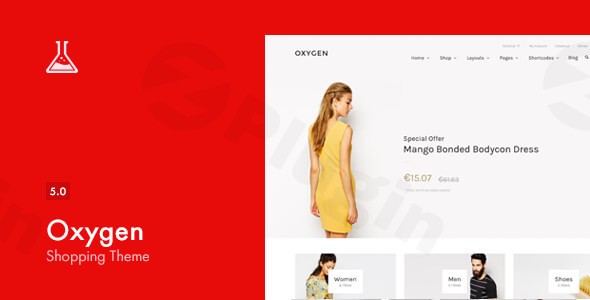
Oxygen is a premium WooCommerce WordPress theme meticulously crafted to elevate online shopping experiences. Designed by Laborator, a team renowned for developing exceptional WordPress and WooCommerce themes, Oxygen offers a robust, feature-rich platform tailored specifically for e-commerce businesses. It’s an ideal choice for store owners, agencies, and entrepreneurs looking to build or revamp modern, visually stunning, and highly functional online stores that drive conversions.This theme combines intuitive design with powerful functionality, providing a comprehensive solution for diverse retail niches, from fashion and lifestyle to electronics and jewelry. Its focus on deep WooCommerce integration ensures a seamless and optimized shopping journey for your customers.
Key Features: Design, Layout & Performance for E-commerce Success
The Oxygen theme is packed with features designed to give you complete control over your store’s aesthetics and performance, ensuring a professional and engaging user experience.
Design & Layout Options
Oxygen offers unparalleled flexibility in design, allowing you to create a unique brand identity.
- Diverse Header Styles: Choose from 5 unique header styles (including Minimal, Full Width, Right Align Menu, Left Sidebar Menu, Centered Menu, and Right Sidebar Menu) to perfectly match your brand’s navigation and aesthetic needs.
- Sophisticated Shop & Product Pages: The theme includes various layouts for both your main shop pages (e.g., Full Width, Sidebar Right) and individual product pages (Simple, Grouped, Variable, External products), along with essential e-commerce pages like Cart and My Account.
- Retina-Ready & Responsive Design: Oxygen is fully responsive and retina-ready, ensuring your store looks crisp and functions flawlessly across all devices, from desktops to smartphones and tablets.
- Unique Visual Elements: Enhance user interaction with features like touch carousels, 4 customizable cart ribbon icons, product sharing options, blog post sharing, a sticky menu, and a quick view functionality for products.
Customization Capabilities
Oxygen puts powerful customization tools at your fingertips, enabling deep personalization without needing to write code.
- Custom Skin Builder & Predefined Themes: Easily establish consistent visual styles with the custom skin builder and 7 predefined themes, allowing for quick changes to your site’s overall look and feel.
- Extensive Typography Options: Access an “ultimate font management library” with 700+ Google Fonts to ensure your typography perfectly reflects your brand’s voice.
- Bundled Premium Plugins: To supercharge your design and functionality, Oxygen includes three powerful premium plugins at no extra cost:
- WPBakery Page Builder (Visual Composer): A popular drag-and-drop page builder for creating complex layouts with ease.
- Slider Revolution: For building stunning, engaging sliders and animated content presentations.
- Advanced Custom Fields PRO (ACF Pro): Extends WordPress’s capabilities by allowing you to add highly flexible and advanced custom fields.
- Custom Code Areas: For advanced users, dedicated custom CSS and tracking code areas provide the flexibility to add bespoke styling and scripts.
Performance & SEO Features
A fast and SEO-friendly store is crucial for online success. Oxygen is built with these priorities in mind.
- Optimized Performance: Positioned as one of the “fastest e-commerce WordPress themes,” Oxygen is designed to be “light on the front end” and features Lazy Loading to defer the initialization of products and other elements, contributing to faster site speeds and improved user experience.
- SEO-Friendly Foundation: The theme boasts a clean, well-structured codebase, making it SEO-friendly and easier for search engines to crawl and index your content, helping your products rank higher.
- Multilingual & RTL Support: With WPML compatibility for multilingual sites and RTL (Right-to-Left) language support, Oxygen is ready for a global audience.
- Child Theme Included: A child theme is included, which is essential for safely making modifications without losing them during theme updates, ensuring long-term maintainability.
Installation & Demo Import
Getting your Oxygen-powered online store up and running is a straightforward process, even for those new to WordPress.
- Install & Activate the Theme:
- Log in to your WordPress dashboard.
- Navigate to
Appearance > Themes. - Click
Add Newand thenUpload Theme. - Choose the
oxygen.zipfile (or similar, provided in your theme package) and clickInstall Now. - Once installed, click
Activate.
- Install Required Plugins:
- After activation, Oxygen will prompt you to install its required and recommended plugins, including WPBakery Page Builder, Slider Revolution, and Advanced Custom Fields PRO.
- Follow the on-screen instructions to install and activate all necessary plugins.
- Import Demo Content:
- Oxygen provides pre-built templates for modern fashion and lifestyle stores. To import these, look for a “Demo Import” or “One-Click Demo Import” option, usually found under
Appearance > Import Demo Dataor within a dedicated theme options panel. - Select the demo you wish to import.
- Click to start the import process. This may take several minutes, depending on your server speed and the amount of content.
- Important Note: For large demo imports, ensure your server’s PHP memory limit (
memory_limit) and maximum execution time (max_execution_time) are sufficiently high (e.g., 256MB memory, 300 seconds execution time) to prevent timeouts.
- Oxygen provides pre-built templates for modern fashion and lifestyle stores. To import these, look for a “Demo Import” or “One-Click Demo Import” option, usually found under
- Review & Setup:
- After the import, check your website. The demo content will include pages, posts, products, menus, and widgets, providing a solid foundation.
- You may need to manually assign your main menu under
Appearance > Menusand set your homepage underSettings > Reading.
Customization Guide: Branding Your Online Store
Oxygen offers extensive flexibility to personalize your store through its comprehensive theme options panel and the integrated WPBakery Page Builder.
- Accessing Global Styles: Most global customization options, such as typography, header types, and general layout settings, can be found in the theme options panel (often located under
Appearance > Customizeor a dedicated “Oxygen Options” menu item in your dashboard). This is where you can select one of the 7 predefined theme skins or use the Custom Skin Builder to define your site’s primary color palette. - Changing Colors and Typography: Within the theme options, you’ll find dedicated sections to adjust primary and accent colors, link colors, and typography settings for various elements across your site. You can leverage the 700+ Google Fonts to select the perfect typeface.
- Header and Footer Layouts: Utilize the 5 configurable header types available in the theme options to customize your site’s header, including navigation, logo placement, and contact information. For the footer, Oxygen provides dedicated widget areas where you can drag and drop widgets to display custom content, contact info, social links, and more.
- Page-Level Customization with WPBakery: For creating unique page layouts, the included WPBakery Page Builder is your primary tool. When editing a page or post, switch to the WPBakery backend or frontend editor to drag and drop elements, utilize pre-designed templates, and customize individual sections with granular control over spacing, backgrounds, and content. Oxygen also provides 9 custom Visual Composer widgets to extend WPBakery’s capabilities specifically for e-commerce.
- Setting Up Your Homepage and Blog Page: Under
Settings > Reading, you can choose a static page (often imported with the demo) as your homepage and another page to display your latest blog posts. - Menu Management: Navigate to
Appearance > Menusto create and manage your navigation menus. You can assign different menus to various locations, such as your primary header menu or footer navigation.The customization experience in Oxygen is designed to be visually driven and intuitive, particularly with the power of WPBakery. This allows for both global theme adjustments and detailed page-specific designs to achieve a truly branded online presence.
FAQ & Troubleshooting
Here are answers to common questions about the Oxygen WooCommerce WordPress Theme:
Is Oxygen compatible with Elementor, WPBakery, or Gutenberg?
Oxygen comes with WPBakery Page Builder (formerly Visual Composer) premium plugin bundled, which is its primary drag-and-drop page builder integration for complex layouts. While it supports the standard WordPress Block Editor (Gutenberg) for content, it is not a block-first theme. Users can technically use Elementor, but the theme’s core design and bundled tools revolve around WPBakery.
Does Oxygen support WooCommerce for online stores?
Yes, Oxygen is a premium WooCommerce WordPress theme built specifically for online shopping. It offers complete and deep integration with WooCommerce, providing essential e-commerce functionality, specialized shop and product page layouts, and features tailored to optimize your online store.
Does Oxygen support child themes?
Yes, Oxygen includes a child theme in its package. Using a child theme is highly recommended for any customizations you make, as it ensures your modifications are not lost when you update the main Oxygen theme.
How can I update the Oxygen theme without losing my customizations?
To update the Oxygen theme safely, always ensure you are using the provided child theme for any custom code or template modifications. When a new theme version is available, you can update it directly from your WordPress dashboard (Appearance > Themes) or by manually uploading the new version. Your child theme customizations will remain intact.
What should I do if the demo import fails or looks different from the demo site?
If the demo import fails, check your server’s PHP configuration, specifically memory_limit (recommended 256MB or higher) and max_execution_time (recommended 300 seconds or higher). If the imported demo looks different, ensure all required plugins (WPBakery, Slider Revolution, ACF Pro) were installed and activated before importing. Also, verify that your homepage and menu settings are correctly configured after the import.
Conclusion
The Oxygen WooCommerce WordPress Theme by Laborator is a robust and highly capable solution for anyone serious about building a professional online store. Its rich suite of design options, including unique header styles and a custom skin builder, combined with the power of bundled premium plugins like WPBakery Page Builder, Slider Revolution, and Advanced Custom Fields PRO, provides an unparalleled level of customization and functionality.With its strong focus on e-commerce, mobile responsiveness, and performance optimizations like lazy loading, Oxygen is well-prepared for the demands of modern online retail. It’s an ideal choice for store owners, small to medium-sized businesses, and agencies who need a comprehensive, visually appealing, and SEO-friendly platform designed from the ground up to sell products effectively. While its primary integration with WPBakery means a learning curve for those unfamiliar with it, the value derived from its features, dedicated support, and proven track record makes Oxygen a standout contender in the premium WooCommerce theme market.
I. Download Limits & Account Benefits
- Free Downloads: Each email address receives 3 downloads per day for free products
- Upgrade Benefits: Purchase any paid product to increase your daily download limit by 3 for each paid product
- No Account Required: You can download immediately by receiving the download link via email
- Account Recommended: Create an account for easier access to your order history and direct update downloads
II. Understanding GPL vs Official Versions
Important: The products available on WPPick are GPL-licensed versions, which differ from official developer versions. Before purchasing, please read our comprehensive guide: Understanding GPL & Official Differences at WPPick
Key Points:
- GPL versions may not include premium support from original developers
- Updates may be delayed compared to official releases
- Some premium features might have limitations
- Always consider your specific needs and support requirements
III. Support & Assistance
We’re here to help through multiple channels:
- Email Support: Direct email assistance for all inquiries
- Live Chat: Real-time support during business hours
- Comprehensive Documentation: Detailed guides and tutorials
IV. Order Tracking
Access your complete purchase history and download links anytime: Order History
V. Account Access
New to WPPick? Login or Create Account to manage your downloads and orders efficiently.
VI. Refund Protection
We stand behind our products with a clear refund policy. Review our terms: Refund Policy
VII. Privacy & Security
Your data security is our priority. Learn how we protect your information: Privacy Policy
VII. Terms of Service
Understanding our service terms ensures a smooth experience: Terms of Use
Quick Tips for Best Experience
- Verify Compatibility: Check plugin/theme compatibility with your WordPress version
- Backup First: Always backup your site before installing new plugins or themes
- Test Environment: Consider testing on a staging site first
- Stay Updated: Regularly check for updates in your account dashboard
- Read Documentation: Review any included documentation for optimal setup
Need Help?
If you have questions about downloads, licensing, or need technical assistance, don’t hesitate to contact our support team. We’re committed to ensuring you have the best possible experience with WPPick products.
Ready to get started? Your download adventure begins with just one click!
- WooCommerce 10.6.x compatibility added
- Improved compatibility with Slider Revolution 7
- WooCommerce 10.5.x compatibility added
- Fixed a security vulnerability in the Google Maps route functionality (reported by Wordfence)
- Important security fix reported by Patchstack
- Advanced Custom Fields PRO plugin updated to version 6.6.2
- WPBakery Page Builder plugin updated to version 8.7.2
- Updated Freemius SDK to the latest version
- WooCommerce 10.2.x compatibility added
- Cannot update Advanced Custom Fields Pro to newest version
- Advanced Custom Fields PRO plugin updated to version 6.6.0
- Slider Revolution plugin updated to version 6.7.38
- WooCommerce 10.1.x compatibility added
- Advanced Custom Fields PRO plugin updated to version – 6.5.0.1
- WPBakery Page Builder plugin updated to version – 8.6.1
- Slider Revolution plugin updated to version – 6.7.36
- Updated Freemius SDK to the latest version
- WooCommerce 9.6.x compatibility added
- Advanced Custom Fields PRO plugin updated to version 6.3.12
- WPBakery Page Builder plugin updated to version 8.1
- Slider Revolution plugin updated to version 6.7.25
- Updated Freemius SDK to the latest version
- WooCommerce 9.4.x compatibility added
- Advanced Custom Fields PRO plugin updated to version – 6.3.11
- WPBakery Page Builder plugin updated to version – 8.0.1
- Slider Revolution plugin updated to version – 6.7.23
- Minor bug fixes and improvements