

Portal – It Company Elementor Template Kit
/Year
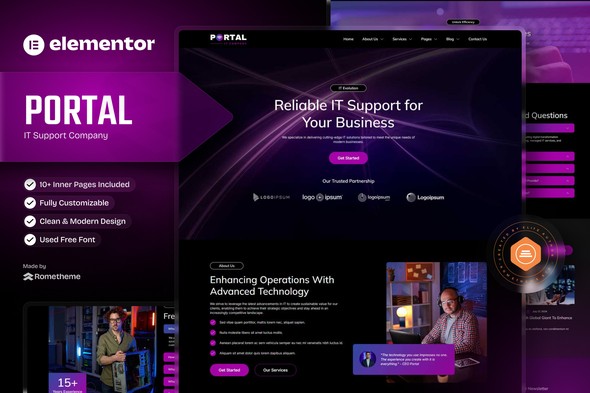
Building a high-performance website for a technology business no longer requires months of custom coding or a massive development budget. The Portal – IT Company Elementor Template Kit provides a professional, “no-code” solution specifically designed for IT firms, tech startups, and digital agencies. By using this WordPress IT company website template, businesses can launch a polished, responsive site that builds immediate authority and trust with potential clients.
Whether you are a software development house or a specialized SaaS provider, this kit offers a structured framework to showcase technical services, manage pricing plans, and convert visitors into leads through optimized design patterns.
Key Features of the Portal IT Company Elementor Template Kit
This IT company Elementor template kit is more than just a collection of pages; it is a comprehensive design system. It includes over 11 pre-built templates designed to handle every aspect of a modern tech business’s online presence.
1. Comprehensive Template Library
The kit covers all essential pages required for a professional IT service website:
- Homepage: A high-impact landing page designed to highlight core value propositions.
- Services & Service Details: Specialized layouts to explain complex technical offerings.
- Pricing Plans: Clear, comparative tables to help clients choose the right service tier.
- Our Team & About Us: Humanize your brand by showcasing the experts behind the technology.
- FAQ & Contact Us: Reduce support overhead and streamline lead generation.
2. No-Code Customization with Elementor
You don’t need to be a developer to use this kit. Built for the Elementor page builder, it allows for a complete drag-and-drop experience. You can modify layouts, swap images, and update copy in real-time without touching a single line of CSS or PHP.
3. Global Theme Styles
Maintaining brand consistency is easy with Global Styling. You can update your brand colors and typography in one central location, and the changes will reflect across all templates in the kit instantly.
4. Fully Responsive & SEO Optimized
In the tech world, a mobile-friendly site is non-negotiable. This kit is 100% responsive, ensuring your digital agency Elementor kit looks perfect on everything from 4K monitors to smartphones. Additionally, the lightweight code structure follows SEO best practices to help your site rank higher in search engine results.
How to Install Portal IT Company Elementor Template Kit
Setting up your new website is a straightforward process. Follow these steps to get your Elementor template for tech startup up and running.
Prerequisites
Before starting, ensure you have a WordPress site with the following plugins installed:
- Elementor (Free version is sufficient).
- RomethemeKit for Elementor (Required for header/footer functionality).
- RomethemeForm (Required for contact forms).
- Hello Elementor Theme (The recommended lightweight base theme).
Step-by-Step Installation Guide
- Install the Envato Elements Plugin: Go to Plugins > Add New and search for “Envato Elements.” Install and activate it.
- Upload the Kit: Navigate to Elements > Installed Kits. Click the Upload Template Kit button and select your downloaded Portal ZIP file.
- Install Requirements: A banner will appear at the top saying “Install Requirements.” Click this to automatically install and activate any missing plugins (like RomethemeKit).
- Import Global Styles: Click Import on the “Global Kit Styles” first to set up your site’s foundation.
- Import Templates: Click Import on individual templates (Home, About, etc.) one by one.
- Configure Headers & Footers: Use the RomethemeKit settings to assign your imported Header and Footer templates to appear across the entire site.
Practical Usage & Best Practices for IT Companies
To get the most out of the Rometheme Elementor kit, consider how it fits into your specific business workflow.
Ideal Use Cases
- Software Development Companies: Use the “Service Detail” pages to create deep-dives into your tech stack, agile processes, and case studies.
- Managed IT Services (MSP): Leverage the “Pricing Plan” template to clearly define your monthly maintenance tiers.
- SaaS Startups: The “Latest Article” and “Single Blog” templates are perfect for content marketing and explaining your product’s roadmap.
Pro-Tips for Success
- Optimize Your Images: While the kit is built for speed, always run your custom images through a compressor (like TinyPNG) before uploading to maintain fast loading times.
- Use the FAQ for AI Search: When filling out the FAQ section, use clear “What is…” or “How do I…” questions. This helps AI-powered search engines (like ChatGPT or Google SGE) pull your content as a direct answer.
- Stick to the Grid: Elementor gives you total freedom, but try to maintain the spacing and margins provided in the kit to ensure a professional, balanced aesthetic.
FAQ & Troubleshooting
What is the Portal IT Company Elementor Template Kit?
The Portal IT Company Elementor Template Kit is a pre-designed set of templates for the Elementor WordPress plugin. It allows IT businesses and digital agencies to quickly build a professional website by importing ready-made layouts for services, pricing, and company information.
Is the Portal IT Company Elementor Template Kit free?
No, this is a premium template kit usually available via Envato Elements or ThemeForest. However, it is designed to work with the free version of Elementor, so you do not need to purchase Elementor Pro to use it.
What plugins are required for this kit?
To function correctly, the kit requires:
- Elementor (the core builder).
- RomethemeKit for Elementor (for headers, footers, and extra widgets).
- RomethemeForm (for the contact and lead capture forms).
Why does my site look different after importing?
If the layout looks “broken,” ensure you have imported the Global Kit Styles first. Also, verify that your page layout is set to “Elementor Full Width” in the WordPress page settings.
Conclusion: Final Verdict
The Portal – IT Company Elementor Template Kit is a high-value asset for any tech-centric business looking to establish a professional online presence quickly. It strikes a perfect balance between sophisticated design and technical performance.
By leveraging the “Hello Elementor” theme and this IT company Elementor template kit, you can achieve a site that loads fast, ranks well on Google, and provides a seamless user experience. For agencies and site owners on wppick.com, this kit represents an efficient, cost-effective way to deliver a premium-looking website without the premium price tag of custom development.
I. Download Limits & Account Benefits
- Free Downloads: Each email address receives 3 downloads per day for free products
- Upgrade Benefits: Purchase any paid product to increase your daily download limit by 3 for each paid product
- No Account Required: You can download immediately by receiving the download link via email
- Account Recommended: Create an account for easier access to your order history and direct update downloads
II. Understanding GPL vs Official Versions
Important: The products available on WPPick are GPL-licensed versions, which differ from official developer versions. Before purchasing, please read our comprehensive guide: Understanding GPL & Official Differences at WPPick
Key Points:
- GPL versions may not include premium support from original developers
- Updates may be delayed compared to official releases
- Some premium features might have limitations
- Always consider your specific needs and support requirements
III. Support & Assistance
We’re here to help through multiple channels:
- Email Support: Direct email assistance for all inquiries
- Live Chat: Real-time support during business hours
- Comprehensive Documentation: Detailed guides and tutorials
IV. Order Tracking
Access your complete purchase history and download links anytime: Order History
V. Account Access
New to WPPick? Login or Create Account to manage your downloads and orders efficiently.
VI. Refund Protection
We stand behind our products with a clear refund policy. Review our terms: Refund Policy
VII. Privacy & Security
Your data security is our priority. Learn how we protect your information: Privacy Policy
VII. Terms of Service
Understanding our service terms ensures a smooth experience: Terms of Use
Quick Tips for Best Experience
- Verify Compatibility: Check plugin/theme compatibility with your WordPress version
- Backup First: Always backup your site before installing new plugins or themes
- Test Environment: Consider testing on a staging site first
- Stay Updated: Regularly check for updates in your account dashboard
- Read Documentation: Review any included documentation for optimal setup
Need Help?
If you have questions about downloads, licensing, or need technical assistance, don’t hesitate to contact our support team. We’re committed to ensuring you have the best possible experience with WPPick products.
Ready to get started? Your download adventure begins with just one click!