

Primecare – Dentist & Dental Clinic WordPress Theme
/Year
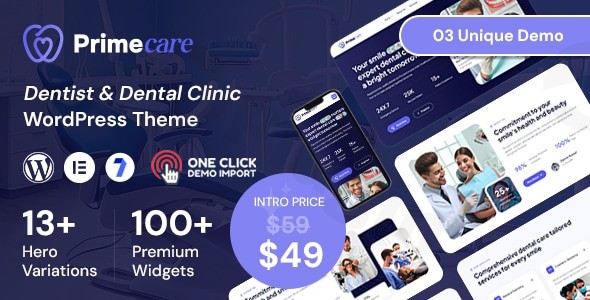
Elevate your dental practice’s online presence with Primecare, a meticulously designed premium WordPress theme crafted specifically for dentists, dental clinics, and oral health professionals. In today’s digital landscape, a professional and trustworthy online identity is paramount, and Primecare provides the robust foundation needed to attract new patients, showcase your expertise, and streamline your practice’s operations.
Why Primecare is Your Practice’s Digital Cornerstone
Primecare isn’t just a theme; it’s a comprehensive digital solution built to reflect the precision, cleanliness, and professionalism inherent in dental healthcare. Our design philosophy centers on creating an online experience that instills confidence and simplifies patient interaction. We understand that your website serves as a crucial point of contact, and Primecare ensures it’s both aesthetically pleasing and highly functional, catering to both new visitors and existing patients.
Key Features That Distinguish Primecare
Every element of Primecare has been thoughtfully integrated to meet the unique needs of dental professionals, combining cutting-edge design with powerful functionality.
Professional & Modern Dental Design
Primecare boasts a clean, sleek, and minimalist layout that immediately conveys professionalism and trust. Its modern aesthetic is free from clutter, focusing on an intuitive user experience and presenting your services and team in an elegant, engaging manner. Well-structured sections guide visitors seamlessly through your site, from services to appointment booking.
Fully Responsive & Mobile-Friendly Experience
In an increasingly mobile world, your website must perform flawlessly on every device. Primecare features a fully responsive design that effortlessly adapts to desktops, tablets, and smartphones, ensuring optimal viewing and interaction regardless of screen size. This guarantees a superior user experience for all your patients.
Effortless Customization Without Coding
Tailor your website to perfectly reflect your brand identity with Primecare’s extensive customization options. Built with the intuitive Elementor Page Builder, you can easily modify layouts, tweak colors, adjust fonts, and integrate your branding elements through a simple drag-and-drop interface, all without requiring any coding knowledge.
Engaging Visuals & Interactive Elements
Capture attention with Primecare’s smooth animations and interactive elements that add a dynamic touch to your site. The theme also includes multiple header and footer styles, allowing you to choose the perfect presentation for your brand’s navigation and crucial contact information.
Comprehensive Pre-designed Pages & Sections
Save valuable time and effort with Primecare’s rich library of pre-built pages. These professionally designed templates cover every essential aspect of a dental practice website:
- Home: With 3 distinct hero versions to make a powerful first impression.
- About Us: Share your practice’s story and mission.
- Services & Service Details: Clearly outline your offerings, from general dentistry to specialized treatments.
- Doctor & Doctor Details: Introduce your qualified team members.
- Blog List & Blog Details: Share valuable dental health information and practice news.
- Gallery: Showcase your clinic’s facilities or patient transformations.
- Testimonials: Build trust with patient success stories.
- FAQs: Address common patient queries proactively.
- Appointment: Streamline booking processes.
- Contact Us: Provide clear contact information and location details.
- 404 Error Page: A custom page for a polished user experience.
Advanced Features for Dental Practice Management
Primecare integrates functionalities vital for a thriving dental practice:
- Advanced Booking System: Allow patients to schedule appointments directly through your website, reducing administrative overhead.
- Service Showcase Capabilities: Highlight your range of services with dedicated, visually appealing sections.
- Team Presentation Features: Professional profile sections for your dental team build patient confidence and familiarity.
- Educational Content Sections: Share valuable dental health information, positioning your practice as an authority.
- Testimonial and Review Integration: Display patient success stories prominently to foster trust.
- Before and After Galleries: Visually demonstrate the transformative results of your cosmetic and restorative procedures.
Technical Excellence for Peak Performance & Reliability
Our commitment to EEAT (Expertise, Experience, Authoritativeness, Trustworthiness) extends to Primecare’s technical foundation, ensuring a robust, secure, and high-performing website.
Built for Modern Web Standards
Primecare is developed using modern web technologies to ensure compatibility, scalability, and adherence to the latest industry standards.
SEO Optimized Structure
Designed with SEO best practices in mind, Primecare helps your dental practice achieve higher rankings in search engine results. Its SEO-friendly structure makes it easier for potential patients to discover your services when searching for dental care online.
Blazing Fast Performance
Speed matters for user experience and SEO. Primecare is fast and lightweight, optimized for rapid page loads to keep visitors engaged and improve your search engine standing.
Broad Compatibility & Integration
Primecare is built to work seamlessly within the WordPress ecosystem:
- WordPress Compatibility: Fully compatible with WordPress versions 6.3.x, 6.4.x, 6.5.x, 6.6.x, 6.7.x.
- Page Builder: Deeply integrated with Elementor Page Builder and Elementor Pro for unmatched customization.
- Contact Form 7: Easily create customizable contact forms.
- WooCommerce Ready: Prepare for potential e-commerce functionalities like selling dental products.
- WPML (Translation Ready): Expand your reach to a diverse patient base.
- Gutenberg Optimized: Works well with WordPress’s native block editor.
- Cross-browser Compatibility: Ensures consistent performance across Chrome, Safari, Firefox, and Edge.
Developer-Friendly Elements
For those who wish to delve deeper, Primecare offers a well-documented structure, includes a child theme, and is widget-ready with custom widgets available, providing flexibility for advanced customization.
Setting Up Your Primecare Website: A Step-by-Step Guide
Getting your professional dental website online with Primecare is a straightforward process, designed to be accessible for users of all technical skill levels.
- Installation:
- Once you’ve downloaded the Primecare theme package, navigate to your WordPress dashboard.
- Go to
Appearance > Themes > Add New > Upload Theme. - Select the Primecare theme
.zipfile and clickInstall Now. - After installation, click
Activate.
- Plugin Installation:
- Upon activation, you’ll likely see a notice to install recommended plugins, including Elementor. Install and activate these to unlock the theme’s full potential.
- Import Demo Content (Optional but Recommended):
- To get started quickly, Primecare often provides one-click demo import options. This populates your site with the pre-designed pages and content, giving you a perfect starting point to customize.
- Leveraging Elementor Page Builder:
- Navigate to any page and click
Edit with Elementor. - Use Elementor’s intuitive drag-and-drop interface to modify sections, add new elements, and rearrange content. Change text, upload images, and adjust styling with ease.
- Navigate to any page and click
- Theme Customizer:
- Go to
Appearance > Customizein your WordPress dashboard. - Here, you can make global changes to your site’s appearance, such as selecting header/footer styles, adjusting primary and accent colors, choosing fonts, and setting up your site identity (logo, favicon).
- Go to
- Populating Pre-designed Content:
- Utilize the custom post types for Services, Doctors, and Testimonials. Go to the respective menus in your dashboard (e.g.,
Services > Add New) to input your specific clinic’s information, details, and patient feedback.
- Utilize the custom post types for Services, Doctors, and Testimonials. Go to the respective menus in your dashboard (e.g.,
- Setting Up Your Appointment System:
- Configure the integrated appointment booking system or link to your preferred scheduling solution to allow patients to book consultations directly through your website.
Who Benefits from the Primecare WordPress Theme?
Primecare is meticulously designed for a specific audience, yet its flexibility allows it to serve a broader range of medical professionals.
- General Dentistry Practices: Perfect for family dentists looking to establish a comprehensive online presence that serves both new and existing patients with ease.
- Specialized Dental Services: Orthodontists, periodontists, endodontists, oral surgeons, and other specialists can highlight their specific expertise and treatment options with dedicated sections.
- Dental Clinics and Groups: Ideal for multi-dentist practices or clinics with multiple locations, offering scalable solutions to grow with your practice.
- Medical and Health Clinics: While optimized for dentistry, its clean design and core functionalities make it suitable for other health professionals seeking a professional online presence.Primecare helps solve common challenges like attracting new patients, showcasing specialized expertise, streamlining appointment scheduling, and building undeniable trust through a polished, authoritative online identity.
Building Trust and Authority with Primecare
Your website is a powerful tool for establishing your practice’s credibility. Primecare facilitates this by:
- Showcasing Expertise: Dedicated sections allow you to present your team’s qualifications, technology used, and commitment to patient care, demonstrating your authoritative standing in the field.
- Improving Patient Engagement: A user-friendly, responsive design with clear navigation and an efficient booking system enhances the overall patient experience, fostering trust and encouraging interaction.
- Leveraging Social Proof: Seamless integration of testimonials and review sections allows prospective patients to see positive experiences from others, building confidence in your services.
- Visual Demonstration of Quality: Before and After Galleries provide compelling visual evidence of your cosmetic and restorative work, showcasing your skill and the quality of your results.
Conclusion: Invest in Your Practice’s Future with Primecare
Primecare – Dentist & Dental Clinic WordPress Theme is more than just a template; it’s a strategic investment in your practice’s digital future. It combines an exquisite, professional design with robust functionality and unparalleled customization options, all built on a foundation of technical excellence. By choosing Primecare, you are selecting a premium solution that will empower you to create an impressive, functional, and trustworthy website that attracts new patients, serves your existing ones effectively, and ultimately elevates your dental practice to new heights.Embrace the power of professional design and comprehensive features. Choose Primecare to build a strong, authoritative online identity that truly represents the quality of care you provide.
I. Download Limits & Account Benefits
- Free Downloads: Each email address receives 3 downloads per day for free products
- Upgrade Benefits: Purchase any paid product to increase your daily download limit by 3 for each paid product
- No Account Required: You can download immediately by receiving the download link via email
- Account Recommended: Create an account for easier access to your order history and direct update downloads
II. Understanding GPL vs Official Versions
Important: The products available on WPPick are GPL-licensed versions, which differ from official developer versions. Before purchasing, please read our comprehensive guide: Understanding GPL & Official Differences at WPPick
Key Points:
- GPL versions may not include premium support from original developers
- Updates may be delayed compared to official releases
- Some premium features might have limitations
- Always consider your specific needs and support requirements
III. Support & Assistance
We’re here to help through multiple channels:
- Email Support: Direct email assistance for all inquiries
- Live Chat: Real-time support during business hours
- Comprehensive Documentation: Detailed guides and tutorials
IV. Order Tracking
Access your complete purchase history and download links anytime: Order History
V. Account Access
New to WPPick? Login or Create Account to manage your downloads and orders efficiently.
VI. Refund Protection
We stand behind our products with a clear refund policy. Review our terms: Refund Policy
VII. Privacy & Security
Your data security is our priority. Learn how we protect your information: Privacy Policy
VII. Terms of Service
Understanding our service terms ensures a smooth experience: Terms of Use
Quick Tips for Best Experience
- Verify Compatibility: Check plugin/theme compatibility with your WordPress version
- Backup First: Always backup your site before installing new plugins or themes
- Test Environment: Consider testing on a staging site first
- Stay Updated: Regularly check for updates in your account dashboard
- Read Documentation: Review any included documentation for optimal setup
Need Help?
If you have questions about downloads, licensing, or need technical assistance, don’t hesitate to contact our support team. We’re committed to ensuring you have the best possible experience with WPPick products.
Ready to get started? Your download adventure begins with just one click!