

Printnest – Printing Company & Woocommerce WordPress Theme
/Year
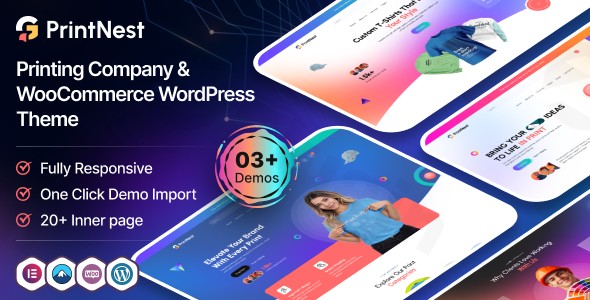
Building a professional online presence for a printing business requires more than just a pretty layout; it demands a functional bridge between digital design and physical production. The Printnest WordPress theme is a modern, conversion-focused solution specifically engineered for this niche. Whether you run a commercial offset printing facility, a local digital print shop, or a custom merchandise store, this printing company WordPress theme provides the technical infrastructure to showcase services and drive sales.In this guide, we will explore the design capabilities, technical performance, and setup process of Printnest to help you decide if it’s the right fit for your business.
Key Features: Design, Layout & Performance
Printnest is built with a clear design philosophy: clean, modern, and sales-ready. It avoids the “bloat” often found in multipurpose themes by focusing strictly on features that benefit the printing and branding industry.
Professional Layout Options
Printnest offers five distinct homepage layouts tailored to different business models:
- Printing Company: Designed for commercial and local shops focusing on B2B services.
- Online Print Store: A WooCommerce printing theme layout optimized for selling products directly online.
- Branding & Design: Perfect for creative agencies that offer print and identity services.
- Packaging Solutions: Specialized for box, label, and packaging providers.
- Custom Merchandise: Ideal for shops selling t-shirts, mugs, and promotional items.
Advanced Customization & Elementor Integration
The theme is a powerful Elementor printing theme, featuring over 35 custom Elementor widgets. This allows you to drag and drop elements like service lists, pricing tables, and portfolio galleries without touching a single line of code.
- Header & Footer Builder: You aren’t stuck with a fixed layout. Create custom navigation and site endings that match your brand perfectly.
- Unlimited Color Schemes: Easily adjust the global palette to match your corporate identity.
- Typography: Full support for Google Fonts ensures your brand voice is consistent across all headings and body text.
Performance & SEO Readiness
Search engines and AI-based answer engines prioritize speed and clean code. Printnest is optimized for performance, ensuring fast load times even with high-resolution portfolio images. Its clean markup and mobile-responsive architecture mean your site will look sharp on smartphones and rank effectively for local SEO keywords.
Installation & One-Click Demo Import
Setting up Printnest is straightforward, even for those new to WordPress. Follow these steps to get your site looking like the professional demo in minutes:
- Theme Installation: Upload the
printnest.zipfile via Appearance > Themes > Add New in your WordPress dashboard. - Activate Plugins: Upon activation, the theme will prompt you to install required plugins, including Elementor, WooCommerce, and Contact Form 7.
- One-Click Demo Import: Navigate to the theme options and locate the “Demo Import” section. Choose your preferred layout (e.g., Online Print Store) and click import.
- Finalize Content: Once the import is complete, your menus, widgets, and sample pages will be ready. You can then begin replacing the placeholder text and images with your own.Note: Ensure your server has adequate memory limits (WP Memory Limit of 256M or higher is recommended) to avoid timeouts during the demo import process.
Customization Guide: Branding & Layout
Personalizing Printnest is done through a combination of the WordPress Customizer and the Elementor Page Builder.
Setting Up Your Brand
Go to Appearance > Customize to upload your logo, set your site favicon, and choose your primary brand colors. Because the theme includes a Child Theme, we highly recommend activating it before making any CSS or functional changes. This ensures your customizations aren’t lost when the theme is updated.
Designing Service Pages
Using the Elementor printing theme capabilities, you can build detailed service pages that convert. Use the custom widgets to add “Request a Quote” forms via Contact Form 7, which is essential for print shops handling custom orders.
Configuring the Online Store
If you are selling standardized products like business cards or flyers, the WooCommerce integration is seamless. You can set up product variations (e.g., paper weight, finish, quantity) to give your customers a clear checkout experience.
FAQ & Troubleshooting
Is Printnest compatible with Elementor?
Yes, Printnest is fully compatible with Elementor. In fact, it includes 35+ custom widgets specifically designed for the Elementor drag-and-drop builder, making it highly flexible for non-coders.
Does Printnest support WooCommerce for online stores?
Absolutely. Printnest is a WooCommerce printing theme that includes pre-built shop layouts. It is designed to handle product listings, shopping carts, and checkout processes specifically for print-related products.
Is a child theme included with Printnest?
Yes, a child theme is included in the package. Using a child theme is a best practice in WordPress development as it allows you to make safe customizations to the code without losing them during future theme updates.
Is Printnest good for print-on-demand businesses?
Yes, because of its robust WooCommerce and Elementor integration, Printnest is an excellent choice for print-on-demand (POD) businesses. You can easily integrate POD plugins or list your custom merchandise using the theme’s high-conversion layouts.
Conclusion
The Printnest WordPress theme is a top-tier choice for any professional in the printing, branding, or packaging industry. It successfully balances aesthetic appeal with the functional requirements of an e-commerce and service-based business. With its Elementor printing theme flexibility, specialized WooCommerce features, and clean, SEO-friendly code, it provides a solid foundation for both beginners and established agencies. If you are looking for a niche-specific theme that reduces setup time while offering premium design quality, Printnest is a highly recommended investment for your printing business.For more WordPress theme reviews and SEO strategies, visit wppick.com.
I. Download Limits & Account Benefits
- Free Downloads: Each email address receives 3 downloads per day for free products
- Upgrade Benefits: Purchase any paid product to increase your daily download limit by 3 for each paid product
- No Account Required: You can download immediately by receiving the download link via email
- Account Recommended: Create an account for easier access to your order history and direct update downloads
II. Understanding GPL vs Official Versions
Important: The products available on WPPick are GPL-licensed versions, which differ from official developer versions. Before purchasing, please read our comprehensive guide: Understanding GPL & Official Differences at WPPick
Key Points:
- GPL versions may not include premium support from original developers
- Updates may be delayed compared to official releases
- Some premium features might have limitations
- Always consider your specific needs and support requirements
III. Support & Assistance
We’re here to help through multiple channels:
- Email Support: Direct email assistance for all inquiries
- Live Chat: Real-time support during business hours
- Comprehensive Documentation: Detailed guides and tutorials
IV. Order Tracking
Access your complete purchase history and download links anytime: Order History
V. Account Access
New to WPPick? Login or Create Account to manage your downloads and orders efficiently.
VI. Refund Protection
We stand behind our products with a clear refund policy. Review our terms: Refund Policy
VII. Privacy & Security
Your data security is our priority. Learn how we protect your information: Privacy Policy
VII. Terms of Service
Understanding our service terms ensures a smooth experience: Terms of Use
Quick Tips for Best Experience
- Verify Compatibility: Check plugin/theme compatibility with your WordPress version
- Backup First: Always backup your site before installing new plugins or themes
- Test Environment: Consider testing on a staging site first
- Stay Updated: Regularly check for updates in your account dashboard
- Read Documentation: Review any included documentation for optimal setup
Need Help?
If you have questions about downloads, licensing, or need technical assistance, don’t hesitate to contact our support team. We’re committed to ensuring you have the best possible experience with WPPick products.
Ready to get started? Your download adventure begins with just one click!