

Prolancer | Freelance Marketplace WordPress Theme
/Year
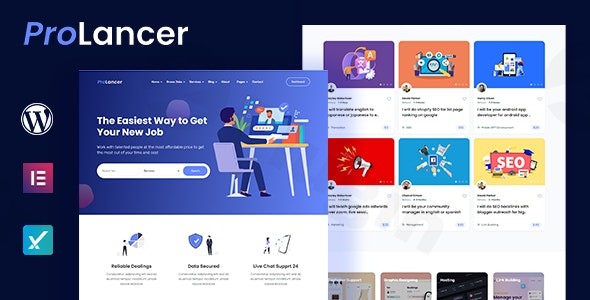
Introduction: Launch Your Gig Economy Platform with Prolancer
Are you dreaming of building your own online service marketplace, akin to giants like Fiverr or Upwork? The Prolancer WordPress Theme is engineered specifically for this purpose, providing a robust and intuitive foundation for connecting clients with talented freelancers. Designed for entrepreneurs, agencies, and businesses, Prolancer empowers you to launch a fully functional freelance platform without needing extensive coding knowledge. Its design philosophy centers on creating a modern, user-friendly interface that prioritizes seamless interactions between service providers and clients, making it an excellent choice for anyone looking to enter the burgeoning gig economy.
Key Features: Design, Layout & Performance for a Thriving Marketplace
Prolancer is a feature-rich theme that blends aesthetic appeal with powerful marketplace functionality, ensuring a high-converting and efficient platform.
Design & Layout Options
Prolancer provides a flexible design framework to customize your marketplace’s look and feel.
- Home Styles: Choose from 4 distinct home page styles to create an immediate impact and cater to different marketplace aesthetics.
- Content Layouts: For posts, projects, services, and both buyer and seller profiles, you get 3 layout options including left sidebar, right sidebar, and full-width, offering control over content presentation.
- Responsive Design: Built on the Bootstrap 5.x framework, Prolancer ensures your freelance platform is fully mobile-optimized and looks stunning on all devices—desktops, tablets, and smartphones. This mobile-first approach is crucial for today’s diverse user base.
Customization Capabilities
Personalizing your marketplace to reflect your brand is straightforward with Prolancer.
- Color Schemes: The theme offers robust gradient and color control, allowing you to manage site-wide colors effortlessly through the integrated Redux Framework theme options panel. This ensures consistent branding across your platform.
- Typography: Elevate your site’s readability and aesthetic with comprehensive Google Fonts support, giving you access to a vast library of typefaces.
- Elementor Integration: Prolancer is fully compatible with Elementor Page Builder and Elementor Pro, offering a drag-and-drop interface for extensive visual customization of pages, headers, and footers without touching a line of code.
Performance & SEO Features
A fast and SEO-friendly platform is vital for attracting both freelancers and clients.
- Real-Time AJAX Search: Prolancer includes lightning-fast AJAX search results for projects, services, and user listings, significantly improving the user experience.
- Cross-Browser Compatibility: Your platform will perform consistently across popular browsers like Firefox, Safari, Opera, Chrome, and Edge.
- SEO-Friendly Structure: While specific Lighthouse or GTmetrix scores are not explicitly provided, the theme’s clean code, responsive Bootstrap 5.x foundation, and clear content structures contribute to its SEO readiness, helping your marketplace rank well in search engines.
Advanced Marketplace Functionality
Beyond design, Prolancer’s core strength lies in its specialized features that facilitate a complete freelance ecosystem.
- Advanced Proposal System: Sellers can submit detailed proposals to potential buyers, streamlining the bidding process.
- Secure Payment Processing: An integrated wallet system with escrow functionality ensures secure transactions, building trust between parties.
- Commission Management: Monetize your platform effectively with customizable admin commission rates.
- Project Management: A complete workflow takes projects from proposal to completion, with tools for communication and delivery.
- Frontend Dashboards: Dedicated, intuitive dashboards for freelancers and clients simplify managing services, orders, proposals, and messages, eliminating complex backend navigation.
- Verification Badges: Enhance trust and credibility with a built-in user verification system.
- Gig Creation with Packages: Sellers can offer services in tiered packages (Basic, Standard, Premium), just like leading freelance platforms.
- Review and Rating System: An essential feature for accountability and quality assurance, allowing users to rate and review services.
Installation & Demo Import: Get Your Marketplace Online Quickly
Setting up your Prolancer-powered freelance platform is designed to be user-friendly, even for those new to WordPress.
- Install & Activate the Theme:
- After purchasing Prolancer, download the theme files.
- Navigate to your WordPress dashboard: Appearance > Themes > Add New > Upload Theme.
- Choose the Prolancer
.zipfile and click “Install Now.” - Once installed, click “Activate.”
- Install Required Companion Plugins:
- Upon activation, Prolancer will likely recommend installing several essential plugins (e.g., Elementor, Redux Framework, Contact Form 7, and its own marketplace-specific plugins).
- Follow the on-screen prompts to install and activate these plugins, as they are crucial for the theme’s full functionality.
- Use the One-Click Demo Import:
- Prolancer includes a one-click demo import feature, which is your fastest route to a professional-looking site.
- Look for a “Demo Import” or “Import Sample Data” option, typically found under Appearance or a dedicated Prolancer menu in your WordPress dashboard.
- Select the demo you wish to import and initiate the process.
- What to Expect:
- The demo import will populate your site with pre-built content, pages, menus, and widgets, making your website look identical to the theme’s demo.
- Tip: Demo imports can be resource-intensive. Ensure your hosting environment meets WordPress’s minimum requirements for PHP memory limit and execution time to avoid timeouts. If you encounter issues, increase your
WP_MEMORY_LIMITandmax_execution_timevalues via your hosting provider orwp-config.php.
Customization Guide: Branding & Layout with Prolancer
Personalizing your Prolancer-powered marketplace to reflect your unique brand identity is straightforward, primarily leveraging the WordPress Customizer and Elementor.
- Accessing Theme Options: Prolancer’s extensive customization options are largely powered by the Redux Framework and the native WordPress Customizer. Navigate to Appearance > Customize to access global settings.
- Changing Colors and Typography:
- Within the Customizer or a dedicated “Theme Options” panel (often labeled “Prolancer Options”), you’ll find sections for Colors and Typography.
- Easily select primary, secondary, and accent colors for your brand. Utilize the Google Fonts integration to choose font families and weights for headings and body text.
- Logo and Site Identity:
- Upload your brand logo under Site Identity in the Customizer. You can also set your site title, tagline, and favicon.
- Header and Footer Layouts:
- While specific dedicated builders are not explicitly mentioned for headers/footers, Prolancer’s deep integration with Elementor allows for significant customization. You can often edit these areas directly with Elementor, giving you drag-and-drop control over their design and content.
- Setting Up Homepage, Blog Page, and Menus:
- Homepage: Go to Settings > Reading and set your imported demo homepage as a “Static page.”
- Blog Page: Similarly, designate a page for your blog posts.
- Menus: Navigate to Appearance > Menus to create and assign your navigation menus (e.g., primary menu, footer menu) to the appropriate theme locations. The demo import will often set up initial menus for you to modify.
- Intuitive Customization: The combination of the WordPress Customizer, Redux Framework, and Elementor makes Prolancer highly intuitive. Most visual changes can be previewed in real-time, allowing for a seamless design experience without needing to write custom code. For more complex layout adjustments, Elementor’s visual builder is your go-to tool.
FAQ & Troubleshooting
Here are answers to common questions about the Prolancer WordPress Theme:
Is Prolancer compatible with Elementor / WPBakery / Gutenberg?
Prolancer is fully compatible with Elementor Page Builder and Elementor Pro, offering a seamless drag-and-drop experience for page customization. While it works with the native WordPress Block Editor (Gutenberg) for basic content, its core marketplace functionalities and advanced design features are best leveraged with Elementor. There is no explicit mention of WPBakery Page Builder compatibility.
Does Prolancer support WooCommerce for online stores and payments?
Yes, Prolancer offers full WooCommerce integration for payment processing. This allows your freelance marketplace to accept payments using various gateways supported by WooCommerce, facilitating secure transactions and commission management.
Does Prolancer support child themes?
Yes, Prolancer supports child themes. It is highly recommended to use a child theme for any custom CSS, functions, or template file modifications. This ensures that your customizations are upgrade-safe and will not be lost when you update the main Prolancer theme.
How can I update the Prolancer theme without losing my customizations?
To update the Prolancer theme safely, always use a child theme for any custom code or modifications. For the core theme files, regular updates are provided by the vendor. If purchased from an official source like ThemeForest, you’ll typically receive update notifications through your WordPress dashboard or can manually download the latest version and update via FTP or the WordPress theme uploader. Always backup your website before performing any theme update.
What should I do if the demo import fails or looks different from the demo site?
If the Prolancer demo import fails, first check your server’s PHP memory limit and execution time (e.g., 256MB memory, 300 seconds execution time) as these are common culprits. You can often increase these values through your hosting control panel or by editing your wp-config.php file. If the demo looks different, ensure all required plugins were installed and activated correctly, and that you have cleared your website and browser cache. Sometimes, regenerating thumbnails or re-saving permalinks (Settings > Permalinks) can also resolve display issues.
Conclusion: Your Foundation for a Successful Freelance Marketplace
The Prolancer WordPress Theme stands out as a dedicated, powerful, and visually aware solution for building a freelance marketplace. Its comprehensive suite of features, including an advanced proposal system, secure payment processing with escrow, and customizable commission management, provides everything needed to create a website like Fiverr with WordPress.From a design perspective, its 4 distinct home styles, flexible content layouts, and full responsiveness (thanks to Bootstrap 5.x) ensure a modern and appealing platform. The deep integration with Elementor Page Builder empowers users with intuitive drag-and-drop customization, making branding and layout adjustments accessible even for beginners. While specific performance benchmarks are not explicitly detailed, its focus on real-time AJAX search and clean code structure contributes to an efficient user experience and strong SEO readiness.Prolancer is ideally suited for entrepreneurs, startups, and agencies looking to launch their own gig economy platform or a WordPress job board theme with payment system. It truly shines by offering specialized marketplace functionalities out-of-the-box, significantly reducing the development time and complexity compared to adapting a generic multipurpose theme. If you’re ready to connect service providers with clients and build a thriving online marketplace, Prolancer offers a robust, user-friendly, and monetization-ready foundation.
I. Download Limits & Account Benefits
- Free Downloads: Each email address receives 3 downloads per day for free products
- Upgrade Benefits: Purchase any paid product to increase your daily download limit by 3 for each paid product
- No Account Required: You can download immediately by receiving the download link via email
- Account Recommended: Create an account for easier access to your order history and direct update downloads
II. Understanding GPL vs Official Versions
Important: The products available on WPPick are GPL-licensed versions, which differ from official developer versions. Before purchasing, please read our comprehensive guide: Understanding GPL & Official Differences at WPPick
Key Points:
- GPL versions may not include premium support from original developers
- Updates may be delayed compared to official releases
- Some premium features might have limitations
- Always consider your specific needs and support requirements
III. Support & Assistance
We’re here to help through multiple channels:
- Email Support: Direct email assistance for all inquiries
- Live Chat: Real-time support during business hours
- Comprehensive Documentation: Detailed guides and tutorials
IV. Order Tracking
Access your complete purchase history and download links anytime: Order History
V. Account Access
New to WPPick? Login or Create Account to manage your downloads and orders efficiently.
VI. Refund Protection
We stand behind our products with a clear refund policy. Review our terms: Refund Policy
VII. Privacy & Security
Your data security is our priority. Learn how we protect your information: Privacy Policy
VII. Terms of Service
Understanding our service terms ensures a smooth experience: Terms of Use
Quick Tips for Best Experience
- Verify Compatibility: Check plugin/theme compatibility with your WordPress version
- Backup First: Always backup your site before installing new plugins or themes
- Test Environment: Consider testing on a staging site first
- Stay Updated: Regularly check for updates in your account dashboard
- Read Documentation: Review any included documentation for optimal setup
Need Help?
If you have questions about downloads, licensing, or need technical assistance, don’t hesitate to contact our support team. We’re committed to ensuring you have the best possible experience with WPPick products.
Ready to get started? Your download adventure begins with just one click!
- Fully compatible with PHP 8.4
- Resolved all undefined variable and array index issues
- Deprecated and removed service-details.php
- Deprecated and removed project-details.php
- Updated all database queries using $wpdb->prepare() for PHP 8.4 compatibility
- Added skill-based search functionality to the prolancer_project_ajax_search_form
- Modified meta_query relation from 'OR' to 'AND' for enhanced precision in prolancer_project_ajax_search_form
- Modified meta_query relation from 'OR' to 'AND' for improved accuracy in prolancer_service_ajax_search_form
- Enhanced precision by modifying meta_query relation from 'OR' to 'AND' in prolancer_seller_ajax_search_form
- Fixed recharging wallet history issue
- Fixed issue with badge based on purchasing
- Improved project featuring to prevent double charging
- Improved service featuring to prevent double charging
- Projects and services featuring will not charge if admin makes any update