

Regalia – Artist Portfolio, Art Gallery Theme
/Year
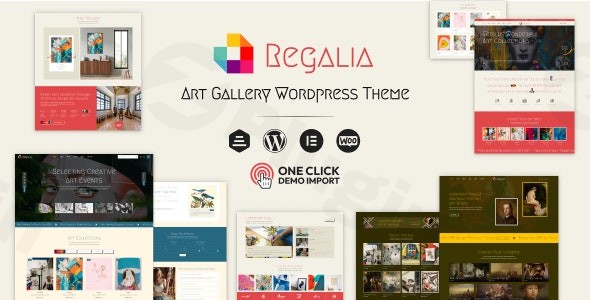
The Regalia WordPress theme is a premium, visually-driven solution specifically engineered for artists, photographers, and creative professionals who demand a sophisticated digital presence. Built with a focus on minimalism and elegance, this artist portfolio WordPress theme provides a high-end canvas that ensures your creative work remains the primary focal point, free from the clutter often found in multipurpose themes.Whether you are a painter looking to sell original pieces or a gallery owner managing multiple collections, Regalia offers the professional polish required to captivate high-end clientele.
Key Features: Design, Layout & Performance
Regalia is more than just a template; it is a comprehensive design system tailored for the creative industry. It balances high-impact visual elements with technical robustness.
Exquisite Design & Layout Options
The theme’s design philosophy revolves around “visual storytelling.” It offers a suite of layouts designed to handle various types of media:
- Diverse Portfolio Layouts: Choose from Masonry, Grid, Justified, or Fullscreen options to showcase projects in the way that best fits their orientation and style.
- Pre-built Inner Pages: With over 25 pre-designed inner pages, you can quickly build out “About,” “Services,” and “Contact” sections without starting from scratch.
- Immersive User Experience: Regalia includes unique visual touches like custom cursor options, smooth scrolling, and elegant transitions that make the browsing experience feel like walking through a physical art gallery.
High-Level Customization Capabilities
Unlike rigid themes, the Regalia WordPress theme gives you deep control over your brand identity through its integration with leading tools:
- Elementor Integration: The theme is highly compatible with the Elementor Page Builder, providing over 35 custom shortcodes specifically designed for artistic layouts.
- Header & Footer Builder: You are not limited to preset headers. Use the Elementor-based builder to create unlimited header and footer variations.
- Typography & Color: Access the full library of Google Fonts with live previews and utilize infinite color options to match your personal branding or gallery aesthetic.
Performance & SEO Readiness
A beautiful site is only effective if it loads quickly and ranks well. Regalia is built with a lightweight codebase designed for high performance.
- SEO Optimized: The theme features clean markup and structured headings, helping your portfolio appear in search engine results.
- Responsive & Retina Ready: Every layout is fully responsive and optimized for high-resolution displays, ensuring your artwork looks crisp on iPhones, iPads, and modern desktop monitors.
Installation & Demo Import
Getting your creative site up and running with Regalia is a streamlined process designed for users of all technical levels.
- Install & Activate: Upload the theme zip file via your WordPress Dashboard under Appearance > Themes > Add New. Once uploaded, click Activate.
- Plugin Setup: Upon activation, you will be prompted to install required plugins, including the WEDESIGNTECH CORE FEATURES PLUGIN and Elementor. Ensure all recommended plugins are active for full functionality.
- One-Click Demo Import: Navigate to the theme options to find the One-Click Demo Import feature. This allows you to replicate the professional look of the demo site (including pages, menus, and sample images) in minutes.
- Verification: After the import, check your menus and homepage settings. Note: If the import hangs, ensure your server’s PHP memory limit is set to at least 256MB to handle the media assets.
Customization Guide: Personalizing Your Gallery
Once the demo content is imported, personalizing the Regalia WordPress theme to match your artistic voice is intuitive.
- Global Styles: Use the WordPress Customizer to set your global color palette and primary typography. This ensures consistency across every page of your site.
- Building with Elementor: Open any page with Elementor to drag and drop elements. Use the specialized Regalia shortcodes to insert “Project Grids” or “Art Carousels” anywhere on your site.
- Setting Up the Shop: If you are selling art, Regalia’s WooCommerce compatibility allows you to activate a shop quickly. You can toggle between Grid and List views for your products and enable “Product Live Search” to help collectors find specific pieces.
FAQ & Troubleshooting
Is the Regalia theme compatible with Elementor?
Yes, the Regalia WordPress theme is fully optimized for Elementor. It includes a dedicated core features plugin that adds over 35 custom shortcodes and elements specifically designed for artists and galleries, allowing for a drag-and-drop design experience.
Does Regalia support WooCommerce for selling art online?
Absolutely. Regalia is fully compatible with WooCommerce. It includes advanced e-commerce features such as Ajax “Add to Cart,” Product Live Search, and stylized shop layouts that maintain the theme’s elegant aesthetic.
Can I use this theme for a photography portfolio?
Yes. While named “Regalia – Artist Portfolio,” its high-resolution image support, masonry layouts, and fullscreen gallery options make it an ideal choice for professional photographers and studios.
What should I do if the demo import fails?
Demo import issues are usually related to server “Timeouts” or low “Memory Limits.” Contact your hosting provider to increase your max_execution_time and memory_limit settings, then attempt the import again.
Conclusion
The Regalia WordPress theme stands out as a premier choice for those in the creative arts. Its strength lies in its ability to provide a high-end, immersive aesthetic without sacrificing performance or ease of use. By combining the power of Elementor with specialized artistic layouts, it bridges the gap between a custom-coded portfolio and an easy-to-manage WordPress site.If you are an individual artist, a gallery owner, or a design agency looking for a sophisticated, SEO-optimized art gallery WordPress theme, Regalia offers the tools and flexibility to showcase your vision professionally. For more theme reviews and WordPress tips, visit wppick.com.
I. Download Limits & Account Benefits
- Free Downloads: Each email address receives 3 downloads per day for free products
- Upgrade Benefits: Purchase any paid product to increase your daily download limit by 3 for each paid product
- No Account Required: You can download immediately by receiving the download link via email
- Account Recommended: Create an account for easier access to your order history and direct update downloads
II. Understanding GPL vs Official Versions
Important: The products available on WPPick are GPL-licensed versions, which differ from official developer versions. Before purchasing, please read our comprehensive guide: Understanding GPL & Official Differences at WPPick
Key Points:
- GPL versions may not include premium support from original developers
- Updates may be delayed compared to official releases
- Some premium features might have limitations
- Always consider your specific needs and support requirements
III. Support & Assistance
We’re here to help through multiple channels:
- Email Support: Direct email assistance for all inquiries
- Live Chat: Real-time support during business hours
- Comprehensive Documentation: Detailed guides and tutorials
IV. Order Tracking
Access your complete purchase history and download links anytime: Order History
V. Account Access
New to WPPick? Login or Create Account to manage your downloads and orders efficiently.
VI. Refund Protection
We stand behind our products with a clear refund policy. Review our terms: Refund Policy
VII. Privacy & Security
Your data security is our priority. Learn how we protect your information: Privacy Policy
VII. Terms of Service
Understanding our service terms ensures a smooth experience: Terms of Use
Quick Tips for Best Experience
- Verify Compatibility: Check plugin/theme compatibility with your WordPress version
- Backup First: Always backup your site before installing new plugins or themes
- Test Environment: Consider testing on a staging site first
- Stay Updated: Regularly check for updates in your account dashboard
- Read Documentation: Review any included documentation for optimal setup
Need Help?
If you have questions about downloads, licensing, or need technical assistance, don’t hesitate to contact our support team. We’re committed to ensuring you have the best possible experience with WPPick products.
Ready to get started? Your download adventure begins with just one click!
- Compatible: Latest WordPress Version
- Compatible: Latest Elementor Version
- Bugs updated