
Robin – Cute & Colorful Blog Theme
/Year
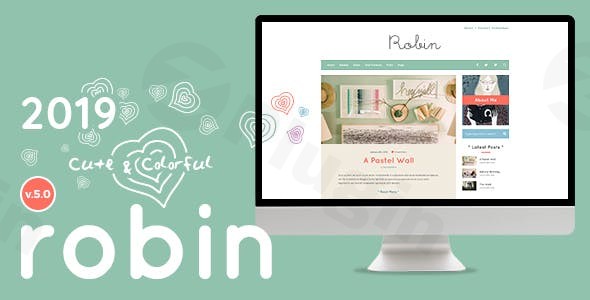
Finding a website design that captures a playful, artistic spirit without sacrificing professional functionality can be a challenge. The Robin – Cute & Colorful Blog Theme is a specialized WordPress solution designed specifically for the “creative ones”—bloggers and entrepreneurs who specialize in handmade crafts, cooking, illustration, and DIY hobbies. While many modern themes lean toward sterile minimalism, Robin embraces a vibrant “fairytale” aesthetic that instantly makes a personal brand feel memorable and engaging.As one of the best WordPress themes for personal blogs in the creative niche, Robin doesn’t just look good; it is built on a robust technical foundation. Whether you are a hobbyist sharing recipes or a professional illustrator showcasing a portfolio, this theme provides the visual tools to tell your story colorfully.
Key Features: Design, Layout & Performance
The Robin theme stands out because of its commitment to a “cute and colorful” design philosophy. It moves away from generic templates to offer something deeply personalized.
Diverse Design & Layout Options
Robin provides incredible flexibility in how you present your content. Users can choose from:
- 7 Distinct Blog Layouts: Options range from classic single columns and sidebars to more complex grids like the (1+2) or (2+3) column layouts.
- 4+ Homepage Variations: These pre-built homepages combine sliders, banners, and service boxes to create a dynamic first impression.
- Unlimited Header Views: You have full control over logo placement, padding, and “sticky” header triggers to ensure your navigation is always user-friendly.
Advanced Customization Capabilities
The heart of this colorful blog theme for WordPress is its color management. Robin allows you to set unique color patterns for different post formats. This means your video posts can have a different aesthetic vibe than your standard text galleries, creating a rich, multi-sensory browsing experience. With access to over 600 Google Fonts and unlimited color pickers in the Live Customizer, your branding options are virtually limitless.
Performance & SEO Readiness
Despite its rich visual elements, Robin is engineered for speed. It is marketed with “Blazing Fast Loading Speed” and follows SEO best practices.
- SEO Optimized: The theme uses clean markup to help search engines index your creative content effectively.
- Mobile Responsiveness: It is a “Responsive & Retina Ready” theme, ensuring that your vibrant illustrations and high-resolution photos look crisp on iPhones, tablets, and 4K monitors alike.
Installation & Demo Import Guide
Getting your site to look like the professional demo is straightforward, even for beginners. Follow these steps to set up the Robin theme:
- Install & Activate: Upload the Robin theme folder via Appearance > Themes > Add New in your WordPress dashboard.
- Plugin Setup: Upon activation, the theme will prompt you to install required companion plugins, including WPBakery Page Builder and Slider Revolution (typically bundled with the theme).
- One-Click Demo Import: Navigate to the theme options panel to find the demo importer. This tool allows you to import dummy content, widgets, and settings with a single click.
- Configuration: Once the import is complete, simply replace the placeholder images and text with your own creative content.Note: For a smooth demo import, ensure your hosting environment meets the recommended requirements (PHP 5.6+ and sufficient memory limits) to avoid timeouts.
Customization Guide: Personalizing Your Brand
Personalizing the Robin theme customization options is done primarily through the WordPress Live Customizer, allowing you to see changes in real-time.
- Branding: Upload your logo and favicon. You can adjust the logo size and header padding to match your specific artwork or brand mark.
- Color-Coding Content: One of Robin’s best features is the ability to assign specific palettes to different categories or post types. This is ideal for handmade blogs that want to distinguish between “Tutorials,” “Store Updates,” and “Personal Stories” visually.
- Typography: Use the integrated Google Fonts library to select typefaces that match the “cute and colorful” vibe. Rounder, sans-serif fonts often work best with Robin’s fairytale aesthetic.
- Page Building: For custom landing pages, use the bundled WPBakery Page Builder or the Elementor integration to drag and drop elements like testimonials, team members, and portfolios.
FAQ & Troubleshooting
Is the Robin theme compatible with Elementor and Gutenberg?
Yes, Robin – Cute & Colorful Blog Theme is fully Gutenberg-ready and award-winning in Envato’s Gutenberg contests. It also offers easy customization via the Elementor page builder, giving users total control over their layouts.
Does Robin support WooCommerce for online stores?
Yes, this theme is excellent for small businesses. It includes 02 dedicated shop layouts and is compatible with WooCommerce, making it a great WordPress theme for crafters who want to sell handmade items or furniture directly from their blog.
How do I change post colors in the Robin theme?
You can change post colors through the Live Customizer or the individual post editor. Robin allows you to set unique color patterns for different post formats (Standard, Gallery, Video, etc.), ensuring a diverse visual experience across your archives.
Does it support child themes?
While the documentation focuses on the Live Customizer, Robin is built following WordPress standards, which generally supports child themes. Using a child theme is recommended if you plan on making extensive code-level modifications to the PHP or CSS files.
Conclusion: Is Robin Right for You?
The Robin – Cute & Colorful Blog Theme is a breath of fresh air for the creative community. It successfully balances a whimsical, “fairytale” design with the technical rigors of modern web development. Who is this for?
- Bloggers who want a high-personality site for cooking, DIY, or lifestyle content.
- Artists and Illustrators looking for a vibrant portfolio.
- Etsy Sellers and Crafters who need a WooCommerce-ready site that matches their handmade aesthetic.If you are looking for a sterile, corporate business layout, Robin isn’t for you. However, if you want a site that feels alive, expressive, and unique, Robin provides all the tools, speed, and SEO optimization needed to build a thriving online presence. Its Gutenberg readiness and Elementor compatibility make it a future-proof choice for any creative professional.
I. Download Limits & Account Benefits
- Free Downloads: Each email address receives 3 downloads per day for free products
- Upgrade Benefits: Purchase any paid product to increase your daily download limit by 3 for each paid product
- No Account Required: You can download immediately by receiving the download link via email
- Account Recommended: Create an account for easier access to your order history and direct update downloads
II. Understanding GPL vs Official Versions
Important: The products available on WPPick are GPL-licensed versions, which differ from official developer versions. Before purchasing, please read our comprehensive guide: Understanding GPL & Official Differences at WPPick
Key Points:
- GPL versions may not include premium support from original developers
- Updates may be delayed compared to official releases
- Some premium features might have limitations
- Always consider your specific needs and support requirements
III. Support & Assistance
We’re here to help through multiple channels:
- Email Support: Direct email assistance for all inquiries
- Live Chat: Real-time support during business hours
- Comprehensive Documentation: Detailed guides and tutorials
IV. Order Tracking
Access your complete purchase history and download links anytime: Order History
V. Account Access
New to WPPick? Login or Create Account to manage your downloads and orders efficiently.
VI. Refund Protection
We stand behind our products with a clear refund policy. Review our terms: Refund Policy
VII. Privacy & Security
Your data security is our priority. Learn how we protect your information: Privacy Policy
VII. Terms of Service
Understanding our service terms ensures a smooth experience: Terms of Use
Quick Tips for Best Experience
- Verify Compatibility: Check plugin/theme compatibility with your WordPress version
- Backup First: Always backup your site before installing new plugins or themes
- Test Environment: Consider testing on a staging site first
- Stay Updated: Regularly check for updates in your account dashboard
- Read Documentation: Review any included documentation for optimal setup
Need Help?
If you have questions about downloads, licensing, or need technical assistance, don’t hesitate to contact our support team. We’re committed to ensuring you have the best possible experience with WPPick products.
Ready to get started? Your download adventure begins with just one click!