
Romea – Personal Portfolio WordPress Theme
/Year
In today’s competitive digital landscape, a compelling online portfolio is indispensable for professionals across all creative and business sectors. The Romea – Premium Personal Portfolio WordPress Theme stands out as a sophisticated, minimalist, and clean one-page solution, meticulously crafted to help individuals and businesses showcase their work with unparalleled elegance and precision. Developed for personal portfolios, startup businesses, companies, agencies, and freelancers, Romea provides a professional, high-performance platform to highlight your projects and services, ensuring your unique vision captivates your audience.
The Romea Design Philosophy: Professionalism Meets Simplicity
Romea’s core design philosophy revolves around minimalist aesthetics and intuitive functionality. It is engineered to deliver a distraction-free experience, placing your content front and center. This premium theme combines advanced design capabilities with user-friendly controls, making professional-grade web design accessible to everyone, from seasoned developers to creative entrepreneurs with no coding experience. Its clean lines and thoughtful layout enhance visual appeal, creating an engaging and memorable journey for every visitor.
Key Features & Benefits: Crafting an Impeccable Online Portfolio
Romea is packed with features designed to solve common website design challenges, offering a robust toolkit for creating a truly unique and impactful online presence.
Seamless Content Creation with Elementor Page Builder Integration
At the heart of Romea’s customization prowess is its deep integration with Elementor, one of the most powerful and versatile drag-and-drop page builders for WordPress. This integration empowers you to:
- Customize Every Aspect: Effortlessly modify layouts, sections, and elements without writing a single line of code.
- Intuitive Control: Add, remove, or rearrange sections with a simple drag-and-drop interface, crafting a site that perfectly reflects your personal branding and creative vision.
- Real-time Previews: See your changes instantly, streamlining the design process and ensuring precision in every detail.
Engaging Visual Experiences
Romea is engineered to create an immersive user experience through dynamic and responsive visual elements:
- Stunning One-Page Layout: Engage visitors with a seamless, narrative-driven one-page design. Smooth scrolling and intuitive navigation guide users effortlessly through your content, maintaining interest and encouraging exploration of your work.
- Dynamic Parallax Elements: Incorporate eye-catching parallax effects for images and text, adding remarkable depth and interactivity. These dynamic elements create a memorable user experience that distinctly sets your portfolio apart from the competition.
- Fully Responsive Design: Ensure your portfolio looks flawless on any device. Romea’s responsive layout automatically adapts to all screen sizes, from high-resolution desktops to smartphones, providing an optimal and consistent viewing experience for every visitor.
Specialized Tools for Portfolio Management
- Dedicated Portfolio Post Type: Showcase your work with ease using a specialized portfolio post type. This feature makes it incredibly simple to organize, categorize, and display your projects. Highlight your best work with customizable galleries and detailed project descriptions that tell your story.
- Ajax Content Loading: Enhance user experience with lightning-fast, Ajax-powered content loading. This technology ensures smooth transitions between sections and pages, significantly reducing load times and keeping your visitors engaged without interruption.
Advanced Customization & Flexibility: Tailoring Romea to Your Brand
Romea understands that true personalization is key to a successful online presence. It offers extensive customization options, allowing you to fine-tune every aspect of your website.
- Child Theme Included: Customize your theme safely and effectively without affecting core files. The included child theme allows for extensive modifications and updates while preserving your original functionality, a crucial best practice for long-term website maintenance.
- Multi-Language Support: Expand your reach to a global audience with full compatibility for leading translation plugins like WPML and Polylang. Easily translate your content, opening doors to international clients and opportunities.
- Easy Translations with .POT Files: Streamline the translation process with readily available .POT files, compatible with tools like Loco Translate. This feature empowers you to tailor your site’s language to suit any target audience.
Professional Demos and Limitless Possibilities
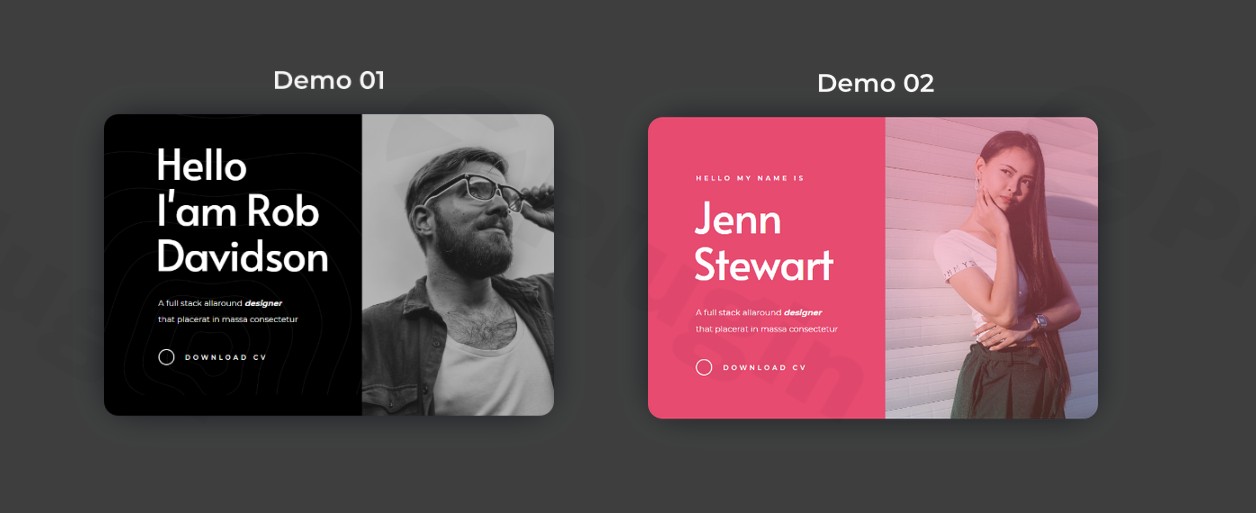
- Two Beautifully Designed Demos: Choose from two distinct, professionally designed demos, each featuring unique color schemes and layouts. Whether your aesthetic is bold or subtle, Romea provides an excellent starting point that can be fully customized to align perfectly with your brand identity.
- Unlimited Sections and Pages: Romea offers limitless possibilities for expansion. Create as many sections and standalone pages as you need, allowing your site to grow and evolve seamlessly alongside your business and professional aspirations.
Setup & Usage: Getting Started with Romea
Setting up your Romea theme is designed to be straightforward, even for those new to WordPress:
- Installation: After downloading Romea, upload the theme to your WordPress site via the Appearance > Themes > Add New > Upload Theme option in your WordPress dashboard. Activate the theme.
- Import Demo Content (Optional): To quickly kickstart your design, consider importing one of Romea’s professional demos. This provides a structured foundation that you can then easily modify.
- Customize with Elementor: Navigate to any page and click “Edit with Elementor.” Here, you can drag-and-drop elements, adjust text, change images, and modify layouts to create your unique design.
- Populate Portfolio: Utilize the dedicated Portfolio Post Type to add your projects. Upload images, write descriptions, and categorize your work to create an impressive showcase.
- General Customization: Use the WordPress Customizer (Appearance > Customize) to fine-tune global settings such as typography, color schemes, and header/footer options.
Target Audience & Use Cases: Who Benefits from Romea?
Romea is a versatile theme ideally suited for a diverse range of professionals and businesses:
- Personal Portfolios: Perfect for individuals looking to showcase their resumes, achievements, and personal brand.
- Freelancers and Agencies: An excellent choice for showcasing client projects, services, and team expertise in a visually compelling manner.
- Startup Businesses: Provides a polished and professional online presence to attract investors, customers, and talent.
- Creative Professionals: Artists, photographers, graphic designers, and writers can effectively display their unique works.
- Corporations Showcasing Projects: Businesses needing a dedicated section to present case studies, product launches, or company achievements will find Romea highly effective.
Why Choose Romea from ZeroPlugin.com? Ensuring Trust and Quality
When you invest in Romea from ZeroPlugin.com, you are choosing more than just a theme; you are opting for a foundation built on trust, quality, and ethical practices.
- Genuine GPL License: Benefit from a genuine GPL license, ensuring legal and ethical use of the theme across your projects.
- Regular Updates and Security: Our products undergo consistent updates to ensure compatibility with the latest WordPress versions and rigorous security scans via VirusTotal to guarantee safety and reliability. This commitment to security and maintenance builds a foundation of trustworthiness.
- Commitment to Quality: ZeroPlugin.com is dedicated to providing high-quality solutions, backed by excellent support and comprehensive documentation.
Conclusion: Unleash Your Creativity with Romea
Romea is more than just a WordPress theme; it’s a powerful tool designed to elevate your professional online presence. With its clean and minimalist design, advanced Elementor integration, dynamic visual elements, and extensive customization options, Romea provides the perfect platform to captivate your audience and drive your professional growth. Embrace the premium capabilities of Romea and build a stunning online portfolio that truly reflects your expertise and passion.
I. Download Limits & Account Benefits
- Free Downloads: Each email address receives 3 downloads per day for free products
- Upgrade Benefits: Purchase any paid product to increase your daily download limit by 3 for each paid product
- No Account Required: You can download immediately by receiving the download link via email
- Account Recommended: Create an account for easier access to your order history and direct update downloads
II. Understanding GPL vs Official Versions
Important: The products available on WPPick are GPL-licensed versions, which differ from official developer versions. Before purchasing, please read our comprehensive guide: Understanding GPL & Official Differences at WPPick
Key Points:
- GPL versions may not include premium support from original developers
- Updates may be delayed compared to official releases
- Some premium features might have limitations
- Always consider your specific needs and support requirements
III. Support & Assistance
We’re here to help through multiple channels:
- Email Support: Direct email assistance for all inquiries
- Live Chat: Real-time support during business hours
- Comprehensive Documentation: Detailed guides and tutorials
IV. Order Tracking
Access your complete purchase history and download links anytime: Order History
V. Account Access
New to WPPick? Login or Create Account to manage your downloads and orders efficiently.
VI. Refund Protection
We stand behind our products with a clear refund policy. Review our terms: Refund Policy
VII. Privacy & Security
Your data security is our priority. Learn how we protect your information: Privacy Policy
VII. Terms of Service
Understanding our service terms ensures a smooth experience: Terms of Use
Quick Tips for Best Experience
- Verify Compatibility: Check plugin/theme compatibility with your WordPress version
- Backup First: Always backup your site before installing new plugins or themes
- Test Environment: Consider testing on a staging site first
- Stay Updated: Regularly check for updates in your account dashboard
- Read Documentation: Review any included documentation for optimal setup
Need Help?
If you have questions about downloads, licensing, or need technical assistance, don’t hesitate to contact our support team. We’re committed to ensuring you have the best possible experience with WPPick products.
Ready to get started? Your download adventure begins with just one click!
- Download available 30 April 2025