
Roofex – Roofing WordPress Theme
/Year
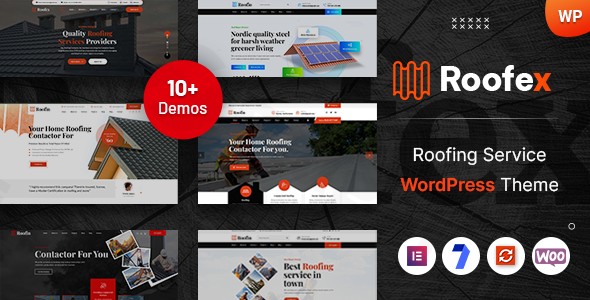
The Roofex WordPress theme stands out as a premier solution specifically crafted for roofing companies, contractors, and service providers aiming to establish a robust and professional online presence. This theme blends modern design aesthetics with powerful, niche-specific functionalities, making it the ultimate choice for any roofing business looking to generate leads and showcase their expertise effectively.
Introduction: Modern Design Meets Roofing Industry Needs
Roofex is more than just a theme; it’s a comprehensive digital toolkit for the roofing industry. Designed by Case-Themes, an Envato Elite Author, it caters specifically to residential and commercial roofing contractors, roof repair services, and related businesses. Its design philosophy emphasizes a clean, contemporary, and visually appealing interface that immediately conveys credibility and professionalism. The theme’s focus on service-oriented architecture ensures that roofing professionals can easily highlight their services, projects, and customer testimonials, providing an exceptional user experience across all devices.
Key Features: Design, Layout & Performance
Roofex is engineered to provide both stunning visuals and robust functionality, ensuring your roofing business makes a strong impression online.
Design & Layout Options
Roofex offers a sophisticated visual appeal with a strong focus on the unique needs of roofing businesses.
- Modern & Professional Layouts: The theme features a clean, contemporary design optimized to showcase roofing services, completed projects, and company expertise. It includes specialized sections for roofing services, emergency repairs, maintenance programs, and project portfolios.
- Dedicated Project Portfolio & Gallery: Showcase your best work with dedicated portfolio sections designed to highlight before-and-after transformations, different roofing materials, and completed projects. The gallery functionality allows potential customers to visualize the quality of your workmanship.
- Flexible Header & Footer Builder: Roofex includes a dedicated Header & Footer Builder, allowing you to choose from pre-built designs or create custom layouts. This provides immense flexibility in controlling your site’s navigation and branding elements.
- Mega Menu Support: For websites with extensive services or content, the integrated Mega Menu builder facilitates complex yet intuitive navigation structures, enhancing user experience.
- Engaging Visual Elements: The theme incorporates cool CSS3 animations, unique effects, and smooth transition effects, along with parallax and video backgrounds, to create an engaging visual experience for visitors.
Customization Capabilities
Personalizing your Roofex site to match your brand identity is intuitive and code-free, thanks to its extensive customization options.
- Unlimited Color Options & Typography: Roofex provides unlimited color options, allowing you to customize the color scheme to align perfectly with your brand. It also supports Google Fonts, offering a vast selection of readable and elegant font combinations.
- Advanced Theme Options: Fine-tune almost any aspect of your website without coding knowledge through the theme’s advanced options, complete with real-time preview via the WordPress Customizer. Page-specific options allow for granular control, overriding global settings for individual pages or posts.
- 50+ Custom Widgets: Extend your layout possibilities with over 50 custom widgets developed by Roofex, each offering various layouts and styles to enrich your content areas.
Performance & SEO Features
Roofex is built with performance and search engine optimization (SEO) at its core, ensuring your roofing business gets found online and loads quickly. This makes it an SEO-friendly roofing WordPress theme.
- Search Engine Optimized: Built with clean, semantic code and adhering to SEO best practices, Roofex helps your roofing business rank well in local search results. It features proper heading structures, meta tag optimization, and fast loading times—all factors favored by search engines like Google and AI search engines.
- Mobile-Responsive Design: Following mobile-first design principles, Roofex ensures your website looks and functions flawlessly on smartphones, tablets, and desktop computers. This responsive approach is crucial for capturing leads from all device types and provides an optimal browsing experience.
- Fast Loading & Performance: Optimized code and efficient resource loading guarantee that your website loads quickly, significantly reducing bounce rates and improving overall user engagement—a key factor for both visitors and search engine rankings.
Installation & Demo Import
Setting up your professional roofing website with Roofex is designed to be straightforward, even for those new to WordPress.
- Install & Activate the Theme:
- After purchasing Roofex, download the theme package.
- Navigate to your WordPress Dashboard > Appearance > Themes > Add New > Upload Theme.
- Choose the
roofex.zipfile (or the main theme file within the downloaded package) and click “Install Now.” - Once installed, click “Activate.”
- Install Required Plugins:
- Upon activation, Roofex will prompt you to install a set of recommended plugins. Essential plugins like Elementor Page Builder, Slider Revolution, and Contact Form 7 are typically included. Install and activate all of these to ensure full theme functionality.
- One-Click Demo Import:
- Roofex comes with a powerful one-click demo content import feature. This is ideal for quickly setting up your site to mirror one of the theme’s professional demo layouts.
- Look for “Demo Import” or “Import Demo Data” under the theme options in your WordPress dashboard.
- Select the demo you wish to import and proceed.
- What to Expect:
- The demo import process will populate your site with pre-designed pages, posts, menus, widgets, and theme options settings, saving you significant setup time.
- Tip for Large Demos: If your server has low memory limits or short execution times, large demo imports can sometimes time out. If you encounter issues, consider temporarily increasing your PHP
memory_limitandmax_execution_timevalues in your server settings (or contact your hosting provider for assistance). - After import, review your pages, menus (Appearance > Menus), and widgets (Appearance > Widgets) to ensure everything is in place and update content with your business details.
Customization Guide: Branding & Layout
Roofex provides extensive flexibility to brand your website and tailor its layout without needing to write any code.
- WordPress Customizer & Advanced Theme Options: Most visual customizations, such as changing colors, fonts, and global settings, can be done through the familiar WordPress Customizer or the theme’s own advanced options panel. These interfaces often provide a real-time preview, allowing you to see your changes instantly.
- Changing Colors and Fonts: Easily adjust primary and secondary color palettes, background colors, and typography settings to match your company’s brand guidelines. With Google Fonts integration, you have thousands of font choices at your fingertips.
- Logo and Favicon: Upload your company logo and favicon through the Customizer or theme options to establish immediate brand recognition.
- Header and Footer Layouts: Utilize the dedicated Header & Footer Builder to select pre-designed layouts or drag-and-drop elements to create custom headers and footers that perfectly suit your aesthetic and functional needs.
- Setting Up Homepage and Blog Page: Designate your desired static homepage and blog posts page via WordPress Settings > Reading. Then, use the Elementor page builder to customize your homepage content.
- Menu Management: Create and assign your main navigation menus via Appearance > Menus, ensuring easy access to your services, portfolio, and contact information.
- Intuitive Page Building with Elementor: Roofex is primarily built with Elementor Page Builder (compatible with the free version). This drag-and-drop interface empowers you to create and customize any page layout with ease, even if you have no prior web design experience. The theme’s 50+ custom widgets further enhance Elementor’s capabilities, offering specialized elements for roofing-related content.
FAQ & Troubleshooting
Here are answers to common questions about the Roofex WordPress theme.
Is Roofex compatible with Elementor and other major plugins?
Yes, Roofex is fully compatible with Elementor Page Builder, offering seamless drag-and-drop functionality for page creation and customization. It also comes with the premium Slider Revolution plugin included for free. Furthermore, Roofex is compatible with WPML for multilingual sites, Contact Form 7, Mailchimp for WordPress (MC4WP), Tidio Chat, and various WooCommerce extensions like WPC Wishlist, WPC Quick View, and Variation Swatches.
Does Roofex support WooCommerce for online stores?
Absolutely. Roofex is WooCommerce plugin ready, meaning you can seamlessly integrate e-commerce functionality into your roofing website. This allows you to sell roofing materials, tools, merchandise, or even service packages directly from your site.
How can I customize the Roofex header and footer?
Roofex features a dedicated Header & Footer Builder that provides extensive customization options. You can access this builder through the theme options in your WordPress dashboard. Here, you can select from pre-built header/footer designs or use a drag-and-drop interface to create entirely custom layouts, add logos, navigation menus, contact information, social media links, and more.
Does Roofex support child themes for advanced customization?
Yes, a blank child theme is included in the Roofex package, and its use is highly recommended for any advanced customizations. Using a child theme ensures that any modifications you make to the theme’s files (e.g., custom CSS, functions) will not be overwritten when you update the main Roofex theme, preserving your unique design choices.
What should I do if the Roofex demo import fails or looks different from the demo site?
If your Roofex demo import fails or doesn’t look exactly like the online demo, there are a few common steps:
- Check Server Resources: Ensure your hosting environment meets the theme’s requirements (PHP 5.6.x or higher, MySQL 5 or higher) and has sufficient memory (
memory_limit) and execution time (max_execution_time). - Install All Required Plugins: Make sure all recommended plugins, especially Elementor and Slider Revolution, are installed and activated before importing the demo.
- Re-import: Try the one-click demo import again. Sometimes, a second attempt resolves transient server issues.
- Consult Documentation/Support: Refer to the comprehensive documentation or contact Case-Themes’ professional support team, providing details of the issue. They can offer specific guidance or troubleshoot the problem directly.
Conclusion
The Roofex WordPress theme stands as an exceptional choice for any roofing company, contractor, or related service provider seeking to elevate their online presence. Its thoughtful blend of modern, professional design, extensive customization options through Elementor and advanced theme settings, and robust performance and SEO features make it a truly high-converting solution.Roofex excels in its niche specialization, offering pre-built layouts and functionalities tailored to showcase services, portfolios, and testimonials critical for the roofing industry. The ease of its one-click demo import and the intuitive drag-and-drop customization make it an ideal theme for beginners, freelancers, agencies, and small to medium businesses alike. While initial setup may require some familiarization, the comprehensive documentation and professional support ensure a smooth experience.Ultimately, if you’re looking for a dedicated, reliable, and visually stunning roofing company website template that effectively generates leads and builds trust, Roofex is a highly recommended and powerful investment for transforming your roofing business online.
I. Download Limits & Account Benefits
- Free Downloads: Each email address receives 3 downloads per day for free products
- Upgrade Benefits: Purchase any paid product to increase your daily download limit by 3 for each paid product
- No Account Required: You can download immediately by receiving the download link via email
- Account Recommended: Create an account for easier access to your order history and direct update downloads
II. Understanding GPL vs Official Versions
Important: The products available on WPPick are GPL-licensed versions, which differ from official developer versions. Before purchasing, please read our comprehensive guide: Understanding GPL & Official Differences at WPPick
Key Points:
- GPL versions may not include premium support from original developers
- Updates may be delayed compared to official releases
- Some premium features might have limitations
- Always consider your specific needs and support requirements
III. Support & Assistance
We’re here to help through multiple channels:
- Email Support: Direct email assistance for all inquiries
- Live Chat: Real-time support during business hours
- Comprehensive Documentation: Detailed guides and tutorials
IV. Order Tracking
Access your complete purchase history and download links anytime: Order History
V. Account Access
New to WPPick? Login or Create Account to manage your downloads and orders efficiently.
VI. Refund Protection
We stand behind our products with a clear refund policy. Review our terms: Refund Policy
VII. Privacy & Security
Your data security is our priority. Learn how we protect your information: Privacy Policy
VII. Terms of Service
Understanding our service terms ensures a smooth experience: Terms of Use
Quick Tips for Best Experience
- Verify Compatibility: Check plugin/theme compatibility with your WordPress version
- Backup First: Always backup your site before installing new plugins or themes
- Test Environment: Consider testing on a staging site first
- Stay Updated: Regularly check for updates in your account dashboard
- Read Documentation: Review any included documentation for optimal setup
Need Help?
If you have questions about downloads, licensing, or need technical assistance, don’t hesitate to contact our support team. We’re committed to ensuring you have the best possible experience with WPPick products.
Ready to get started? Your download adventure begins with just one click!