
Roofplan – Roofing Services WordPress Theme + Rtl
/Year
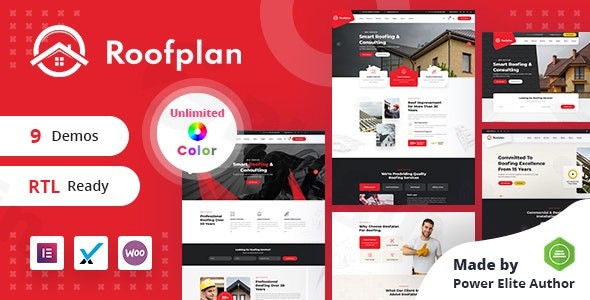
RoofPlan is a professional roofing services WordPress theme meticulously engineered to transform the online presence of roofing contractors, companies, and service providers. This robust solution offers a complete digital toolkit designed to showcase your expertise, highlight your project portfolio, and effectively generate qualified leads, making it an ideal choice for businesses seeking to establish a strong, converting digital footprint.
Introduction: Elevate Your Roofing Business Online
In the highly competitive roofing industry, a professional, high-performing website is no longer a luxury but a necessity. RoofPlan steps in as the ultimate roofing services WordPress theme, providing a specialized and visually appealing platform. Its design philosophy is clean, minimalist, and pixel-perfect, tailored to present your services with clarity and impact. Whether you’re a residential contractor, a commercial roofing specialist, or a roof repair expert, RoofPlan offers the comprehensive features needed to attract more customers and build trust through a sophisticated online presence.
Key Features: Design, Layout & Performance for Roofing Professionals
RoofPlan is packed with features that empower roofing businesses to create stunning, functional websites without needing extensive coding knowledge.
Mobile-Responsive Design
With a significant portion of internet traffic coming from mobile devices, RoofPlan ensures your website delivers an impeccable user experience across all screen sizes. From smartphones and tablets to desktops, your potential clients can effortlessly browse your services, view your galleries, and contact you, guaranteeing accessibility and a professional look on any device.
Intuitive Drag-and-Drop Page Builder
At the heart of RoofPlan’s ease of use is its seamless integration with the Elementor Drag & Drop Page Builder. This powerful tool empowers you to create stunning page layouts with effortless precision, customize sections, add service details, and showcase your best work visually, all without writing a single line of code. Its intuitive interface makes designing complex layouts accessible to everyone.
SEO-Optimized Architecture
Getting found by homeowners actively searching for roofing services is crucial. RoofPlan is built with clean, well-structured code and adheres to SEO best practices, giving your website a significant advantage in search engine rankings. This optimization helps drive more organic traffic directly to your business, increasing visibility and lead potential.
Professional Portfolio Showcase
Demonstrate your craftsmanship and expertise with RoofPlan’s stunning portfolio galleries. Easily display before-and-after comparisons, detailed project descriptions, and high-quality imagery to build credibility and trust with potential clients, showcasing the quality of your completed work.
Comprehensive Service Presentation & Lead Generation Tools
RoofPlan offers a complete business solution beyond just design. It allows you to beautifully present all your roofing services—from repairs and replacements to maintenance and inspections—with clear descriptions and options. Furthermore, the theme integrates strategically placed contact forms, call-to-action buttons, and quote request systems designed specifically to convert website visitors into valuable leads.
Testimonial Management System
Building social proof is vital in the home services industry. RoofPlan includes an integrated testimonial system, making it simple to showcase customer reviews and satisfaction stories. This feature helps new prospects feel more confident in choosing your roofing services by highlighting positive past experiences.
RTL (Right-to-Left) Language Support
A significant differentiator for businesses targeting a broader audience, RoofPlan comes with out-of-the-box RTL support. This makes it an excellent choice for creating multilingual websites that cater to languages written from right to left, such as Arabic or Hebrew, extending your reach and ensuring a global-friendly design.
Installation & One-Click Demo Import Guide
Getting your RoofPlan website up and running is designed to be straightforward, even for those new to WordPress. The theme leverages a one-click demo import feature to quickly set up a professionally designed starting point.Here’s a step-by-step guide:
- Download & Upload the Theme:
- After purchasing RoofPlan from ThemeForest, download the theme package.
- Log in to your WordPress dashboard.
- Navigate to
Appearance > Themes > Add New > Upload Theme. - Choose the
roofplan.zipfile from your download, then clickInstall Now.
- Activate the Theme:
- Once installed, click on the
Activatelink to make RoofPlan your active theme.
- Once installed, click on the
- Install Required Plugins:
- Upon activation, RoofPlan will prompt you to install a set of recommended plugins. These typically include the Elementor Page Builder, Contact Form 7, and WooCommerce (if you plan to sell products). It also mentions Slider Revolution as a powerful plugin that comes with the theme.
- Follow the on-screen instructions to install and activate all recommended plugins.
- One-Click Demo Import:
- With the theme and necessary plugins activated, look for a “Demo Import” or “Import Demo Data” option in your WordPress dashboard (often found under
Appearanceor a dedicated theme options panel). - Select the demo you wish to import and click the import button.
- Important Note: Importing demo content can be resource-intensive. Ensure your hosting environment meets standard WordPress requirements (e.g., adequate PHP memory limit, execution time) to prevent timeouts. For very large demo imports, consider temporarily increasing these limits if issues arise.
- With the theme and necessary plugins activated, look for a “Demo Import” or “Import Demo Data” option in your WordPress dashboard (often found under
- Review Imported Content:
- After the demo import completes, your website should resemble the live demo. This includes pre-built pages, posts, sample portfolios, menus, and widgets.
- Navigate to
Appearance > MenusandAppearance > Widgetsto ensure everything is assigned correctly. You may need to set your homepage and blog page underSettings > Reading.
Customization Guide: Branding Your Roofing Business
RoofPlan offers extensive customization options through an advanced admin panel, allowing you to personalize every aspect of your website to match your brand’s unique identity.
- Accessing Customization Options:
- Most global styling options can be found in the WordPress Customizer (
Appearance > Customize) or within a dedicated “Theme Options” panel often accessible from your dashboard sidebar (e.g., “RoofPlan Options”).
- Most global styling options can be found in the WordPress Customizer (
- Colors & Typography:
- Color Schemes: The advanced admin panel provides comprehensive control over your site’s color schemes. You can easily adjust primary, secondary, and accent colors to align with your brand’s palette.
- Typography: Utilize advanced typography options to select from over 600 Google Fonts. You can also upload custom fonts to maintain unique brand consistency. This allows for precise control over font sizes, weights, and line heights for headings and body text.
- Logo & Site Identity:
- Easily upload your company logo, favicon, and adjust site title and tagline through the Customizer, ensuring your brand is prominently displayed.
- Header & Footer Layouts:
- The advanced admin panel provides options for customizing header and footer elements. Given its integration with Elementor, you’ll likely have powerful drag-and-drop capabilities to design custom header and footer sections, defining menus, contact information, social links, and widget areas.
- Page Layouts with Elementor:
- For individual page customization, navigate to any page and click “Edit with Elementor.” This will open the Elementor interface, where you can visually drag and drop elements, customize sections, and arrange content to create unique layouts for your services, portfolio, and contact pages.
- Child Theme Compatibility & Custom CSS:
- RoofPlan is child-theme compatible, which is essential for making safe customizations. Creating a child theme ensures that any direct code modifications you make won’t be overwritten during theme updates.
- For advanced users, the theme is “Custom CSS Ready,” allowing you to inject your own styling rules directly through the Customizer or your child theme’s stylesheet.
FAQ & Troubleshooting
Here are answers to common questions about the RoofPlan WordPress theme:
Is RoofPlan compatible with Elementor, WPBakery, or Gutenberg?
RoofPlan is primarily and seamlessly integrated with the Elementor Drag & Drop Page Builder, making it the recommended tool for visual page building and customization. While there’s a minor mention of WPBakery in some older lists, Elementor is the consistently highlighted and integrated page builder. Compatibility with the native WordPress Block Editor (Gutenberg) is not explicitly emphasized, as the theme’s workflow centers around Elementor.
Does RoofPlan support WooCommerce for online stores?
Yes, RoofPlan is fully compatible with WooCommerce. This means you can easily set up an online store to sell roofing materials, tools, or related services directly from your website, leveraging WooCommerce’s robust e-commerce functionalities.
Does RoofPlan support child themes, and why should I use one?
Yes, RoofPlan is child-theme compatible. Using a child theme is highly recommended for any customizations you wish to make to the theme’s code or styling. It ensures that your modifications are preserved even when you update the main RoofPlan theme, preventing loss of your bespoke changes.
How can I ensure my RoofPlan website performs well and ranks high on search engines?
RoofPlan is built with SEO-optimized architecture and clean code to help with search engine rankings. To further enhance performance and SEO, ensure you use high-quality, optimized images, write compelling and keyword-rich content, utilize caching plugins, and choose a reliable hosting provider. The theme’s mobile responsiveness also contributes positively to SEO.
What should I do if the demo import fails or doesn’t look like the live demo?
If your RoofPlan demo import encounters issues or doesn’t match the live demo, first verify that all required plugins were installed and activated correctly. Next, check your server’s PHP configuration, specifically the memory_limit and max_execution_time. Temporarily increasing these values can often resolve import problems. If issues persist, consult the theme’s documentation for specific troubleshooting steps or contact the theme developer’s support.
Conclusion: Your Foundation for Roofing Industry Success
RoofPlan stands out as a highly specialized and effective WordPress theme for roofing contractors and related businesses. Its design flexibility, powered by Elementor, allows for deep customization, ensuring your brand identity shines through. With a focus on performance, SEO readiness, and crucial lead-generation tools, RoofPlan provides a solid foundation for online success.It’s an ideal choice for residential and commercial roofing companies, repair specialists, and full-service contractors looking for a professional, mobile-friendly, and search-engine-optimized website without the need for extensive coding. RoofPlan empowers beginners and experienced users alike to create a visually stunning and highly functional online presence that builds trust, generates leads, and ultimately helps grow their roofing business. If you’re ready to elevate your digital footprint in the competitive roofing industry, RoofPlan offers the complete solution you need.
I. Download Limits & Account Benefits
- Free Downloads: Each email address receives 3 downloads per day for free products
- Upgrade Benefits: Purchase any paid product to increase your daily download limit by 3 for each paid product
- No Account Required: You can download immediately by receiving the download link via email
- Account Recommended: Create an account for easier access to your order history and direct update downloads
II. Understanding GPL vs Official Versions
Important: The products available on WPPick are GPL-licensed versions, which differ from official developer versions. Before purchasing, please read our comprehensive guide: Understanding GPL & Official Differences at WPPick
Key Points:
- GPL versions may not include premium support from original developers
- Updates may be delayed compared to official releases
- Some premium features might have limitations
- Always consider your specific needs and support requirements
III. Support & Assistance
We’re here to help through multiple channels:
- Email Support: Direct email assistance for all inquiries
- Live Chat: Real-time support during business hours
- Comprehensive Documentation: Detailed guides and tutorials
IV. Order Tracking
Access your complete purchase history and download links anytime: Order History
V. Account Access
New to WPPick? Login or Create Account to manage your downloads and orders efficiently.
VI. Refund Protection
We stand behind our products with a clear refund policy. Review our terms: Refund Policy
VII. Privacy & Security
Your data security is our priority. Learn how we protect your information: Privacy Policy
VII. Terms of Service
Understanding our service terms ensures a smooth experience: Terms of Use
Quick Tips for Best Experience
- Verify Compatibility: Check plugin/theme compatibility with your WordPress version
- Backup First: Always backup your site before installing new plugins or themes
- Test Environment: Consider testing on a staging site first
- Stay Updated: Regularly check for updates in your account dashboard
- Read Documentation: Review any included documentation for optimal setup
Need Help?
If you have questions about downloads, licensing, or need technical assistance, don’t hesitate to contact our support team. We’re committed to ensuring you have the best possible experience with WPPick products.
Ready to get started? Your download adventure begins with just one click!