
Ruffer – Roof Construction & Repair WordPress Theme
/Year
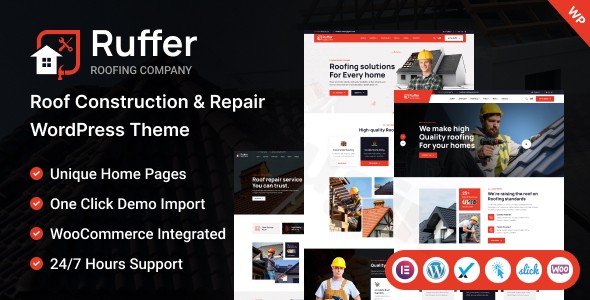
The Ruffer WordPress Theme is an expertly crafted and highly specialized solution designed to build a powerful online presence for roofing companies, general construction firms, and a wide array of home repair and service businesses. This theme is engineered for professionals who demand a clean, modern design paired with robust functionality, ensuring their website not only looks outstanding but also drives business growth and client engagement.
Elevate Your Construction Business with Ruffer’s Professional Design & Powerful Features
Ruffer distinguishes itself by offering a meticulously designed platform that instills confidence in potential clients. It’s ideal for those in the construction industry – including roofing contractors, remodeling specialists, plumbing services, carpentry experts, and handyman teams – who need a website that effectively showcases their projects, services, and professionalism. The theme’s aesthetic is clean and contemporary, reflecting the high quality of workmanship its target users provide.
Key Features: Design, Layout & Performance
Ruffer integrates a suite of features focused on visual appeal, flexible layouts, and technical excellence to deliver a superior user experience and strong online performance.
Professional Design & Versatile Layout Options
Ruffer comes equipped with a wealth of design elements and layout choices tailored to the construction and repair industry:
- Extensive Pre-built Demos: Kickstart your site with over 30 different homepage layouts, specifically designed for roofing and construction services. These ready-made templates provide a quick and efficient way to launch your site with professional polish.
- Specialized Pages: Showcase your expertise with dedicated layouts for service listings (e.g., roof installation, repair, maintenance), impressive project portfolios, and compelling case studies.
- Diverse Inner Pages: Beyond the homepage, find creative and elegant pre-designed templates for various inner pages and multiple blog layouts to share industry insights and news.
- Flexible Header & Footer Styles: Choose from multiple header and footer variations, strategically designed to house crucial information and navigation elements, alongside a dynamic page header.
Intuitive Customization Capabilities
Tailoring Ruffer to your brand identity is straightforward, even without coding knowledge:
- Limitless Color Schemes: Easily modify colors for headers, navigation menus, buttons, links, and backgrounds to perfectly match your brand palette.
- Advanced Typography: Leverage support for Google Web Fonts to fine-tune your website’s typography, enhancing readability and brand consistency.
- Dynamic Visual Elements: Enjoy a clean, trending, and modern design that is fully responsive and retina-ready, ensuring pixel-perfect display on any device. Features like creative animations, WOW Animation, and Isotope filtering add a modern, engaging touch to the user interface.
Optimized Performance & SEO Readiness
Ruffer is built with performance and search engine visibility at its core:
- SEO Best Practices: Crafted with SEO-friendly code, Ruffer helps your construction business rank higher in search results, attracting more qualified traffic and increasing conversion rates.
- Clean & Efficient Code: The theme features clean and optimized code that contributes to faster page load times and overall site performance. It also supports compression of JavaScript and CSS scripts for accelerated website speed.
- Fully Responsive & Cross-Browser Compatible: Your website will look impeccable and function flawlessly on all devices – desktops, laptops, tablets, and smartphones. Ruffer is also compatible with all modern browsers, including Chrome, Safari, Firefox, and IE11+.
Installation & One-Click Demo Import Guide
Setting up your Ruffer-powered website is a streamlined process designed for efficiency.
- Install & Activate the Theme:
- Navigate to your WordPress dashboard. Go to
Appearance > Themes > Add New > Upload Theme. - Choose the Ruffer theme
.zipfile you downloaded and clickInstall Now. - Once installed, click
Activate.
- Navigate to your WordPress dashboard. Go to
- Install Required Companion Plugins:
- Upon activation, Ruffer will typically prompt you to install a set of recommended plugins. These often include essential tools like Elementor (the primary page builder), Contact Form 7 for forms, Mailchimp for email marketing integration, and WPML for translation support.
- Proceed to install and activate all recommended plugins to ensure full theme functionality.
- Use the One-Click Demo Import:
- Ruffer features a powerful one-click demo importer tool. This is the fastest way to replicate the theme’s beautiful demo content and layouts, providing a robust foundation for your site.
- Look for a menu item like
Appearance > Import Demo Dataor a similar option in your theme settings or a dedicated plugin menu. - Select your preferred demo layout and initiate the import process.
- What to Expect During/After Demo Import:
- The demo import will populate your site with pages, posts, images (often placeholders), menus, widgets, and theme settings from the chosen demo.
- Patience is Key: Depending on your server’s resources and the size of the demo, this process can take several minutes. Ensure your server has sufficient memory and a generous execution time limit to prevent timeouts (though this is a general tip and not a known issue with Ruffer specifically).
- After import, you’ll likely need to navigate to
Appearance > Menusto assign your primary navigation andAppearance > Widgetsto customize sidebar and footer content. Your homepage will typically be set automatically, but you can confirm this underSettings > Reading.
Customization Guide: Branding & Layout with Ruffer
Ruffer offers extensive customization capabilities, allowing you to personalize every aspect of your website to perfectly align with your brand identity. The intuitive interface, powered primarily by Elementor, ensures you can modify layouts and content without needing to write code.
Leveraging Elementor for Drag-and-Drop Design
Ruffer’s deep integration with the Elementor page builder is central to its customization flexibility.
- Page-Level Customization: Open any page with Elementor to visually edit content, drag-and-drop elements, rearrange sections, and customize the styling of individual components. This allows for unparalleled control over your page layouts.
- Pre-built Blocks & Templates: Elementor often comes with its own library of pre-designed blocks and templates, which you can use in conjunction with Ruffer’s specialized layouts to build unique pages quickly.
WordPress Customizer & Theme Options Panel
Beyond Elementor, Ruffer provides robust global customization options:
- Real-time Theme Customizer: Access
Appearance > Customizein your WordPress dashboard to make real-time changes to global styles. Here you can typically adjust site identity (logo, favicon), header layouts, footer content, blog settings, and general color schemes. - Powerful Admin Panel (Redux Framework): Ruffer leverages the Redux Framework for its powerful admin panel. This is where you’ll find comprehensive theme options that control global settings not available in the Customizer, such as advanced typography, performance settings, social media links, and more specific layout controls.
Personalizing Your Brand Elements
- Logos & Site Identity: Easily upload your custom logo and favicon via the WordPress Customizer to brand your site instantly.
- Color & Typography: Fine-tune your website’s overall look by setting global colors for various elements and selecting fonts from Google Web Fonts to match your brand’s aesthetic.
- Header & Footer Layouts: Experiment with the multiple header and footer styles Ruffer offers. With Elementor, you can often customize these areas even further, including adding Mega Menu support for complex navigation.
Setting Up Core Pages
- Homepage Configuration: After importing a demo, your homepage is usually set. If not, go to
Settings > Readingand select a static page for your homepage. - Blog Page: Similarly, designate a page to display your latest posts under
Settings > Reading. Ruffer provides various blog layouts to present your content beautifully. - Menu Management: Head to
Appearance > Menusto create and assign your navigation menus to the desired locations (e.g., primary menu, footer menu).
Developer-Friendly Customization
For advanced users or developers, Ruffer includes a child theme. This is a critical feature that allows you to make custom code modifications without directly altering the parent theme, ensuring your changes are preserved when the theme receives updates. The code is also described as well-commented and easy to customize.
FAQ & Troubleshooting
Here are answers to common questions about the Ruffer WordPress Theme:
Is Ruffer compatible with Elementor / WPBakery / Gutenberg?
The Ruffer theme is fully integrated with Elementor, making it the primary drag-and-drop page builder for easy customization without coding. While some sources mention Visual Composer (WPBakery), Elementor is consistently highlighted as the main builder. For the WordPress Block Editor (Gutenberg), while it can be used for basic content, complex layouts will primarily be built with Elementor.
Does Ruffer support WooCommerce for online stores?
Yes, Ruffer is fully WooCommerce friendly. It provides seamless integration for creating and managing online stores, allowing construction and repair businesses to sell products or services directly from their website, including features like a Wishlist for product lists.
Does Ruffer support child themes?
Yes, the Ruffer theme includes a child theme. This is an essential feature for developers and users who wish to make custom code modifications, as it ensures that your customizations are safe and will not be overwritten during future theme updates.
How can I update the Ruffer theme without losing my customizations?
To update the Ruffer theme without losing customizations, it is crucial to use a child theme for any code modifications. For theme options and content changes, these are typically stored in the database and are safe during updates. Always back up your website before performing any major updates. If you obtained Ruffer from a GPL reseller, they often provide “lifetime free updates,” which you can typically download and install manually (or via an auto-updater if provided).
What should I do if the Ruffer demo import fails or looks different from the demo site?
If the Ruffer demo import fails or looks incorrect, first check your server requirements (PHP version, memory limit, execution time) as large imports need adequate resources. Ensure all recommended plugins are installed and activated before importing. If issues persist, try re-importing, or consult the theme’s documentation (if available) for specific troubleshooting steps. Often, image placeholders are used in demos, so your site will look different once you replace them with your own high-quality images. You may also need to manually set menus and the static homepage after import.
Conclusion
The Ruffer WordPress Theme stands out as an exceptional choice for any business in the roofing, construction, and home repair sectors. Its professional, modern design, coupled with extensive layout options and a user-friendly customization experience through Elementor, provides a robust foundation for a high-converting website.From showcasing your portfolio with dedicated project layouts to attracting new clients with an integrated appointment booking system and driving sales via WooCommerce compatibility, Ruffer offers a complete business solution. Its focus on SEO optimization and responsive design ensures your site performs well across all devices and ranks higher in search results.Whether you’re a small local roofer, a growing construction firm, or a specialized repair service, Ruffer offers the perfect blend of aesthetic appeal, functional power, and ease of use. It’s an ideal theme for those seeking a professional, niche-specific WordPress solution that genuinely helps grow their online presence and convert visitors into valuable customers.
I. Download Limits & Account Benefits
- Free Downloads: Each email address receives 3 downloads per day for free products
- Upgrade Benefits: Purchase any paid product to increase your daily download limit by 3 for each paid product
- No Account Required: You can download immediately by receiving the download link via email
- Account Recommended: Create an account for easier access to your order history and direct update downloads
II. Understanding GPL vs Official Versions
Important: The products available on WPPick are GPL-licensed versions, which differ from official developer versions. Before purchasing, please read our comprehensive guide: Understanding GPL & Official Differences at WPPick
Key Points:
- GPL versions may not include premium support from original developers
- Updates may be delayed compared to official releases
- Some premium features might have limitations
- Always consider your specific needs and support requirements
III. Support & Assistance
We’re here to help through multiple channels:
- Email Support: Direct email assistance for all inquiries
- Live Chat: Real-time support during business hours
- Comprehensive Documentation: Detailed guides and tutorials
IV. Order Tracking
Access your complete purchase history and download links anytime: Order History
V. Account Access
New to WPPick? Login or Create Account to manage your downloads and orders efficiently.
VI. Refund Protection
We stand behind our products with a clear refund policy. Review our terms: Refund Policy
VII. Privacy & Security
Your data security is our priority. Learn how we protect your information: Privacy Policy
VII. Terms of Service
Understanding our service terms ensures a smooth experience: Terms of Use
Quick Tips for Best Experience
- Verify Compatibility: Check plugin/theme compatibility with your WordPress version
- Backup First: Always backup your site before installing new plugins or themes
- Test Environment: Consider testing on a staging site first
- Stay Updated: Regularly check for updates in your account dashboard
- Read Documentation: Review any included documentation for optimal setup
Need Help?
If you have questions about downloads, licensing, or need technical assistance, don’t hesitate to contact our support team. We’re committed to ensuring you have the best possible experience with WPPick products.
Ready to get started? Your download adventure begins with just one click!
- Added Warehouse Home 6