

Sasico – Saas & Tech Startup WordPress Theme
/Year
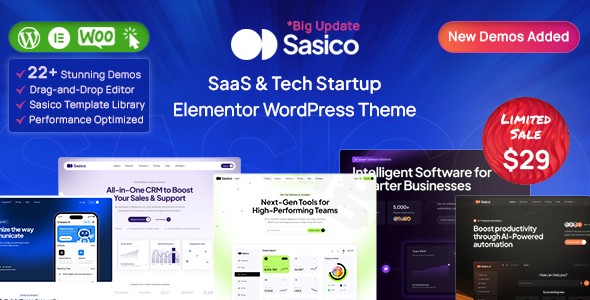
Finding the right Saas WordPress theme can be the difference between a high-bounce landing page and a conversion-focused platform that scales your business. Sasico is a professional, component-driven WordPress theme specifically engineered for SaaS companies, tech startups, digital agencies, and IT solution providers. With its modern UI/UX and performance-first architecture, it allows product-led teams to launch polished websites that look like they were custom-coded by a high-end agency.
Key Features: Design, Layout & Performance
Sasico stands out in the crowded tech niche by offering a design philosophy rooted in modularity. Instead of rigid templates, it utilizes a component-driven system where flexible sections—such as hero areas, feature grids, and pricing tables—snap together to create a cohesive user journey.
Modern Design & Layout Options
Whether you are launching an MVP or scaling a corporate agency, Sasico provides the visual tools to match your brand’s maturity.
- 12+ Homepage Demos & 50+ Inner Pages: You can choose from various layouts tailored for app showcases, software landing pages, and marketing agencies.
- Component-Driven System: The theme features modular sections that maintain visual rhythm, ensuring your typography and spacing remain consistent even as you add new content.
- Header & Footer Builder: With multiple variations and a built-in mega menu builder, you have complete control over your site’s navigation hierarchy.
Customization Capabilities
As a tech startup WordPress theme, Sasico offers deep customization without the need for developer intervention:
- Typography: Access to over 1,470 Google Fonts allows you to fine-tune your brand voice.
- Global Styling: Use the real-time WordPress Customizer to adjust brand colors, container widths, and button styles site-wide with instant live previews.
- Advanced Elementor Integration: Built specifically for the Elementor page builder, Sasico includes custom ElementsKit addons that extend the standard drag-and-drop experience.
Performance & SEO Readiness
Sasico is built on a “clean and light code” foundation. It utilizes the Unyson framework and Bootstrap (4.x/5.x) to ensure mobile responsiveness and fast load times. For SEO, the theme follows clean markup standards and is compatible with major plugins like Yoast SEO and Rank Math, helping your tech product rank higher in search engine results.
Installation & Demo Import Guide
Getting your site up and running with Sasico is straightforward, even for non-technical users. Follow these steps to replicate the professional look of the demos:
- Theme Installation: Upload the Sasico theme zip file via Appearance > Themes > Add New in your WordPress dashboard.
- Activate Required Plugins: Upon activation, you will be prompted to install companion plugins, including Elementor, ElementsKit, and MetForm.
- One-Click Demo Import: Navigate to the theme’s import section (usually under the Unyson framework or Theme Options). Select your preferred demo and click “Import.”
- Note: Ensure your server’s PHP execution time and memory limit are sufficient to avoid timeouts during the import of high-quality assets.
- Finalize Setup: Once the import is complete, check your Settings > Reading to ensure the correct homepage is set, and verify your menus in Appearance > Menus.
Customization Guide: Personalizing Your Brand
Once the demo is imported, personalizing your Sasico WordPress theme is handled through two primary interfaces:
The WordPress Customizer
Use this for “Global” changes. This is where you set your logo, choose your primary and secondary brand colors, and define your default typography presets. This ensures that every new page you create automatically inherits your brand identity.
Elementor Page Builder
For page-specific layouts, simply click “Edit with Elementor.” You can drag and drop pre-built blocks like “Service Grids,” “Testimonials,” and “Pricing Tables.” Sasico’s design system ensures that even if you move elements around, the visual hierarchy remains professional and conversion-optimized.
FAQ & Troubleshooting
Is Sasico compatible with Elementor and Gutenberg?
Yes, Sasico is a fully Elementor compatible SaaS theme and is also Gutenberg-optimized, allowing you to use both the modern block editor and the drag-and-drop power of Elementor.Does Sasico support WooCommerce for online stores?
Absolutely. Sasico is fully compatible with WooCommerce and includes ready-made templates for shop pages, product layouts, and shopping carts, making it ideal for tech companies selling digital licenses or hardware.Does it support child themes?
Yes, Sasico is child-theme ready. This allows developers to add custom CSS or PHP functions without fear of losing those changes when the parent theme is updated.What should I do if the demo import fails?
Demo imports usually fail due to server limitations. Check that your PHP memory_limit is set to 256M or higher and max_execution_time is at least 300. If issues persist, clearing your browser cache or checking the Unyson plugin settings typically resolves the conflict.
Conclusion
Sasico is a high-performance solution for any business looking to establish a credible online presence in the technology sector. Its combination of a component-driven design system, deep Elementor integration, and lightweight code makes it a top choice for both agencies and founders.Whether you are building a complex SaaS platform or a sleek landing page for a new app, Sasico provides the flexibility to grow with your brand. For more WordPress tips and theme reviews, stay tuned to wppick.com.
I. Download Limits & Account Benefits
- Free Downloads: Each email address receives 3 downloads per day for free products
- Upgrade Benefits: Purchase any paid product to increase your daily download limit by 3 for each paid product
- No Account Required: You can download immediately by receiving the download link via email
- Account Recommended: Create an account for easier access to your order history and direct update downloads
II. Understanding GPL vs Official Versions
Important: The products available on WPPick are GPL-licensed versions, which differ from official developer versions. Before purchasing, please read our comprehensive guide: Understanding GPL & Official Differences at WPPick
Key Points:
- GPL versions may not include premium support from original developers
- Updates may be delayed compared to official releases
- Some premium features might have limitations
- Always consider your specific needs and support requirements
III. Support & Assistance
We’re here to help through multiple channels:
- Email Support: Direct email assistance for all inquiries
- Live Chat: Real-time support during business hours
- Comprehensive Documentation: Detailed guides and tutorials
IV. Order Tracking
Access your complete purchase history and download links anytime: Order History
V. Account Access
New to WPPick? Login or Create Account to manage your downloads and orders efficiently.
VI. Refund Protection
We stand behind our products with a clear refund policy. Review our terms: Refund Policy
VII. Privacy & Security
Your data security is our priority. Learn how we protect your information: Privacy Policy
VII. Terms of Service
Understanding our service terms ensures a smooth experience: Terms of Use
Quick Tips for Best Experience
- Verify Compatibility: Check plugin/theme compatibility with your WordPress version
- Backup First: Always backup your site before installing new plugins or themes
- Test Environment: Consider testing on a staging site first
- Stay Updated: Regularly check for updates in your account dashboard
- Read Documentation: Review any included documentation for optimal setup
Need Help?
If you have questions about downloads, licensing, or need technical assistance, don’t hesitate to contact our support team. We’re committed to ensuring you have the best possible experience with WPPick products.
Ready to get started? Your download adventure begins with just one click!