

Saudagar Wp – WordPress Online Store Theme
/Year
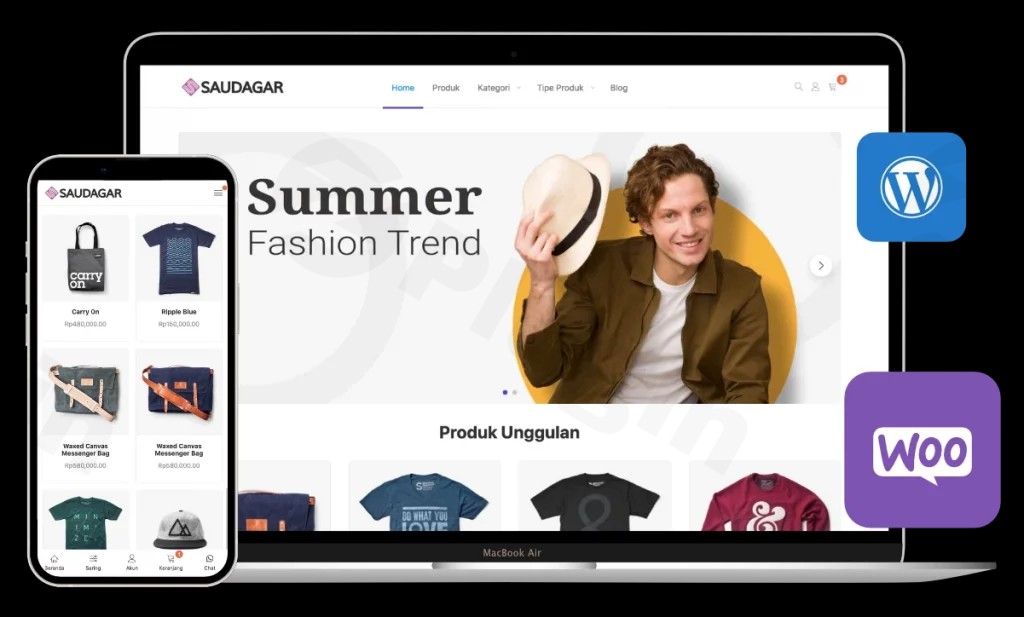
The digital marketplace demands online stores that are not only visually appealing but also performant and conversion-focused. The Saudagar WP WordPress theme emerges as a dedicated solution for entrepreneurs, small business owners, and freelancers looking to launch a professional e-commerce site quickly and efficiently. Designed with a minimalist, modern aesthetic and deep WooCommerce WordPress theme integration, Saudagar WP provides a robust foundation for selling anything from physical products to digital downloads and services.This review delves into Saudagar WP’s features, walks you through the setup process, explores its customization options, and answers common questions, ensuring you have all the information to decide if this theme is the right fit for your online venture.
Key Features: Design, Layout & Performance
Saudagar WP is engineered to provide a seamless e-commerce experience for both store owners and their customers, prioritizing aesthetics, functionality, and speed.
Design & Layout Options
Saudagar WP offers a range of tools to craft a unique online storefront. Its intuitive Front Page Builder allows for diverse homepage layouts, enabling you to showcase products and promotions effectively. Complementing this is a Header Builder for customizing your site’s navigation and branding elements. The theme comes packed with numerous ready-to-use templates tailored for various niches, including fashion, gadgets, cosmetics, grocery, culinary, digital products, and more. This means you can select a design that perfectly matches your industry during installation, providing a strong starting point for your brand. All layouts are designed with mobile-responsive principles, ensuring your store looks impeccable and functions flawlessly on any device—from smartphones to desktops.
Customization Capabilities
Personalizing your online store is made straightforward with Saudagar WP’s extensive customization options, primarily through the WordPress Customizer Panel. You gain control over:
- Color Schemes: Easily adjust colors to align with your brand identity.
- Typography: Customize fonts to enhance readability and visual appeal, contributing to a professional presentation.
- Spacing, Containers, and Backgrounds: Fine-tune the visual hierarchy and layout of your pages, sections, and overall site with granular control.
- Shop Booster Features: Unique to Saudagar WP, these include a “Latest Sales Pop Up” to build social proof and a “Promo Countdown Timer” to create urgency around discounts, directly aiming to boost conversions.
Performance & SEO Features
A fast-loading store is critical for user experience and search engine rankings. Saudagar WP is built with fast loading performance in mind, featuring optimized code and a clean architecture. This focus on efficiency helps improve your store’s SEO rankings and reduces bounce rates. Furthermore, the theme follows best SEO practices in its codebase, ensuring that your product pages and content are structured optimally for search engines like Google and AI search platforms. Its responsive design also contributes positively to SEO by providing an excellent experience across all customer devices.
E-commerce Optimization
At its core, Saudagar WP is a WooCommerce-specific WordPress theme, meticulously optimized for online selling. It integrates seamlessly with WooCommerce, providing specialized product showcase layouts, simplified checkout processes, and conversion-focused design elements designed to maximize your sales. Features like the integrated WhatsApp Chat Module and support for Indonesian payment gateways (Midtrans, Tripay, Duitku, Xendit) and shipping via ongkoskirim.id further enhance its utility, especially for specific local markets.
Installation & Demo Import
Getting your Saudagar WP online store up and running is designed to be an accessible process, even for beginners.
- Download & Upload: After purchasing Saudagar WP, download the theme package. Then, navigate to your WordPress Dashboard > Appearance > Themes > Add New > Upload Theme, and upload the
saudagarwp.zipfile. - Activate the Theme: Once uploaded, click “Install Now” and then “Activate.”
- Run the Theme Setup Wizard: Saudagar WP includes a user-friendly “Theme Setup” wizard. This wizard will guide you through installing any required companion plugins (like WooCommerce) and importing demo content.
- One-Click Demo Import: The wizard typically includes an option for one-click demo import. Select your preferred pre-built template (e.g., fashion, electronics, culinary) and proceed with the import. This process replicates the demo site’s structure, pages, menus, and placeholder content, giving you a functional store layout almost instantly.
- Post-Import Steps: After the demo import is complete, you may need to:
- Set your desired homepage (Settings > Reading).
- Assign your main navigation menus (Appearance > Menus).
- Customize any widgets (Appearance > Widgets).Common Pitfalls: For a smooth demo import experience, especially with themes that include extensive content, ensure your hosting environment meets the theme’s requirements. Saudagar WP recommends PHP 8.3 or higher and sufficient PHP limits (e.g.,
max_execution_time = 300seconds,memory_limit = 256M). Insufficient resources can sometimes lead to incomplete demo imports or “white screen” errors. Consult your hosting provider if you encounter such issues.
Customization Guide: Branding & Layout
Saudagar WP empowers you to truly make your store your own, reflecting your brand’s unique identity without needing to write a single line of code.The primary hub for personalization is the WordPress Customizer Panel. This live preview interface allows you to see your changes in real-time before publishing them.Here’s how you can personalize your Saudagar WP store:
- Colors & Fonts: Dive into the Customizer to set your brand’s primary and accent colors, ensuring visual consistency across your store. You can also select from various fonts for headings, body text, and other elements, tailoring the typography to your brand’s voice.
- Logo & Branding: Easily upload your custom logo and favicon to establish immediate brand recognition.
- Header Layouts: Utilize the Header Builder to customize the appearance of your site’s header. You can adjust its layout, background, and the elements it contains, ensuring your navigation is clear and on-brand.
- Homepage Configuration: With the Front Page Builder, you have intuitive control over the sections and elements displayed on your homepage. This allows you to highlight specific products, promotions, or categories, guiding your customers effectively.
- WooCommerce Styling: The theme offers dedicated options within the Customizer to style your product pages, shop archives, and checkout process, ensuring a cohesive look for your entire e-commerce journey.
- Widgets: Saudagar WP is equipped with custom widgets for products, banners, and product categories, which you can drag and drop into various widget areas (sidebars, footer, etc.) to meet specific store needs.The customization experience is highly intuitive, providing dozens of options through a user-friendly interface. This makes Saudagar WP an excellent choice for users who want to focus on their business rather than getting bogged down in complex theme settings.
FAQ & Troubleshooting
Here are some common questions about the Saudagar WP theme:
Is Saudagar WP compatible with Elementor, WPBakery, or Gutenberg?
Saudagar WP offers dedicated support and custom widgets for Elementor, making it an excellent Elementor compatible WooCommerce theme for drag-and-drop page building. While it works alongside the standard WordPress Block Editor (Gutenberg), specific deep integrations are not detailed. There is no explicit mention of compatibility with WPBakery or Beaver Builder in the provided documentation.
Does Saudagar WP support WooCommerce for online stores?
Yes, Saudagar WP is a premium WooCommerce WordPress theme built specifically for online stores. It features deep integration with WooCommerce, providing specialized layouts for products, categories, and a streamlined, conversion-focused checkout process to maximize sales.
What are the technical requirements for Saudagar WP?
Saudagar WP requires WordPress version 4.9 or higher and specifically mandates PHP 8.3 or higher for optimal performance and security. It also recommends MySQL 5.6 or higher and sufficient PHP memory limits (e.g., max_execution_time = 300, memory_limit = 256M) to prevent issues during installation or demo import. This makes it a PHP 8.3 WordPress theme, aligning with modern server standards.
How does Saudagar WP help boost sales conversions?
Saudagar WP includes built-in “Shop Booster” features designed to enhance sales. These include a “Latest Sales Pop Up,” which displays recent purchases to leverage social proof, and a “Promo Countdown Timer” to create urgency for promotional offers. Additionally, its simplified checkout process aims to reduce cart abandonment. These features make Saudagar WP an effective WordPress theme with sales pop up and other conversion tools.
What should I do if the Saudagar WP demo import fails or looks different from the demo site?
If your Saudagar WP demo import fails or doesn’t match the live demo, the most common culprit is insufficient server resources, particularly PHP memory and execution time limits. Check your hosting provider’s settings to ensure they meet the recommended PHP 8.3 WordPress theme requirements (e.g., max_execution_time = 300 and memory_limit = 256M). You can also consult the theme’s official documentation or support channels for specific troubleshooting steps.
Can I continue using Saudagar WP if my license for updates and support expires?
Yes, according to the licensing model, if Saudagar WP was installed on your website before your annual license for updates and support expired, you can generally continue to use the theme indefinitely. However, you will no longer receive theme updates or professional support, which can be critical for security, compatibility, and new features.
Conclusion
The Saudagar WP online store theme stands out as a powerful, yet incredibly user-friendly solution for anyone looking to build a high-converting e-commerce website with WordPress and WooCommerce. Its commitment to a minimalist, modern aesthetic combined with robust conversion-boosting features makes it an excellent choice for small business owners, entrepreneurs, and even freelancers or agencies managing client sites.Saudagar WP shines in its ease of setup, thanks to the intuitive Theme Setup wizard and one-click demo import, making it one of the best WordPress themes for online store beginners. Its deep WooCommerce integration, coupled with unique “Shop Booster” elements like sales pop-ups and countdown timers, directly supports your sales goals. The theme’s focus on fast performance, mobile-responsive design, and adherence to SEO best practices ensures your store is ready for both traditional and AI-powered search engines.While its deep focus on e-commerce means it might be less versatile for non-store websites compared to some multipurpose themes, for its intended purpose—building a fast, affordable, and professional online store—Saudagar WP is an exceptional choice. If you’re seeking a dedicated, conversion-optimized, and easy-to-manage WooCommerce theme, Saudagar WP provides a strong foundation for your digital storefront.
I. Download Limits & Account Benefits
- Free Downloads: Each email address receives 3 downloads per day for free products
- Upgrade Benefits: Purchase any paid product to increase your daily download limit by 3 for each paid product
- No Account Required: You can download immediately by receiving the download link via email
- Account Recommended: Create an account for easier access to your order history and direct update downloads
II. Understanding GPL vs Official Versions
Important: The products available on WPPick are GPL-licensed versions, which differ from official developer versions. Before purchasing, please read our comprehensive guide: Understanding GPL & Official Differences at WPPick
Key Points:
- GPL versions may not include premium support from original developers
- Updates may be delayed compared to official releases
- Some premium features might have limitations
- Always consider your specific needs and support requirements
III. Support & Assistance
We’re here to help through multiple channels:
- Email Support: Direct email assistance for all inquiries
- Live Chat: Real-time support during business hours
- Comprehensive Documentation: Detailed guides and tutorials
IV. Order Tracking
Access your complete purchase history and download links anytime: Order History
V. Account Access
New to WPPick? Login or Create Account to manage your downloads and orders efficiently.
VI. Refund Protection
We stand behind our products with a clear refund policy. Review our terms: Refund Policy
VII. Privacy & Security
Your data security is our priority. Learn how we protect your information: Privacy Policy
VII. Terms of Service
Understanding our service terms ensures a smooth experience: Terms of Use
Quick Tips for Best Experience
- Verify Compatibility: Check plugin/theme compatibility with your WordPress version
- Backup First: Always backup your site before installing new plugins or themes
- Test Environment: Consider testing on a staging site first
- Stay Updated: Regularly check for updates in your account dashboard
- Read Documentation: Review any included documentation for optimal setup
Need Help?
If you have questions about downloads, licensing, or need technical assistance, don’t hesitate to contact our support team. We’re committed to ensuring you have the best possible experience with WPPick products.
Ready to get started? Your download adventure begins with just one click!
- Tester: WordPress: 6.8 | WooCommerce: 10.1 | Elementor 3.30
- Fix: Tombol add to cart tetap ditampilkan pada mode catalog.
- Improve: Warna link menu mobile saat diklik, menyesuaikan warna utama.
- Tester: WordPress: 6.8 | WooCommerce: 10.1 | Elementor 3.30
- Update WooCommerce template ke versi 10.1.0
- Tester: WordPress: 6.8 | WooCommerce: 10.0 | Elementor 3.30
- Improve: Mengatasi pilihan attribute dan kategori produk tidak tampil di filter mobile saat menggunakan metode dropdown.
- Tester: WordPress: 6.8 | WooCommerce: 10.0 | Elementor 3.30
- Improve: Memperbaiki isu komentar yang tidak berhasil dikirim di halaman artikel.
- Tester: WordPress: 6.8 | WooCommerce: 10.0 | Elementor 3.30
- Improve: Update template WooCommerce cart dan mini cart ke versi 10.0.0.
- Note: If you're using a previous version and are updating to the latest version, please reset the license, re-enter the license, and then activate it. (The license can be anything you want.)
- Mengatasi element artikel tidak tampil di halaman homebuilder
- Mengatasi deskripsi tidak tampil pada halaman homebuilder product brand
- Mengatasi notifikasi "store" ditampilkan ganda
- Notifikasi error "incorrectly _load_textdomain_just_in_time" saat mode debug diaktifkan
- Produk di halaman home tetap menampilkan produk yang stok habis dengan fitur WooCommerce "Hide Out of Stock Products on catalog" diaktifkan
- Update template WooCommerce ke versi 9.9.0