

Savoy – Best Minimalist Ajax Woocommerce Theme
/Year
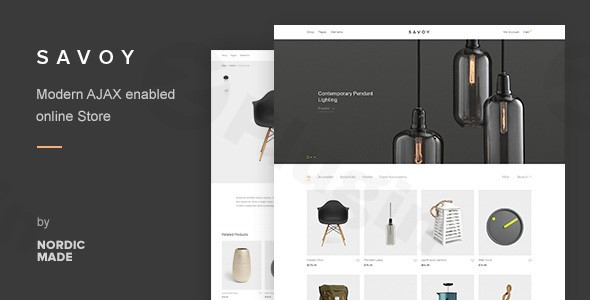
The digital storefront landscape demands both beauty and brawn. Enter Savoy WordPress theme, a sophisticated solution meticulously crafted for modern online stores. If you’re an e-commerce entrepreneur, a fashion boutique owner, or any business prioritizing elegant product presentation and a seamless, high-performance shopping experience, Savoy is designed with your needs in mind. This minimalist AJAX WooCommerce theme emphasizes clean design, robust functionality, and exceptional user experience across all devices, making it an ideal choice for building a compelling online presence.
Key Features: Design, Layout & Performance for a Flawless Store
Savoy isn’t just a theme; it’s a foundation for a high-converting online store, blending aesthetic appeal with powerful technical capabilities.
Design & Layout Options
Savoy’s core strength lies in its modern minimalist interface. This design philosophy ensures your products remain the undeniable focal point, free from unnecessary distractions.
- Fully Responsive & Mobile-Ready: The layout adapts flawlessly to any screen size, guaranteeing a consistent and engaging experience for customers browsing on desktops, tablets, or smartphones. It’s also Retina-ready, ensuring crisp, high-resolution visuals.
- Flexible Product Catalog: You have granular control over your shop’s appearance, with customizable product catalog layouts ranging from 1 to 6 columns, allowing you to tailor product density to your aesthetic.
- Diverse Blog & Header Layouts: Beyond the shop, Savoy offers flexible blog layouts (grid, list, standard) with adjustable columns and options for infinite loading or standard pagination. Multiple header configurations, including floating (sticky) headers and page-specific transparency, provide extensive branding opportunities.
- One-Click Demo Import: Get a head start with pre-designed content. Savoy includes a one-click demo import feature, allowing you to set up a professional-looking site instantly, which you can then customize.
Customization Capabilities
Tailoring Savoy to your brand identity is intuitive and comprehensive.
- Visual Composer (WPBakery Page Builder) & Slider Revolution Included: To empower visual site building, Savoy bundles the premium WPBakery Page Builder (formerly Visual Composer) and Slider Revolution plugins. This means you can design complex layouts and dynamic sliders without touching a single line of code. Savoy also offers strong compatibility with Elementor, providing flexibility for your preferred page builder.
- Extensive Theme Options Panel: An intuitive options panel serves as your central hub for global styles and settings, giving you broad control over your store’s aesthetic.
- Typography & Color Schemes: Integrate with 700+ Google Fonts and enjoy Adobe Typekit compatibility for ultimate typographic control. Versatile color schemes allow you to fine-tune your brand’s visual identity with ease.
- Advanced Header & Footer Builders: Beyond multiple header layouts, you can customize your footer bar with menus, social icons, and custom text or HTML, creating a cohesive brand experience from top to bottom.
Performance & SEO Features
A beautiful store is ineffective if it’s slow or invisible. Savoy addresses this head-on.
- Built-in AJAX Functionality: This is a game-changer for user experience. Savoy’s AJAX product filtering and search, AJAX add-to-cart, and infinite page loading mean customers can browse, sort, and add products without disruptive page reloads, leading to a much smoother and faster shopping journey and potentially boosting conversion rates.
- Optimized for Speed and Search Engines: The theme is built with performance in mind. Features like image Lazy Loading significantly improve page load times, while its clean code structure contributes to better SEO rankings.
- Caching Plugin Compatibility: Savoy is optimized to work seamlessly with major caching plugins, further enhancing your site’s speed and efficiency.
- Retina-Ready Graphics: Ensures your product images and site graphics look sharp and professional on high-resolution screens.
Installation & Demo Import: Get Your Store Running Fast
Setting up your Savoy store is designed to be straightforward, even for those new to WordPress.
- Install & Activate the Theme:
- First, download the Savoy theme package from a trusted source like ZeroPlugin.com (which provides 100% genuine GPL licensed products and virus-free code) or ThemeForest.
- Log into your WordPress dashboard, navigate to
Appearance > Themes > Add New > Upload Theme. Choose thesavoy.zipfile (this is the main theme file, not the full download package if it contains documentation, etc.) and clickInstall Now. - Once installed, click
Activate.
- Install Required Companion Plugins:
- After activation, you’ll typically see a notice prompting you to install recommended plugins. Savoy bundles premium plugins like WPBakery Page Builder and Slider Revolution, which are crucial for replicating the demo content and utilizing the theme’s full design capabilities.
- Install and activate all recommended plugins.
- Use the One-Click Demo Import:
- Savoy features a one-click demo import tool, usually found under
Appearance > Import Demo Dataor within the theme’s specific options panel. - Select the demo you wish to import (Savoy generally offers a primary, versatile demo that can be customized extensively).
- Click
Import.
- Savoy features a one-click demo import tool, usually found under
- What to Expect:
- The demo import process will populate your site with pre-designed pages, posts, sample products, menus, and widgets, making your site look identical to the online demo.
- Common Pitfall: For larger demo imports, ensure your server’s PHP memory limit and execution time are sufficient (often
memory_limitto 256MB+ andmax_execution_timeto 300+ seconds). If the import fails or times out, these are the first settings to check with your hosting provider. - After import, you may need to navigate to
Appearance > MenusandAppearance > Widgetsto assign the imported menus and widget areas as your primary ones.
Customization Guide: Branding Your Savoy Store
Personalizing Savoy to perfectly reflect your brand is a rewarding experience, largely managed through its comprehensive theme options.
- Accessing Global Styles and Settings:
- Savoy primarily uses an Extensive Theme Options Panel (often found under
Appearance > Theme Optionsor a dedicated menu item named “Savoy” in your dashboard). This panel is where you’ll control most of your site’s global styling, layout settings, and performance options.
- Savoy primarily uses an Extensive Theme Options Panel (often found under
- Changing Colors, Fonts, and Logos:
- Within the Theme Options Panel, you’ll find dedicated sections for Color Schemes, allowing you to set primary, secondary, and accent colors.
- The Typography section lets you choose from Google Fonts or integrate Adobe Typekit, defining font families, sizes, and weights for headings, body text, and other elements.
- Logo Upload: Easily upload your brand logo for your header and potentially a favicon for browser tabs.
- Configuring Header & Footer Layouts:
- Explore the
Headersection in the Theme Options to select from multiple header layouts, enable sticky headers, and adjust page-specific transparency. - The
Footersettings allow you to customize the footer bar content, including menus, social media links, and custom HTML.
- Explore the
- Setting Up Homepage, Blog Page, and Menus:
- Homepage: Go to
Settings > Readingand set your static homepage to one of the pages imported with the demo (e.g., “Home”). - Blog Page: Similarly, set a static page for your blog posts (e.g., “Blog”).
- Menus: Navigate to
Appearance > Menus. Here, you can customize the navigation menus (e.g., “Primary Menu,” “Footer Menu”) that were imported with the demo, or create new ones and assign them to the appropriate menu locations defined by the theme.
- Homepage: Go to
- Page-Level Customization with Page Builders:
- For individual pages like product listings, contact forms, or custom landing pages, you’ll use WPBakery Page Builder (or Elementor if you prefer). This drag-and-drop interface allows you to add, arrange, and style the 40+ customizable elements included with Savoy, giving you immense control over specific page layouts.
- The experience is highly intuitive, allowing for direct visual editing and real-time previews, making design changes efficient and precise.
FAQ & Troubleshooting
Here are answers to common questions about the Savoy WordPress theme:
Is Savoy compatible with Elementor / WPBakery / Gutenberg?
Yes, Savoy offers strong compatibility with popular page builders. It explicitly includes and integrates with WPBakery Page Builder (formerly Visual Composer) and also has robust support for Elementor. While its primary focus isn’t the Block Editor (Gutenberg), its compatibility with major page builders generally implies good functionality with the standard WordPress editor as well.
Does Savoy support WooCommerce for online stores?
Absolutely. Savoy is purpose-built as a WooCommerce theme, offering deep integration and advanced e-commerce features. Its entire design and functionality, including AJAX product filtering, quick view, and multiple product layouts, are centered around creating a seamless and high-converting online store powered by WooCommerce.
Does Savoy support child themes?
Yes, a starter child theme is provided with Savoy. Using a child theme is highly recommended for advanced customizations, as it allows you to make modifications to the theme’s code and styling without directly altering the core theme files. This ensures your customizations are safe from being overwritten when you update the main Savoy theme.
How can I update the Savoy theme without losing my customizations?
To update Savoy safely, ensure you are using a child theme for any custom code or CSS. Before updating, always back up your entire website. You can update the theme directly from your WordPress dashboard (Appearance > Themes) if you have a valid license and the theme is connected to its update source, or by manually uploading the new version of the theme files via FTP (overwriting the old theme files, but not your child theme).
What should I do if the demo import fails or looks different from the demo site?
If the demo import fails or your site doesn’t match the demo, first check your server’s PHP memory limit (recommend 256MB or higher) and max execution time (recommend 300 seconds or higher). These settings can be adjusted in your wp-config.php file or through your hosting provider. Also, ensure all recommended plugins were installed and activated prior to running the import. If issues persist, refer to the official Savoy documentation or contact your theme provider’s support for assistance.
Conclusion
The Savoy – Minimalist AJAX WooCommerce Theme stands out as an exceptional choice for anyone looking to build a sophisticated and efficient online store. Its striking minimalist design puts your products first, while AJAX functionality creates an incredibly smooth and fast shopping experience, a critical factor for boosting conversions in today’s competitive e-commerce landscape.With powerful features like the included WPBakery Page Builder and Slider Revolution, extensive customization options, and a focus on speed and SEO, Savoy offers a robust platform for growth. It’s ideally suited for store owners, freelancers, and agencies who prioritize a clean aesthetic, dynamic user interaction, and seamless WooCommerce integration. Whether you’re launching a high-end fashion boutique or a modern home decor store, Savoy provides the design flexibility, performance readiness, and intuitive customization needed to craft a truly impactful online presence.
I. Download Limits & Account Benefits
- Free Downloads: Each email address receives 3 downloads per day for free products
- Upgrade Benefits: Purchase any paid product to increase your daily download limit by 3 for each paid product
- No Account Required: You can download immediately by receiving the download link via email
- Account Recommended: Create an account for easier access to your order history and direct update downloads
II. Understanding GPL vs Official Versions
Important: The products available on WPPick are GPL-licensed versions, which differ from official developer versions. Before purchasing, please read our comprehensive guide: Understanding GPL & Official Differences at WPPick
Key Points:
- GPL versions may not include premium support from original developers
- Updates may be delayed compared to official releases
- Some premium features might have limitations
- Always consider your specific needs and support requirements
III. Support & Assistance
We’re here to help through multiple channels:
- Email Support: Direct email assistance for all inquiries
- Live Chat: Real-time support during business hours
- Comprehensive Documentation: Detailed guides and tutorials
IV. Order Tracking
Access your complete purchase history and download links anytime: Order History
V. Account Access
New to WPPick? Login or Create Account to manage your downloads and orders efficiently.
VI. Refund Protection
We stand behind our products with a clear refund policy. Review our terms: Refund Policy
VII. Privacy & Security
Your data security is our priority. Learn how we protect your information: Privacy Policy
VII. Terms of Service
Understanding our service terms ensures a smooth experience: Terms of Use
Quick Tips for Best Experience
- Verify Compatibility: Check plugin/theme compatibility with your WordPress version
- Backup First: Always backup your site before installing new plugins or themes
- Test Environment: Consider testing on a staging site first
- Stay Updated: Regularly check for updates in your account dashboard
- Read Documentation: Review any included documentation for optimal setup
Need Help?
If you have questions about downloads, licensing, or need technical assistance, don’t hesitate to contact our support team. We’re committed to ensuring you have the best possible experience with WPPick products.
Ready to get started? Your download adventure begins with just one click!
- WooCommerce 10.6 compatibility and template updates.
- Minor styling corrections for Cart block.
- Wishlist product thumbnail not clickable on mobile.
- Envato Market plugin: Updated to latest version.
- Slider Revolution: Included latest version.
- WooCommerce 10.5.1 add-to-cart template update.
- Slider Revolution: Included latest version.
- WooCommerce 10.5 compatibility and template updates.
- Product Categories widget can now display thumbnail images.
- Minor styling corrections for Checkout block.
- Various code refactoring and optimizations.
- Slider Revolution: Included latest version.
- WooCommerce 10.4 compatibility and template updates.
- Added support for displaying logos/thumbnails on Brands page.
- Various minor styling corrections.
- Slider Revolution plugin: Included latest version (6.7.40).
- WPBakery Page Builder: Updated to latest version (8.7.2).
- WooCommerce 10.3 template updates.
- WooCommerce price tax settings applied for search-suggestions.
- Cart panel loader not hiding in rare cases.
- "target" link attribute not added for Team Members element.
- Extra space above checkout block select-box in some cases.
- Slider Revolution plugin: Included latest version (6.7.38).
- WPBakery Page Builder: Updated to latest version (8.7.1).
- Updated version number (refer to v3.1.0 below for recent changes).
- WooCommerce 10.1 template updates.
- Added setting to change default label for Quick-view link.
- Updated coupon form title on Cart page to match WooCommerce text.
- Excluded private/draft products from quick-view Ajax request.
- Various minor styling improvements.
- Search panel visible on touch scroll in rare cases.
- "Demo/testing store" notice always hidden.
- Slider Revolution plugin: Included latest version (6.7.36).
- WPBakery Page Builder: Updated to latest version (8.6.1).
- PHP warning for cart-panel in some cases
- Minor styling correction for Top Bar
- WooCommerce 9.9 template updates.
- Added option to display text "cycles" in Top Bar.
- Added option to display free shipping meter in cart panel.
- Added border-radius settings for images, modals and buttons.
- Enabled individual buttons for "active" shop filters.
- Displaying result count above infinite load button/loader.
- Category header can now be displayed without a background image.
- Header search and suggestions enabled on mobile by default.
- Minor styling corrections for the shop and cart page.
- Various styling improvements for the blog and post pages.
- Using flexbox CSS model for footer-bar layout.
- PHP warning for Banner's alternative image in rare cases.
- Slider Revolution plugin: Included latest version (6.7.34).