

Seafood Company & Restaurant WordPress Theme
/Year
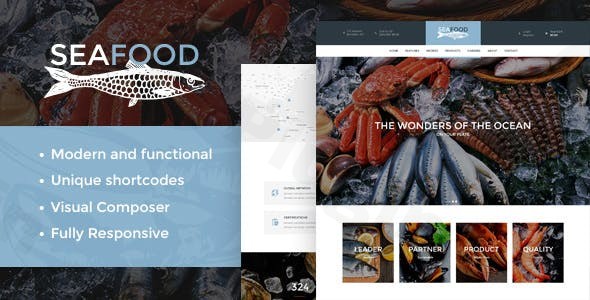
The Seafood Company & Restaurant WordPress Theme is a premium, niche-specific solution crafted for businesses that thrive on the bounty of the ocean. Whether you are running a high-end seafood restaurant, a local fish market, or a large-scale seafood supplier, this theme provides a professional visual framework designed to make your culinary offerings look irresistible. With its elegant design philosophy and robust feature set, it is the go-to fish restaurant WordPress theme for owners who want to combine aesthetic appeal with high-performance functionality.
Key Features: Design, Layout & Performance
The Seafood Company & Restaurant WordPress Theme stands out by offering a highly specialized set of tools that generic restaurant themes often lack. It focuses on a clean, uncluttered UI/UX that allows high-quality imagery—essential for food businesses—to take center stage.
Design & Layout Options
- Versatile Page Layouts: Choose between boxed and wide layouts depending on your brand’s style. Wide layouts are perfect for immersive, high-resolution seafood photography, while boxed layouts offer a more traditional, structured feel.
- Multiple Header Styles: The theme includes various header configurations, allowing you to prioritize navigation, contact information, or social media links to suit your business goals.
- Prebuilt Demos: For those who need to get online quickly, the theme offers several one-click starter sites tailored for seafood markets and restaurants.
- Engaging Visuals: Built-in hover effects and smooth transitions enhance the user experience, making your menu items and services feel interactive and modern.
Customization Capabilities
While the theme is visually stunning out of the box, its flexibility is its true strength. You can easily adjust colors, typography, and spacing through the theme options panel. It integrates seamlessly with the WPBakery Page Builder, giving you a drag-and-drop interface to create unique page structures without touching a single line of code.
Performance & SEO Features
In the competitive food industry, speed is a ranking factor. This theme is built with clean HTML5 and CSS3 code, ensuring fast loading times and a smooth experience across all devices. It is a fully responsive seafood theme for WordPress, meaning your site will look just as appetizing on a smartphone as it does on a 4K monitor. Additionally, it follows SEO best practices with structured headings and schema-friendly markup to help your business climb search engine results.
Installation & Demo Import: A Step-by-Step Guide
Setting up your WordPress theme for seafood business is a straightforward process, provided you follow the recommended technical steps.
- Install & Activate: Upload the theme files through your WordPress Dashboard (
Appearance > Themes > Add New) and activate the theme. - Plugin Installation: Upon activation, the theme will prompt you to install required companion plugins, including WPBakery Page Builder, Revolution Slider, and the Cooked – Recipe Plugin.
- One-Click Demo Import: Navigate to the theme options and use the One-Click Demo Installation feature. This will import all pages, menus, and sample images to give you a head start.
- Server Requirements: To ensure the import process runs smoothly, check that your server settings are optimized. We recommend a
max_execution_timeof 600 and amemory_limitof at least 256M.
Customization Guide: Branding & Layout
Personalizing the Seafood Company & Restaurant WordPress Theme is intuitive, even for beginners.
- Global Styles & Branding: Use the WordPress Customizer to upload your logo and set your primary brand colors. Because the theme is built for the seafood niche, its default color palettes often include ocean-inspired blues and clean whites, but these can be fully customized.
- Menu & Recipe Management: Utilize the integrated “Cooked” plugin to add detailed recipes, cooking times, and nutritional information—a fantastic feature for food bloggers or markets looking to add value to their customers.
- E-commerce Integration: If you are running an online fish market, the WooCommerce seafood theme compatibility allows you to set up a shop quickly. You can manage inventory, set delivery dates using the “Product Delivery Date” lite plugin, and process payments securely.
FAQ & Troubleshooting
Is the Seafood Company & Restaurant WordPress Theme compatible with Elementor?
While the theme is natively optimized for WPBakery Page Builder, many users have successfully used Elementor alongside it. However, for the best experience and to utilize the prebuilt demo layouts exactly as shown, WPBakery is the recommended tool.
Does this theme support WooCommerce for online seafood stores?
Yes, this is a fully compatible WooCommerce seafood theme. It includes specialized layouts for product pages, cart, and checkout, making it ideal for fish markets and seafood suppliers who want to sell products online.
How do I add recipes to my seafood website?
The theme comes integrated with the Cooked – Recipe Plugin. This allows you to create professional, SEO-friendly recipe cards with ingredients, instructions, and preparation times directly within your WordPress dashboard.
Does the theme support child themes?
Absolutely. Using a child theme is highly recommended for this theme to ensure that your custom CSS and functional modifications are preserved when the parent theme receives updates.
Final Verdict
The Seafood Company & Restaurant WordPress Theme is a specialized powerhouse. It successfully bridges the gap between a high-end design aesthetic and the technical requirements of a modern food business. While it relies on WPBakery rather than the newer Gutenberg-first approach, the level of niche-specific detail—such as recipe management and WooCommerce delivery date support—makes it an exceptional value for money.Whether you are a web designer building a site for a client or a restaurant owner taking your first steps online, this theme provides the reliability and visual “wow factor” needed to succeed in the seafood industry. Ready to build your site? Visit wppick.com for more WordPress tips and theme insights.
I. Download Limits & Account Benefits
- Free Downloads: Each email address receives 3 downloads per day for free products
- Upgrade Benefits: Purchase any paid product to increase your daily download limit by 3 for each paid product
- No Account Required: You can download immediately by receiving the download link via email
- Account Recommended: Create an account for easier access to your order history and direct update downloads
II. Understanding GPL vs Official Versions
Important: The products available on WPPick are GPL-licensed versions, which differ from official developer versions. Before purchasing, please read our comprehensive guide: Understanding GPL & Official Differences at WPPick
Key Points:
- GPL versions may not include premium support from original developers
- Updates may be delayed compared to official releases
- Some premium features might have limitations
- Always consider your specific needs and support requirements
III. Support & Assistance
We’re here to help through multiple channels:
- Email Support: Direct email assistance for all inquiries
- Live Chat: Real-time support during business hours
- Comprehensive Documentation: Detailed guides and tutorials
IV. Order Tracking
Access your complete purchase history and download links anytime: Order History
V. Account Access
New to WPPick? Login or Create Account to manage your downloads and orders efficiently.
VI. Refund Protection
We stand behind our products with a clear refund policy. Review our terms: Refund Policy
VII. Privacy & Security
Your data security is our priority. Learn how we protect your information: Privacy Policy
VII. Terms of Service
Understanding our service terms ensures a smooth experience: Terms of Use
Quick Tips for Best Experience
- Verify Compatibility: Check plugin/theme compatibility with your WordPress version
- Backup First: Always backup your site before installing new plugins or themes
- Test Environment: Consider testing on a staging site first
- Stay Updated: Regularly check for updates in your account dashboard
- Read Documentation: Review any included documentation for optimal setup
Need Help?
If you have questions about downloads, licensing, or need technical assistance, don’t hesitate to contact our support team. We’re committed to ensuring you have the best possible experience with WPPick products.
Ready to get started? Your download adventure begins with just one click!
- WP 6.8.3 compatibility has been added.
- Plugins have been updated to their latest version.
- Scripts libraries have been updated.
- Potential LFI vulnerability during pagination has been fixed.