

Segovia – A Minimal Portfolio And Blog WordPress Theme
/Year
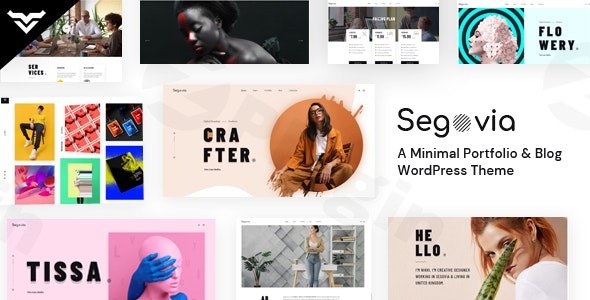
Choosing the right platform to showcase creative work requires a balance between aesthetic elegance and technical performance. The Segovia WordPress theme is a visually stunning and minimal portfolio WordPress theme specifically engineered for photographers, designers, and creative agencies. Its design philosophy centers on a clean, handcrafted aesthetic that ensures your content remains the hero of the site without the clutter of traditional multipurpose themes.In this guide, we will explore how Segovia helps creative professionals build a high-converting digital presence and walk you through the setup process to get your site live in minutes.
Key Features: Design, Layout & Performance
Segovia stands out in the crowded WordPress marketplace by prioritizing a “less is more” approach while still providing a robust set of tools for deep customization.
1. Meticulously Crafted Layouts
Segovia offers a versatile foundation with four distinct home page versions and eight specialized portfolio layouts. Whether you prefer a masonry grid, a minimalist list, or a bold full-width gallery, these layouts are designed to add a personal touch to your projects. Beyond the homepage, you’ll find prebuilt inner pages for:
- About Me/Us: For storytelling and branding.
- Services & Pricing: To turn visitors into clients.
- Shop & Blog: Integrated layouts for commerce and content marketing.
2. Powerful Customization Capabilities
While the theme is minimal in style, its customization options are extensive.
- Elementor Integration: Segovia is fully compatible with the Elementor Page Builder, allowing for a drag-and-drop experience that requires zero coding knowledge.
- Advanced Typography: Access over 790 Google Fonts or upload custom typography to match your brand identity perfectly.
- Visual Customizer: Change color schemes in real-time using the WordPress Customizer. The “WYSIWYG” (What You See Is What You Get) panel ensures you can see changes as they happen.
- Header & Footer Builder: Use the built-in modules to create bespoke navigation and site footers that deviate from standard templates.
3. Performance & SEO Optimization
A beautiful portfolio is useless if it doesn’t load. Segovia is a lightweight WordPress theme built with “perfect coding” that minimizes server bloat.
- Speed Optimized: Features like Lazy Load Image Handling ensure that high-resolution galleries don’t slow down the initial page load.
- SEO-Friendly: The theme follows the latest SEO criteria, using clean markup and structured headings to help your portfolio rank higher in search engine results.
* Retina Ready & Responsive: Your work will look crisp on high-resolution displays and adapt flawlessly to any mobile device size.
Installation & Demo Import: Step-by-Step
Getting started with the Segovia WordPress theme is straightforward. Follow these steps to replicate the professional look of the theme’s demo sites.
- Install & Activate: Upload the
segovia.zipfile via Appearance > Themes > Add New in your WordPress dashboard. Activate the theme once the upload is complete. - Install Required Plugins: Upon activation, you will see a prompt to install required plugins, including Elementor, Contact Form 7, and MailChimp. We recommend installing the included Child Theme at this stage if you plan on making custom code modifications.
- One-Click Demo Import: Navigate to the Theme Options or the dedicated Demo Import tab. Choose your preferred demo version (Home 1-4) and click import.
- Wait for Completion: This process imports images, menus, and page structures. Ensure your server has adequate memory limits to prevent timeouts during this stage.
5. Finalize Menus: After the import, go to Appearance > Menus to ensure your primary navigation is assigned to the correct location.
Customization Guide: Branding Your Portfolio
Once the demo is imported, personalizing Segovia to match your brand is the next priority.
- Setting the Global Palette: Open the WordPress Customizer to adjust the global color settings. This ensures consistency across your portfolio items, blog posts, and shop pages.
- Refining Typography: Use the Advanced Typography settings in the theme options panel to adjust font weights and line heights. This is crucial for a minimal theme where white space and text are the primary design elements.
- The Password Protected Gallery: For photographers or designers working with private clients, utilize the built-in Password Protected Gallery feature. This allows you to share specific project drafts or private collections securely.
* Utilizing Shortcodes: Segovia includes over 55 shortcodes. These allow you to drop complex elements like team profiles, skill bars, or testimonials into any Elementor section with ease.
FAQ & Troubleshooting
Is Segovia compatible with Elementor?
Yes, the Segovia WordPress theme is highly integrated and fully compatible with the Elementor Page Builder. It utilizes Elementor for its drag-and-drop page creation and provides custom elements specifically designed for the theme.
Does Segovia support WooCommerce for online stores?
Yes, Segovia is a WooCommerce-ready theme. It is compatible with versions 3.5.x up to the latest 9.5.x releases, allowing you to sell physical products, digital downloads, or creative services directly from your site.
Does it support child themes?
Absolutely. A child theme is included in the download package. It is highly recommended to use the child theme for any CSS or PHP modifications to ensure your changes are not overwritten during theme updates.
Is Segovia a lightweight WordPress theme?
Yes, Segovia is optimized for speed. It uses lightweight code and features built-in lazy loading for images to ensure fast load times, which is essential for SEO and user experience in image-heavy portfolios.
How do I update the theme?
You can update Segovia via the WordPress dashboard if you have connected your license. Always ensure you have a full backup of your site before updating, and use the child theme for customizations to prevent data loss.
Conclusion: Is Segovia Right for You?
The Segovia WordPress theme is a premier choice for creative professionals who value a “content-first” design philosophy. Its blend of minimalist aesthetics and powerful technical features like Elementor integration and SEO optimization makes it more than just a template—it is a comprehensive branding tool.Ideal for:
- Photographers & Artists looking for a clean, distraction-free way to showcase galleries.
- Designers & Freelancers who need a professional, fast-loading portfolio.
- Creative Agencies requiring a high degree of layout flexibility without the bloat of multipurpose themes.If you are looking for a minimal portfolio WordPress theme that balances ease of use for beginners with the technical depth required by developers, Segovia is a top-tier contender for your next project.For more WordPress theme reviews and optimization tips, visit wppick.com.
I. Download Limits & Account Benefits
- Free Downloads: Each email address receives 3 downloads per day for free products
- Upgrade Benefits: Purchase any paid product to increase your daily download limit by 3 for each paid product
- No Account Required: You can download immediately by receiving the download link via email
- Account Recommended: Create an account for easier access to your order history and direct update downloads
II. Understanding GPL vs Official Versions
Important: The products available on WPPick are GPL-licensed versions, which differ from official developer versions. Before purchasing, please read our comprehensive guide: Understanding GPL & Official Differences at WPPick
Key Points:
- GPL versions may not include premium support from original developers
- Updates may be delayed compared to official releases
- Some premium features might have limitations
- Always consider your specific needs and support requirements
III. Support & Assistance
We’re here to help through multiple channels:
- Email Support: Direct email assistance for all inquiries
- Live Chat: Real-time support during business hours
- Comprehensive Documentation: Detailed guides and tutorials
IV. Order Tracking
Access your complete purchase history and download links anytime: Order History
V. Account Access
New to WPPick? Login or Create Account to manage your downloads and orders efficiently.
VI. Refund Protection
We stand behind our products with a clear refund policy. Review our terms: Refund Policy
VII. Privacy & Security
Your data security is our priority. Learn how we protect your information: Privacy Policy
VII. Terms of Service
Understanding our service terms ensures a smooth experience: Terms of Use
Quick Tips for Best Experience
- Verify Compatibility: Check plugin/theme compatibility with your WordPress version
- Backup First: Always backup your site before installing new plugins or themes
- Test Environment: Consider testing on a staging site first
- Stay Updated: Regularly check for updates in your account dashboard
- Read Documentation: Review any included documentation for optimal setup
Need Help?
If you have questions about downloads, licensing, or need technical assistance, don’t hesitate to contact our support team. We’re committed to ensuring you have the best possible experience with WPPick products.
Ready to get started? Your download adventure begins with just one click!
- Swiper extra JS code removed