

Shella – Fashion Store Woocommerce Theme
/Year
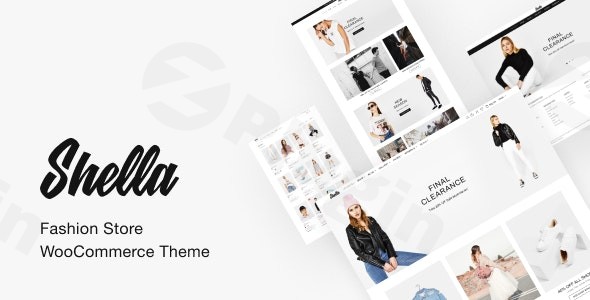
The Shella – Fashion Store WooCommerce Theme is a premium, visually-driven solution designed specifically for the fast-paced world of online apparel and lifestyle retail. In an industry where first impressions are everything, this Shella WordPress theme prioritizes a clean, UI/UX-focused aesthetic that mimics the high-end feel of luxury fashion houses. Whether you are launching a boutique clothing brand or scaling a multi-category lifestyle store, Shella provides the technical framework to turn casual browsers into loyal customers.
Key Features: Design, Layout, and Performance
The Shella – Fashion Store WooCommerce Theme distinguishes itself through its specialized focus on the fashion niche. Unlike generic multipurpose themes that require heavy lifting to look “trendy,” Shella comes out of the box with a high-fashion editorial feel.
Sophisticated Layout & Design Options
Shella offers a versatile array of layout options tailored for product storytelling:
- Flexible Grids: Choose between wide and boxed layouts to suit your brand’s personality.
- Industry-Specific Templates: Pre-built layouts for homepages and shop grids are optimized for clothing, jewelry, and accessories.
- Retina-Ready Visuals: The theme ensures that high-resolution product photography remains sharp across all devices, from MacBooks to iPhones.
Seamless Customization Capabilities
Personalizing your store to match your brand identity is intuitive thanks to the powerful Theme Options Panel:
- Unlimited Color Schemes: Easily manage and apply brand colors across the entire site.
- Advanced Typography: Full integration with Google Fonts allows for sophisticated font pairings that elevate the shopping experience.
- Header & Footer Builder: Multiple pre-defined styles give you control over the navigation and “sticky” elements of your site.
Performance and SEO Optimization
Speed is a ranking factor for both Google and AI search engines like Perplexity and SGE. Shella is built with SEO-friendly code and optimized for fast loading times. By utilizing clean markup and supporting structured data, this theme helps your products appear more prominently in search results. It is fully responsive, ensuring a seamless checkout process for mobile shoppers.
Installation and Demo Import Guide
Setting up a fashion store WordPress theme should be straightforward. Shella streamlines this process with a user-friendly onboarding experience.
- Theme Installation: Upload the Shella theme files via
Appearance > Themes > Add Newin your WordPress dashboard. - Plugin Activation: Upon activation, the theme will prompt you to install required companion plugins, including WooCommerce, Revolution Slider, and your choice of page builder (WPBakery or Elementor).
- One-Click Demo Import: Navigate to the Shella Theme Options to find the One-Click Demo Import feature. This allows you to replicate the professional look of the demo sites (including pages, menus, and sample products) in minutes.
- Verification: After the import, check your menus and widgets. It is recommended to regenerate your CSS or clear your cache to ensure all styles are pulling through correctly.Note: For large demo imports, ensure your server’s memory limit and execution time are set appropriately to prevent timeouts.
Customization Guide: Branding and Layout
Once your demo content is live, the next step is aligning the site with your brand’s unique voice.
- Global Styles: Use the WordPress Customizer for real-time edits. This is where you can upload your logo and set your global primary and secondary colors.
- Page Building: Since Shella is compatible with both Elementor and WPBakery, you can use drag-and-drop modules to create “Lookbooks” or promotional landing pages without writing a single line of code.
- Sidebar Generator: Create custom sidebars for specific product categories (e.g., a “Size Filter” sidebar for shoes and a “Material Filter” for coats) to improve user navigation and conversion.
FAQ & Troubleshooting
Is Shella compatible with Elementor and WPBakery?
Yes, the Shella WordPress theme is fully compatible with both Elementor and WPBakery Page Builders. This flexibility allows you to choose the design interface you are most comfortable with for building custom pages and product layouts.
Does Shella support WooCommerce for online stores?
Absolutely. Shella is built with WooCommerce at its core. It includes specialized e-commerce features like product quick view, advanced filtering, and optimized checkout pages specifically designed for fashion retailers.
How do I update the Shella theme without losing my customizations?
To protect your customizations, always use a child theme for any code-level changes. For CSS or general settings adjusted via the Theme Options Panel, these are stored in the database and will typically persist through updates. Always back up your site before performing a major theme update.
Is the Shella theme good for SEO?
Yes, Shella is designed with SEO best practices in mind. It uses clean, valid code and a logical heading structure (H1, H2, H3) which helps search engines and AI search tools understand your content, potentially leading to higher rankings and better visibility.
What should I do if the demo import fails?
If a demo import fails, it is usually due to server resource limits (PHP Max Execution Time or Memory Limit). Increase these values in your php.ini file or contact your hosting provider. Ensure all required plugins are active before starting the import.
Final Verdict: Is Shella Right for Your Store?
The Shella – Fashion Store WooCommerce Theme is an exceptional choice for entrepreneurs and agencies who prioritize aesthetics and user experience. While it offers enough depth for advanced developers, its one-click setup and intuitive customization make it accessible for beginners looking to launch a professional boutique.Ideal for:
- Fashion brands requiring a high-end, editorial look.
- Store owners who want a mobile-first, fast-loading e-commerce site.
- Agencies looking for a reliable, feature-rich framework for client projects.By combining visual elegance with robust technical performance, Shella stands out as one of the best WordPress themes for clothing boutiques and modern e-commerce brands today. For more theme reviews and WordPress tutorials, visit wppick.com.
I. Download Limits & Account Benefits
- Free Downloads: Each email address receives 3 downloads per day for free products
- Upgrade Benefits: Purchase any paid product to increase your daily download limit by 3 for each paid product
- No Account Required: You can download immediately by receiving the download link via email
- Account Recommended: Create an account for easier access to your order history and direct update downloads
II. Understanding GPL vs Official Versions
Important: The products available on WPPick are GPL-licensed versions, which differ from official developer versions. Before purchasing, please read our comprehensive guide: Understanding GPL & Official Differences at WPPick
Key Points:
- GPL versions may not include premium support from original developers
- Updates may be delayed compared to official releases
- Some premium features might have limitations
- Always consider your specific needs and support requirements
III. Support & Assistance
We’re here to help through multiple channels:
- Email Support: Direct email assistance for all inquiries
- Live Chat: Real-time support during business hours
- Comprehensive Documentation: Detailed guides and tutorials
IV. Order Tracking
Access your complete purchase history and download links anytime: Order History
V. Account Access
New to WPPick? Login or Create Account to manage your downloads and orders efficiently.
VI. Refund Protection
We stand behind our products with a clear refund policy. Review our terms: Refund Policy
VII. Privacy & Security
Your data security is our priority. Learn how we protect your information: Privacy Policy
VII. Terms of Service
Understanding our service terms ensures a smooth experience: Terms of Use
Quick Tips for Best Experience
- Verify Compatibility: Check plugin/theme compatibility with your WordPress version
- Backup First: Always backup your site before installing new plugins or themes
- Test Environment: Consider testing on a staging site first
- Stay Updated: Regularly check for updates in your account dashboard
- Read Documentation: Review any included documentation for optimal setup
Need Help?
If you have questions about downloads, licensing, or need technical assistance, don’t hesitate to contact our support team. We’re committed to ensuring you have the best possible experience with WPPick products.
Ready to get started? Your download adventure begins with just one click!
- WooCommerce 10.2 templates updated.