

Shieldgroup | An Insurance & Finance WordPress Theme
/Year
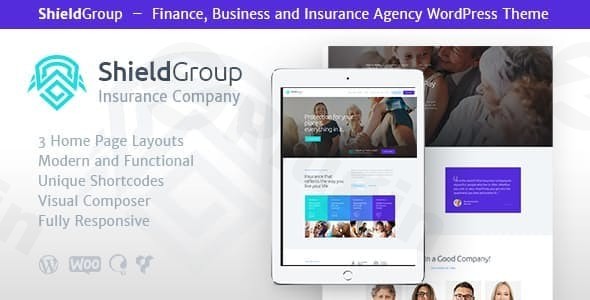
Establishing trust is the most critical factor for any financial service provider. The ShieldGroup WordPress theme is a premium, modern, and highly responsive solution specifically engineered for insurance agencies, financial advisors, and consulting firms. With its vibrant color palette and professional layout, ShieldGroup helps businesses transition from a generic online presence to a high-converting, authoritative brand. Whether you are an independent consultant or a large-scale brokerage, this insurance WordPress theme provides the technical framework necessary to showcase services, manage leads, and build client confidence.
Key Features: Design, Layout & Performance
ShieldGroup stands out in the crowded market of business themes by balancing aesthetic appeal with deep functional customization. It is not just a “skin” for WordPress; it is a comprehensive design system tailored for the finance sector.
Versatile Design & Layout Options
ShieldGroup offers a variety of layout styles to suit different brand identities. Users can choose between boxed and full-width layouts, depending on whether they want a traditional corporate feel or a modern, sprawling design.
- Multiple Blog Styles: Share industry insights and financial news using various grid and list formats.
- Interactive Visuals: The theme includes support for Slider Revolution and Swiper Slider, allowing you to create high-impact hero sections that highlight your core value propositions.
- Ajax Search: Enhance user experience with a real-time search feature that helps clients find insurance policies or financial documents instantly.
Extensive Customization Capabilities
With over 750+ Customizer options, ShieldGroup gives you granular control over every visual element.
- Typography: Full integration with Google Fonts ensures your site’s text is as professional as your advice.
- Color Systems: Flexible color schemes allow you to match the theme to your existing corporate branding with just a few clicks.
- Header & Footer Builders: By leveraging integrated page builders, you can create bespoke headers and footers that include call-to-action buttons, contact info, and social links.
Performance & SEO Readiness
A slow website can cost you leads. ShieldGroup is optimized for best performance, ensuring fast loading times across all devices. The code is clean and follows SEO best practices, providing a solid foundation for ranking in search engines. Its 100% responsive design ensures that whether a client is checking their policy on a smartphone or a desktop, the experience remains seamless.
Installation & Demo Import: Get Started in Minutes
One of the biggest advantages of the ShieldGroup WordPress theme is its accessibility for beginners. You don’t need to be a developer to launch a professional-grade site.
- Install & Activate: Upload the theme files via your WordPress Dashboard (Appearance > Themes > Add New).
- Install Companion Plugins: Upon activation, ShieldGroup will prompt you to install essential plugins like WPBakery Page Builder (or Elementor), Slider Revolution, and Contact Form 7.
- One-Click Demo Import: Navigate to the theme options and select the “One-Click Demo Import” feature. This will populate your site with the exact layouts, images, and menus seen in the official preview.
- Final Polish: Once the import is complete, simply swap the demo content for your own text and images.Pro Tip: Ensure your hosting environment meets modern standards (PHP 7.4+ and sufficient memory limit) to ensure a smooth, error-free demo import.
Customization Guide: Personalizing Your Finance Brand
ShieldGroup is built to work harmoniously with the world’s most popular page builders, specifically Elementor and WPBakery. This drag-and-drop functionality means you can modify page structures without touching a single line of code.
Branding and Global Styles
To personalize the theme, use the WordPress Customizer. Here, you can upload your logo, set your primary brand colors, and adjust the global spacing of your site. The “Setting Inheritance and Override System” allows you to set global rules while still having the flexibility to change the look of individual pages.
Building Niche Pages
For financial firms, specific pages are vital. Use the pre-built templates to quickly set up:
- Service Pages: Detailed breakdowns of insurance types (Life, Auto, Health).
- Quote Request Forms: Integrated with Contact Form 7 to capture lead data.
- Team Sections: Introduce your consultants and advisors to build human connection.
FAQ & Troubleshooting
Is ShieldGroup compatible with Elementor or WPBakery?
Yes, ShieldGroup fully supports both Elementor Page Builder and WPBakery Page Builder. This provides maximum flexibility for users who prefer drag-and-drop design interfaces to customize their layouts.Does ShieldGroup support WooCommerce for online stores?
Absolutely. This finance WordPress theme is fully compatible with WooCommerce, making it easy to sell financial products, books, or paid consultation services directly through your website.Is the Shieldgroup WordPress theme SEO-friendly?
Yes, ShieldGroup is built with clean, high-quality code and is optimized for performance. It follows modern SEO standards to help your finance or insurance agency rank better in search engine results.What should I do if the demo import fails?
Most demo import issues are caused by server timeouts or low memory limits. Ensure your PHP max_execution_time is set to at least 300 and your memory_limit is 256M or higher. If issues persist, AncoraThemes provides 24/7 support for buyers.
Conclusion: Is ShieldGroup Right for You?
The ShieldGroup WordPress theme is a powerhouse for anyone in the professional services sector. Its primary strength lies in its niche-specific design—it doesn’t try to be everything for everyone; instead, it focuses on being the best insurance and finance WordPress theme on the market.Ideal for:
- Insurance Agencies: Who need to present complex information clearly.
- Financial Advisors: Looking for a trustworthy, corporate aesthetic.
- Agencies: Who want a fast-to-deploy solution for financial clients.With its blend of performance optimization, extensive customizer options, and seamless page builder integration, ShieldGroup is a reliable investment for any firm looking to grow its digital footprint in 2024 and beyond. For more insights and the latest theme updates, visit wppick.com.
I. Download Limits & Account Benefits
- Free Downloads: Each email address receives 3 downloads per day for free products
- Upgrade Benefits: Purchase any paid product to increase your daily download limit by 3 for each paid product
- No Account Required: You can download immediately by receiving the download link via email
- Account Recommended: Create an account for easier access to your order history and direct update downloads
II. Understanding GPL vs Official Versions
Important: The products available on WPPick are GPL-licensed versions, which differ from official developer versions. Before purchasing, please read our comprehensive guide: Understanding GPL & Official Differences at WPPick
Key Points:
- GPL versions may not include premium support from original developers
- Updates may be delayed compared to official releases
- Some premium features might have limitations
- Always consider your specific needs and support requirements
III. Support & Assistance
We’re here to help through multiple channels:
- Email Support: Direct email assistance for all inquiries
- Live Chat: Real-time support during business hours
- Comprehensive Documentation: Detailed guides and tutorials
IV. Order Tracking
Access your complete purchase history and download links anytime: Order History
V. Account Access
New to WPPick? Login or Create Account to manage your downloads and orders efficiently.
VI. Refund Protection
We stand behind our products with a clear refund policy. Review our terms: Refund Policy
VII. Privacy & Security
Your data security is our priority. Learn how we protect your information: Privacy Policy
VII. Terms of Service
Understanding our service terms ensures a smooth experience: Terms of Use
Quick Tips for Best Experience
- Verify Compatibility: Check plugin/theme compatibility with your WordPress version
- Backup First: Always backup your site before installing new plugins or themes
- Test Environment: Consider testing on a staging site first
- Stay Updated: Regularly check for updates in your account dashboard
- Read Documentation: Review any included documentation for optimal setup
Need Help?
If you have questions about downloads, licensing, or need technical assistance, don’t hesitate to contact our support team. We’re committed to ensuring you have the best possible experience with WPPick products.
Ready to get started? Your download adventure begins with just one click!
- CSS/PHP fixes for WP 6.0+ (shortcodes/widget layouts).