

Shopic – Multistore Woocommerce WordPress Theme
/Year
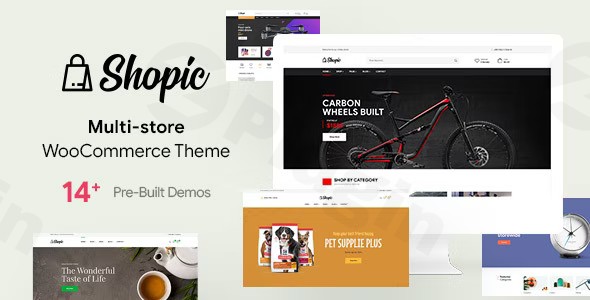
Transform Your eCommerce Business with Shopic WordPress Theme
The Shopic WordPress Theme stands out as a premium and highly versatile solution for anyone looking to launch or elevate an online store. Specifically engineered for modern online retailers, Shopic empowers businesses to manage multiple online storefronts efficiently or to create a single, feature-rich eCommerce destination. It’s an ideal choice for entrepreneurs, small business owners, and agencies seeking a robust, visually appealing, and high-performing platform without requiring deep technical expertise. With its clean, modern aesthetic and powerful features, Shopic provides the foundation for a professional and conversion-focused online presence.
Key Features: Design, Layout & Performance
Shopic is packed with features designed to provide unparalleled flexibility, stunning design, and optimal performance for your eCommerce ventures.
Diverse Design & Layout Options
Shopic distinguishes itself with its extensive collection of 14+ professionally designed homepage demonstrations. These demos cater to a broad spectrum of market segments, ensuring that you can find a perfect starting point for almost any niche. From bicycle and sports equipment retailers to luxury watch stores and gourmet food shops, Shopic offers tailored layouts that are both beautiful and functional.Beyond the homepages, the theme provides:
- Multiple Shop Page Styles: Choose from over 3 distinct shop page layouts to best showcase your products.
- Header & Footer Options: A variety of customizable header and footer styles allow for unique branding and improved navigation.
- Modern Blog Layouts: Integrate content marketing seamlessly with several blog layouts that maintain a cohesive design.
- Professional Inner Pages: Essential pages like 404, FAQ, cart, checkout, and ‘my account’ are pre-designed, saving you significant development time.
Powerful Customization Capabilities
With Shopic, personalization is at your fingertips. The theme is built on and fully integrated with the Elementor Drag & Drop Page Builder, offering a 100% visual design experience. This means you can customize every aspect of your website without writing a single line of code.Key customization features include:
- Unlimited Color Options: Brand your store precisely with a comprehensive color palette.
- Advanced Typography Controls: Select from an excellent range of fonts and control every typographic element to enhance readability and brand identity.
- Section & Background Control: Leverage Elementor to manage spacing, containers, and sections with ease, including amazing parallax effects for dynamic visual engagement.
- Global Styles: Fine-tune overall site aesthetics for consistent branding across your entire store.
Optimized for Performance & SEO
Shopic is not just about looks; it’s built for speed and visibility. The theme’s developers have prioritized clean, efficient code, which translates directly into fast loading times and smooth user interactions. A mobile-first design philosophy ensures that your online store looks and performs flawlessly across all devices, from desktops to smartphones, contributing to an optimal user experience and improved search engine rankings.
- Fast Loading Times: Engineered for high performance, aiming for a high loading score to keep visitors engaged and reduce bounce rates.
- SEO-Friendly Architecture: The theme’s structure and proper HTML markup are optimized for search engines, helping your products and stores achieve better visibility and attract organic traffic.
- Cross-Browser Compatibility: Your website will function consistently across various web browsers, ensuring a wide reach for your audience.
Installation & Demo Import Guide
Getting your Shopic Multistore WooCommerce theme up and running is a straightforward process, even for beginners. Here’s a general guide to get your new eCommerce site started:
- Install & Activate the Theme:
- Log in to your WordPress dashboard.
- Navigate to
Appearance > Themes > Add New > Upload Theme. - Choose the
shopic.zipfile (ensure you’re uploading the main theme file, not the entire downloaded package if it contains documentation or other files). If you encounter an error like “The package could not be unzipped. The theme does not have the stylesheet style.css.”, it likely means you’ve uploaded the wrong zip file. Unzip the main download, and you’ll usually find the correctshopic.zipinside. - Click
Install Now, thenActivate.
- Install Required Companion Plugins:
- Upon activation, Shopic will typically prompt you to install a set of recommended plugins, including WooCommerce (essential for eCommerce functionality) and Elementor Page Builder.
- Follow the on-screen prompts to install and activate these plugins. Other compatible plugins mentioned include MailChimp, Revolution Slider, Contact Form 7, WPML, and Yoast SEO.
- One-Click Demo Import:
- Shopic features a convenient one-click demo import function. This is how you can replicate the stunning layouts seen in the theme’s demos.
- Look for a menu item or dashboard notification related to “Demo Import” or “Import Sample Data” (often found under
Appearanceor a dedicated theme options panel). - Select your desired demo from the 14+ options.
- Initiate the import process.
- Important Note: Importing demo content, especially for a feature-rich theme like Shopic, can be resource-intensive. Ensure your hosting environment has adequate server memory and execution time limits to prevent timeouts. If you encounter issues, contacting your host to temporarily increase these limits may be necessary.
- Post-Import Setup:
- After a successful demo import, your site will have sample pages, posts, menus, and widgets mirroring the chosen demo.
- Navigate to
Appearance > Menusto ensure your main navigation is correctly assigned. - Go to
Settings > Readingto set your imported homepage as the static front page. - Review
Appearance > Widgetsto customize any sidebar or footer content.
Customization Guide: Branding & Layout
Personalizing your Shopic Elementor theme to match your brand vision is intuitive and powerful.
- Using Elementor for Page Building: Since Shopic is deeply integrated with Elementor, most of your page-level customization will happen directly within the Elementor editor.
- Edit any page with Elementor to drag and drop elements, customize sections, adjust spacing, and apply your unique branding.
- Leverage Elementor’s vast widget library to add functionalities like product grids, call-to-action buttons, sliders, and more.
- WordPress Customizer for Global Styles: For sitewide settings, navigate to
Appearance > Customize. Here, you’ll typically find options to:- Change Colors: Adjust primary, secondary, and accent colors to align with your brand identity.
- Update Typography: Select fonts and control sizes for headings, body text, and other elements.
- Upload Logo & Favicon: Replace the default branding with your own.
- Header & Footer Layouts: Experiment with the various header and footer options Shopic provides, customizing elements like contact information, social media links, and navigation.
- Set Homepage and Blog Page: Designate which pages serve as your static front page and your blog archive.
- Mega Menu Builder: Shopic includes a built-in mega menu feature, perfect for large eCommerce stores with extensive product categories. This allows for multi-column dropdowns with rich content, significantly enhancing store navigation.The customization experience with Shopic is designed to be user-friendly, allowing you to achieve a professional, custom look without needing to delve into code. Its reliance on Elementor means a visual, real-time editing experience, making design changes immediate and satisfying.
FAQ & Troubleshooting
Is Shopic theme compatible with Elementor and WooCommerce?
Yes, Shopic is fully compatible with both Elementor and WooCommerce. It is explicitly built with Elementor Drag & Drop Page Builder, offering seamless visual customization. As a “Multistore WooCommerce WordPress Theme,” it provides deep integration with WooCommerce for all your online store functionalities, from product management to payment gateways.
Does Shopic theme support the WordPress Block Editor (Gutenberg)?
While Shopic’s primary design workflow revolves around Elementor, it is generally compatible with the WordPress Block Editor (Gutenberg) for basic content creation within posts and pages. However, for complex layouts and advanced design, Elementor remains the recommended tool.
Is Shopic theme mobile friendly?
Yes, Shopic is designed with a mobile-first philosophy, making it fully responsive across all devices (mobile, desktop, laptop, iPad). This ensures your online store provides an optimal viewing and shopping experience for all users, regardless of their screen size.
How can I update Shopic theme without losing my customizations?
To update Shopic without losing customizations, it is highly recommended to use a child theme. A child theme inherits the functionality and styling of the parent theme (Shopic) but keeps your custom changes separate. When Shopic is updated, your child theme and its customizations remain untouched. For minor CSS changes, you can use the “Additional CSS” section in the WordPress Customizer.
What should I do if the demo import fails or looks different from the demo site?
If the demo import fails, first ensure your server’s PHP memory limit and execution time are sufficiently high (consult your hosting provider if unsure). If you downloaded Shopic from a GPL club and encountered an “unzipping” error, ensure you’ve extracted the main download package and are uploading the shopic.zip file, not the entire bundle. After a successful import, clear any caching plugins and regenerate permalinks (Settings > Permalinks > Save Changes) to ensure all content and links display correctly.
Conclusion
The Shopic Multistore WooCommerce WordPress Theme emerges as a powerful and highly versatile solution for anyone serious about eCommerce. Its impressive collection of 14+ niche-specific demos, coupled with deep integration with the Elementor page builder, makes it an exceptionally flexible choice for creating visually stunning and high-converting online stores.Shopic shines particularly for:
- Store Owners aiming to establish a professional online presence with robust eCommerce capabilities.
- Beginners who appreciate an intuitive, drag-and-drop interface for website creation.
- Freelancers and Agencies looking for a performant and customizable base to build diverse client eCommerce sites.
- Businesses requiring a fast loading WooCommerce theme that is also optimized for SEO and mobile responsiveness.With its focus on performance, user experience, and comprehensive multistore features, Shopic provides an excellent foundation to build an online retail empire. It offers the perfect blend of aesthetic appeal, functional power, and ease of use, making it a highly recommended WordPress theme for your next eCommerce project.
I. Download Limits & Account Benefits
- Free Downloads: Each email address receives 3 downloads per day for free products
- Upgrade Benefits: Purchase any paid product to increase your daily download limit by 3 for each paid product
- No Account Required: You can download immediately by receiving the download link via email
- Account Recommended: Create an account for easier access to your order history and direct update downloads
II. Understanding GPL vs Official Versions
Important: The products available on WPPick are GPL-licensed versions, which differ from official developer versions. Before purchasing, please read our comprehensive guide: Understanding GPL & Official Differences at WPPick
Key Points:
- GPL versions may not include premium support from original developers
- Updates may be delayed compared to official releases
- Some premium features might have limitations
- Always consider your specific needs and support requirements
III. Support & Assistance
We’re here to help through multiple channels:
- Email Support: Direct email assistance for all inquiries
- Live Chat: Real-time support during business hours
- Comprehensive Documentation: Detailed guides and tutorials
IV. Order Tracking
Access your complete purchase history and download links anytime: Order History
V. Account Access
New to WPPick? Login or Create Account to manage your downloads and orders efficiently.
VI. Refund Protection
We stand behind our products with a clear refund policy. Review our terms: Refund Policy
VII. Privacy & Security
Your data security is our priority. Learn how we protect your information: Privacy Policy
VII. Terms of Service
Understanding our service terms ensures a smooth experience: Terms of Use
Quick Tips for Best Experience
- Verify Compatibility: Check plugin/theme compatibility with your WordPress version
- Backup First: Always backup your site before installing new plugins or themes
- Test Environment: Consider testing on a staging site first
- Stay Updated: Regularly check for updates in your account dashboard
- Read Documentation: Review any included documentation for optimal setup
Need Help?
If you have questions about downloads, licensing, or need technical assistance, don’t hesitate to contact our support team. We’re committed to ensuring you have the best possible experience with WPPick products.
Ready to get started? Your download adventure begins with just one click!
- Validated post_style setting with fallback to default style
- Resolved compatibility issues with WooCommerce 10.2.0
- Resolved compatibility issues with WooCommerce 9.9.0