

Skillstream – Online Courses And Education WordPress Theme
/Year
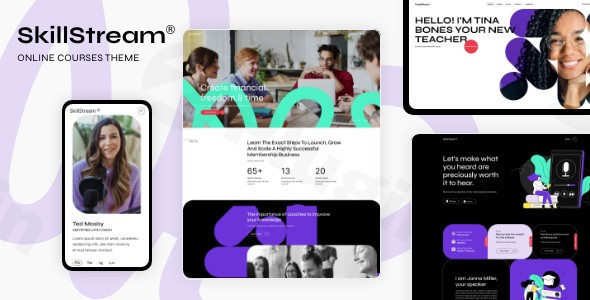
Building a professional e-learning platform requires more than just a pretty layout; it demands a robust technical backbone. The SkillStream WordPress theme is a premium, feature-rich solution specifically engineered for educators, coaching businesses, and academic institutions. Whether you are launching a solo tutoring site or a multi-instructor university portal, this online courses WordPress theme provides a seamless blend of aesthetic appeal and deep Learning Management System (LMS) functionality.Designed by the Power Elite authors at Select-Themes, SkillStream focuses on high engagement and conversion. Its design philosophy centers on a clean, modern UI that prioritizes content readability and student progress, making it a top contender for anyone looking to professionalize their digital classroom.
Key Features: Design, Layout & Performance
SkillStream is not just a “skin” for WordPress; it is a comprehensive toolkit for the modern educator. It distinguishes itself from generic themes by offering specialized layouts tailored to the education industry.
Professional Layout Options
The theme offers a variety of pre-designed homepages, including:
- Main Education Home: Ideal for large institutions and schools.
- Instructor Focus: Perfect for personal branding and independent coaches.
- Podcast & Audio Learning: A unique layout for creators who prioritize auditory educational content.
- 25+ Inner Pages: Includes dedicated templates for “About Us,” “Our Team,” and “Pricing Plans.”
Deep LMS & Customization Capabilities
As a specialized education WordPress theme, SkillStream includes built-in support for custom post types that are essential for e-learning:
- Courses & Lessons: Organize your curriculum with a clear hierarchy.
- Quizzes & Questions: Engage students and track their understanding.
- Instructor Profiles: Showcase the expertise of your teaching staff.
- Events & Podcasts: Manage live sessions and supplementary audio content.Customization is handled via the Elementor Page Builder, allowing for a drag-and-drop experience. You can modify headers, footers, and global typography (using Font Awesome and Font Elegant) without touching a single line of code.
Performance & SEO Optimization
In the world of online education, speed is critical for student retention. SkillStream is built with clean, optimized code to ensure fast loading times. It is fully responsive and mobile-friendly, which is a major ranking factor for search engines. Furthermore, its structured heading hierarchy and clean markup make it an SEO-friendly education theme, helping your courses appear in search and AI-driven answer engines.
Installation & Demo Import
Setting up SkillStream is straightforward, even for those who aren’t tech-savvy. Follow these steps to get your site running:
- Install & Activate: Upload the theme zip file via Appearance > Themes > Add New. Once uploaded, click Activate.
- Install Required Plugins: Upon activation, SkillStream will prompt you to install several mandatory plugins, including the SkillStream Core Plugin, Elementor, and Slider Revolution.
- One-Click Demo Import: Navigate to the theme’s import dashboard. Select your preferred demo (e.g., Main Home or Coaching) and click Import. This will pull in all sample courses, images, and menus.
- Check Permalinks: After the import, go to Settings > Permalinks and click “Save Changes” to ensure all your new course and lesson URLs work correctly.Pro Tip: Ensure your server has a high “Max Execution Time” (at least 300) and “Memory Limit” (256M or higher) to prevent the demo import from timing out due to the large amount of educational data being processed.
Customization Guide: Branding & Layout
Personalizing the SkillStream WordPress theme to match your brand identity is intuitive thanks to its integration with the WordPress Customizer and Elementor.
- Branding & Colors: Access the Global Styles to set your brand’s primary and secondary colors. These will automatically apply to buttons, links, and icons throughout your LMS.
- Header & Footer Builder: SkillStream allows you to choose from multiple header behaviors (sticky, transparent, or fixed). You can easily upload your logo and organize your navigation menus for better UX.
- Course Monetization: SkillStream is fully compatible with WooCommerce. To sell your courses, simply link your course post types to WooCommerce products. This enables features like the QODE Wishlist and Quick View, enhancing the shopping experience.
- Community Building: Use the integrated bbPress compatibility to add forums. This allows students to discuss lessons, fostering a community-driven learning environment.
FAQ & Troubleshooting
Is SkillStream compatible with Elementor?
Yes, SkillStream is a fully Elementor compatible education theme. It includes custom widgets and the Qi Addons for Elementor, allowing you to build complex educational layouts using a visual drag-and-drop interface.
Does SkillStream support WooCommerce for selling online courses?
Yes, SkillStream is a professional LMS WordPress theme that integrates seamlessly with WooCommerce. This allows you to sell individual courses, memberships, or physical educational materials with ease.
How do I create an online course website with Skillstream?
To create an online course website, install SkillStream, use the one-click demo import to set up the structure, and then use the “Courses” custom post type to add your curriculum. You can then add lessons, quizzes, and instructors through the dedicated dashboard menus.
Does it support child themes?
Yes, SkillStream comes with a child theme included in the package. Using a child theme is recommended so you can apply custom CSS or PHP modifications without losing them when the parent theme is updated.
What should I do if the demo import fails?
If the demo import looks different or fails, check your server requirements. Most issues are caused by low PHP memory limits or script execution timeouts. Ensure you have activated all required plugins before starting the import.
Conclusion
The SkillStream WordPress theme is a powerhouse for anyone serious about the e-learning industry. It bridges the gap between a standard website and a full-scale learning management system. With its sleek design, Elementor integration, and dedicated post types for courses and quizzes, it offers a level of specialization that multipurpose themes simply cannot match.Whether you are an independent tutor or a large-scale academy, SkillStream provides the professional polish and technical reliability needed to succeed. For more WordPress insights and theme reviews, visit wppick.com.
I. Download Limits & Account Benefits
- Free Downloads: Each email address receives 3 downloads per day for free products
- Upgrade Benefits: Purchase any paid product to increase your daily download limit by 3 for each paid product
- No Account Required: You can download immediately by receiving the download link via email
- Account Recommended: Create an account for easier access to your order history and direct update downloads
II. Understanding GPL vs Official Versions
Important: The products available on WPPick are GPL-licensed versions, which differ from official developer versions. Before purchasing, please read our comprehensive guide: Understanding GPL & Official Differences at WPPick
Key Points:
- GPL versions may not include premium support from original developers
- Updates may be delayed compared to official releases
- Some premium features might have limitations
- Always consider your specific needs and support requirements
III. Support & Assistance
We’re here to help through multiple channels:
- Email Support: Direct email assistance for all inquiries
- Live Chat: Real-time support during business hours
- Comprehensive Documentation: Detailed guides and tutorials
IV. Order Tracking
Access your complete purchase history and download links anytime: Order History
V. Account Access
New to WPPick? Login or Create Account to manage your downloads and orders efficiently.
VI. Refund Protection
We stand behind our products with a clear refund policy. Review our terms: Refund Policy
VII. Privacy & Security
Your data security is our priority. Learn how we protect your information: Privacy Policy
VII. Terms of Service
Understanding our service terms ensures a smooth experience: Terms of Use
Quick Tips for Best Experience
- Verify Compatibility: Check plugin/theme compatibility with your WordPress version
- Backup First: Always backup your site before installing new plugins or themes
- Test Environment: Consider testing on a staging site first
- Stay Updated: Regularly check for updates in your account dashboard
- Read Documentation: Review any included documentation for optimal setup
Need Help?
If you have questions about downloads, licensing, or need technical assistance, don’t hesitate to contact our support team. We’re committed to ensuring you have the best possible experience with WPPick products.
Ready to get started? Your download adventure begins with just one click!