

Skrn – Media Streaming App WordPress Theme
/Year
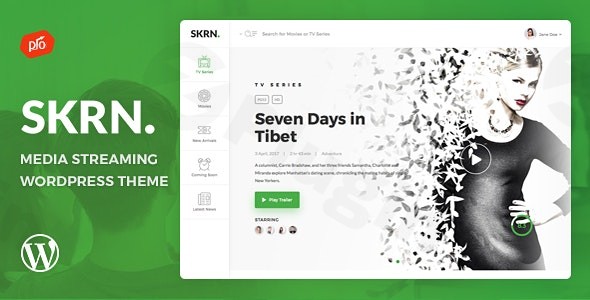
Creating a professional video-on-demand service no longer requires a team of developers and a massive budget. The SKRN WordPress theme is a premium, feature-rich Media Streaming App WordPress Theme specifically designed to help creators build their own platforms, similar to Netflix or Hulu. Whether you are looking to launch a niche movie site, a premium audio library, or a subscription-based video course platform, SKRN provides the aesthetic and technical foundation needed to manage exclusive content for members.In this guide, we will explore the design capabilities, technical specifications, and setup process for this powerful theme, helping you decide if it is the right fit for your streaming project.
Key Features: Design, Layout & Performance
The design philosophy of SKRN is centered on user engagement and high-quality visual hierarchy. Unlike multipurpose themes that try to do everything, SKRN is laser-focused on the media consumption experience.
1. Advanced Media & Video Player
The standout feature is the integrated, customizable video player. It supports locally hosted videos, YouTube, and Vimeo, ensuring you have flexibility in how you store and serve your content. To enhance the “Netflix-like” feel, the theme includes:
- Video Rating System: Allow users to rate content, boosting engagement.
- Watchlists & Favorites: Users can save content to their personal profiles for later viewing.
- Responsive & Retina-Ready Design: Ensures that your video thumbnails and player look crisp on high-resolution mobile devices and 4K monitors.
2. Specialized Layouts & UI/UX
SKRN prioritizes the user dashboard and landing page experience. It features a sleek, dark-mode-ready interface (common in streaming apps) that puts the focus entirely on the media posters. While it uses a drag-and-drop page builder for customization, the out-of-the-box templates are already optimized for:
- Landing Pages: Designed to convert visitors into subscribers.
- User Profiles: A clean area for members to manage their subscriptions and settings.
- Grid Layouts: Automatically organized video galleries that respond to different screen sizes.
3. SEO & Performance Readiness
Speed is critical for streaming sites. The SKRN WordPress theme is built with clean markup and is SEO-optimized to help your media platform rank in search engines. While performance often depends on your hosting and video delivery method (like using a CDN), the theme’s lightweight code helps minimize bloat, ensuring fast transitions between pages.
Installation & Demo Import
Setting up SKRN is straightforward, even for those who aren’t technical experts. Follow these steps to get your streaming site live:
- Install & Activate: Upload the theme files through your WordPress Dashboard under Appearance > Themes > Add New.
- Install Required Plugins: Upon activation, the theme will prompt you to install bundled plugins. ARMember (for memberships) and Boosted Elements (for page building) are essential for the theme to function correctly.
- One-Click Demo Import: Navigate to the theme’s options panel and look for the demo importer. This will bring in the “Netflix-style” layout, including sample videos, menus, and landing pages.
- Check Server Requirements: Because media themes can be resource-intensive, ensure your WordPress memory limit is set to at least 256MB to avoid timeouts during the import process.
Customization Guide: Personalizing Your Brand
Once the demo is imported, you can begin tailoring the site to your brand identity.
Branding & Global Styles
Using the WordPress Customizer, you can upload your logo and adjust the primary accent colors to match your brand. Since SKRN is a WordPress theme for video streaming, you should focus on high-contrast colors that make your “Play” buttons and “Subscribe” calls-to-action stand out.
Building with Drag-and-Drop
The included page builder allows you to move sections around without touching a single line of code. You can easily add new “Featured Video” sliders or “New Releases” rows to your homepage using the Boosted Elements add-on.
Membership & Monetization
The core of your business will be managed through the ARMember WordPress theme integration. This plugin allows you to:
- Set up multiple subscription tiers (e.g., Free, Silver, Gold).
- Restrict specific videos to “Members Only.”
- Integrate various payment gateways to accept credit cards or PayPal.
FAQ & Troubleshooting
Is the SKRN theme compatible with Elementor?
While SKRN comes with its own drag-and-drop builder and the Boosted Elements add-on, it is designed to be compatible with most modern WordPress standards. However, for the best results and to maintain the specific streaming UI, it is recommended to use the bundled tools provided by the developer.
Does SKRN support WooCommerce?
The theme primarily uses the ARMember plugin for monetization and subscriptions, which is a robust alternative to WooCommerce for digital memberships. This allows for a more streamlined checkout process specifically for streaming services.
Can I build a Netflix clone with WordPress using this theme?
Yes, SKRN is often cited as one of the best themes for creating a “Netflix clone.” It includes the necessary user dashboards, watchlists, and tiered membership features required to replicate that specific business model.
Does it support child themes?
Yes, SKRN supports child themes. It is highly recommended to use a child theme if you plan on making custom code changes, as this ensures your customizations are not lost when the theme is updated.
Conclusion
The SKRN WordPress theme is a powerful, specialized solution for anyone looking to enter the media streaming market. By bundling high-value plugins like ARMember and providing a dedicated video player interface, it removes the technical hurdles usually associated with building a subscription-based video site.Who is this for?
- Content Creators: Perfect for those wanting to host their own premium video content away from YouTube.
- Entrepreneurs: Ideal for launching niche “Netflix-style” streaming services.
- Educators: A great fit for selling access to high-quality video course libraries.If you need a visually stunning, responsive, and monetization-ready platform, SKRN is a top-tier choice for your next WordPress project. Visit wppick.com for more insights on the latest WordPress tools and design trends.
I. Download Limits & Account Benefits
- Free Downloads: Each email address receives 3 downloads per day for free products
- Upgrade Benefits: Purchase any paid product to increase your daily download limit by 3 for each paid product
- No Account Required: You can download immediately by receiving the download link via email
- Account Recommended: Create an account for easier access to your order history and direct update downloads
II. Understanding GPL vs Official Versions
Important: The products available on WPPick are GPL-licensed versions, which differ from official developer versions. Before purchasing, please read our comprehensive guide: Understanding GPL & Official Differences at WPPick
Key Points:
- GPL versions may not include premium support from original developers
- Updates may be delayed compared to official releases
- Some premium features might have limitations
- Always consider your specific needs and support requirements
III. Support & Assistance
We’re here to help through multiple channels:
- Email Support: Direct email assistance for all inquiries
- Live Chat: Real-time support during business hours
- Comprehensive Documentation: Detailed guides and tutorials
IV. Order Tracking
Access your complete purchase history and download links anytime: Order History
V. Account Access
New to WPPick? Login or Create Account to manage your downloads and orders efficiently.
VI. Refund Protection
We stand behind our products with a clear refund policy. Review our terms: Refund Policy
VII. Privacy & Security
Your data security is our priority. Learn how we protect your information: Privacy Policy
VII. Terms of Service
Understanding our service terms ensures a smooth experience: Terms of Use
Quick Tips for Best Experience
- Verify Compatibility: Check plugin/theme compatibility with your WordPress version
- Backup First: Always backup your site before installing new plugins or themes
- Test Environment: Consider testing on a staging site first
- Stay Updated: Regularly check for updates in your account dashboard
- Read Documentation: Review any included documentation for optimal setup
Need Help?
If you have questions about downloads, licensing, or need technical assistance, don’t hesitate to contact our support team. We’re committed to ensuring you have the best possible experience with WPPick products.
Ready to get started? Your download adventure begins with just one click!
- ARMember Plugin Update (7.0.1)
- ARMember Lite Plugin Update (5.0.1)