

Stockie – Multi-purpose Creative Woocommerce Theme By Colabrio
/Year
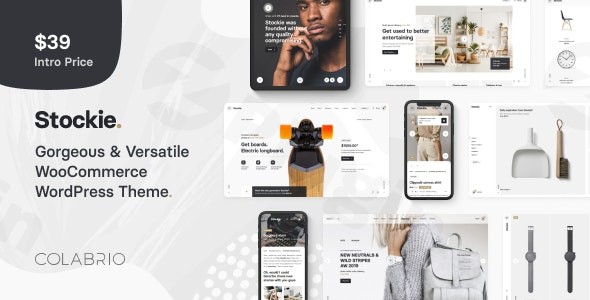
The Stockie WordPress theme is a meticulously designed, multi-purpose solution from the experienced developers at Colabrio. Combining minimalist aesthetics with robust functionality, Stockie empowers creatives, agencies, and online store owners to build modern, high-performing websites without writing a single line of code. If you’re looking for a versatile platform to launch an eCommerce store, showcase a creative portfolio, or run a stylish blog, Stockie offers a refined user experience and extensive customization options.
1. Introduction: Your Canvas for Creativity and Commerce
Stockie positions itself as a premium, multi-purpose WooCommerce theme that balances a minimalist design philosophy with powerful features. It’s an ideal choice for a diverse range of users, from small business owners wanting a sleek minimalist WooCommerce theme to designers and photographers needing an elegant portfolio. This theme is built to deliver a sharp user experience, focusing on clean layouts, smooth animations, and intuitive design tools that cater to both seasoned developers and WordPress beginners.
2. Key Features: Design, Layout & Performance
Stockie provides a comprehensive suite of features that address both the aesthetic and functional demands of modern websites, ensuring your site looks great and performs efficiently.
Design & Layout Options: Visually Striking and Versatile
Stockie excels in providing diverse, pixel-perfect layouts ready for various industries and creative showcases.
- Shop Layouts: Designed for high conversion, Stockie offers classic grid, minimal grid, scattered grid, and carousel layouts, each with appealing hover effects like navigation buttons, image overlays, and color overlays. This flexibility makes it an excellent Stockie WooCommerce theme for showcasing products.
- Portfolio Layouts: Creatives will appreciate options such as Classic Grid, Minimal Grid, and Metro Grid, alongside varied single project types like “Classic – Left Gallery” or “Split – Left Gallery” for presenting work with impact.
- Blog Layouts: Content creators can choose from styles like Blog Simple, Blog Classic, or Blog Overlay, ensuring their articles are presented beautifully.
- Header Layouts: Match your brand’s identity with flexible navigation options including a minimalist Hamburger menu, immersive Fullscreen overlay, Classic navigation with multiple positions, or unique Sidebar and Panel menus.
- Prebuilt Templates & Demo Content: To kickstart your project, Stockie includes ten professionally designed demo templates. These aren’t just pretty faces; they’re tailored for niches like Scandinavian kitchen stores, single-product skate shops, jewelry displays, fashion eCommerce, and interior design showcases. The inclusion of Figma source files is a bonus for designers who prefer to mock up designs before implementation.
Customization Capabilities: Tailor-Made for Your Brand
Stockie’s customization power is largely driven by the bundled ACF Pro (Advanced Custom Fields Pro) plugin, which provides an advanced engine for theme settings.
- Global Styling: Adjust primary fill colors, highlight colors, and link hover states across your entire site for consistent branding.
- Typography: Comprehensive typography options allow you to select and manage fonts, with a regularly updated Google Fonts list, ensuring your text is always legible and stylish.
- Spacing & Visual Elements: Fine-tune corner radius values for general elements, grids, buttons, and forms. The theme also includes smooth CSS3 animations and a collection of built-in icons to enhance user experience.
- Header & Footer Flexibility: Beyond pre-defined layouts, Stockie supports shortcodes in the footer copyright area (e.g.,
[stockie_current_year],[stockie_site_name]), allowing for dynamic content.
Performance & SEO Features: Fast, Responsive, and Search-Engine Friendly
Stockie is built with modern web standards in mind, prioritizing speed and search engine optimization.
- SEO Optimized Structure: The theme features a clean, well-structured codebase that is optimized for search engines, making it easier for your website to rank higher. It’s compatible with popular SEO plugins like Yoast SEO.
- Mobile Responsiveness: All layouts are designed to be fully responsive, ensuring your website looks and functions perfectly on desktops, tablets, and smartphones, crucial for today’s mobile-first indexing.
- Fast Loading: Optimized for speed and high performance, Stockie aims to provide a fast loading WordPress theme WooCommerce experience, which is vital for user retention and SEO.
- Gutenberg Ready: Stockie is compatible with WordPress 5.0+ and the Block Editor (Gutenberg), allowing for flexible content creation using native WordPress tools.
3. Installation & Demo Import: Get Your Site Running Fast
Getting started with Stockie is a streamlined process, thanks to its one-click demo import feature and clear technical requirements.Before You Begin:
- Ensure your WordPress installation is version 6.0 or higher.
- Your server should run PHP 7.4 or greater and MySQL 5 or greater. Most quality WordPress hosting providers will meet these specifications.Step-by-Step Setup:
- Install the Stockie Theme:
- Download the Stockie theme package from your purchase source (e.g., ThemeForest).
- In your WordPress dashboard, navigate to
Appearance > Themes > Add New > Upload Theme. - Upload the
stockie.zipfile and clickInstall Now. - Once installed, click
Activate.
- Install Required Plugins:
- Upon activation, Stockie will prompt you to install several recommended plugins. Crucially, it comes bundled with WPBakery Page Builder and ACF Pro.
- Install and activate all recommended plugins to ensure full theme functionality and access to all demo content.
- One-Click Demo Import:
- Navigate to
Appearance > Import Demo Data(or a similarly named menu item, depending on the theme’s specific implementation). - Select the demo you wish to import. Stockie’s ten pre-made demos offer a great starting point.
- Click the “Import” button.
- Expectation during import: The demo import process can take several minutes, especially for larger demos, as it imports pages, posts, images, theme options, and widgets. Do not close your browser or navigate away until it’s complete.
- After import: Your site will resemble the chosen demo. You will typically find all demo pages, posts, menus, and widgets already set up. You may need to manually assign the primary navigation menu under
Appearance > Menus.
- Navigate to
- Child Theme (Recommended): Stockie is child theme ready. If you plan any custom code modifications, always install and activate the provided child theme (usually found in the main theme package) to ensure your changes are safe during theme updates.
4. Customization Guide: Branding & Layout
Personalizing your Stockie website is straightforward, primarily handled through its comprehensive “Theme Options” panel, powered by ACF Pro, and the native WordPress Customizer.
- Accessing Theme Options: You’ll typically find a dedicated “Stockie Options” or “Theme Options” link in your WordPress dashboard sidebar. This is where you’ll control global aspects of your site.
- Branding: Upload your custom logo, favicon, and adjust site titles.
- Colors: Easily change your site’s primary color palette, accent colors, and link hover states to align with your brand identity.
- Typography: Select fonts, adjust sizes, line heights, and letter spacing for headings, body text, and other elements. Stockie’s integration with Google Fonts provides a vast library of choices.
- Header & Navigation: Configure your chosen header layout (Classic, Centered Logo, Sidebar Menu, etc.), adjust sticky header behavior, and customize navigation menus.
- Page Layouts: Set default sidebar positions, content widths, and page title bar visibility.
- Shop & Product Settings: Fine-tune WooCommerce-specific settings like product grid columns, single product page layouts, AJAX cart behavior, and quick view options.
- Blog & Portfolio Settings: Define how your blog posts and portfolio projects are displayed, including archive layouts and single post/project template choices.
- WPBakery Page Builder: For content and page layouts, the bundled WPBakery Page Builder is your primary tool. You can drag and drop elements, utilize Stockie’s custom shortcodes, and create intricate page designs visually. This is key for creating custom creative WordPress theme for portfolio pages or unique product showcases.
- WordPress Customizer: While global settings are in Theme Options, the WordPress Customizer (
Appearance > Customize) provides a live preview for some core WordPress settings and potentially theme-specific styling elements, making it intuitive to see changes in real-time. - Setting Up Pages & Menus:
- Homepage: Go to
Settings > Readingand select your desired page (e.g., “Home”) as your static homepage. - Blog Page: If you have a blog, assign a page (e.g., “Blog”) as your Posts page in
Settings > Reading. - Menus: Navigate to
Appearance > Menusto create and assign your primary, footer, and other navigation menus to the available menu locations defined by Stockie.The customization experience with Stockie is intuitive. The structured Theme Options panel, combined with the visual capabilities of WPBakery, allows for extensive personalization without needing to delve into code.
- Homepage: Go to
5. FAQ & Troubleshooting
Here are answers to some common questions about the Stockie WordPress theme:
Q: Is Stockie theme compatible with Elementor / WPBakery / Gutenberg?
A: Yes, Stockie is fully compatible with WPBakery Page Builder (which is bundled with the theme) and Gutenberg (the native WordPress Block Editor). While WPBakery is the primary page builder for crafting layouts with Stockie, it’s also designed to work seamlessly with content created using Gutenberg. It does not explicitly mention official Elementor support, implying WPBakery is the recommended visual builder.
Q: Does Stockie theme support WooCommerce for online stores?
A: Absolutely! Stockie is a WooCommerce-centric theme, offering deep integration and a wide array of specialized shop, product, and related layouts. It is fully compatible with the latest versions of WooCommerce (e.g., WooCommerce 9.9) and includes features like AJAX cart, quick view, color swatches, and currency switcher, making it an excellent choice for any online shop.
Q: Does Stockie support child themes?
A: Yes, Stockie is child theme ready. It’s highly recommended to use a child theme if you plan to make any custom code modifications to prevent your changes from being overwritten during theme updates. A child theme is usually included in the main theme package.
Q: How can I update the Stockie theme without losing my customizations?
A: To update Stockie safely, you should always be using a child theme for any code customizations. For theme options and settings, these are generally stored in the database and are safe during updates. Ensure you have a full backup of your website before performing any major updates. You can update the theme directly through the WordPress dashboard Appearance > Themes if you purchased it from ThemeForest and have the Envato Market plugin, or by manually uploading the new version if you’re using a GPL version from a reputable distributor that provides direct updates from the source.
Q: What should I do if the demo import fails or looks different from the demo site?
A: If the demo import fails or doesn’t look as expected, first check your server requirements (PHP 7.4+, MySQL 5+, sufficient PHP memory limits and execution time). Large demo imports can sometimes time out on servers with low resources. Try increasing memory_limit, upload_max_filesize, and max_execution_time in your php.ini file or ask your hosting provider to do so. After confirming server settings, deactivate and reactivate the theme and its associated plugins, then attempt the demo import again. Ensure all required plugins (WPBakery, ACF Pro) are active before importing.
6. Conclusion: The Ideal Choice for Creative eCommerce and Portfolios
The Stockie WordPress theme stands out as a powerful and aesthetically pleasing solution for anyone aiming to build a modern, high-converting website. Its strong emphasis on minimalist design, coupled with an extensive range of layout options for shops, portfolios, and blogs, makes it incredibly versatile.For store owners, Stockie’s deep WooCommerce integration, AJAX features, and diverse product displays make it an ideal theme for online shops. Creative professionals will find its dedicated portfolio layouts and design flexibility perfect for showcasing their work. Agencies and freelancers will appreciate the bundled premium plugins like WPBakery Page Builder and ACF Pro, which enable robust, code-free customization.Developed by the reputable Envato Power Elite Author, Colabrio, Stockie comes with the assurance of regular updates, exceptional 5-star customer support, and a commitment to continuous improvement. Its SEO-optimized structure and responsive design ensure your site is discoverable and accessible on all devices.In essence, if you’re seeking a feature-rich, visually appealing, and highly customizable WordPress theme that prioritizes a sharp user experience and excels in both eCommerce and creative presentation, Stockie is a truly compelling choice. It empowers you to create a professional online presence that truly stands out.
I. Download Limits & Account Benefits
- Free Downloads: Each email address receives 3 downloads per day for free products
- Upgrade Benefits: Purchase any paid product to increase your daily download limit by 3 for each paid product
- No Account Required: You can download immediately by receiving the download link via email
- Account Recommended: Create an account for easier access to your order history and direct update downloads
II. Understanding GPL vs Official Versions
Important: The products available on WPPick are GPL-licensed versions, which differ from official developer versions. Before purchasing, please read our comprehensive guide: Understanding GPL & Official Differences at WPPick
Key Points:
- GPL versions may not include premium support from original developers
- Updates may be delayed compared to official releases
- Some premium features might have limitations
- Always consider your specific needs and support requirements
III. Support & Assistance
We’re here to help through multiple channels:
- Email Support: Direct email assistance for all inquiries
- Live Chat: Real-time support during business hours
- Comprehensive Documentation: Detailed guides and tutorials
IV. Order Tracking
Access your complete purchase history and download links anytime: Order History
V. Account Access
New to WPPick? Login or Create Account to manage your downloads and orders efficiently.
VI. Refund Protection
We stand behind our products with a clear refund policy. Review our terms: Refund Policy
VII. Privacy & Security
Your data security is our priority. Learn how we protect your information: Privacy Policy
VII. Terms of Service
Understanding our service terms ensures a smooth experience: Terms of Use
Quick Tips for Best Experience
- Verify Compatibility: Check plugin/theme compatibility with your WordPress version
- Backup First: Always backup your site before installing new plugins or themes
- Test Environment: Consider testing on a staging site first
- Stay Updated: Regularly check for updates in your account dashboard
- Read Documentation: Review any included documentation for optimal setup
Need Help?
If you have questions about downloads, licensing, or need technical assistance, don’t hesitate to contact our support team. We’re committed to ensuring you have the best possible experience with WPPick products.
Ready to get started? Your download adventure begins with just one click!
- Minor style fixes and improvements
- Simple product adding to cart with ajax issue fixed
- Option to show/hide WooCommerce filter widgets
- Option to show/hide WooCommerce the sort by dropdown menu
- WooCommerce 10 compatibility added
- Stockie Extra plugin to the 1.2.11 version
- Main language file stockie.pot